It is currently Sun Sep 06, 2026 3:03 pm


All times are UTC - 5 hours [ DST ]


Post new topic Reply to topic  [ 43 posts ]  Go to page Previous  1, 2, 3  Next
Author Message
 Post subject: Re: Video Editors?
PostPosted: Tue Apr 17, 2018 1:57 am  (#21) 
Offline
GimpChat Member
User avatar

Joined: Jul 06, 2013
Posts: 2662
Location: California
racer-x wrote:
I've heard of it, but never used it. I assume it's an entry level video editor and therefore is limited in functions. That's my guess anyway...
I was just curious. I checked it out on youtube and it looked like movie maker but a step up from that.


Last edited by mackenzieh on Mon Apr 23, 2018 2:02 am, edited 1 time in total.

Top
 Post subject: Re: Video Editors?
PostPosted: Tue Apr 17, 2018 2:56 am  (#22) 
Offline
GimpChat Member
User avatar

Joined: Aug 08, 2016
Posts: 2863
Location: East Midlands of England
I used MovieMaker for my simple home movies and then moved to VSCD when became unsupported. Last time I used it was about two years ago. It had many more features than the old MovieMaker and a fair number of options for both video and audio formats. Perhaps their 'how to' page may give you the information you need.

http://www.videosoftdev.com/how-to-use-free-video-editor

_________________
Image
"Let no one steal your dreams."
Paul Cookson

Custom Font Links
2.10 Tools
Character Paths
White Bases


Top
 Post subject: Re: Video Editors?
PostPosted: Thu May 17, 2018 6:39 pm  (#23) 
Offline
GimpChat Member
User avatar

Joined: Jul 06, 2013
Posts: 2662
Location: California
I've decided between 2 video editors: Shotcut and HitFilm. I'm not sure which one to go with because one is open source, and one isn't. Also the effects play a factor because with shotcut, I don't see where to get other effects if I wanted to use any and with HitFilm, a youtube user has a few that Hitfilm doesn't come with.


Top
 Post subject: Re: Video Editors?
PostPosted: Thu May 17, 2018 7:02 pm  (#24) 
Offline
GimpChat Member
User avatar

Joined: Apr 15, 2017
Posts: 1837
Use both. I have a handful of video editors/compositors that I use for whatever reason.

I'm always testing out new ones if they are FOSS. I just got done testing Natron. It's pretty good and has lot's of nice tools. The problem is because it uses nodes, you have to add a node for every effect and that can get cluttered. It also requires Image Sequence source and dislikes any video codec I fed it. I got tired of it and ditched it. I like Aviutl better anyway...


Top
 Post subject: Re: Video Editors?
PostPosted: Thu May 17, 2018 10:41 pm  (#25) 
Offline
GimpChat Member
User avatar

Joined: Jul 06, 2013
Posts: 2662
Location: California
racer-x wrote:
Use both. I have a handful of video editors/compositors that I use for whatever reason.

I'm always testing out new ones if they are FOSS. I just got done testing Natron. It's pretty good and has lot's of nice tools. The problem is because it uses nodes, you have to add a node for every effect and that can get cluttered. It also requires Image Sequence source and dislikes any video codec I fed it. I got tired of it and ditched it. I like Aviutl better anyway...


I think I might look into Kdenlive since it too, is FOSS.


Last edited by mackenzieh on Thu May 17, 2018 11:22 pm, edited 1 time in total.

Top
 Post subject: Re: Video Editors?
PostPosted: Thu May 17, 2018 10:49 pm  (#26) 
Offline
Administrator
User avatar

Joined: Aug 10, 2012
Posts: 14193
Location: Native to NYC living in Arizona, Gimp 2.8 - 3.0, Win 11 PC.
mackenzieh wrote:
racer-x wrote:
Use both. I have a handful of video editors/compositors that I use for whatever reason.

I'm always testing out new ones if they are FOSS. I just got done testing Natron. It's pretty good and has lot's of nice tools. The problem is because it uses nodes, you have to add a node for every effect and that can get cluttered. It also requires Image Sequence source and dislikes any video codec I fed it. I got tired of it and ditched it. I like Aviutl better anyway...


I think I might look into Kdenlive, Shotcut and HitFilm.

I think I may have already said this,
but here goes anyway...

I use Shotcut,
whenever I need to edit a video.
It's a basic editor,
but that's all I need.
There are also quite a few tutorials on YouTube for it as well.

_________________
Image
"A wise man learns more from a foolish question than a fool can learn from a wise answer"
Image


Top
 Post subject: Re: Video Editors?
PostPosted: Thu May 17, 2018 11:28 pm  (#27) 
Offline
GimpChat Member
User avatar

Joined: Jul 06, 2013
Posts: 2662
Location: California
Wallace wrote:
mackenzieh wrote:
racer-x wrote:
Use both. I have a handful of video editors/compositors that I use for whatever reason.

I'm always testing out new ones if they are FOSS. I just got done testing Natron. It's pretty good and has lot's of nice tools. The problem is because it uses nodes, you have to add a node for every effect and that can get cluttered. It also requires Image Sequence source and dislikes any video codec I fed it. I got tired of it and ditched it. I like Aviutl better anyway...


I think I might look into Kdenlive, Shotcut and HitFilm.

I think I may have already said this,
but here goes anyway...

I use Shotcut,
whenever I need to edit a video.
It's a basic editor,
but that's all I need.
There are also quite a few tutorials on YouTube for it as well.


Yes, you've said it before. :) I've looked into shotcut and it looks easy but creating effects/transitions are the hard part and I'm more of a person who likes finding effects/transitions and adding them, rather than creating them manually. I've tried that with Sony Vegas and it didn't work so well, plus it's time consuming.


Last edited by mackenzieh on Fri May 18, 2018 12:38 am, edited 1 time in total.

Top
 Post subject: Re: Video Editors?
PostPosted: Thu May 17, 2018 11:32 pm  (#28) 
Offline
Administrator
User avatar

Joined: Aug 10, 2012
Posts: 14193
Location: Native to NYC living in Arizona, Gimp 2.8 - 3.0, Win 11 PC.
mackenzieh wrote:

Yes, you've said it before. :) I've looked into shotcut and it looks easy but creating effects are the hard part and I'm more of a person who likes finding effects and adding them, rather than creating them manually. i've tried that with Sony Vegas and it didn't work so well, plus it's time consuming.

Well,
good luck. :bigthup
I'm sure you'll find one that suits your needs.

_________________
Image
"A wise man learns more from a foolish question than a fool can learn from a wise answer"
Image


Top
 Post subject: Re: Video Editors?
PostPosted: Fri May 18, 2018 12:40 am  (#29) 
Offline
GimpChat Member
User avatar

Joined: Jul 06, 2013
Posts: 2662
Location: California
Wallace wrote:
mackenzieh wrote:

Yes, you've said it before. :) I've looked into shotcut and it looks easy but creating effects are the hard part and I'm more of a person who likes finding effects and adding them, rather than creating them manually. i've tried that with Sony Vegas and it didn't work so well, plus it's time consuming.

Well,
good luck. :bigthup
I'm sure you'll find one that suits your needs.


Thanks, I'm sure I'll find one. :bigthup


Top
 Post subject: Re: Video Editors?
PostPosted: Sun May 20, 2018 3:34 pm  (#30) 
Offline
GimpChat Member
User avatar

Joined: Jul 06, 2013
Posts: 2662
Location: California
I have decided on either HitFilm Express or Kdenlive... or should I download both? Which is more stable for Windows 10 or are they both stable?


Top
 Post subject: Re: Video Editors?
PostPosted: Sun May 20, 2018 5:11 pm  (#31) 
Offline
GimpChat Member
User avatar

Joined: Apr 15, 2017
Posts: 1837
I don't do windows, so can't say. Probably HitFilm as it runs natively in windows.


Top
 Post subject: Re: Video Editors?
PostPosted: Fri Aug 03, 2018 2:22 pm  (#32) 
Offline
GimpChat Member
User avatar

Joined: Jul 06, 2013
Posts: 2662
Location: California
Decided to dig up Sony Vegas movie studio 13 and see if it works. So far, it has installed, hopefully the registration works too.


Top
 Post subject: Re: Video Editors?
PostPosted: Fri Aug 03, 2018 4:52 pm  (#33) 
Offline
GimpChat Member
User avatar

Joined: Apr 15, 2017
Posts: 1837
It should, no reason why it won't...

I used to use Sony Vegas back in the day. I believe it was version 10. It worked well and was very flexible. I've since gone all Free/OpenSource. Sometimes I have to work around limitations, but in most cases, my programs are quite superior to Vegas / Premiere...

The real challenge to video editing is creativity. You either have it or you don't. The application of your creativity is the easy part.

Good luck....


Top
 Post subject: Re: Video Editors?
PostPosted: Fri Aug 03, 2018 5:54 pm  (#34) 
Offline
GimpChat Member
User avatar

Joined: Jul 06, 2013
Posts: 2662
Location: California
racer-x wrote:
It should, no reason why it won't...

I used to use Sony Vegas back in the day. I believe it was version 10. It worked well and was very flexible. I've since gone all Free/OpenSource. Sometimes I have to work around limitations, but in most cases, my programs are quite superior to Vegas / Premiere...

The real challenge to video editing is creativity. You either have it or you don't. The application of your creativity is the easy part.

Good luck....


It works. I even added free presets that I found online.


Top
 Post subject: Re: Video Editors?
PostPosted: Sun Jun 09, 2019 2:34 pm  (#35) 
Offline
GimpChat Member
User avatar

Joined: Jul 06, 2013
Posts: 2662
Location: California
There's another open source video editor out called Olive. Has anyone tried it?
Olive: https://www.olivevideoeditor.org/


Top
 Post subject: Re: Video Editors?
PostPosted: Sun Jul 21, 2019 1:39 pm  (#36) 
Offline
GimpChat Member
User avatar

Joined: Jul 06, 2013
Posts: 2662
Location: California
I decided on Shotcut, Olive was too confusing to use. So far, I like ShotCut except for the fact that it forces you to name a project on start up, even if you don't want to. Here's what I mean:Image

Is there any way to get around that?


Top
 Post subject: Re: Video Editors?
PostPosted: Sun Jul 21, 2019 2:38 pm  (#37) 
Offline
Administrator
User avatar

Joined: Aug 10, 2012
Posts: 14193
Location: Native to NYC living in Arizona, Gimp 2.8 - 3.0, Win 11 PC.
mackenzieh wrote:
I decided on Shotcut, Olive was too confusing to use. So far, I like ShotCut except for the fact that it forces you to name a project on start up, even if you don't want to. Here's what I mean:[ Image ]

Is there any way to get around that?

What version are you using?

_________________
Image
"A wise man learns more from a foolish question than a fool can learn from a wise answer"
Image


Top
 Post subject: Re: Video Editors?
PostPosted: Mon Jul 22, 2019 11:55 am  (#38) 
Offline
GimpChat Member
User avatar

Joined: Jul 06, 2013
Posts: 2662
Location: California
Wallace wrote:
mackenzieh wrote:
I decided on Shotcut, Olive was too confusing to use. So far, I like ShotCut except for the fact that it forces you to name a project on start up, even if you don't want to. Here's what I mean:[ Image ]

Is there any way to get around that?

What version are you using?


I am using the most recent version, 19.07.15 Windows 10 64 Bit. I have tried both the installer and the portable and both seem to be giving me what the previous image shows and that's every time I start it up. I currently have the installer, not the portable.


Top
 Post subject: Re: Video Editors?
PostPosted: Mon Jul 22, 2019 12:25 pm  (#39) 
Offline
Administrator
User avatar

Joined: Aug 10, 2012
Posts: 14193
Location: Native to NYC living in Arizona, Gimp 2.8 - 3.0, Win 11 PC.
mackenzieh wrote:

I am using the most recent version, 19.07.15 Windows 10 64 Bit. I have tried both the installer and the portable and both seem to be giving me what the previous image shows and that's every time I start it up. I current have the installer, not the portable.

I'm using Shotcut version 18.06.02 and this doesn't happen.
I also went into the setting and can't seem to find anything related to this.
I did notice that the Video Mode,
in your screenshot of the interface is set to HD 720p 50 fps.
I have Video Mode set to Automatic.
Not sure if this will help,
but you can try setting the Video Mode to Automatic,
to see if this helps.
Otherwise,
you might want to look into trying an earlier version,
to see how it behaves.


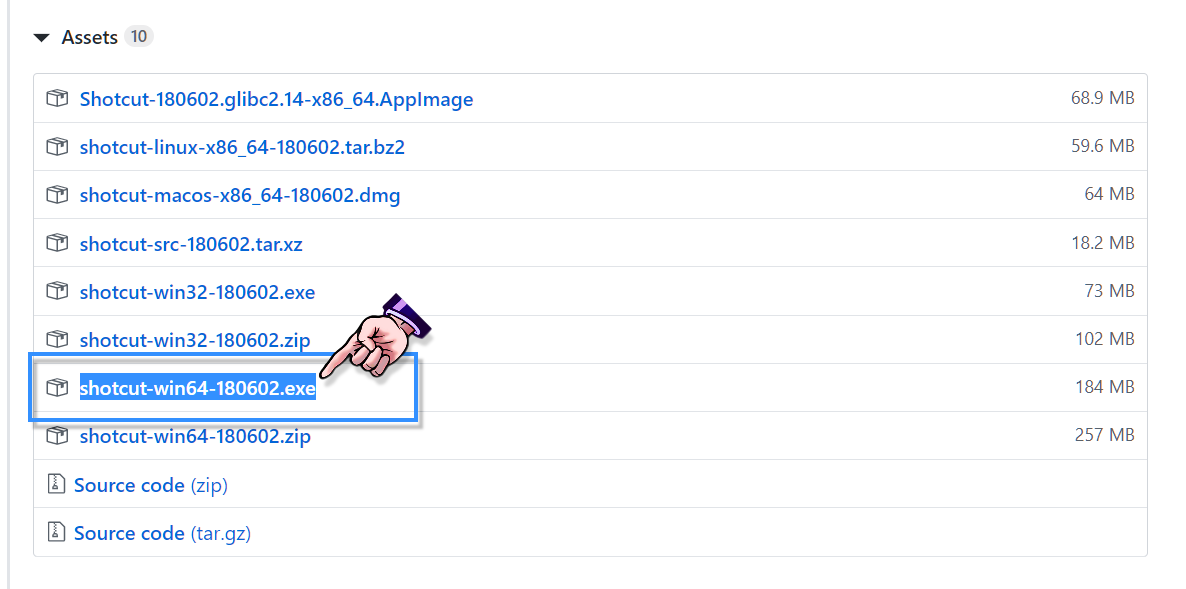
You can download the same version I'm using,
following the link below to github.com.

Image
Download Page For Shotcut-180602 @ github.com


You'll find the download link,
at the bottom of the page.
Be sure you select the correct download link,
as shown in my screenshot below.

Image

_________________
Image
"A wise man learns more from a foolish question than a fool can learn from a wise answer"
Image


Top
 Post subject: Re: Video Editors?
PostPosted: Mon Jul 22, 2019 12:59 pm  (#40) 
Offline
GimpChat Member
User avatar

Joined: Jul 06, 2013
Posts: 2662
Location: California
Wallace, I tried changing the setting to automatic and it didn't change anything. I am still forced to name a project before even starting one. Image


Top
Post new topic Reply to topic  [ 43 posts ]  Go to page Previous  1, 2, 3  Next

All times are UTC - 5 hours [ DST ]


* Login  


Powered by phpBB3 © phpBB Group