It is currently Mon Nov 16, 2026 10:56 pm


All times are UTC - 5 hours [ DST ]


Post new topic Reply to topic  [ 51 posts ]  Go to page Previous  1, 2, 3  Next
Author Message
 Post subject: Re: Linux newbie with some questions.
PostPosted: Thu Dec 16, 2010 10:30 pm  (#21) 
Offline
GimpChat Member

Joined: Apr 11, 2010
Posts: 545
Location: In the mini-chat, saying silly things
Bob,

Am I correct to assume that I can disable the following at start up because I can always enable them when I need them?
Remote Desktop
MintUpload
Gnome Do

If these aren't being started at start up, can you still start them manually once your computer is on?

About GSettings Data Conversion, is this something that's done in the background on a regular basis and you should keep letting it do it, like system restore on windows, or is it just running in case you need it?

The lag isn't a firefox issue for me. Chrome acts the same, and it only happens when the laptop is on for a longer period. It seems when they got hot some laptops get slower.


Wanted to reply to something Gerard (Had eerst niet door dat je Nederlands was en zat in mijn hoofd al te bedenken hoe ik je naam uit moest spreken. :hehe ) said, but can't find the post now. :gaah

Gnu, I'll come back to your post later, I only got a few hours sleep and now my brain refuses to have complicated thoughts. Maybe I should go back. :otb

_________________
Image


Top
 Post subject: Re: Linux newbie with some questions.
PostPosted: Fri Dec 17, 2010 12:35 am  (#22) 
Offline
GimpChat Member
User avatar

Joined: Oct 19, 2010
Posts: 376
Location: North Central Ohio, USA
Jolie,

To the best of my knowledge, Remote Desktop and Mint Upload can safely be disabled through the Startup Applications. They should not affect the basic operation of your system. In fact as I was writing this reply, I opened my own Startup Applications and disabled them. While I don't anticipate any negative effects, I will let you know if anything related occurs.

I really don't know anything about gnome-do, other than it inspired docky and apparently can be used to quick launch applications and search for info among favorites, e-mail, etc. Perhaps you know more as I think you mentioned you used docky and what sort of capabilities that app provides. However, I do not see anything that would make me reluctant to turn it off.

_________________
Life Truth: #12
My cat is a worst typist than I am.


Top
 Post subject: Re: Linux newbie with some questions.
PostPosted: Fri Dec 17, 2010 1:18 am  (#23) 
Offline
GimpChat Member

Joined: Apr 11, 2010
Posts: 545
Location: In the mini-chat, saying silly things
I'll start up from the live CD, if it isn't in the list on there I'm going to assume Gnome Do was installed with docky and be turned off.


GnuTux,

The only xorg.conf file I could find is in /usr/share/doc/xserver-xorg-video-nouveau/examples/xorg.conf

It says:

Quote:
# Minimal xorg.conf for the Nouveau driver

Section "Device"
Identifier "Default screen"
Driver "nouveau"
EndSection

_________________
Image


Top
 Post subject: Re: Linux newbie with some questions.
PostPosted: Fri Dec 17, 2010 2:08 am  (#24) 
Offline
GimpChat Member
User avatar

Joined: Oct 06, 2010
Posts: 4050
type "locate xorg.conf" in terminal, just to be sure you're not missing the original.

_________________
"In order to attain the impossible, one must attempt the absurd."
~ Miguel de Cervantes


Top
 Post subject: Re: Linux newbie with some questions.
PostPosted: Fri Dec 17, 2010 4:22 am  (#25) 
Offline
GimpChat Member

Joined: Apr 11, 2010
Posts: 545
Location: In the mini-chat, saying silly things
Nope. There is a folder in usr/share/X11 called xorg.conf.d but that's it.

And just noticed the weirdest thing, Alt Tab doesn't work.

_________________
Image


Top
 Post subject: Re: Linux newbie with some questions.
PostPosted: Fri Dec 17, 2010 7:35 am  (#26) 
Offline
GimpChat Member
User avatar

Joined: Oct 19, 2010
Posts: 376
Location: North Central Ohio, USA
<Alt><Tab> (on my machine) is provided by compiz. For application switching, right?

_________________
Life Truth: #12
My cat is a worst typist than I am.


Top
 Post subject: Re: Linux newbie with some questions.
PostPosted: Fri Dec 17, 2010 12:32 pm  (#27) 
Offline
GimpChat Founder
User avatar

Joined: May 22, 2008
Posts: 5243
Location: Gimpville
Bob63 wrote:
<Alt><Tab> (on my machine) is provided by compiz. For application switching, right?
Alt-tab should cycle through the currently open windows in Gnome. Compiz is not required.

Jolie wrote:
Nope. There is a folder in usr/share/X11 called xorg.conf.d but that's it.
It's not surprising you don't have this file by default. Linux distributions can auto-detect most everything these days. Sometimes this is fine, other times not so much.

Placing xorg.conf in the folder /etc/X11 directs Linux to override the default settings, using instead the configuration information contained inside xorg.conf. Sometimes the defaults settings for your hardware are not optimal and need to be tweaked via xorg.conf.

How's the testing going? Any lockups since disabling desktop effects?

_________________
"If Microsoft ever does applications for Linux it means I've won." - Linus Torvalds


Top
 Post subject: Re: Linux newbie with some questions.
PostPosted: Fri Dec 17, 2010 1:16 pm  (#28) 
Offline
GimpChat Member
User avatar

Joined: Oct 19, 2010
Posts: 376
Location: North Central Ohio, USA
GnuTux wrote:
Bob63 wrote:
<Alt><Tab> (on my machine) is provided by compiz. For application switching, right?
Alt-tab should cycle through the currently open windows in Gnome. Compiz is not required.


This only seems to be true if compiz is off or completely disabled, when Gnome can reassert it's keyboard shortcuts relating to the desktop, apparently. On my system in order to get Gnome to start using its keyboard shortcuts I had to go Menu -> Preferences -> Appearance, select Visual Effects tab and set to none to disable compiz - short of uninstalling it. If compiz is still running and Application Switcher is disabled, Gnome doesn't seem to get the keystrokes for this combo, even though on my setup the keystrokes are the same.

I think it is likely that Jolie may be experiencing the same thing as we have the same general OS (I'm LinuxMint 64-bit, J is 32-bit).

@Jolie, did you completely disable compiz, or only turn off the various plug-ins from the Compiz Settings Manager?

_________________
Life Truth: #12
My cat is a worst typist than I am.


Top
 Post subject: Re: Linux newbie with some questions.
PostPosted: Fri Dec 17, 2010 9:11 pm  (#29) 
Offline
GimpChat Founder
User avatar

Joined: May 22, 2008
Posts: 5243
Location: Gimpville
Bob63 wrote:
GnuTux wrote:
Alt-tab should cycle through the currently open windows in Gnome. Compiz is not required.
This only seems to be true if compiz is off or completely disabled, when Gnome can reassert it's keyboard shortcuts relating to the desktop, apparently. On my system in order to get Gnome to start using its keyboard shortcuts I had to go Menu -> Preferences -> Appearance, select Visual Effects tab and set to none to disable compiz - short of uninstalling it.

That sounds like a bug, Bob. With Fedora, I can toggle back and forth between compiz desktop effects on and having them disabled without losing Alt-Tab window switching capability in Gnome.

_________________
"If Microsoft ever does applications for Linux it means I've won." - Linus Torvalds


Top
 Post subject: Re: Linux newbie with some questions.
PostPosted: Fri Dec 17, 2010 9:48 pm  (#30) 
Offline
GimpChat Member
User avatar

Joined: Oct 19, 2010
Posts: 376
Location: North Central Ohio, USA
No it might be that I wasn't clear. :oops:

There's only an issue if compiz is on, but both of the switcher plug-ins are off.

compiz on + Application Switcher plug-in off AND Static Application switcher plug-in off = no switching

compiz off = Gnome handles switching

_________________
Life Truth: #12
My cat is a worst typist than I am.


Top
 Post subject: Re: Linux newbie with some questions.
PostPosted: Sat Dec 18, 2010 12:43 am  (#31) 
Offline
GimpChat Member

Joined: Apr 11, 2010
Posts: 545
Location: In the mini-chat, saying silly things
No lock ups since so fingers crossed it stays that way. It started with streaming video though Moonlight so I'm going to test that later.

About Alt Tab,

I disabled the effects by right clicking on the desktop and setting the effects to none. When I set the effect to normal it doesn't work either. Currently have the effects set to none and application switcher is disabled.

What keyboard layout do you guys use?

_________________
Image


Top
 Post subject: Re: Linux newbie with some questions.
PostPosted: Sat Dec 18, 2010 7:59 am  (#32) 
Offline
GimpChat Member
User avatar

Joined: Oct 19, 2010
Posts: 376
Location: North Central Ohio, USA
I use USA, as selected during OS installation. Also, just to verify, I went to Menu -> Preferences -> Keyboard Shortcuts. Scrolled down to the Window Management section and looked for "Move between windows using a popup window." Mine is set for <Alt>+<Tab>. This should be the where Gnome gets it keyboard shortcuts from.

This may not apply, but I have read elsewhere of Gnome setting getting "stuck" on the wrong setting/value and have experienced it myself once or twice; to make a value "unstuck" you have to change it to something different and close the setting program, then reopen and reset the value correctly.

For example: change the keyboard shortcut to another key sequence and close the app, then reopen the app and reset it to <Alt>+<Tab>. Just a thought.

If you have the effects set even to normal, you will have to have one of compiz's Application switcher plug-ins turned on.

_________________
Life Truth: #12
My cat is a worst typist than I am.


Top
 Post subject: Re: Linux newbie with some questions.
PostPosted: Sat Dec 18, 2010 9:16 am  (#33) 
Offline
GimpChat Member

Joined: Apr 11, 2010
Posts: 545
Location: In the mini-chat, saying silly things
mYSTERY SOLVED. (As you can see my caps lock is working perfectly. :yes )

It said disabled where it was supposed be say Alt+Tab. Doesn't tab between workspaces so now I have to go back to see what the shortkeys are to get to another workspace as I have the terminal windows open on workspace 4 so they don't get in the way.

_________________
Image


Top
 Post subject: Re: Linux newbie with some questions.
PostPosted: Sat Dec 18, 2010 9:38 am  (#34) 
Offline
GimpChat Member
User avatar

Joined: Oct 19, 2010
Posts: 376
Location: North Central Ohio, USA
Glad I could help you that much. :hi5

If I can be of any other help, let me know.

_________________
Life Truth: #12
My cat is a worst typist than I am.


Top
 Post subject: Re: Linux newbie with some questions.
PostPosted: Sun Dec 19, 2010 6:53 am  (#35) 
Offline
GimpChat Member

Joined: Apr 11, 2010
Posts: 545
Location: In the mini-chat, saying silly things
Thanks! :hi5

_________________
Image


Top
 Post subject: Re: Linux newbie with some questions.
PostPosted: Tue Dec 21, 2010 2:07 am  (#36) 
Offline
GimpChat Member

Joined: Apr 11, 2010
Posts: 545
Location: In the mini-chat, saying silly things
It happened again. Think we can rule out Compiz now.

There was nothing weird going on in "top". Pulseaudio took 4% CPU. Seems normal.

It's a weird freeze. I can use the keyboard but I can't click the mouse on most things. But I can move the mouse, just not click. I didn't even realise for a while until I couldn't pause a video on youtube. Other things in firefox I could still click on. Then noticed I couldn't not click anything on the panel. Plugged in another mouse but that didn't help.

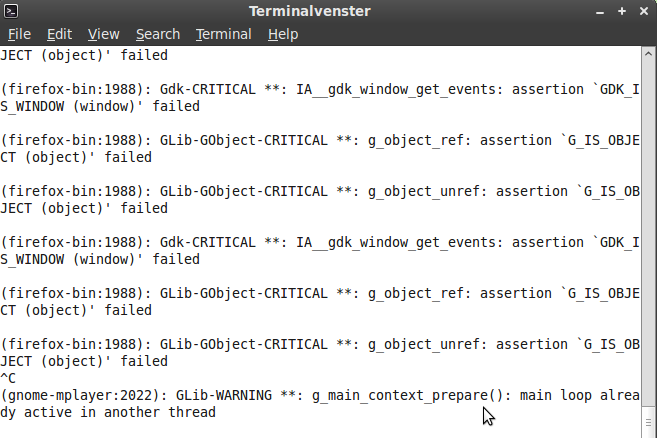
Did manage to make a screenshot of the terminal of firefox.

Image

Where you see "^C" I tried to Ctrl A and Ctrl C to copy the text. Instead it closed firefox. After that I still had to do Ctrl Alt Backspace to make everything work again.

_________________
Image


Top
 Post subject: Re: Linux newbie with some questions.
PostPosted: Tue Dec 21, 2010 2:10 am  (#37) 
Offline
Global Moderator
User avatar

Joined: May 16, 2010
Posts: 16272
It could possibly be a sticking shift key Jolie.
Or any other key. =)

_________________
Image


Top
 Post subject: Re: Linux newbie with some questions.
PostPosted: Tue Dec 21, 2010 7:35 am  (#38) 
Offline
GimpChat Member

Joined: Apr 11, 2010
Posts: 545
Location: In the mini-chat, saying silly things
But if a key is stuck then I shouldn't be able to use short keys. I get the feeling that it's something with the mouse. Because everything seems to be working fine with the keyboard. CPU usage is normal and with all programs closed the problem is still there.

_________________
Image


Top
 Post subject: Re: Linux newbie with some questions.
PostPosted: Tue Dec 21, 2010 8:55 am  (#39) 
Offline
Global Moderator
User avatar

Joined: May 16, 2010
Posts: 16272
Did you look to see the mouse is plugged into the tower tightly?

_________________
Image


Top
 Post subject: Re: Linux newbie with some questions.
PostPosted: Tue Dec 21, 2010 9:22 am  (#40) 
Offline
GimpChat Member

Joined: Apr 11, 2010
Posts: 545
Location: In the mini-chat, saying silly things
I even plugged in another mouse, to rule out that my mouse is faulty.

_________________
Image


Top
Post new topic Reply to topic  [ 51 posts ]  Go to page Previous  1, 2, 3  Next

All times are UTC - 5 hours [ DST ]


* Login  


Powered by phpBB3 © phpBB Group