It is currently Fri Nov 13, 2026 4:51 am


All times are UTC - 5 hours [ DST ]


Post new topic Reply to topic  [ 2 posts ] 
Author Message
 Post subject: Help with G'MIC, Layers, Blend (Seamless)
PostPosted: Wed Nov 04, 2015 9:30 pm  (#1) 
Offline
New Member

Joined: Nov 04, 2015
Posts: 1
Hi-

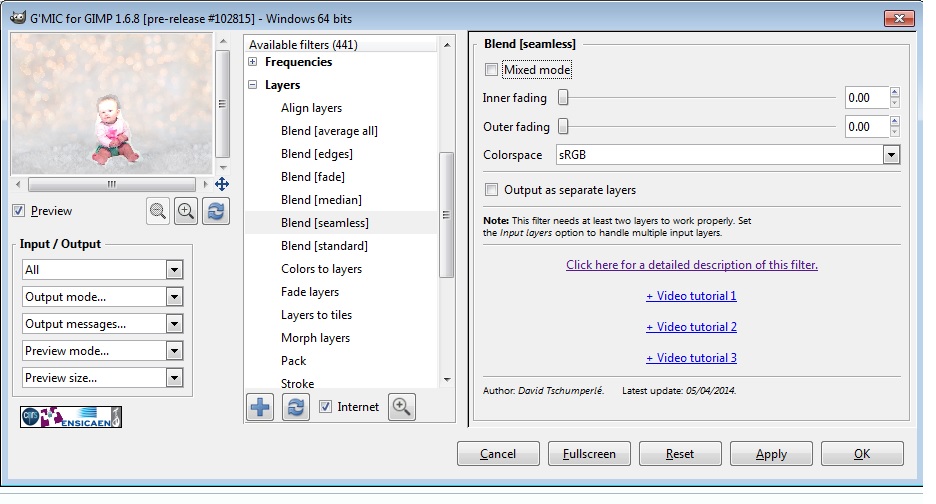
I am new to this so please bear with me. When I open G'MIC to use the function "blend (seamless)" it pulls up a screen that says "inner fading, outer fading, colorspace" etc.

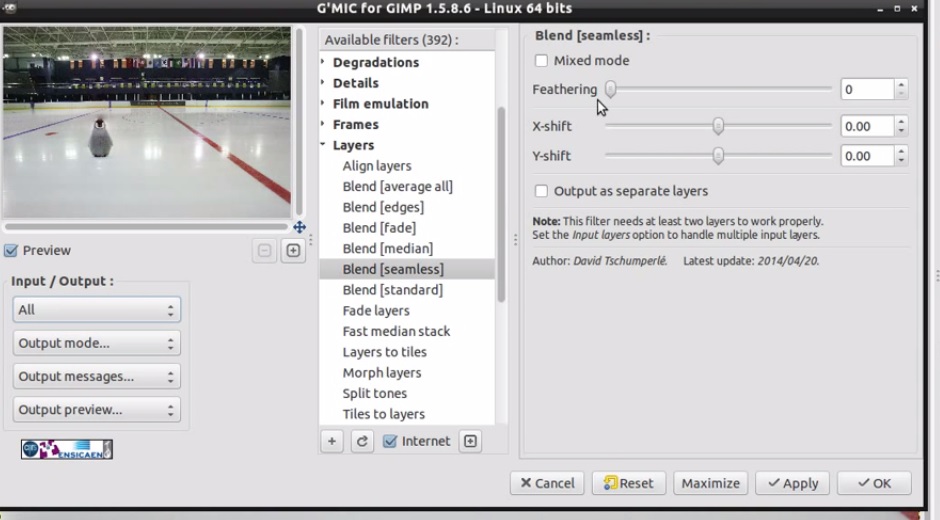
When I was watching the video on the tutorial on how to use this function it had a different screen saying "feathering, x-shift, y-shift" etc.

Did something change? My layer didn't blend near as good as what the tutorial shows. What am I doing wrong? How can I make my layer blend better? Please see attachments below.

Thank you!


Attachments:
gimp2.jpg
gimp2.jpg [ 107.31 KiB | Viewed 3169 times ]
gimp1.jpg
gimp1.jpg [ 132.82 KiB | Viewed 3169 times ]
Share on Facebook Share on Twitter Share on Orkut Share on Digg Share on MySpace Share on Delicious Share on Technorati
Top
 Post subject: Re: Help with G'MIC, Layers, Blend (Seamless)
PostPosted: Thu Nov 05, 2015 6:35 am  (#2) 
Offline
Global Moderator
User avatar

Joined: May 16, 2010
Posts: 16261
You probably need to update G'MIC. Also after updating begin to refresh (two blue arrows) click that button and all the filters will refresh. This adds new filters also.

_________________
Image


Top
Post new topic Reply to topic  [ 2 posts ] 

All times are UTC - 5 hours [ DST ]


* Login  


Powered by phpBB3 © phpBB Group