It is currently Sun Sep 06, 2026 4:38 pm


All times are UTC - 5 hours [ DST ]


Post new topic Reply to topic  [ 32 posts ]  Go to page 1, 2  Next
Author Message
 Post subject: Linux
PostPosted: Tue Aug 17, 2010 10:44 am  (#1) 
Offline
GimpChat Member
User avatar

Joined: Apr 30, 2010
Posts: 1937
Location: Missouri
I know this is a gimp forum but I don't know anyone on linux forums so I'm asking here, sorry of it's too way off base. I've been wanting to give linux a try and since I'm aquiring a 4th computer today I thought I might use it for experimenting and put Linux on it but there are some things I'm not sure about:
1 - There seem to be 42,000 versions of linux and I have no idea which one to use. I have an ISO with ubuntu v10.something but haven't used it yet.

2 - Do I need to completely remove windows first, and if not can I switch between them when I need to.

3 - Is there anything else i need to know before I start this adventure?

This is just for fun and my own experience but I want to come into it with some foresight.

_________________
Image
The last time I kept an open mind,
my brain fell out and the dog grabbed it.
Now it's full of dirt, toothmarks, and dog slobber.
No more open minds or dogs for me.


Share on Facebook Share on Twitter Share on Orkut Share on Digg Share on MySpace Share on Delicious Share on Technorati
Top
 Post subject: Re: Linux
PostPosted: Tue Aug 17, 2010 11:23 am  (#2) 
Offline
Global Moderator
User avatar

Joined: May 16, 2010
Posts: 16169
If you do decide to use it i know one thing for sure.You will find alot more nice freeware that only is available for Linux users at this time. =)

I have been searching and searching for a good Windows compatible keyboard and mouse screen-cast tool, and only Linux has one. =\
So that is definitely one great aspect of Linux. All the FREE software you can download for it.

Whatever you decide have fun with it!

_________________
Image


Top
 Post subject: Re: Linux
PostPosted: Tue Aug 17, 2010 4:23 pm  (#3) 
Offline
GimpChat Founder
User avatar

Joined: May 22, 2008
Posts: 5241
Location: Gimpville
Gms9810 wrote:
1 - There seem to be 42,000 versions of linux and I have no idea which one to use. I have an ISO with ubuntu v10.something but haven't used it yet.

Ubuntu is very popular and they have a pretty good support community. They also have a LTS (long term support) version. LTS is nice if you don't want to upgrade or reinstall every 2 years but you get stuck with older and outdated software in the later years. You really need to upgrade Linux every couple of years to stay on the cutting edge, so LTS is not an issue afaic.

I've used lots of different distributions and my favorite is Fedora. I think they strike the best balance between cutting edge and stability. Check out: http://distrowatch.com/ This site ranks the various distros and has details on what's included with each distro, as well as tons of useful links and reviews.

Quote:
2 - Do I need to completely remove windows first, and if not can I switch between them when I need to.

You can use both but you will need to shrink the current windows partition to allow room for Linux. Fedora has a shrink option available during the install. Alternately, you can use gparted (or some other utility) to shrink the Windows partition before installing Linux. During the install, Fedora will automatically see your Window's partition and give you an option to boot to either Windows or Linux. Other distros will do this as well.

Quote:
3 - Is there anything else i need to know before I start this adventure?

If you are dual booting Windows and Linux, you will need to defrag Windows and run chkdsk just before you shrink the Windows partition. Don't be afraid to try out different distributions to find out which one you like best and/or which one works best with your particular hardware configuration.

If you can post the type of video card and wireless network device your system uses, I can give you a recommendation. Config of network and video seems to be where new users have the most trouble. Intel and NVidia have the best Open GL (3D) support in Linux. These days, most all hardware is supported right out of the box (unless it's really old or really new).

I highly recommend downloading and running the "Live CD" to test your hardware before installing. Most distributions have a live CD. You basically boot and run Linux from the CD before installing, so you can give your hardware a test drive. It's kinda slow running from the CD but it's nice to give it a test before you install. If all goes well, you can install onto your HD right from the Live CD.

http://fedoraproject.org/

_________________
“If you reach for the stars, you just might land on a decently sized hill.” - Stuart Hill


Top
 Post subject: Re: Linux
PostPosted: Tue Aug 17, 2010 8:39 pm  (#4) 
Offline
GimpChat Member
User avatar

Joined: Apr 30, 2010
Posts: 1937
Location: Missouri
Not sure what kind of video card is in it yet. I spent most of the day fixing the blue screen problems and getting windows fixed, updated and working. I've worked on a woman's computer for a few years and she took it in her head to buy a laptop and asked if I wanted this one. I'm really not a fan of Dell but it's fast enough and has plenty of RAM so I decided it was worth it for free. I think it blue screened on her and she thought it was trashed. She told my wife it might be good for parts. I've heard that a dozen times before and fixed them. Thanks for the thoughts, The Ubuntu CD I burned has the live CD option on it, I might try it since I've already burned it but I've seen other people say fedora is more friendly and overall better so I'll download that too and try it.

_________________
Image
The last time I kept an open mind,
my brain fell out and the dog grabbed it.
Now it's full of dirt, toothmarks, and dog slobber.
No more open minds or dogs for me.


Top
 Post subject: Re: Linux
PostPosted: Tue Aug 17, 2010 10:40 pm  (#5) 
Offline
GimpChat Founder
User avatar

Joined: May 22, 2008
Posts: 5241
Location: Gimpville
Free is always good! :hehe

You can run lspci from the command prompt (terminal) in any Linux distro to list your hardware devices and chipsets.

Here's the output from the box I'm on now..

[gnutuxt@localhost ~]$ lspci
00:00.0 Host bridge: Intel Corporation 82865G/PE/P DRAM Controller/Host-Hub Interface (rev 02)
00:01.0 PCI bridge: Intel Corporation 82865G/PE/P PCI to AGP Controller (rev 02)
00:06.0 System peripheral: Intel Corporation 82865G/PE/P Processor to I/O Memory Interface (rev 02)
00:1d.0 USB Controller: Intel Corporation 82801EB/ER (ICH5/ICH5R) USB UHCI Controller #1 (rev 02)
00:1d.1 USB Controller: Intel Corporation 82801EB/ER (ICH5/ICH5R) USB UHCI Controller #2 (rev 02)
00:1d.2 USB Controller: Intel Corporation 82801EB/ER (ICH5/ICH5R) USB UHCI Controller #3 (rev 02)
00:1d.3 USB Controller: Intel Corporation 82801EB/ER (ICH5/ICH5R) USB UHCI Controller #4 (rev 02)
00:1d.7 USB Controller: Intel Corporation 82801EB/ER (ICH5/ICH5R) USB2 EHCI Controller (rev 02)
00:1e.0 PCI bridge: Intel Corporation 82801 PCI Bridge (rev c2)
00:1f.0 ISA bridge: Intel Corporation 82801EB/ER (ICH5/ICH5R) LPC Interface Bridge (rev 02)
00:1f.1 IDE interface: Intel Corporation 82801EB/ER (ICH5/ICH5R) IDE Controller (rev 02)
00:1f.2 IDE interface: Intel Corporation 82801EB (ICH5) SATA Controller (rev 02)
00:1f.3 SMBus: Intel Corporation 82801EB/ER (ICH5/ICH5R) SMBus Controller (rev 02)
01:00.0 VGA compatible controller: nVidia Corporation NV18 [GeForce4 MX 4000] (rev c1)
02:02.0 Multimedia audio controller: Creative Labs SB Live! EMU10k1 (rev 08)
02:02.1 Input device controller: Creative Labs SB Live! Game Port (rev 08)
02:08.0 Ethernet controller: Intel Corporation 82801EB/ER (ICH5/ICH5R) integrated LAN Controller (rev 02)


You can just run lspci from terminal when you boot up with a Live CD.

Heck, you'd think most people would want to dual boot Linux and Windows on at least one machine anyway, just to have options. Options are always good. :mrgreen:

_________________
“If you reach for the stars, you just might land on a decently sized hill.” - Stuart Hill


Top
 Post subject: Re: Linux
PostPosted: Tue Aug 17, 2010 11:09 pm  (#6) 
Offline
GimpChat Member
User avatar

Joined: Apr 30, 2010
Posts: 1937
Location: Missouri
Well for the past few years I've seen and heard people talking about all of the superior software there is for Linux and I'm really anxious to try it. I'm downloading the fedora ISO now, as soon as it's done I'll burn it then try it tonight if all goes well.

_________________
Image
The last time I kept an open mind,
my brain fell out and the dog grabbed it.
Now it's full of dirt, toothmarks, and dog slobber.
No more open minds or dogs for me.


Top
 Post subject: Re: Linux
PostPosted: Wed Aug 18, 2010 12:02 am  (#7) 
Offline
GimpChat Founder
User avatar

Joined: May 22, 2008
Posts: 5241
Location: Gimpville
Well, I don't know if it's fair to compare free open source software applications to equivalent commercial packages. It's kinda like comparing GIMP to PhotoShop. In some cases, FOSS Linux apps are superior to commercial equivalents but many times, that's not the case. High end commercial apps, with lots of well paid developers writing code, can be far superior to FOSS equivalents, which are normally coded by programmers working for free in their spare time.

Although, many of the applications the average user needs are exactly the same, like FireFox, Opera, Flash, and GIMP. There's lots of good multimedia stuff in Linux too, CD/DVD burning apps, MP3 jukeboxes, media players and the like. Apps not withstanding, I am of the opinion that compared to Windows, both Mac OS and Linux are superior, more secure, operating systems.

Personally, I view Operating Systems as a tool and I'll use the best tool for the job.

_________________
“If you reach for the stars, you just might land on a decently sized hill.” - Stuart Hill


Top
 Post subject: Re: Linux
PostPosted: Wed Aug 18, 2010 8:45 am  (#8) 
Offline
GimpChat Member
User avatar

Joined: Apr 30, 2010
Posts: 1937
Location: Missouri
Yes, I suppose so but I DO compare Gimp to Photoshop and other open source to commercial. I've found that they're fair comparisons because it seems to me that writers of open source are more dedicated to their task and making good software to them is means much more than a paycheck.

_________________
Image
The last time I kept an open mind,
my brain fell out and the dog grabbed it.
Now it's full of dirt, toothmarks, and dog slobber.
No more open minds or dogs for me.


Top
 Post subject: Update on the foray into linux land
PostPosted: Wed Aug 18, 2010 8:55 am  (#9) 
Offline
GimpChat Member
User avatar

Joined: Apr 30, 2010
Posts: 1937
Location: Missouri
At 2:30 this morning I got my other work done got Fedora burned to a CD, plopped it in and fired it up to..... nothing. I had expected to see more than a blank screen, I guess I expected it to look similar to windows. I discovered that by right clicking the desktop I was presented with some dialogs. Yippee! that was my first interaction with Linux, but I couldn't figure our how to really do anything. This was about 3:00 in the morning and I was zombified so after a few hours sleep I'm going back Fedora's site and immerse myself in all the documentation that I can find. I haven't felt this excited since I was 3 years old and got my first shotgun.

_________________
Image
The last time I kept an open mind,
my brain fell out and the dog grabbed it.
Now it's full of dirt, toothmarks, and dog slobber.
No more open minds or dogs for me.


Top
 Post subject: Re: Linux
PostPosted: Wed Aug 18, 2010 12:52 pm  (#10) 
Offline
Global Moderator
User avatar

Joined: May 16, 2010
Posts: 16169
heheh =)

_________________
Image


Top
 Post subject: Re: Update on the foray into linux land
PostPosted: Wed Aug 18, 2010 10:59 pm  (#11) 
Offline
GimpChat Founder
User avatar

Joined: May 22, 2008
Posts: 5241
Location: Gimpville
Gms9810 wrote:
At 2:30 this morning I got my other work done got Fedora burned to a CD, plopped it in and fired it up to..... nothing. I had expected to see more than a blank screen, I guess I expected it to look similar to windows. I discovered that by right clicking the desktop I was presented with some dialogs.

Booting clean from Fedora Live (Gnome Desktop Version), you should get a full GUI desktop that looks similar to Windows. Something like this...

Image

If you just get a blank screen with a flashing cursor in the upper left corner, X-Windows didn't start up. Linux uses X to facilitate its GUI windowing system. If that's the case, I'm not sure why you would get any kind of dialog by right clicking on the desktop. Maybe I'm misunderstanding just how far you got. Did you get to the auto login screen?

In Linux (Gnome Desktop), you have task bars (panels in Linux) at both the top and bottom of the screen , whereas in Windows, you have the task bar and app menu on the bottom only.

Fedora 13 uses some experimental open source video drivers for certain video cards and it's possible that you didn't boot all the way to the desktop. You might want to try Fedora 12 Live CD if you can't get up in F13.

I'll be happy to help troubleshoot or answer any questions that I can.

Another good support resource is: http://fedoraforum.org/

_________________
“If you reach for the stars, you just might land on a decently sized hill.” - Stuart Hill


Top
 Post subject: Re: Linux
PostPosted: Fri Aug 20, 2010 12:22 am  (#12) 
Offline
GimpChat Member
User avatar

Joined: Apr 30, 2010
Posts: 1937
Location: Missouri
No, nothing but what looks like a blank desktop. I could right click and get some options but nothing i could see as usable. I'm downloading the fedora 12 ISO now.

_________________
Image
The last time I kept an open mind,
my brain fell out and the dog grabbed it.
Now it's full of dirt, toothmarks, and dog slobber.
No more open minds or dogs for me.


Top
 Post subject: Re: Linux
PostPosted: Fri Aug 20, 2010 2:29 pm  (#13) 
Offline
GimpChat Founder
User avatar

Joined: May 22, 2008
Posts: 5241
Location: Gimpville
I've booted various Linux Live CDs on lots of different machines and the ones that wouldn't boot were usually related to problems with the video card or it was just a bad CD burn/bad CD drive.

If you have other PCs around, try booting the live CD on one of those to ensure you have a good download and a good CD burn.

If you hit the Esc key during boot, you'll switch over to text mode and you can sometimes see where the problem is. You might want to take a look at device manager on the Windows side and see what kind of video card you have. That might give you some clues.

There are also some log files that get generated when you boot that can point you to the problem.

_________________
“If you reach for the stars, you just might land on a decently sized hill.” - Stuart Hill


Top
 Post subject: Re: Linux
PostPosted: Sat Aug 21, 2010 11:10 am  (#14) 
Offline
GimpChat Member
User avatar

Joined: Apr 30, 2010
Posts: 1937
Location: Missouri
Sorry I didn't get a chance to answer this sooner, for being 'retired' things are way too hectic in my life. Anyway, I'm attaching a PDF with most of my system info in it. I couldn't do screen captures so i took a pic of my monitor at various stages. I've attached that as a zip file too. I've tried it on 2 computers (my desktop and my laptop) with the same result. The Dell I just acquired doesn't want to boot from the CD and I have to sort that out yet or I would have tried it too.I guess it COULD be a bad CD or a corrupt ISO. I have a pretty good nvidia graphics board that's never given me any trouble yet but it's possible that it's messing up. I've done pretty extensive diagnostics on it and it said it passed. I've ran benchmark tests and they also said it was ok but I've known diagnostics and benchmark tests to be wrong.

_________________
Image
The last time I kept an open mind,
my brain fell out and the dog grabbed it.
Now it's full of dirt, toothmarks, and dog slobber.
No more open minds or dogs for me.


Top
 Post subject: Re: Linux
PostPosted: Sat Aug 21, 2010 1:20 pm  (#15) 
Offline
GimpChat Member

Joined: Apr 12, 2010
Posts: 5870
if you still have Windows and you want try (try, or install with several options but all well explained ) i suggest you WUBI
http://wubi-installer.org/

Not only is really friendly to use but solved for me in case for some reson Live CD were not working

_________________
My 3D Gallery on Deviantart http://photocomix2.deviantart.com/
Main gallery http://www.flickriver.com/photos/photocomix-mandala/
Mandala and simmetry http://www.flickriver.com/photos/photocomix_mandala/

Image

Mrs Wilbress


Top
 Post subject: Re: Linux
PostPosted: Sat Aug 21, 2010 2:01 pm  (#16) 
Offline
GimpChat Member
User avatar

Joined: Apr 30, 2010
Posts: 1937
Location: Missouri
ok thanks, I'll give it a try. I'm hoping to try it and without being committed to it, I'd like to be able to uninstall it or just use it off of a CD. If i can't get the live CD to work I'll try this.

_________________
Image
The last time I kept an open mind,
my brain fell out and the dog grabbed it.
Now it's full of dirt, toothmarks, and dog slobber.
No more open minds or dogs for me.


Top
 Post subject: Re: Linux
PostPosted: Sat Aug 21, 2010 4:12 pm  (#17) 
Offline
GimpChat Founder
User avatar

Joined: May 22, 2008
Posts: 5241
Location: Gimpville
Those screenshots were helpful.

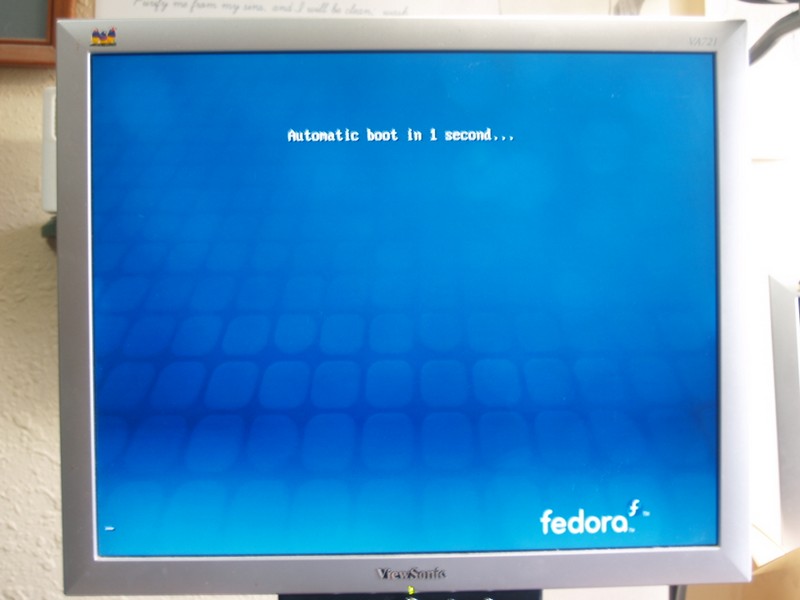
Looks like you are booting from Fedora 12 live, right?

I suspect you are having problems with the new open source nVidia drivers (Nouveau drivers) which were introduced in F12 and continue with F13. Imo, nVidia is the best card to use in Linux but the new open source drivers are a little buggy. I use the drivers supplied by nVidia and provided via Fedora's 3rd party driver repository (rpmfusion). Those drivers work great but you can't get at them with the Live CD. You have to install Fedora first.

You're getting to the desktop but it appears you just can't see the taskbars (panels) on the top and bottom. It almost looks you're viewing just a section (or window) of the desktop. This is probably due to an issue with the new open source Nouveau drivers. While I don't think it's the problem, can you adjust the height adjustment on the monitor to see those task bars? Just tossing that one out there.

Having said all that, you should be able to boot from the Live CD using the generic vesa drivers.

From the screen below..
Image

1) Hit the space bar and you'll be presented with a boot menu.
2) Press the tab key and you'll be able to edit the boot parameters
3) Add the following to the end of that line.

xdriver=vesa nomodeset

4) Press the <Enter> key and the live CD should boot using the generic vesa video driver.

I tested this out on my nvidia box with the Fedora 13 Live CD.

Hopefully, that will allow you to view the full desktop and test drive the CD. Running an OS from a CD is very slow so take that into consideration when evaluating.

On a side note, if you really want to permanently run and use Linux from a CD, Puppy Linux is the way to go. It runs out of ramdisk so it's fast. It's not as slick and as cutting edge as Fedora or Ubuntu, but it's a nice little distro for running from a CD. You can also run Fedora from a USB thumb drive, if you BIOS supports booting from a USB device. However, the best Linux experience is to run a full blown distro from your hard drive.

_________________
“If you reach for the stars, you just might land on a decently sized hill.” - Stuart Hill


Top
 Post subject: Re: Linux
PostPosted: Sat Aug 21, 2010 5:33 pm  (#18) 
Offline
GimpChat Member
User avatar

Joined: Apr 30, 2010
Posts: 1937
Location: Missouri
Well I only get driver updates from nvidia's site. My monitors can see the whole image with everything else, and I wouldn't think the 5 monitors (dual on both desktops and single on laptop) on all three computers would be that far out of calibration. I'll just try installing it on my spare and see how it goes and let you know. It's a clean installation with nothing except windows on it. I'll try the other things you suggested too.

_________________
Image
The last time I kept an open mind,
my brain fell out and the dog grabbed it.
Now it's full of dirt, toothmarks, and dog slobber.
No more open minds or dogs for me.


Top
 Post subject: Re: Linux
PostPosted: Sat Aug 21, 2010 6:53 pm  (#19) 
Offline
GimpChat Founder
User avatar

Joined: May 22, 2008
Posts: 5241
Location: Gimpville
I just tossed out the idea of the monitor adjustment, thinking that the open source nVidia drivers (Nouveau drivers) drivers may have set your refresh rate differently that what you normally use but I didn't expect that to be the problem. I ran into an issue where the Nouveau drivers would set the monitor to a refresh rate beyond the range of the display, so you never know..

Just some background; Fedora will not release any proprietary or non-free software as part of their release discs. Nvidia, ATI and such are proprietary, closed drivers. That's why you have to get them from the 3rd party repository (rpmfusion). Rpmfusion is where all non GPL licensed software for Fedora is located. The Nouveau drivers don't come from nVidia. They are independently developed open source drivers.

Setting the xdriver to vesa on boot should get you going with the generic video driver.

From there, you can test drive and install. Once you install to the HD, you can grab nVidia's proprietary drivers from rpmfusion. You never want to install nVidia drivers from the nVidia website in Fedora. nVidia's default Linux install listed on their website is not compatible with Fedora. Fedora grabs the latest drivers from nVidia, packages them properly for Fedora and makes them available to you via the rpmfusion repository.

I hope all that makes sense. It all boils down to developing true open source drivers for nVidia card, which means growing pains, at times.

_________________
“If you reach for the stars, you just might land on a decently sized hill.” - Stuart Hill


Top
 Post subject: Re: Linux
PostPosted: Sun Aug 22, 2010 6:28 am  (#20) 
Offline
GimpChat Member
User avatar

Joined: Apr 30, 2010
Posts: 1937
Location: Missouri
Yes that made perfect sense. Only my desktop has nvidia though, my laptop and my 'spare' computers only have the onboard Intel drivers.

_________________
Image
The last time I kept an open mind,
my brain fell out and the dog grabbed it.
Now it's full of dirt, toothmarks, and dog slobber.
No more open minds or dogs for me.


Top
Post new topic Reply to topic  [ 32 posts ]  Go to page 1, 2  Next

All times are UTC - 5 hours [ DST ]


* Login  


Powered by phpBB3 © phpBB Group




