It is currently Thu Jun 04, 2026 3:23 pm


All times are UTC - 5 hours [ DST ]


Post new topic Reply to topic  [ 11 posts ] 
Author Message
 Post subject: Faking a Dave Hill.
PostPosted: Tue Jan 04, 2011 2:52 am  (#1) 
Offline
GimpChat Member
User avatar

Joined: Sep 24, 2010
Posts: 12775
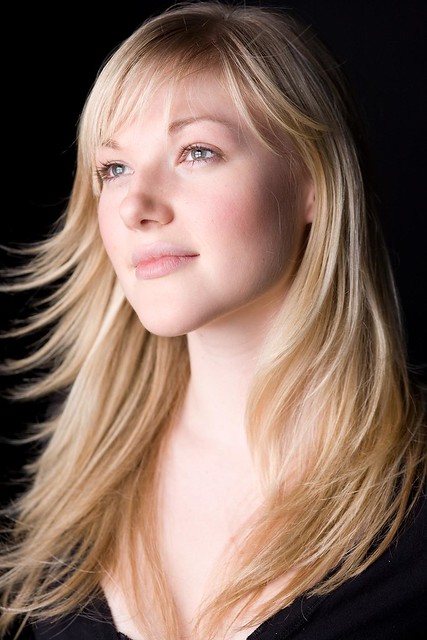
Pranav wanted my flow for how I would fake a Dave Hill. I responded and thought I would share here too. Not sharing a tut, but am sharing my XCF file which pretty much is self explanatory (i.e., better then a tut). :)

ref (for non-commercial use only): http://www.flickr.com/photos/cabbit/4402209095/sizes/o/

Compressed XCF: http://cid-924d59d1561f4c34.office.live ... le.xcf.bz2

Image

Hosted free thanks to Flickr

edit:

For some reason, the link no longer works. Below's link should. :)

https://onedrive.live.com/redir?resid=9 ... file%2cbz2

_________________
Lyle

Psalm 109:8

Image


Last edited by lylejk on Wed Nov 25, 2015 1:25 am, edited 1 time in total.

Share on Facebook Share on Twitter Share on Orkut Share on Digg Share on MySpace Share on Delicious Share on Technorati
Top
 Post subject: Re: Faking a Dave Hill.
PostPosted: Tue Jan 04, 2011 11:58 am  (#2) 
Offline
Retired Staff
User avatar

Joined: May 22, 2008
Posts: 6946
Location: Somewhere in GIMP
Wow, Lyle. That's remarkable. Nice work!

_________________
Image
World War IV will be fought with sticks and stones. - Albert Einstein


Top
 Post subject: Re: Faking a Dave Hill.
PostPosted: Tue Jan 04, 2011 1:46 pm  (#3) 
Offline
Former Member
User avatar

Joined: Nov 17, 2010
Posts: 618
Location: Rockford, IL
That particular "focussing" effect so many people ask me, and I actually recorded a tutorial of it, just haven't got around to making the introduction.

Anyway nicely done my friend :jumpclap


Last edited by mikethedj4 on Tue Jan 04, 2011 2:29 pm, edited 1 time in total.

Top
 Post subject: Re: Faking a Dave Hill.
PostPosted: Tue Jan 04, 2011 2:16 pm  (#4) 
Offline
GimpChat Member
User avatar

Joined: Sep 24, 2010
Posts: 12775
Thanks. There is a missing step though. After you run Three Bar Sin gradient, the result needs to be inverted then dupped. Anyway, appreciate the comments. Again, it doesn't work for all cases (as yet haven't found a do all technique with the same flow), but this method works 80% to 90% of the time. :)

_________________
Lyle

Psalm 109:8

Image


Top
 Post subject: Re: Faking a Dave Hill.
PostPosted: Wed Jan 05, 2011 11:29 pm  (#5) 
Offline
GimpChat Member

Joined: Apr 12, 2010
Posts: 5870
I believe Graphic Novel Fx may do something similar

i used this just cropped to speed up the rendering

ORIGINAL

Image
Stay Golden by inorman88, on Flickr

i only used Graphic Novel


Image
Testing Graphic Novel for faking D Hill by PhotoComiX, on Flickr

lighter

Image
Testing Graphic Novel for faking D Hill by PhotoComiX, on Flickr

lighter & smoother

Image
Testing Graphic Novel for faking D Hill by PhotoComiX, on Flickr


BACK IN THEME

Image
Testing Graphic Novel for faking D Hill by PhotoComiX, on Flickr

_________________
My 3D Gallery on Deviantart http://photocomix2.deviantart.com/
Main gallery http://www.flickriver.com/photos/photocomix-mandala/
Mandala and simmetry http://www.flickriver.com/photos/photocomix_mandala/

Image

Mrs Wilbress


Top
 Post subject: Re: Faking a Dave Hill.
PostPosted: Wed Jan 05, 2011 11:33 pm  (#6) 
Offline
Global Moderator
User avatar

Joined: May 16, 2010
Posts: 16009
Sweeet!

_________________
Image


Top
 Post subject: Re: Faking a Dave Hill.
PostPosted: Wed Jan 05, 2011 11:47 pm  (#7) 
Offline
GimpChat Member

Joined: Apr 12, 2010
Posts: 5870
I discover something else cool about GMic filter & Gimp

, , when a image is saved as XCF the name of the filter used and the values settings used remain preserved as layer name

In simple words if you forget the setting used for a cool effect ,they could be extracted from the layer name so you may ,as example save as new preset

_________________
My 3D Gallery on Deviantart http://photocomix2.deviantart.com/
Main gallery http://www.flickriver.com/photos/photocomix-mandala/
Mandala and simmetry http://www.flickriver.com/photos/photocomix_mandala/

Image

Mrs Wilbress


Top
 Post subject: Re: Faking a Dave Hill.
PostPosted: Fri Jan 07, 2011 10:26 am  (#8) 
Offline
GimpChat Member

Joined: Apr 12, 2010
Posts: 5870
i try with the man too seems to require very different settings but i think will mostly need some manual work

the first is the most excessive now fis skin looks of as that of a Cernobyl Victim

Image
skin disease by PhotoComiX, on Flickr

more moderate

Image
pranav 2_000006 by PhotoComiX, on Flickr

Image
pranav 2_000005 by PhotoComiX, on Flickr

Image
pranav 2_000004 by PhotoComiX, on Flickr

Image
pranav 2_000003 by PhotoComiX, on Flickr

_________________
My 3D Gallery on Deviantart http://photocomix2.deviantart.com/
Main gallery http://www.flickriver.com/photos/photocomix-mandala/
Mandala and simmetry http://www.flickriver.com/photos/photocomix_mandala/

Image

Mrs Wilbress


Top
 Post subject: Re: Faking a Dave Hill.
PostPosted: Fri Jan 07, 2011 10:30 am  (#9) 
Offline
Retired Staff
User avatar

Joined: May 22, 2008
Posts: 6946
Location: Somewhere in GIMP
Way cool, PhotoComix. Very nice results.

_________________
Image
World War IV will be fought with sticks and stones. - Albert Einstein


Top
 Post subject: Re: Faking a Dave Hill.
PostPosted: Fri Jan 07, 2011 11:52 am  (#10) 
Offline
GimpChat Member
User avatar

Joined: Apr 07, 2010
Posts: 14182
Yes, very nice. PC now could you shave the goat thingy off the chin?

_________________
Image


Top
 Post subject: Re: Faking a Dave Hill.
PostPosted: Sat Jan 08, 2011 12:36 am  (#11) 
Offline
GimpChat Member

Joined: Aug 13, 2010
Posts: 23
Great works!
@PC your last result looks cool :-)

_________________
My photostream: http://flickr.com/neychurluvr/ | I have plenty of CC licensed pictures for your use :-)


Top
Post new topic Reply to topic  [ 11 posts ] 

All times are UTC - 5 hours [ DST ]


* Login  


Powered by phpBB3 © phpBB Group