It is currently Wed Sep 02, 2026 2:25 pm


All times are UTC - 5 hours [ DST ]


Post new topic Reply to topic  [ 35 posts ]  Go to page Previous  1, 2
Author Message
 Post subject: Re: ZebraTrace
PostPosted: Wed Nov 19, 2014 12:01 pm  (#21) 
Offline
Global Moderator
User avatar

Joined: May 16, 2010
Posts: 16169
Ok change the png back to svg and if shellout works and opens ZebraTrace do your edit and go to File>save as that should open the appdata>local>temp folder. Look for ShellOutTempFile.svg and overwrite it.Close the ZebraTrace program and GIMP should open a new top layer that is your ZebraTrace layer. If changing the png to svg doesn't allow for ZebraTrace to open through Shellout then i have no idea what the problem is. Mine worked just by doing the above.

_________________
Image


Top
 Post subject: Re: ZebraTrace
PostPosted: Wed Nov 19, 2014 12:08 pm  (#22) 
Offline
GimpChat Member
User avatar

Joined: Jan 20, 2013
Posts: 14831
Location: roma, italy
but as I said (see my previous post) having svg ZT doesn't start
I hoped you found an error in my file...

_________________
"Where am I ?"


Top
 Post subject: Re: ZebraTrace
PostPosted: Wed Nov 19, 2014 12:42 pm  (#23) 
Offline
GimpChat Member
User avatar

Joined: Jan 20, 2013
Posts: 14831
Location: roma, italy
tried again
no chance
even tried with uppercase (SVG) -like a desperate attempt- instead of lowercase
no chance
restored png
it works again
if i put the name you indicated (standard shellout output name) it saved (overriding) the proper file but obviously it "moves" it to gimp as .png, thus unreadable
I have to re-open it again manually as .svg and I got it

I guess I have to survive as such

Maybe some lovely guru will create a ZebraTrace python plug-in for Gimp...
spes ultima dea

_________________
"Where am I ?"


Top
 Post subject: Re: ZebraTrace
PostPosted: Wed Nov 19, 2014 8:48 pm  (#24) 
Offline
Script Coder
User avatar

Joined: Jul 14, 2010
Posts: 697
@dinasset-
The issue is that zebratrace requires a raster input (png or jpg) and generates a vector (svg) output. I'm using the gimp pdb calls to save a layer as a raster file and and then reload the same raster file as a new layer. Not sure how Rod got it to work, as I can't export a file as SVG in the version of gimp I am using (it has to be exported from the export path menu, which uses a different pdb call (gimp-vectors-export-to-file), unless it actually saved it as a png file with an svg extension that was readable by zebratrace..... not really sure.

Potentially shellout could be changed to allow an additional parameter, which could be used to specify the input file format for loading back in the layer, but it would be "icky" in that a whole bunch of checks would have to be done and the user would have to ensure the proper filename in the proper location was used, etc.

-Rob A>

_________________
Image
Fantasy Cartography and Mapping by RobA


Top
 Post subject: Re: ZebraTrace
PostPosted: Wed Nov 19, 2014 8:51 pm  (#25) 
Offline
GimpChat Member
User avatar

Joined: Sep 24, 2010
Posts: 12840
I'm not sure how Rod got it to work either; maybe, somehow, another program is converting the SVG to bitmap with his particular setup. Unfortunately that doesn't happen for me. :)

_________________
Lyle

Psalm 109:8

Image


Top
 Post subject: Re: ZebraTrace
PostPosted: Thu Nov 20, 2014 4:31 am  (#26) 
Offline
GimpChat Member
User avatar

Joined: Jan 20, 2013
Posts: 14831
Location: roma, italy
Thanks, RobA!
So now I'm happy not to be the only unlucky user of Shellout, it seems that is Rod who is the only lucky user....hehehe

Rod, it's up to you to tell us how to make Shellout working when the author himself says it can't, due to Gimp's pdb restrictions....you are a magician! and someone else likes to learn your magics.

_________________
"Where am I ?"


Top
 Post subject: Re: ZebraTrace
PostPosted: Thu Nov 20, 2014 7:05 am  (#27) 
Offline
Global Moderator
User avatar

Joined: May 16, 2010
Posts: 16169
RobA wrote:
@dinasset-
The issue is that zebratrace requires a raster input (png or jpg) and generates a vector (svg) output. I'm using the gimp pdb calls to save a layer as a raster file and and then reload the same raster file as a new layer. Not sure how Rod got it to work, as I can't export a file as SVG in the version of gimp I am using (it has to be exported from the export path menu, which uses a different pdb call (gimp-vectors-export-to-file), unless it actually saved it as a png file with an svg extension that was readable by zebratrace..... not really sure.

Potentially shellout could be changed to allow an additional parameter, which could be used to specify the input file format for loading back in the layer, but it would be "icky" in that a whole bunch of checks would have to be done and the user would have to ensure the proper filename in the proper location was used, etc.

-Rob A>

This is exactly what Shellout is doing on my end. It takes a dup layer or visible and exports to ZebraTrace. I edit the file in ZT and go to File>save as. ZT opens the directory where Shellout puts the temp file. Then i just overwrite the temp svg file Shellout creates and then i close ZebraTrace. The file is sent back to GIMP as the top layer and the Temp svg is removed. :lol I know nothing of magic.
I am basically fooling ZT into thinking it is saving a SVG file. :cool
I have absolutely no idea why it doesn't work for you guys too. It should by just adding that line of code.

_________________
Image


Top
 Post subject: Re: ZebraTrace
PostPosted: Thu Nov 20, 2014 7:48 am  (#28) 
Offline
GimpChat Member
User avatar

Joined: Jan 20, 2013
Posts: 14831
Location: roma, italy
Rod,
is it possible that you are running Shellout on a previous Gimp release when the "pdb.gimp_file_save" (called by Shellout) worked for any kind of file?
I'm asking that because of RobA's sentence:
"Not sure how Rod got it to work, as I can't export a file as SVG in the version of gimp I am using (it has to be exported from the export path menu, which uses a different pdb call (gimp-vectors-export-to-file)"

_________________
"Where am I ?"


Top
 Post subject: Re: ZebraTrace
PostPosted: Thu Nov 20, 2014 10:30 pm  (#29) 
Offline
Script Coder
User avatar

Joined: Jul 14, 2010
Posts: 697
dinasset wrote:
Rod,
is it possible that you are running Shellout on a previous Gimp release when the "pdb.gimp_file_save" (called by Shellout) worked for any kind of file?
I'm asking that because of RobA's sentence:
"Not sure how Rod got it to work, as I can't export a file as SVG in the version of gimp I am using (it has to be exported from the export path menu, which uses a different pdb call (gimp-vectors-export-to-file)"

Good question.

I have no svg file handler in file saves. I.E. I can't export an SVG image from the File->Export As menu.

-Rob A>

_________________
Image
Fantasy Cartography and Mapping by RobA


Top
 Post subject: Re: ZebraTrace
PostPosted: Fri Nov 21, 2014 10:10 am  (#30) 
Offline
Global Moderator
User avatar

Joined: May 16, 2010
Posts: 16169
dinasset wrote:
Rod,
is it possible that you are running Shellout on a previous Gimp release when the "pdb.gimp_file_save" (called by Shellout) worked for any kind of file?
I'm asking that because of RobA's sentence:
"Not sure how Rod got it to work, as I can't export a file as SVG in the version of gimp I am using (it has to be exported from the export path menu, which uses a different pdb call (gimp-vectors-export-to-file)"

I am running Shellout in GIMP-2.8.14.

_________________
Image


Top
 Post subject: Re: ZebraTrace
PostPosted: Fri Nov 21, 2014 11:29 am  (#31) 
Offline
GimpChat Member
User avatar

Joined: Sep 24, 2010
Posts: 12840
Maybe that's it Rod since I never upgraded due to all the early bugs from 2.12 and some were there w/ 2.14 (so I still have 2.10). :)

_________________
Lyle

Psalm 109:8

Image


Top
 Post subject: Re: ZebraTrace
PostPosted: Fri Nov 21, 2014 11:42 am  (#32) 
Offline
GimpChat Member
User avatar

Joined: Sep 24, 2010
Posts: 12840
OK; broke down finally and installed 2.8.14. I hope I don't live to regret it. Still, it did not fix the expore SVG issue with shellout (so changed it back to PNG) w.r.t. Zebratrace, so Rod must have some mystical magical computer. lol

:)

_________________
Lyle

Psalm 109:8

Image


Top
 Post subject: Re: ZebraTrace
PostPosted: Sat Nov 22, 2014 8:51 am  (#33) 
Offline
Global Moderator
User avatar

Joined: May 16, 2010
Posts: 16169
lylejk wrote:
OK; broke down finally and installed 2.8.14. I hope I don't live to regret it. Still, it did not fix the expore SVG issue with shellout (so changed it back to PNG) w.r.t. Zebratrace, so Rod must have some mystical magical computer. lol

:)


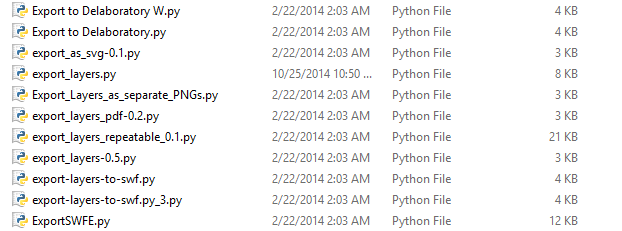
Maybe it's one of the export as path scripts or plug-ins i have installed? It seems it would have to be a python module working with Shellout. I have these export as Python modules installed. You could try and install each one at a time and check. Up to you. Files are attached in a zip here.


Image


Attachments:
export-as-vector-python-modules_RD.zip [19.16 KiB]
Downloaded 142 times

_________________
Image
Top
 Post subject: Re: ZebraTrace
PostPosted: Sat Nov 22, 2014 10:52 am  (#34) 
Offline
GimpChat Member
User avatar

Joined: Sep 24, 2010
Posts: 12840
lol

Not to concerned about it Rod since I just save the SVG and drag it into GIMP. There are a few issues (such as the small layer mode drop) that I do regret, but I can learn to live with it. It's also not too friendly with GreenHeart theme (which I use) in that you no longer get a highlighted drop-down when you hover your mouse over the differently sections. Still, it's running everything else right and other themes work fine with it (highlighted drop-down that is). I can live with these new "features". :)

_________________
Lyle

Psalm 109:8

Image


Top
 Post subject: Re: ZebraTrace
PostPosted: Sat Nov 22, 2014 6:17 pm  (#35) 
Offline
Global Moderator
User avatar

Joined: May 16, 2010
Posts: 16169
lylejk wrote:
lol

Not to concerned about it Rod since I just save the SVG and drag it into GIMP. There are a few issues (such as the small layer mode drop) that I do regret, but I can learn to live with it. It's also not too friendly with GreenHeart theme (which I use) in that you no longer get a highlighted drop-down when you hover your mouse over the differently sections. Still, it's running everything else right and other themes work fine with it (highlighted drop-down that is). I can live with these new "features". :)

That is most likely because of the cairo dll file, Graechan replaced his with the dll from GIMP-2.8.10 and it worked after that. Just a bug. It hates my Blue Metalic Licorice theme also. It highlights all my lists in layers, save as, channels, paths, and even my splash screen... :lol I can live with it though. No real big issues.
More on that dll topic here.
http://gimpchat.com/viewtopic.php?f=4&t=11437

_________________
Image


Top
Post new topic Reply to topic  [ 35 posts ]  Go to page Previous  1, 2

All times are UTC - 5 hours [ DST ]


* Login  


Powered by phpBB3 © phpBB Group