It is currently Sun Sep 06, 2026 12:43 am


All times are UTC - 5 hours [ DST ]


Post new topic Reply to topic  [ 11 posts ] 
Author Message
 Post subject: Using LightZone
PostPosted: Wed Feb 17, 2016 10:36 pm  (#1) 
Offline
Global Moderator
User avatar

Joined: Apr 01, 2012
Posts: 8470
Location: On the other side of your screen
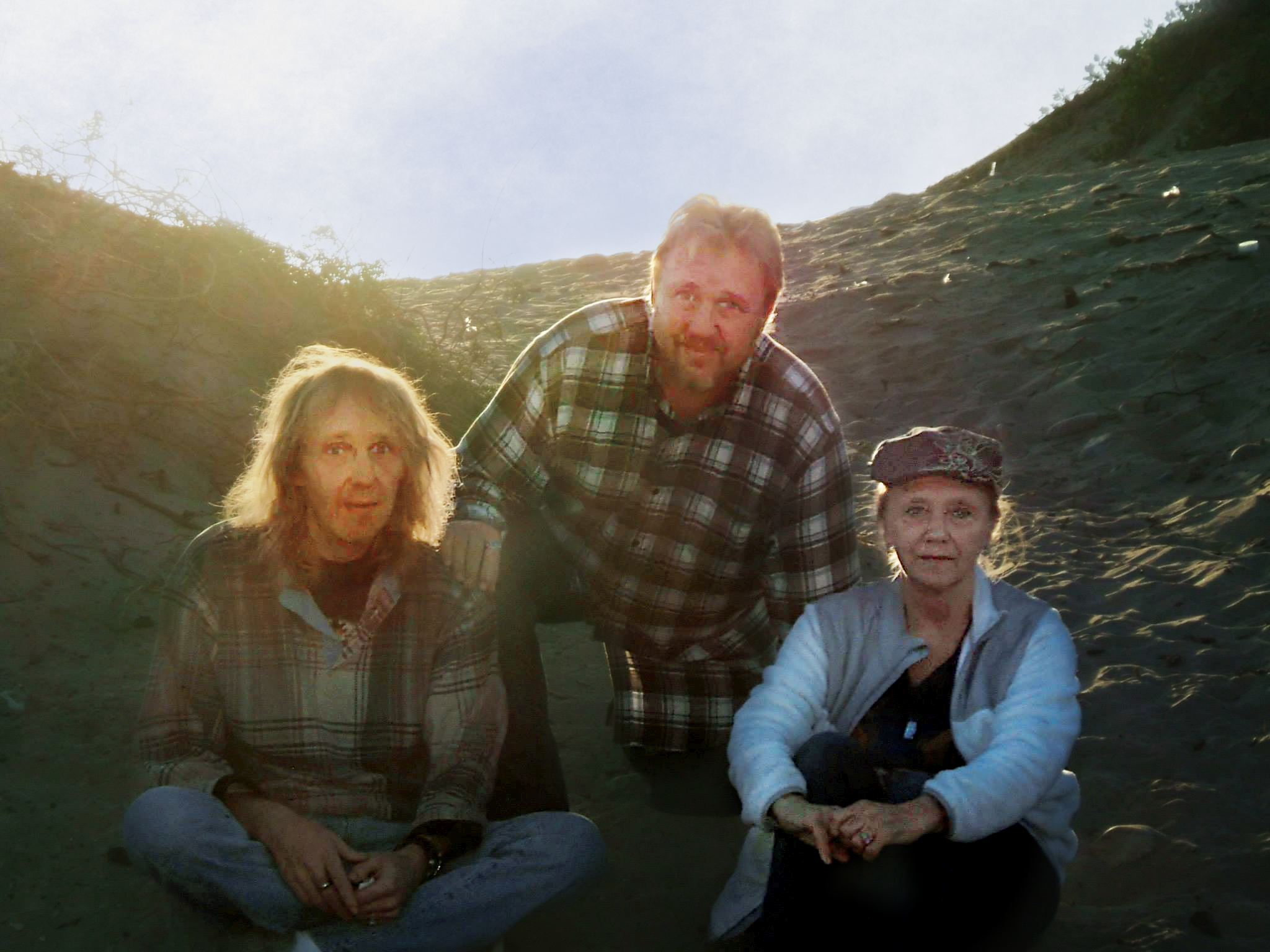
We were asked to lighten this photo so that the faces could be seen better
Image
I couldn't do it properly in gimp so I tried LightZone.
I didn't do anything else to the photo except lighten it.
Image

_________________
Image
Free Fun Photo Editing & resources
Poems from the Lord
Gimp Newby
Gimp version 3.2.4 and GMIC-Qt 4.0.2 OS :- Windows 10 Home 64


Share on Facebook Share on Twitter Share on Orkut Share on Digg Share on MySpace Share on Delicious Share on Technorati
Top
 Post subject: Re: Using LightZone
PostPosted: Thu Feb 18, 2016 2:00 am  (#2) 
Offline
GimpChat Member
User avatar

Joined: Jan 20, 2013
Posts: 14831
Location: roma, italy
using my modLCS filter with the following preset:
action = strong
luma = 120
contrast = 120
sat = 104

Attachment:
1831_12710820_modLCS-120-120-104-strong.jpg
1831_12710820_modLCS-120-120-104-strong.jpg [ 357.78 KiB | Viewed 4533 times ]


edit: you may play yourself, Sally, with this filter, experimenting different presets and even using it more than once (with changed preset)

_________________
"Where am I ?"


Top
 Post subject: Re: Using LightZone
PostPosted: Thu Feb 18, 2016 2:47 am  (#3) 
Offline
Global Moderator
User avatar

Joined: Apr 01, 2012
Posts: 8470
Location: On the other side of your screen
I'll show you what I achieved with Gimp. I got it lighter playing around with contrast/brightness and saturation - but not as light as the other.


Image

Probably looks more natural but I thought it was still too glary in the background.

_________________
Image
Free Fun Photo Editing & resources
Poems from the Lord
Gimp Newby
Gimp version 3.2.4 and GMIC-Qt 4.0.2 OS :- Windows 10 Home 64


Top
 Post subject: Re: Using LightZone
PostPosted: Thu Feb 18, 2016 4:03 am  (#4) 
Offline
Script Coder
User avatar

Joined: Jun 22, 2010
Posts: 1171
Location: Here and there
Best I could manage, using Photivo for most of the adjustment, then in GIMP lightening the lady on the right on a new layer with a layer-mask.
Attachment:
1831_12710820_1113111748740476_5850986076291510926_o-tweak.jpg
1831_12710820_1113111748740476_5850986076291510926_o-tweak.jpg [ 565.19 KiB | Viewed 4507 times ]


Kevin


Top
 Post subject: Re: Using LightZone
PostPosted: Thu Feb 18, 2016 4:24 am  (#5) 
Offline
GimpChat Member
User avatar

Joined: Nov 15, 2014
Posts: 875
A couple of attempts using multiple, modified, layer masks. Not very good. Others are achieving much better results!

david.


Attachments:
attempt2.jpg
attempt2.jpg [ 353.92 KiB | Viewed 4504 times ]
attempt1.jpg
attempt1.jpg [ 322.12 KiB | Viewed 4504 times ]
Top
 Post subject: Re: Using LightZone
PostPosted: Thu Feb 18, 2016 5:16 am  (#6) 
Offline
Global Moderator
User avatar

Joined: Apr 01, 2012
Posts: 8470
Location: On the other side of your screen
Nice Kevin and David. I found it hard not to give the guy on the left a halo. I might try that one day dinasset.

_________________
Image
Free Fun Photo Editing & resources
Poems from the Lord
Gimp Newby
Gimp version 3.2.4 and GMIC-Qt 4.0.2 OS :- Windows 10 Home 64


Top
 Post subject: Re: Using LightZone
PostPosted: Thu Feb 18, 2016 3:33 pm  (#7) 
Offline
GimpChat Member

Joined: Aug 30, 2013
Posts: 63
This is what I came up with using GIMP and G'MIC. I tried luminosity masks and curves to brighten the foreground without losing the darks, but nothing worked globally. I don't think there's any way to avoid making three separate layers, each masked for a different person, because each subject needs different adjustments. Value and RGB curves, lots of dodging and burning. And my secret weapon for emphasizing facial detail: run G'MIC Test-Photocomix-wild cartoonizer, set that layer to "darken only" and turn the opacity down until it doesn't look obvious. Sort of like taking an eyeliner pencil and drawing what you want to emphasize (can you tell I've done theatrical makeup?) While I was at it, I masked in a sky.

Because I was experimenting (which means I had no idea what I was doing) this is overbaked. I tried some sharpening and noise reduction, but probably shouldn't have. I went ahead and embraced the artificiality of the lighting, pretending the photographer had mongo big reflectors because there's no way this lighting could be natural. I tried toning down the halo on the left, but that looked less natural given the bright backlight. Person on the left needs still more color correction -- I've seen tutorials about how to add sunglow, but how do you remove it?

So many layers, and no time to go back and do it right. But maybe this helps...
Image


Top
 Post subject: Re: Using LightZone
PostPosted: Thu Feb 18, 2016 6:40 pm  (#8) 
Offline
GimpChat Member
User avatar

Joined: Nov 16, 2011
Posts: 5127
Location: Metro Vancouver, BC
Nice job, Acmespace :bigthup

_________________
Image
Gimp 2.8.18, Linux, median user
Gimp Chat Tutorials Index
Spirit Bear (Kermode)


Top
 Post subject: Re: Using LightZone
PostPosted: Fri Feb 19, 2016 3:03 am  (#9) 
Offline
Global Moderator
User avatar

Joined: Apr 01, 2012
Posts: 8470
Location: On the other side of your screen
Nice job Acmespace

_________________
Image
Free Fun Photo Editing & resources
Poems from the Lord
Gimp Newby
Gimp version 3.2.4 and GMIC-Qt 4.0.2 OS :- Windows 10 Home 64


Top
 Post subject: Re: Using LightZone
PostPosted: Sat Feb 20, 2016 12:56 am  (#10) 
Offline
Global Moderator
User avatar

Joined: Apr 01, 2012
Posts: 8470
Location: On the other side of your screen
Acmespace wrote:

I went ahead and embraced the artificiality of the lighting, pretending the photographer had mongo big reflectors because there's no way this lighting could be natural. ]


Either that, or I was thinking some silly person tried to take a photo with the sun behind them....Sun up maybe?
Unless using extra equipment I thought it was the natural thing to have the sun at the back/to the side of the photographer!?

_________________
Image
Free Fun Photo Editing & resources
Poems from the Lord
Gimp Newby
Gimp version 3.2.4 and GMIC-Qt 4.0.2 OS :- Windows 10 Home 64


Top
 Post subject: Re: Using LightZone
PostPosted: Sat Feb 20, 2016 3:25 pm  (#11) 
Offline
GimpChat Member

Joined: Aug 30, 2013
Posts: 63
sallyanne wrote:
Acmespace wrote:

I went ahead and embraced the artificiality of the lighting, pretending the photographer had mongo big reflectors because there's no way this lighting could be natural. ]

Either that, or I was thinking some silly person tried to take a photo with the sun behind them....Sun up maybe? Unless using extra equipment I thought it was the natural thing to have the sun at the back/to the side of the photographer!?

Yep, it would be entirely natural and also good planning to have the sun at the back of the photographer. It's that second sun behind the subjects and providing the strong backlighting that's hard to explain! On this planet anyway. :cool Someone with better PP skills than I have would need to eliminate all traces of the backlighting -- not just in the hair but also on the shoulders and the background -- to argue this was naturally lit on Earth and not Tatooine. I kinda like Tatooine anyway. :)


Top
Post new topic Reply to topic  [ 11 posts ] 

All times are UTC - 5 hours [ DST ]


* Login  


Powered by phpBB3 © phpBB Group




