It is currently Mon Sep 07, 2026 6:19 am


All times are UTC - 5 hours [ DST ]


Post new topic Reply to topic  [ 7 posts ] 
Author Message
 Post subject: CIRCLE OF GIMP VS INSCAPE
PostPosted: Thu Apr 21, 2016 12:28 am  (#1) 
Offline
GimpChat Member

Joined: Dec 29, 2015
Posts: 223
Hi There,

Firstly I don't know how to export Inkscape Gradients to Gimp EASILY. So I created gradients separately in Inkscape and Gimp.

Secondly I don't know how to make rim in gradient of a specific size i.e, I made rim 24 px thick in Inkscape but I THINK it is not possible in Gimp.

But anyway it was a good way to learn the use of creation of Circles in Gimp and Inkscape with Transparent Centers.

Bye.


Attachments:
File comment: Circle in Inkscape 24 px wide Gradient.
Circle in  Inkscape.png
Circle in Inkscape.png [ 305.7 KiB | Viewed 3494 times ]
File comment: Circle in Gimp with unknown thickness.
Cicle in Gimp.png
Cicle in Gimp.png [ 68.21 KiB | Viewed 3494 times ]
Share on Facebook Share on Twitter Share on Orkut Share on Digg Share on MySpace Share on Delicious Share on Technorati
Top
 Post subject: Re: CIRCLE OF GIMP VS INSCAPE
PostPosted: Thu Apr 21, 2016 1:35 am  (#2) 
Offline
Administrator
User avatar

Joined: Aug 10, 2012
Posts: 14193
Location: Native to NYC living in Arizona, Gimp 2.8 - 3.0, Win 11 PC.
Here's one that I made using Gimp.
It's 24 pixels wide.
It was made by creating a horizontal selection 48 pixels wide.
Centered across the entire 800x800 canvas.
Using the Rectangle Selection Tool and filling it with a gradient.
Next I ran Distort>Polar Coordinates on it,
using the default settings.
Image
It may not be the prettiest looking thing in the world,
but it works. :hehe

_________________
Image
"A wise man learns more from a foolish question than a fool can learn from a wise answer"
Image


Top
 Post subject: Re: CIRCLE OF GIMP VS INSCAPE
PostPosted: Thu Apr 21, 2016 2:42 am  (#3) 
Offline
GimpChat Member

Joined: Dec 29, 2015
Posts: 223
Thanks Mr. Wallace for this alternate method for creating circles with specific rim-width.


Attachments:
File comment: Blue circle with 24 px wide rim while orange circle with 48 px wide rim.
Cicle in Gimp.png
Cicle in Gimp.png [ 204.43 KiB | Viewed 3417 times ]
Top
 Post subject: Re: CIRCLE OF GIMP VS INSCAPE
PostPosted: Thu Apr 21, 2016 3:40 am  (#4) 
Offline
Administrator
User avatar

Joined: Aug 10, 2012
Posts: 14193
Location: Native to NYC living in Arizona, Gimp 2.8 - 3.0, Win 11 PC.
Rashid wrote:
Thanks Mr. Wallace for this alternate method for creating circles with specific rim-width.

No problem Rashid. :bigthup

Here's another circle/ring just for fun.
Image

_________________
Image
"A wise man learns more from a foolish question than a fool can learn from a wise answer"
Image


Top
 Post subject: Re: CIRCLE OF GIMP VS INSCAPE
PostPosted: Thu Apr 21, 2016 10:55 am  (#5) 
Offline
GimpChat Member
User avatar

Joined: Nov 16, 2011
Posts: 5127
Location: Metro Vancouver, BC
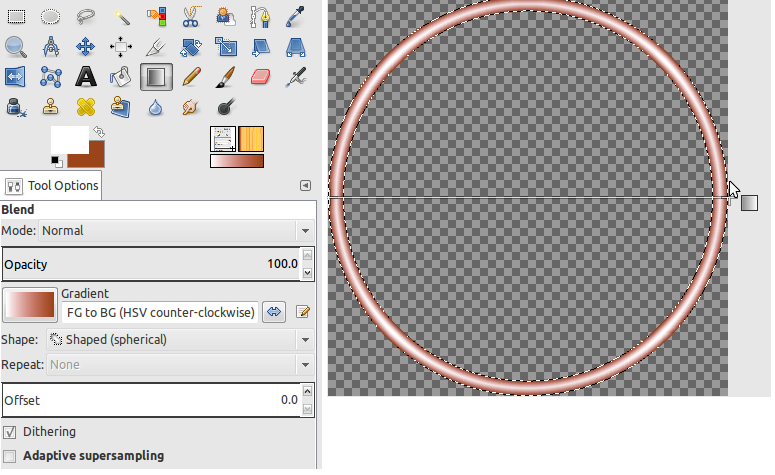
Gimp Blend Tool: Gradient, FG to BG (HSV counter-clockwise), Shaped (spherical)
FG to BG (RGB) could work as well.

Image
Inkscape version is a copy of the original

Image

_________________
Image
Gimp 2.8.18, Linux, median user
Gimp Chat Tutorials Index
Spirit Bear (Kermode)


Top
 Post subject: Re: CIRCLE OF GIMP VS INSCAPE
PostPosted: Thu Apr 21, 2016 9:17 pm  (#6) 
Offline
GimpChat Member

Joined: Dec 29, 2015
Posts: 223
Thanks Odinbc.

This method is short and precise. Is using HSV counter Clockwise type gradient compulsory? I didn't use it and got perfect result.


Attachments:
Circle.png
Circle.png [ 186.58 KiB | Viewed 3296 times ]
Top
 Post subject: Re: CIRCLE OF GIMP VS INSCAPE
PostPosted: Fri Apr 22, 2016 1:31 am  (#7) 
Offline
GimpChat Member
User avatar

Joined: Nov 16, 2011
Posts: 5127
Location: Metro Vancouver, BC
Rashid wrote:
Thanks Odinbc.

This method is short and precise. Is using HSV counter Clockwise type gradient compulsory? I didn't use it and got perfect result.
No not required. I used HSV counter Clockwise with Shaped (spherical) because it was the closest way to replicate the look of the original from Inkscape.

_________________
Image
Gimp 2.8.18, Linux, median user
Gimp Chat Tutorials Index
Spirit Bear (Kermode)


Top
Post new topic Reply to topic  [ 7 posts ] 

All times are UTC - 5 hours [ DST ]


* Login  


Powered by phpBB3 © phpBB Group