It is currently Fri Sep 04, 2026 12:31 am


All times are UTC - 5 hours [ DST ]


Post new topic Reply to topic  [ 131 posts ]  Go to page Previous  1 ... 3, 4, 5, 6, 7  Next
Author Message
 Post subject: Re: Flame Painter
PostPosted: Sat Dec 03, 2011 8:57 pm  (#101) 
Offline
GimpChat Member
User avatar

Joined: Jul 08, 2011
Posts: 285
MrBiggz wrote:
Ana wrote:
MrBiggz wrote:
Well, 1st of take a step back, breathe then take a step forward again! Relax!

Uninstalling it and re-installing isn't going to hurt. I'd say do it.

But let me ask are you on Vista or XP?

XP.Why??


I just wanted to install it on an virtualbox XP setup I have to see if I can mimic any of this. And it's there even if I minimize it and close it and then open it again with the program icon.

Go ahead and uninstall it and re-install it .. hopefully *fingers crossed* this will work!

Thanks MrBiggz on your patience.I'll do it first thing in the morning.It's 3 am here and it's time for bed.Night everybody!

_________________
Image

My Flickr
http://anaplus.deviantart.com/


Top
 Post subject: Re: Flame Painter
PostPosted: Sun Dec 04, 2011 6:59 am  (#102) 
Offline
GimpChat Member
User avatar

Joined: Jul 08, 2011
Posts: 285
OK...i uninstalled and then reinstalled the program and nothing again......why????

_________________
Image

My Flickr
http://anaplus.deviantart.com/


Top
 Post subject: Re: Flame Painter
PostPosted: Sun Dec 04, 2011 8:51 am  (#103) 
Offline
GimpChat Member
User avatar

Joined: Jul 04, 2011
Posts: 395
Location: Indianapolis, IN
Ana wrote:
OK...i uninstalled and then reinstalled the program and nothing again......why????


Ana, could you do me a favor? Minimize all other applications that are open and start the Flame Painter application, click that button just to the right of the 'Ribbon' button and then take a screen shot of your desktop.

If you don't know how to take a screen shot of the desktop it's easy. Just hit press the PrtSrn button on the keyboard, it's the next key to the right of the F12 key. Then in Gimp go File->Create->From Clipboard (SHIFT+CTRL+V). Save that image and post it.

We'll get you going! =) I'm sure it's there, it's just hiding from us!

_________________
"That which does not kill us makes us stronger." ~ Friedrich Nietzsche


Top
 Post subject: Re: Flame Painter
PostPosted: Sun Dec 04, 2011 9:44 am  (#104) 
Offline
GimpChat Member
User avatar

Joined: Jul 08, 2011
Posts: 285
MrBiggz wrote:
Ana wrote:
OK...i uninstalled and then reinstalled the program and nothing again......why????


Ana, could you do me a favor? Minimize all other applications that are open and start the Flame Painter application, click that button just to the right of the 'Ribbon' button and then take a screen shot of your desktop.

If you don't know how to take a screen shot of the desktop it's easy. Just hit press the PrtSrn button on the keyboard, it's the next key to the right of the F12 key. Then in Gimp go File->Create->From Clipboard (SHIFT+CTRL+V). Save that image and post it.

We'll get you going! =) I'm sure it's there, it's just hiding from us!

Sorry that takes me to long MrBiggz....My internet conection failed down.Ok this is the image:

Image

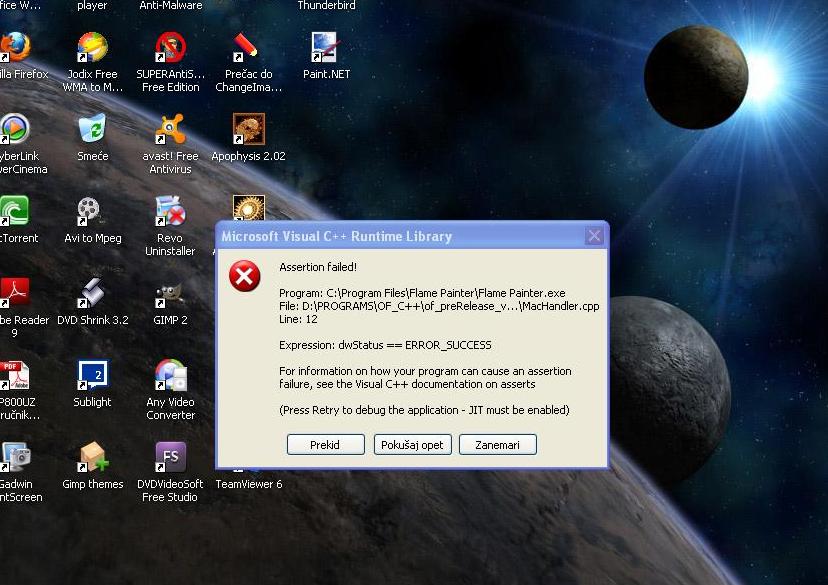
I did install this program on my notebook but it's the same problem,no brushes.And now i can't open flame painter on my PC....it shows me this message:

Image

So...i uninstalled it again....and now don't know what to do next

_________________
Image

My Flickr
http://anaplus.deviantart.com/


Top
 Post subject: Re: Flame Painter
PostPosted: Sun Dec 04, 2011 9:57 am  (#105) 
Offline
GimpChat Member
User avatar

Joined: Jul 08, 2011
Posts: 285
Couldn't resist so i installed it again....Works fine (no message,which is good) but still the brushes don't appear. :gaah

_________________
Image

My Flickr
http://anaplus.deviantart.com/


Top
 Post subject: Re: Flame Painter
PostPosted: Sun Dec 04, 2011 10:15 am  (#106) 
Offline
GimpChat Member
User avatar

Joined: Jul 04, 2011
Posts: 395
Location: Indianapolis, IN
I duplicated your problem!

What is your screen resolution set to on your desktop?

_________________
"That which does not kill us makes us stronger." ~ Friedrich Nietzsche


Top
 Post subject: Re: Flame Painter
PostPosted: Sun Dec 04, 2011 10:19 am  (#107) 
Offline
GimpChat Member
User avatar

Joined: Jul 08, 2011
Posts: 285
MrBiggz wrote:
I duplicated your problem!

What is your screen resolution set to on your desktop?


It's 1024x768

_________________
Image

My Flickr
http://anaplus.deviantart.com/


Top
 Post subject: Re: Flame Painter
PostPosted: Sun Dec 04, 2011 10:28 am  (#108) 
Offline
GimpChat Member
User avatar

Joined: Jul 04, 2011
Posts: 395
Location: Indianapolis, IN
This is what's happening. It's there, it's just off the screen and you are not able to grab it.

I set my virtual XP to a desktop of 800x600 and clicked on the brushes button and nothing. I then increased it to 1024x768 same .. nothing. I then went full screen clicked the button and voilà they (the brushes) appeared!

Do you know how to change the resolution on your PC? If so tell me what is the greatest resolution it has (slider all the way to the right).

_________________
"That which does not kill us makes us stronger." ~ Friedrich Nietzsche


Top
 Post subject: Re: Flame Painter
PostPosted: Sun Dec 04, 2011 10:47 am  (#109) 
Offline
GimpChat Member
User avatar

Joined: Jul 08, 2011
Posts: 285
MrBiggz wrote:
This is what's happening. It's there, it's just off the screen and you are not able to grab it.

I set my virtual XP to a desktop of 800x600 and clicked on the brushes button and nothing. I then increased it to 1024x768 same .. nothing. I then went full screen clicked the button and voilà they (the brushes) appeared!

Do you know how to change the resolution on your PC? If so tell me what is the greatest resolution it has (slider all the way to the right).


OK...I changed it to 1280x600 and finally I saw it.But when i return resolution back,it's disappear again.How to fix it?What should I do?

_________________
Image

My Flickr
http://anaplus.deviantart.com/


Top
 Post subject: Re: Flame Painter
PostPosted: Sun Dec 04, 2011 10:54 am  (#110) 
Offline
Global Moderator
User avatar

Joined: May 16, 2010
Posts: 16169
Sounds like you got it Mr Biggz! Good job!
Ana can't you keep your res set at that size?
I have mine set to 1440x900 and it works great.

Image

_________________
Image


Top
 Post subject: Re: Flame Painter
PostPosted: Sun Dec 04, 2011 10:59 am  (#111) 
Offline
GimpChat Member
User avatar

Joined: Jul 08, 2011
Posts: 285
Rod wrote:
Sounds like you got it Mr Biggz! Good job!
Ana can't you keep your res set at that size?
I have mine set to 1440x900 and it works great.

Image


Uffff no....because in that resolution i've got dizzy and i see double....is there any other solution??????

_________________
Image

My Flickr
http://anaplus.deviantart.com/


Top
 Post subject: Re: Flame Painter
PostPosted: Sun Dec 04, 2011 11:07 am  (#112) 
Offline
GimpChat Member
User avatar

Joined: Jul 04, 2011
Posts: 395
Location: Indianapolis, IN
This is my humble opinion:

I think the developer of this app is anticipating that people are running at higher resolutions. He's application isn't taking into the account that you have a only 1024x768 worth of desktop and the flame painting window takes up the remainder after the brush controls load. If I were the creator of this I would have loaded the brushes in the lower part of the flame painting window, but that's me! :roll:

I would go to the support page ( http://www.escapemotions.com/products/flamepainter/support.php ) and there is an email address there. It's right in that very first section under 'Support.'

I think you have a valid argument. I'm sure you know what to do from there. Don't leave anything out! :) Tell him that you rather work at 1024x768 .. it's better on your eyes!

And yeah, what Rod said!

I'd still report the bug. Have to remember this program is still in it's infancy I'm sure the interface is going to mature as time goes on. And this is just one of the reasons how by finding the little quirky flaws! :)

_________________
"That which does not kill us makes us stronger." ~ Friedrich Nietzsche


Top
 Post subject: Re: Flame Painter
PostPosted: Sun Dec 04, 2011 11:10 am  (#113) 
Offline
GimpChat Member
User avatar

Joined: Jul 04, 2011
Posts: 395
Location: Indianapolis, IN
Ana,

You and my wife would get along great! LooooooooooL She's got the 26" monitor that I so nicely got her for xmas last year but she likes it a 1024x768. I can read that from 50 meters away clearly! :hehe

_________________
"That which does not kill us makes us stronger." ~ Friedrich Nietzsche


Top
 Post subject: Re: Flame Painter
PostPosted: Sun Dec 04, 2011 11:16 am  (#114) 
Offline
GimpChat Member
User avatar

Joined: Jul 08, 2011
Posts: 285
This is my humble opinion:

I think the developer of this app is anticipating that people are running at higher resolutions. He's application isn't taking into the account that you have a only 1024x768 worth of desktop and the flame painting window takes up the remainder after the brush controls load. If I were the creator of this I would have loaded the brushes in the lower part of the flame painting window, but that's me! :roll:

I would go to the support page ( http://www.escapemotions.com/products/flamepainter/support.php ) and there is an email address there. It's right in that very first section under 'Support.'

I think you have a valid argument. I'm sure you know what to do from there. Don't leave anything out! :) Tell him that you rather work at 1024x768 .. it's better on your eyes!

And yeah, what Rod said!

I'd still report the bug. Have to remember this program is still in it's infancy I'm sure the interface is going to mature as time goes on. And this is just one of the reasons how by finding the little quirky flaws! :)[/quote]

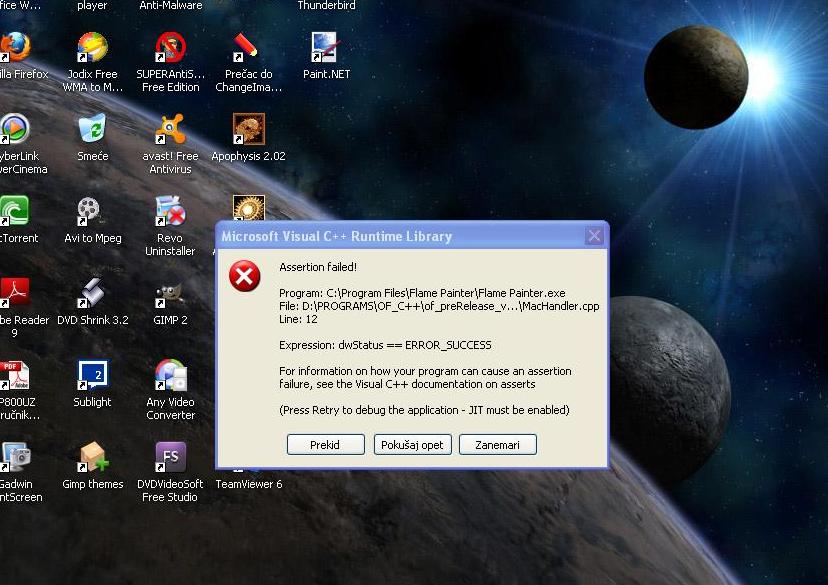
Big,big,big thanks MrBiggz :) :tyspin .I already sent them the email because of this brushes.I'll try again.But tell me what this message means (really would like to know)because it appears after i installed the program on my notebook.
Image[quote="MrBiggz"]

_________________
Image

My Flickr
http://anaplus.deviantart.com/


Last edited by Ana on Sun Dec 04, 2011 11:23 am, edited 1 time in total.

Top
 Post subject: Re: Flame Painter
PostPosted: Sun Dec 04, 2011 11:21 am  (#115) 
Offline
GimpChat Member
User avatar

Joined: Jul 08, 2011
Posts: 285
MrBiggz wrote:
Ana,

You and my wife would get along great! LooooooooooL She's got the 26" monitor that I so nicely got her for xmas last year but she likes it a 1024x768. I can read that from 50 meters away clearly! :hehe


Hheeeehjee :hehe FDefault resolution on this monitor was 800x600,but because of the gmic and mathmap i set it to 1024x768.But if i change the resolution again the letters are really,realy small...even my kids don't see it very well.I think I'm gonna need bigger monitor heheeee :)

_________________
Image

My Flickr
http://anaplus.deviantart.com/


Top
 Post subject: Re: Flame Painter
PostPosted: Sun Dec 04, 2011 12:35 pm  (#116) 
Offline
GimpChat Member
User avatar

Joined: Jul 04, 2011
Posts: 395
Location: Indianapolis, IN
Ana,

That C++ error is beyond me, sorry. :(

You may have to submit as a bug also. It's probably something missing, either C++ or .net and I could be completely wrong though.

Maybe one of the uber guru's here would know!

_________________
"That which does not kill us makes us stronger." ~ Friedrich Nietzsche


Top
 Post subject: Re: Flame Painter
PostPosted: Sun Dec 04, 2011 12:50 pm  (#117) 
Offline
GimpChat Member
User avatar

Joined: Jul 08, 2011
Posts: 285
MrBiggz wrote:
Ana,

That C++ error is beyond me, sorry. :(

You may have to submit as a bug also. It's probably something missing, either C++ or .net and I could be completely wrong though.

Maybe one of the uber guru's here would know!


OK thanks anyway MrBiggz :) Will see...now it's working fine

_________________
Image

My Flickr
http://anaplus.deviantart.com/


Top
 Post subject: Re: Flame Painter
PostPosted: Sun Dec 04, 2011 3:42 pm  (#118) 
Offline
Global Moderator
User avatar

Joined: May 16, 2010
Posts: 16169
I was going to suggest trying to reboot and loading it again, but it looks like you figured that out on your own Ana. :)

_________________
Image


Top
 Post subject: Re: Flame Painter
PostPosted: Sun Dec 04, 2011 4:03 pm  (#119) 
Offline
GimpChat Member
User avatar

Joined: Jul 04, 2011
Posts: 395
Location: Indianapolis, IN
It's windows and they should have a sticker on the box that says Murphy inside! As in Murphy's Law!

_________________
"That which does not kill us makes us stronger." ~ Friedrich Nietzsche


Top
 Post subject: Re: Flame Painter
PostPosted: Sun Dec 04, 2011 5:39 pm  (#120) 
Offline
GimpChat Member
User avatar

Joined: Jul 08, 2011
Posts: 285
I just couldn't resist heheee :hehe .

Image

Created with Flame Panter and a Gimp script ''Darlas amazing circle script''.

_________________
Image

My Flickr
http://anaplus.deviantart.com/


Top
Post new topic Reply to topic  [ 131 posts ]  Go to page Previous  1 ... 3, 4, 5, 6, 7  Next

All times are UTC - 5 hours [ DST ]


* Login  


Powered by phpBB3 © phpBB Group