It is currently Sat Sep 05, 2026 6:05 am


All times are UTC - 5 hours [ DST ]


Post new topic Reply to topic  [ 5 posts ] 
Author Message
 Post subject: Pingotec
PostPosted: Mon Jun 01, 2015 8:16 pm  (#1) 
Offline
Global Moderator
User avatar

Joined: May 16, 2010
Posts: 16169
Sorry i couldn't find the other original post about this software.
This isn't freeware or open source.

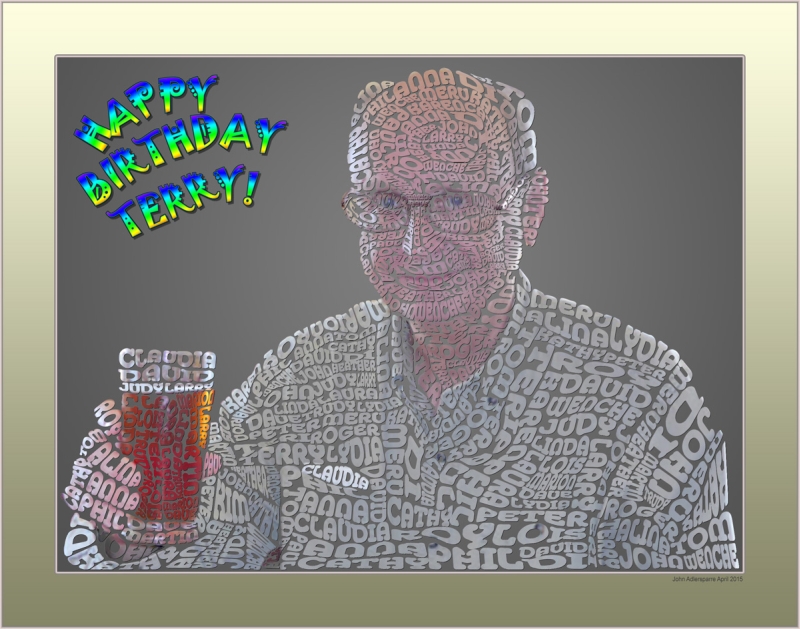
Pingotec uses text to paint images. You could probably do this effect in GIMP if you created animated text brushes.

I emailed John the creator of the software asking when the software would be updated to work on Windows 8 and he replied letting me know a NEW version for Windows 8 will be released some time in July.Anyone who bought the first version for xp will be able to get it for free. John is currently working on a info YouTube video and the help file. After those are done he should be able to release it. One of the new features will be able to create effects like this one.

Every text item is a separate layer that can be moved, scaled and resized. There's no extra stuff ion the picture, just text items.
Image

_________________
Image


Share on Facebook Share on Twitter Share on Orkut Share on Digg Share on MySpace Share on Delicious Share on Technorati
Top
 Post subject: Re: Pingotec
PostPosted: Mon Jun 01, 2015 9:30 pm  (#2) 
Offline
GimpChat Member
User avatar

Joined: Sep 24, 2010
Posts: 12844
Yes; it's not free. Haven't broken down to purchase it yet and it still not fully automated. That said, Johnny did a great job with this program Rod. He also is the creator of PicPaks (which currently is free). I purchased several of his graphic packs to support PicPaks. I'm still hoping he starts working on PicPaks once again. He did say he has some more work to do on his bread and butter programs (which Pingotec is one of them) so hopefully he'll finish that work and get back to PicPaks once again. Sorry for sort of spieling on your thread. Nice result by the way. :)

_________________
Lyle

Psalm 109:8

Image


Top
 Post subject: Re: Pingotec
PostPosted: Tue Jun 02, 2015 5:42 am  (#3) 
Offline
Global Moderator
User avatar

Joined: May 16, 2010
Posts: 16169
lylejk wrote:
Yes; it's not free. Haven't broken down to purchase it yet and it still not fully automated. That said, Johnny did a great job with this program Rod. He also is the creator of PicPaks (which currently is free). I purchased several of his graphic packs to support PicPaks. I'm still hoping he starts working on PicPaks once again. He did say he has some more work to do on his bread and butter programs (which Pingotec is one of them) so hopefully he'll finish that work and get back to PicPaks once again. Sorry for sort of spieling on your thread. Nice result by the way. :)

No problem Lyle. These results are straight from John himself. A test image he sent me using the newer version.
I thought you purchased Pingotec. I haven't been able to use mine on Windows 8.Not until he releases this new version that is. I agree it would be cool to see some new stuff with PicPaks. :hehe

_________________
Image


Top
 Post subject: Re: Pingotec
PostPosted: Fri Nov 20, 2015 7:49 am  (#4) 
Offline
Global Moderator
User avatar

Joined: May 16, 2010
Posts: 16169
The newer version has been released. 25 dollars USD. That isn't bad for this software.
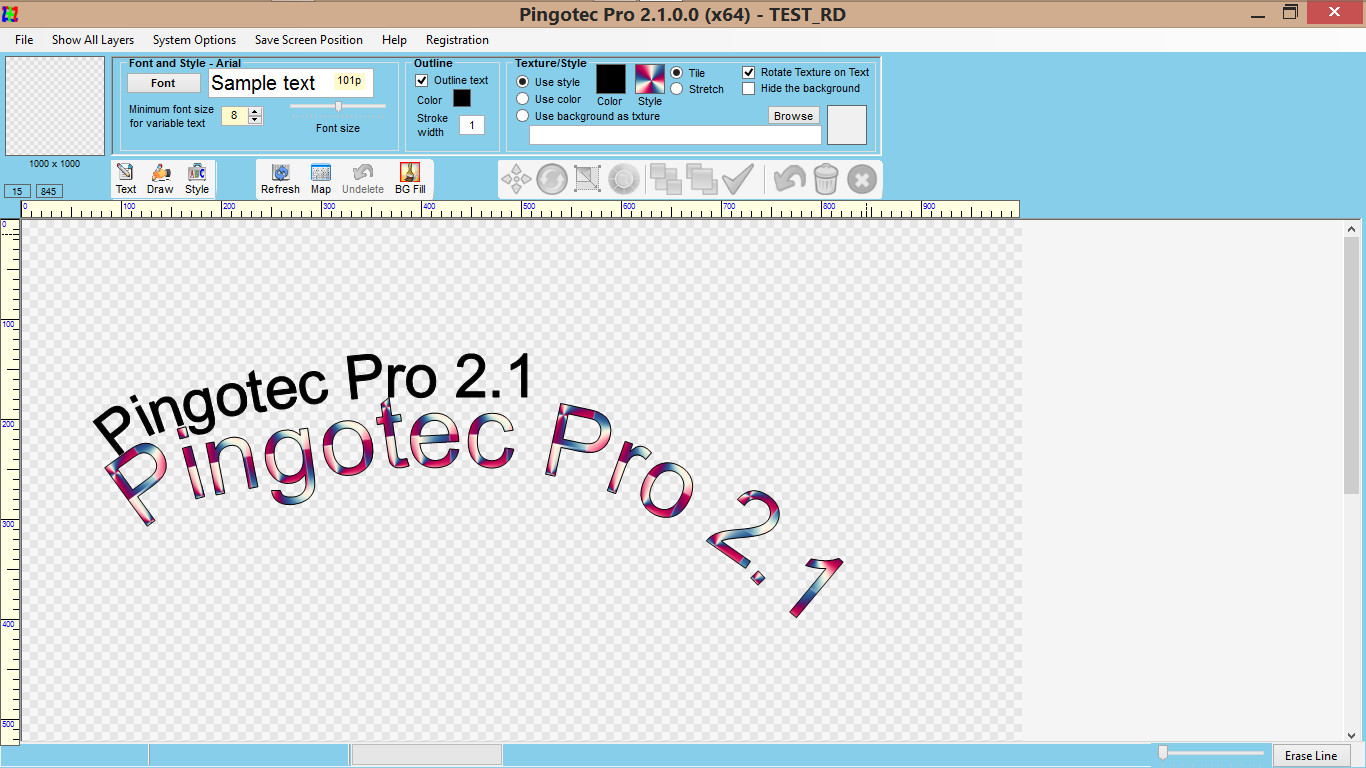
Here is a screenshot of this new version interface.

Image


Still trying to figure out how to use everything. Love the new layers though! And it's available in 32 and 64 bit now. :)

Thanks John.

_________________
Image


Top
 Post subject: Re: Pingotec
PostPosted: Thu Apr 07, 2016 1:41 pm  (#5) 
Offline
GimpChat Member
User avatar

Joined: Sep 24, 2010
Posts: 12844
Hey Rod; just had a correspondance with Johnny (He created Pingotec; he also created PicPaks (hence my correspondence). Below's a snippet of his response fyi. I think you will like this news. :)

I have been feverishly working on a new feature in Pingotec to automatically create its text mosaics from any picture at the click of a few buttons. The other way of doing each text item manually is too slow indeed. It’s been a hurdle to develop numerous algorithms to size, fill and position each text item. They still become layers that can be changed anytime.

_________________
Lyle

Psalm 109:8

Image


Top
Post new topic Reply to topic  [ 5 posts ] 

All times are UTC - 5 hours [ DST ]


cron

* Login  


Powered by phpBB3 © phpBB Group