It is currently Fri Sep 25, 2026 5:56 pm


All times are UTC - 5 hours [ DST ]


Post new topic Reply to topic  [ 27 posts ]  Go to page Previous  1, 2
Author Message
 Post subject: Re: Tricks for retouching brightness/contrast
PostPosted: Sun Feb 01, 2015 1:27 pm  (#21) 
Offline
Global Moderator
User avatar

Joined: May 16, 2010
Posts: 16175
dinasset wrote:
thanks, Rod
now my problem is: learn using LAB!
is there a simple tut for that? I'm really a novice, not even understanding which values operate on the A-B channels (the simplest to understand for me is the L...)

have to go back to school...


Colors>Components>Decompose>LAB
This option decomposes image into three greyscaled layers, layer “L” for Luminance, layer “A” for colors between green and red, layer “B” for colors between blue and yellow.

The LAB Decomposing is a color model of the Luminance-Color family. A channel is used for the Luminosity while two other channels are used for the Colors. The LAB color model is used by Photoshop.


Top
 Post subject: Re: Tricks for retouching brightness/contrast
PostPosted: Sun Feb 01, 2015 1:31 pm  (#22) 
Offline
GimpChat Member
User avatar

Joined: Jan 20, 2013
Posts: 14835
Location: roma, italy
thanks Rod, by googling I found the initial ideas (that you already synthesized)
I post here what I found, for some other novice like me on LAB

When any image is converted to 'Lab' it will look exactly the same. Because the 'Lab' contains all possible colours there can be no deterioration in the image quality as all colours translate unaltered. But when the separate 'Lab' channels are looked at they can seem a little odd at first. An RGB image is easily understood as there are three logical colours. But 'Lab' has a mix of one channel with no colour (L), plus two channels with a dual colour combination that have no contrast (a+b).

The 'L' channel, or Lightness, is the easiest to understand as it is a Greyscale. It has no colour value at all; it just contains the contrast between the lightest and darkest points in the image. On the other hand the 'a' and 'b' channels need a little explanation. The 'a' is the colour balance between Green and Magenta, and the 'b' is the colour balance between Blue and Yellow. .... Wherever the channel is mid grey there is a balance between the dual colours.

NOTE: While the 'L' stands for Lightness, the 'a' and 'b' are arbitrary names; they could just as easily have been labelled 'α' and 'β', or '1' and '2' instead.

_________________
"Where am I ?"


Top
 Post subject: Re: Tricks for retouching brightness/contrast
PostPosted: Sun Feb 01, 2015 1:33 pm  (#23) 
Offline
Global Moderator
User avatar

Joined: May 16, 2010
Posts: 16175
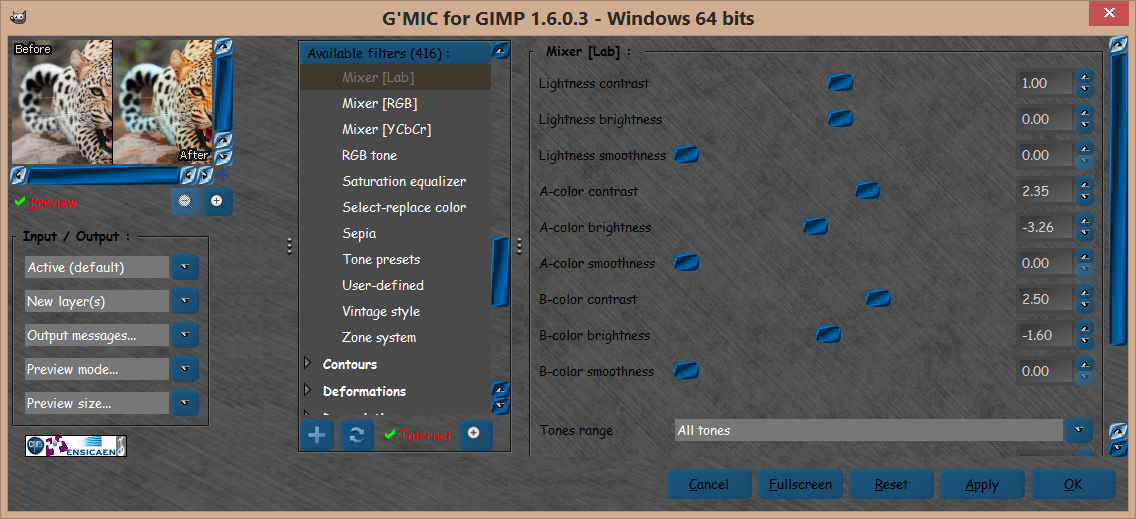
I actually tried using LAB as an algorithm for the Rodilius filter for GIMP. :)
But motion blurring (and rotating) the "L" channel posed a problem. I couldn't get it to work. Luckily David wrote us one for G'MIC.

I should actually get back to work on that problem some day.


Top
 Post subject: Re: Tricks for retouching brightness/contrast
PostPosted: Sun Feb 01, 2015 2:07 pm  (#24) 
Offline
GimpChat Member
User avatar

Joined: Nov 16, 2011
Posts: 5127
Location: Metro Vancouver, BC
dinasset wrote:
thanks, Rod
now my problem is: learn using LAB!
is there a simple tut for that? I'm really a novice, not even understanding which values operate on the A-B channels (the simplest to understand for me is the L...)

have to go back to school...
Have a look at both this tutorial and the G'MIC method in the second post.
Subject: Using the LAB color space to adjust an image

_________________
Image
Gimp 2.8.18, Linux, median user
Gimp Chat Tutorials Index
Spirit Bear (Kermode)


Top
 Post subject: Re: Tricks for retouching brightness/contrast
PostPosted: Sun Feb 01, 2015 2:36 pm  (#25) 
Offline
Global Moderator
User avatar

Joined: May 16, 2010
Posts: 16175
Odinbc wrote:
dinasset wrote:
thanks, Rod
now my problem is: learn using LAB!
is there a simple tut for that? I'm really a novice, not even understanding which values operate on the A-B channels (the simplest to understand for me is the L...)

have to go back to school...
Have a look at both this tutorial and the G'MIC method in the second post.
Subject: Using the LAB color space to adjust an image

Excellent! :)

Image

Under Colors>mixer-lab now though. :)
Image
Image


Top
 Post subject: Re: Tricks for retouching brightness/contrast
PostPosted: Sun Feb 01, 2015 3:05 pm  (#26) 
Offline
GimpChat Member
User avatar

Joined: Jan 20, 2013
Posts: 14835
Location: roma, italy
thanks Odin!
(being a bit lazy I went immediately to the Gmic method!...)
nice results (a Gmic filter I never considered sofar, being ignorant about LAB)
Attachment:
by_rachelle_vance_by_megancoffey-d5dh6n9_GMICmixerLAB.jpg
by_rachelle_vance_by_megancoffey-d5dh6n9_GMICmixerLAB.jpg [ 78.58 KiB | Viewed 2262 times ]

_________________
"Where am I ?"


Top
 Post subject: Re: Tricks for retouching brightness/contrast
PostPosted: Sun Feb 01, 2015 3:32 pm  (#27) 
Offline
GimpChat Member
User avatar

Joined: Apr 08, 2010
Posts: 5420
Location: Northwest Ohio
Just tried out the GMiC>color>lab and it works great.


Top
Post new topic Reply to topic  [ 27 posts ]  Go to page Previous  1, 2

All times are UTC - 5 hours [ DST ]


* Login  


Powered by phpBB3 © phpBB Group