Requirements:
GIMP
G'MIC (
http://gmic.sourceforge.net/)
GPS brushes set (
https://code.google.com/p/gps-gimp-pain ... loads/list)
The possibilities of generating textures with this method are endless. You can use different brushes, patterns, filters and one or more passes (iterations) of "Gradient norm" in G'MIC. Here I only show some examples where they can be used to generate textures of grass, carpet, etc.. You experience it for yourself.
*Texture 1 (Similar to Carpet)

1- Bucket Fill tool (Gray color)
2- Filters, Noise, RGB Noise (untick Correlated noise and Independent RGB options; All values to the maximum.)
3- Filters, G'MIC, Contours, Gradient norm (Apply twice)
4- Colors, Colorize (You try different values, decrease saturation and lightness)
*Texture 2
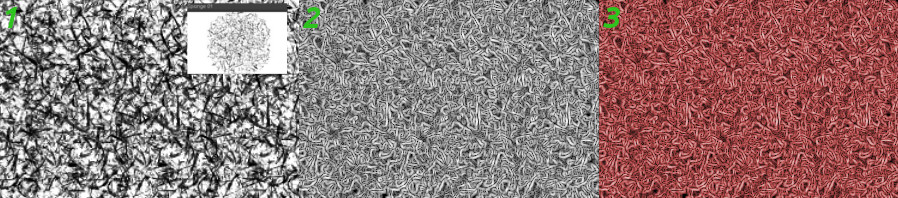
1- Paintbrush tool (Black color) and Sponge 01 brush Size 300 in transparent background
2- Filters, G'MIC, Contours, Gradient norm
3- Colors, Colorize (You try different values, decrease saturation and lightness)
*Texture 3

1- Paintbrush tool (Black color) and Sponge 01 brush Size 300 in transparent background
2- Filters - G'MIC, Patterns, Canvas (High Sharpness value in both directions)
3- Filters, G'MIC, Contours, Gradient norm
4- Colors, Colorize (You try different values, decrease saturation and lightness)
*Texture 4

1- Paintbrush tool (Black color) and Sc-Scratches (30x30) brush Size 130 - Spacing 9 - Jitter 25 - in transparent background
2- Filters, G'MIC, Patterns, Sponge
3- Filters, G'MIC, Contours, Gradient norm
4- Colors, Colorize (You try different values, decrease saturation and lightness)
*Texture 5

1- Paintbrush tool (Black color) and Round brush size 5 - Jitter 20 - in transparent background
2- Filters, G'MIC, Patterns, Stencil
3- Filters, G'MIC, Contours, Gradient norm (Apply twice)
4- Colors, Colorize (You try different values, decrease saturation and lightness)
*Texture 6 (Similar to grass)

1- Paintbrush tool (Black color) and Rectangle 080 brush size 15 - Jitter 20 - in transparent background
2- Filters, Noise, RGB Noise (Untik Correlated noise and Independent RGB - All values to 0 and Alpha to top [1.00])
3- Filters, G'MIC, Contours, Gradient norm (Apply twice)
4- Colors, Colorize (You try different values, decrease saturation and lightness)
*Texture 7
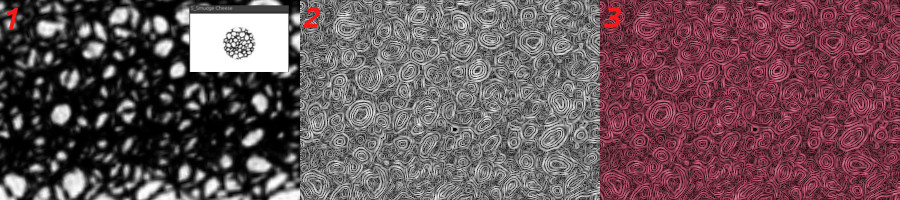
1- Paintbrush tool (Black color) and S_Smudge Cheese brush size 260 - in transparent background
2- Filters, G'MIC, Contours, Gradient norm (Apply three times)
3- Colors - Colorize (You try different values, decrease saturation and lightness)
 Login
Login Register
 Tweets
 FAQ
FAQ Advanced Search










