It is currently Fri Sep 25, 2026 10:07 pm


All times are UTC - 5 hours [ DST ]


Post new topic Reply to topic  [ 40 posts ]  Go to page Previous  1, 2
Author Message
 Post subject: Re: Purple (with tutorial link)
PostPosted: Sun May 19, 2013 9:29 am  (#21) 
Offline
GimpChat Member
User avatar

Joined: Aug 16, 2012
Posts: 4271
Location: Göteborg, Sweden
2-ton: that looks really good! the purple text on purple background with a drop shadow worked very well.

esper: thank you! of course i didn't use your texture. :hoh i spent so much time and effort getting that effect (and i always have to run the relief light filter twice before anything happens) so i finally want to use it on something :hehe .
i used one coloured pink for the glow and i kept one orange/yellow for the stroke - it was never meant to be gold, just a stroke. it does look good, though, enough variation between shadows and highlights.
wallace: thank you :).

_________________


Top
 Post subject: Re: Purple (with tutorial link)
PostPosted: Sun May 19, 2013 9:32 am  (#22) 
Offline
GimpChat Member
User avatar

Joined: Apr 07, 2010
Posts: 14182
Very nice job 2-ton... I like it

_________________
Image


Top
 Post subject: Re: Purple (with tutorial link)
PostPosted: Sun May 19, 2013 11:44 am  (#23) 
Offline
GimpChat Member
User avatar

Joined: Apr 08, 2010
Posts: 5420
Location: Northwest Ohio
I had the same problem with curves...that was one of the places I had to get creative. Alpha was greyed out, so at the tutorials suggestion for if the first way didn't work, I did the blur and ran the curve on that...but had to use value instead of alpha. I think I tried to do alpha on the layer mask, then on the layer itself, both with and without selection on. This was on both the highlight layer and the shadow layer. I often have to do a tutorial several times to get it right, lol. I used the tutorial screen shots to try and make it work.


Top
 Post subject: Re: Purple (with tutorial link)
PostPosted: Sun May 19, 2013 12:02 pm  (#24) 
Offline
Administrator
User avatar

Joined: Aug 10, 2012
Posts: 14211
Location: Native to NYC living in Arizona, Gimp 2.8 - 3.0, Win 11 PC.
Quote:
What i dont understand is, how have you been able to get the final result, if you couldnt apply any of the curves in alpha mode on your layers ?


Yes that is what confused me about it.
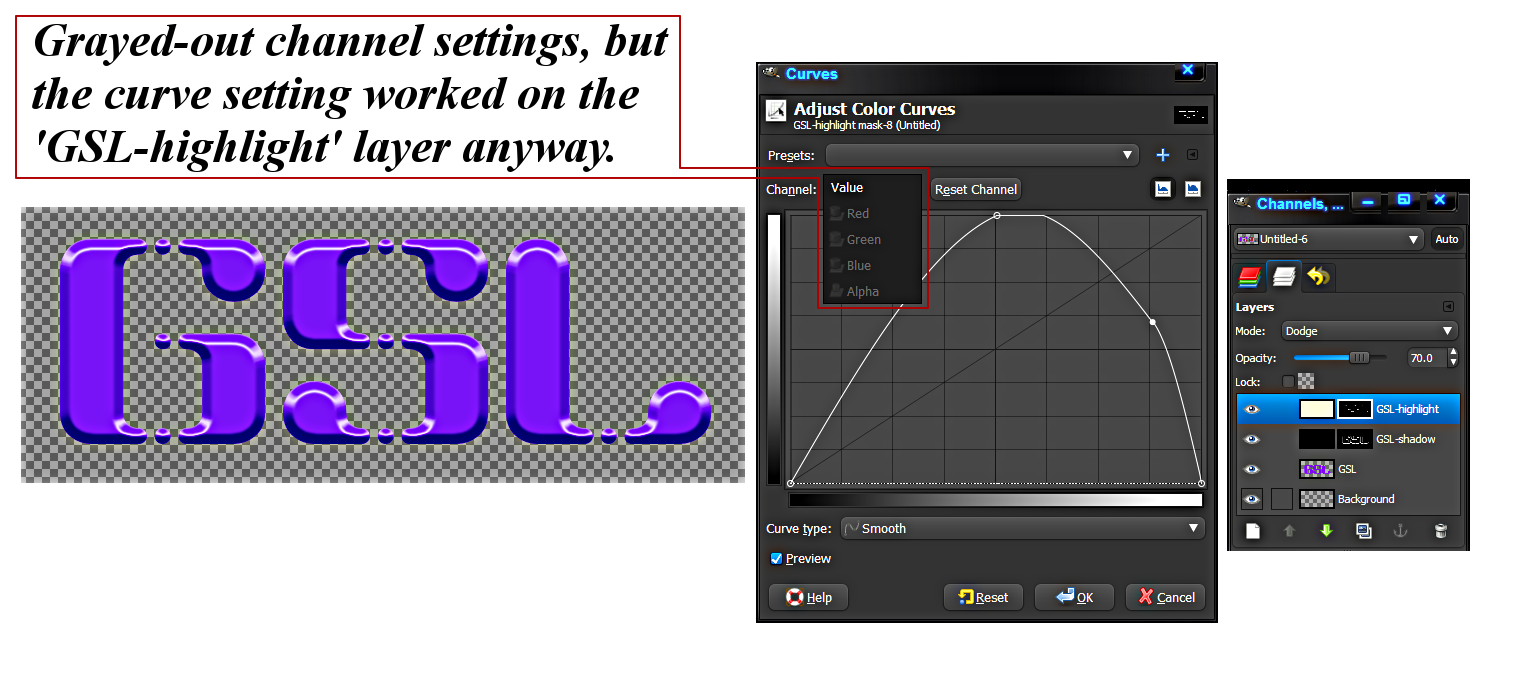
The curve modes were all grayed out. I couldn't set it to any mode, so I just applied your curve settings and watched what was happening. To my surprise all the curves worked. As you can see for the text image that I created using your tut.
Maybe the curves mode for these layers is by default 'Alpha' and this can't be changed.
Whatever it is your tutorial worked out nicely for me even with this small issue.

_________________
Image
"A wise man learns more from a foolish question than a fool can learn from a wise answer"
Image


Top
 Post subject: Re: Purple (with tutorial link)
PostPosted: Sun May 19, 2013 12:24 pm  (#25) 
Offline
GimpChat Member
User avatar

Joined: Jul 17, 2012
Posts: 2769
2-ton and Wallace:
thats extemely odd

i made a test run: created the bevel with layerfx
when i activate the bevel-highlight-layer, all the curve modes are there, nothing is greyed out
when i try to change the curve in Value mode, not much happens (as expected)
same with Red, Green, Blue
in alpha mode, the bevel expands or retracts a bit (also as expected)

2-ton wrote:
but had to use value instead of alpha.
that can not be
you cant change the shape with a value curve, you can only affect the colour with it

2-ton wrote:
I think I tried to do alpha on the layer mask
what layermask ?
there is no layermask in this tutorial

i can not think of anything, that would result in the alpha channel being greyed out in the curves tool
considering you were able to shape the bevels, its only logical to assume you did it somehow, although the aphachannel was seemingly greyed out
i mean, there is no other way, as far as i understand

EDIT: wait, what kind of layerfx are you using ?
i use the Jonathan Stipe python script, not the .scm and not the ICII that Graechan modified recently

if i remember correctly, a different version of layereffects works with layermasks
if thats the case, its obvious you cant affect the alphachannel, because you have a completely coloured layer with a layermask
you will habe to apply the layermask, before you can use the alpha-curves


Top
 Post subject: Re: Purple (with tutorial link)
PostPosted: Sun May 19, 2013 1:09 pm  (#26) 
Offline
GimpChat Member
User avatar

Joined: Apr 08, 2010
Posts: 5420
Location: Northwest Ohio
aha, that is it! I use the scm because I can't seem to get py files to show up in gimp, even when in the py folder. I would like to be able to use the alpha channel because I like to do tutorials just like they are written the first time, then I can better understand how and what I might want to experiment with.


Top
 Post subject: Re: Purple (with tutorial link)
PostPosted: Sun May 19, 2013 1:14 pm  (#27) 
Offline
GimpChat Member
User avatar

Joined: Jul 17, 2012
Posts: 2769
so you do end up with a layer that is completely coloured in the shadow/highlight colour, with a layermask attached to it ?


Top
 Post subject: Re: Purple (with tutorial link)
PostPosted: Sun May 19, 2013 1:28 pm  (#28) 
Offline
Administrator
User avatar

Joined: Aug 10, 2012
Posts: 14211
Location: Native to NYC living in Arizona, Gimp 2.8 - 3.0, Win 11 PC.
Esper wrote:
so you do end up with a layer that is completely coloured in the shadow/highlight colour, with a layermask attached to it ?


This is at step 03 of your tutorial, where the first curve is applied to shape the bevel – for the highlight layer...

Image


I used 'Script-Fu/Layer Effects/Bevel and Emboss'...

_________________
Image
"A wise man learns more from a foolish question than a fool can learn from a wise answer"
Image


Last edited by Wallace on Mon May 20, 2013 11:41 am, edited 1 time in total.

Top
 Post subject: Re: Purple (with tutorial link)
PostPosted: Sun May 19, 2013 1:45 pm  (#29) 
Offline
GimpChat Member
User avatar

Joined: Jul 17, 2012
Posts: 2769
Wallace: i see from your screenshot that you have the bevels with a layermask and when you try to apply the curve, you do it to the layermask

what you have to do, is rightclick and choose 'apply layermask' from the list, so that only the bits that are visible will remain
then you will be able to affect the alphachannel


Top
 Post subject: Re: Purple (with tutorial link)
PostPosted: Sun May 19, 2013 1:59 pm  (#30) 
Offline
Administrator
User avatar

Joined: Aug 10, 2012
Posts: 14211
Location: Native to NYC living in Arizona, Gimp 2.8 - 3.0, Win 11 PC.
Esper wrote:
Wallace: i see from your screenshot that you have the bevels with a layermask and when you try to apply the curve, you do it to the layermask

what you have to do, is rightclick and choose 'apply layermask' from the list, so that only the bits that are visible will remain
then you will be able to affect the alphachannel


I didn't do that and it worked nonetheless, as you can see.
I did however download the 'layerfx.py' file and will see if applying the python 'Bevel and Emboss' allows me to select the 'alpha' channel when doing the curves.

_________________
Image
"A wise man learns more from a foolish question than a fool can learn from a wise answer"
Image


Top
 Post subject: Re: Purple (with tutorial link)
PostPosted: Sun May 19, 2013 2:01 pm  (#31) 
Offline
GimpChat Member
User avatar

Joined: Aug 16, 2012
Posts: 4271
Location: Göteborg, Sweden
2-ton and wallace: not much of a mystery in the end :). i'd forgotten all about the layermasks in the script-fu versions of layer effects, so when i first read about wallace's curves that worked though it wasn't supposed to work i was completely mystified. of course the curves would work in value mode as long as you apply them to the layer mask :).

_________________


Top
 Post subject: Re: Purple (with tutorial link)
PostPosted: Sun May 19, 2013 2:11 pm  (#32) 
Offline
GimpChat Member
User avatar

Joined: Jul 17, 2012
Posts: 2769
AnMal wrote:
of course the curves would work in value mode as long as you apply them to the layer mask :).
im not quite sure why, though


Top
 Post subject: Re: Purple (with tutorial link)
PostPosted: Sun May 19, 2013 2:26 pm  (#33) 
Offline
GimpChat Member
User avatar

Joined: Aug 16, 2012
Posts: 4271
Location: Göteborg, Sweden
esper: well, the black in the layer mask works exactly the same as the transparent parts in a layer with transparency and the white like the opaque parts, so it's obvious you can use the value curves on a layer mask the same way you use alpha curves on a layer with transparency. before i had any idea you could use curves on the alpha channel i had learned this way of tweaking transparent parts.

_________________


Top
 Post subject: Re: Purple (with tutorial link)
PostPosted: Sun May 19, 2013 2:26 pm  (#34) 
Offline
Administrator
User avatar

Joined: Aug 10, 2012
Posts: 14211
Location: Native to NYC living in Arizona, Gimp 2.8 - 3.0, Win 11 PC.
Esper wrote:
AnMal wrote:
of course the curves would work in value mode as long as you apply them to the layer mask :).
im not quite sure why, though


I did 'right click' on the layer mask and selected 'apply layer mask' and the effect was much different when the first curve was applied to it. It came out better without doing the 'right click, apply layer mask'.

_________________
Image
"A wise man learns more from a foolish question than a fool can learn from a wise answer"
Image


Top
 Post subject: Re: Purple (with tutorial link)
PostPosted: Sun May 19, 2013 2:33 pm  (#35) 
Offline
GimpChat Member
User avatar

Joined: Apr 07, 2010
Posts: 14182
I think the biggest problem is that there are too many layer effect scripts. Everyone has their favorite and they use that for their tutorials.
It is confusing to the people that don't know there are so many. I have had the scm, the layerfx2.2.8.py, the ICCII and another version, can't remember the number of it. I like them all and they all have their own best features.
I do not like the one I have right now cuz it puts all the layers into groups, I don't want that. I want them to be single layers. It is too hard to edit a layer in a group, or can you edit them. I can see why it is confusing.
It shows in my computer that I have two but I only see the one under layers. The scrn shot shows the two.


Attachments:
layer effects.png
layer effects.png [ 7.26 KiB | Viewed 2547 times ]

_________________
Image
Top
 Post subject: Re: Purple (with tutorial link)
PostPosted: Sun May 19, 2013 3:00 pm  (#36) 
Offline
GimpChat Member
User avatar

Joined: Jul 17, 2012
Posts: 2769
AnMal wrote:
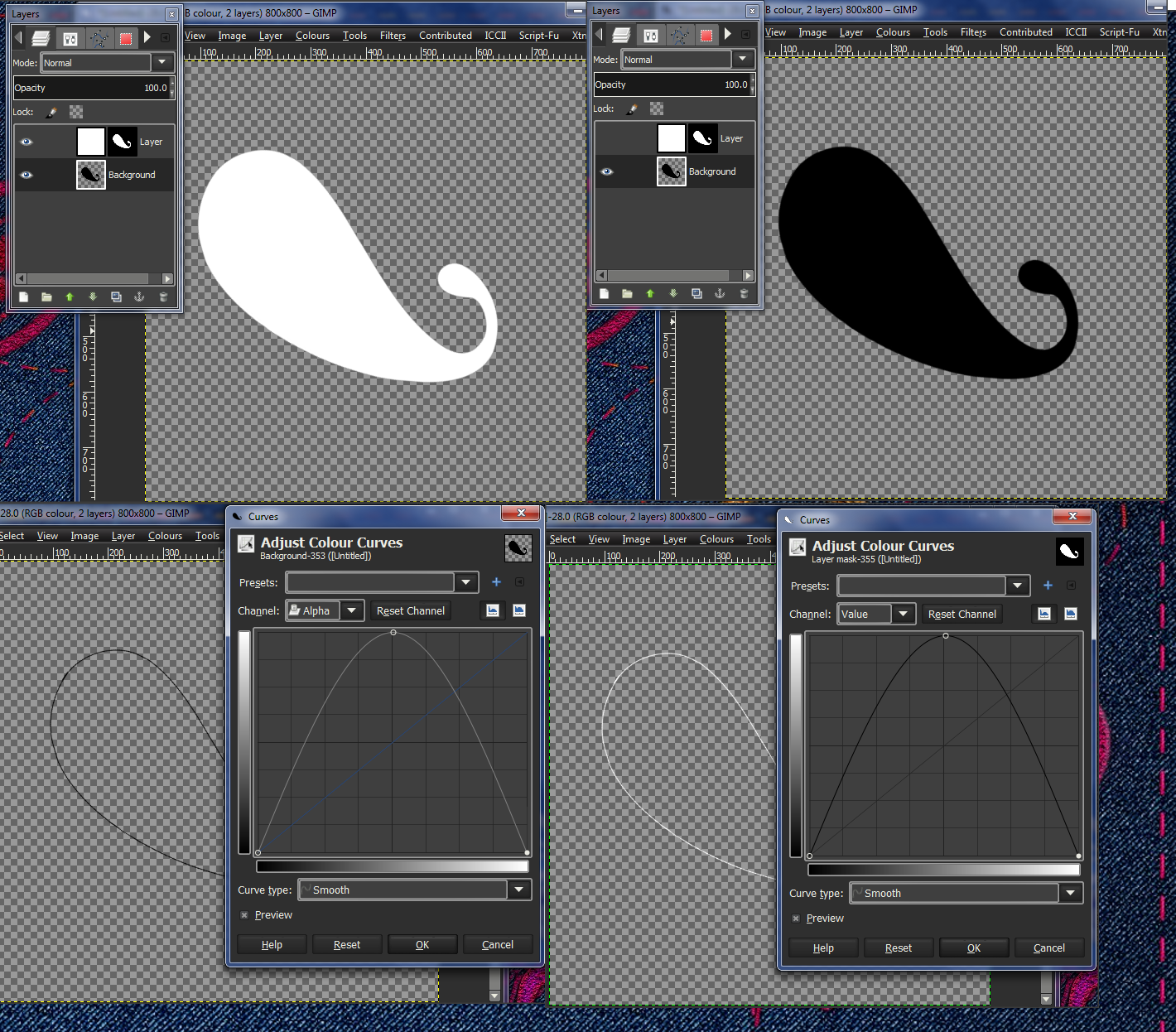
esper: well, the black in the layer mask works exactly the same as the transparent parts in a layer with transparency and the white like the opaque parts, so it's obvious you can use the value curves on a layer mask the same way you use alpha curves on a layer with transparency.
im not 100% convinced its the same
it wouldnt work on sharp edges, would it ?
will have to do some experiments later

Wallace wrote:
I did 'right click' on the layer mask and selected 'apply layer mask' and the effect was much different when the first curve was applied to it. It came out better without doing the 'right click, apply layer mask'.
interesting to know :bigthup

molly wrote:
I think the biggest problem is that there are too many layer effect scripts. Everyone has their favorite and they use that for their tutorials.
It is confusing to the people that don't know there are so many. I have had the scm, the layerfx2.2.8.py, the ICCII and another version, can't remember the number of it.
i think there are really just two, the Jonathan Stipe and Graechan's ICII fix that are relevant

molly wrote:
I do not like the one I have right now cuz it puts all the layers into groups, I don't want that
you need to fall back to the 2.6 Jonathan Stipe version, molly
that has no groupfolders

i do see the problems, but my blog doesnt work that way
i dont do tutorials for beginners
yes, i expect people who try my tutorials to understand the basic techniques, how i make Glows, Shadows and Alpha-curves
the blog is called next level for a reason
of course im always willing to give support for all my GC buddies :heart

lots of intersting stuff coming out if this thread so far !


Top
 Post subject: Re: Purple (with tutorial link)
PostPosted: Sun May 19, 2013 3:09 pm  (#37) 
Offline
GimpChat Member
User avatar

Joined: Apr 07, 2010
Posts: 14182
Thanks I will go looking for the 2.6 one right now cuz I do not like the groups version.

_________________
Image


Top
 Post subject: Re: Purple (with tutorial link)
PostPosted: Sun May 19, 2013 3:32 pm  (#38) 
Offline
GimpChat Member
User avatar

Joined: Aug 16, 2012
Posts: 4271
Location: Göteborg, Sweden
esper: hmm, not sure what you mean by sharp edges, but look at this picture, i have always assumed this is how layer masks and alpha channels work:
Image

the two paisleys are exactly the same since i've just copied the original to the layer mask. using curves on the black paisley layer and on the layer mask of the white paisley layer gives exactly the same effect and i don't see why they shouldn't?

_________________


Top
 Post subject: Re: Purple (with tutorial link)
PostPosted: Sun May 19, 2013 3:36 pm  (#39) 
Offline
GimpChat Member
User avatar

Joined: Apr 07, 2010
Posts: 14182
I cannot find the 2.6 version of layerfx. The one I did find and installed is no where to be found. It is just called layerfx.py. Maybe it doesn't work in Linux Fedora or 64 bit. Is that a Windows version that you have Esper?

_________________
Image


Top
 Post subject: Re: Purple (with tutorial link)
PostPosted: Sun May 19, 2013 3:44 pm  (#40) 
Offline
GimpChat Member
User avatar

Joined: Jul 17, 2012
Posts: 2769
AnMal wrote:
the two paisleys are exactly the same since i've just copied the original to the layer mask. using curves on the black paisley layer and on the layer mask of the white paisley layer gives exactly the same effect and i don't see why they shouldn't?
thank you my fellow scientist ! :mrgreen: :bigthup

molly wrote:
I cannot find the 2.6 version of layerfx. The one I did find and installed is no where to be found. It is just called layerfx.py. Maybe it doesn't work in Linux Fedora or 64 bit. Is that a Windows version that you have Esper?


sorry molly, its not called 2.6
its Version: Rev 7
get it here:
http://gimpscripts.com/2011/10/gimp-lay ... fb-file-35

yes, i use win7 - 64bit


Top
Post new topic Reply to topic  [ 40 posts ]  Go to page Previous  1, 2

All times are UTC - 5 hours [ DST ]


* Login  


Powered by phpBB3 © phpBB Group