It is currently Thu Sep 10, 2026 6:20 pm


All times are UTC - 5 hours [ DST ]


Post new topic Reply to topic  [ 3 posts ] 
Author Message
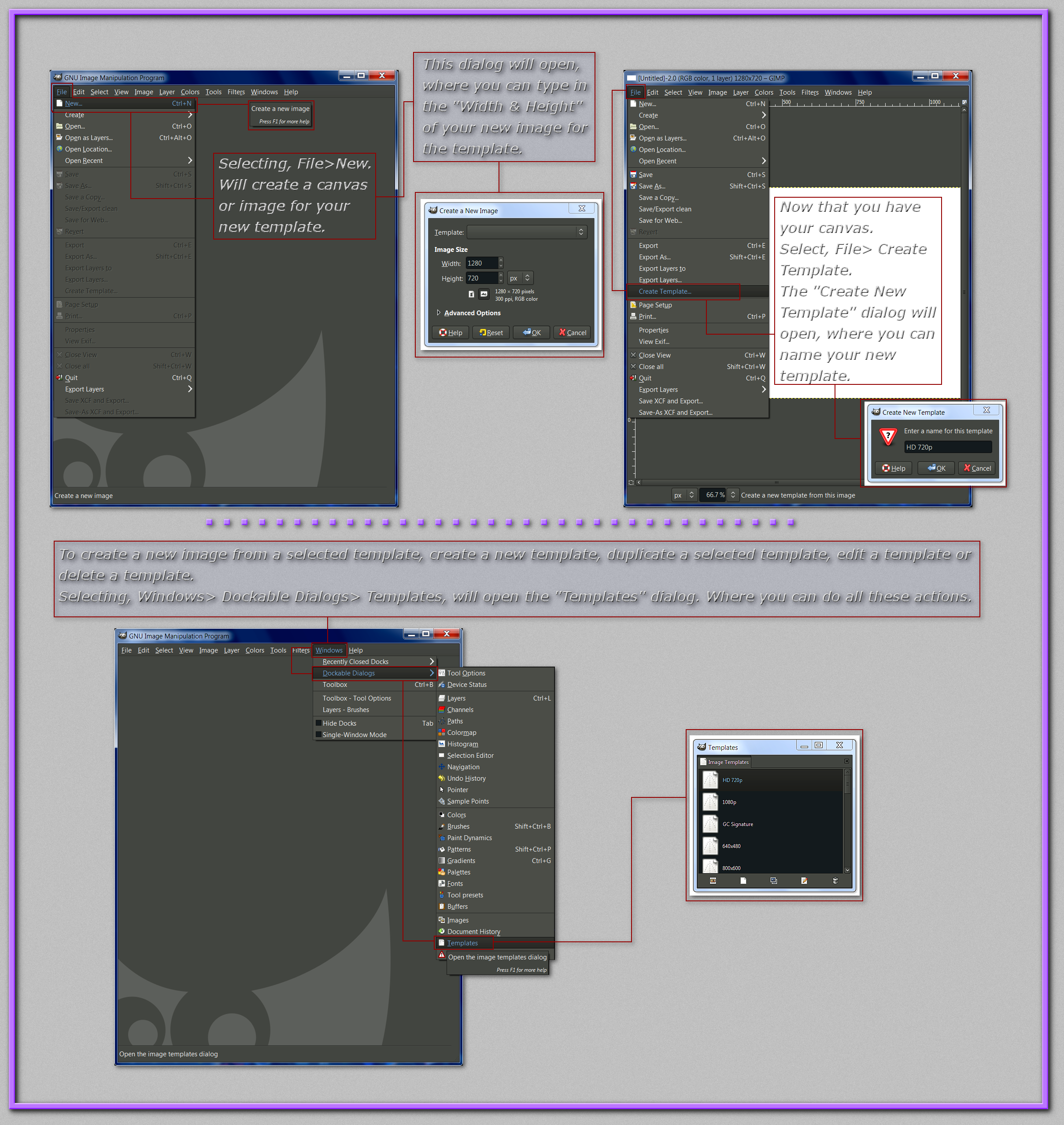
 Post subject: Image/Canvas Templates in Gimp 2.8
PostPosted: Thu Apr 03, 2014 10:01 pm  (#1) 
Offline
Administrator
User avatar

Joined: Aug 10, 2012
Posts: 14197
Location: Native to NYC living in Arizona, Gimp 2.8 - 3.0, Win 11 PC.
This tutorial is a response to this thread... viewtopic.php?f=8&t=10099&p=132509#p132440

I'd like to thank Odin, who refreshed my memory about the "Templates" dialog.
Image

_________________
Image
"A wise man learns more from a foolish question than a fool can learn from a wise answer"
Image


Share on Facebook Share on Twitter Share on Orkut Share on Digg Share on MySpace Share on Delicious Share on Technorati
Top
 Post subject: Re: Image/Canvas Templates in Gimp 2.8
PostPosted: Fri Apr 04, 2014 6:55 am  (#2) 
Offline
GimpChat Member
User avatar

Joined: Jan 20, 2013
Posts: 590
Thanks, Wallace.

_________________
Image


Top
 Post subject: Re: Image/Canvas Templates in Gimp 2.8
PostPosted: Fri Apr 04, 2014 8:18 am  (#3) 
Offline
Administrator
User avatar

Joined: Aug 10, 2012
Posts: 14197
Location: Native to NYC living in Arizona, Gimp 2.8 - 3.0, Win 11 PC.
Carlos Diniz wrote:
Thanks, Wallace.

No es un problema de mi amigo. :bigthup

_________________
Image
"A wise man learns more from a foolish question than a fool can learn from a wise answer"
Image


Top
Post new topic Reply to topic  [ 3 posts ] 

All times are UTC - 5 hours [ DST ]


* Login  


Powered by phpBB3 © phpBB Group