It is currently Sun Aug 02, 2026 7:37 am


All times are UTC - 5 hours [ DST ]


Post new topic Reply to topic  [ 94 posts ]  Go to page Previous  1, 2, 3, 4, 5  Next
Author Message
 Post subject: Re: Creating a realistic gear in GIMP
PostPosted: Sun Oct 03, 2010 9:31 am  (#21) 
Offline
GimpChat Member
User avatar

Joined: Apr 07, 2010
Posts: 14182
That is very nice Wbool63. I like the way it is now...

_________________
Image


Top
 Post subject: Re: Creating a realistic gear in GIMP
PostPosted: Sun Oct 03, 2010 3:39 pm  (#22) 
Offline
GimpChat Member
User avatar

Joined: Sep 24, 2010
Posts: 12822
Found this cool set of Script-fus that includes a pretty cool Gear preset. It can be used to create pretty compelling masks for this. :)

http://registry.gimp.org/node/59


Attachments:
mask_outline.png
mask_outline.png [ 51.54 KiB | Viewed 5820 times ]
gear.png
gear.png [ 527.56 KiB | Viewed 5820 times ]

_________________
Lyle

Psalm 109:8

Image
Top
 Post subject: Re: Creating a realistic gear in GIMP
PostPosted: Sun Oct 03, 2010 3:57 pm  (#23) 
Offline
GimpChat Member
User avatar

Joined: Jun 24, 2010
Posts: 504
Location: Western Vic Australia
Hi, Rod, somehow I missed your earlier post about how to make that circular blur, so sorry for asking the question!. Nevertheless, I spent about an hour and a half trying to making something that approached your effort. I did not succeed.

Cheers Wbool63

_________________
Image


Top
 Post subject: Re: Creating a realistic gear in GIMP
PostPosted: Mon Oct 04, 2010 5:17 am  (#24) 
Offline
Global Moderator
User avatar

Joined: May 16, 2010
Posts: 16144
wbool63 wrote:
Rod, a very nice tutorial. Here is my try. I do not have all my filters in place yet as I had a hard disk failure and I am still installing stuff, so no nice bevels! I tried to make my own circular brushed metal image , but I had trouble with the highlights. I tried with noise and radial motion blur with diagonal black/white stripes and/or conical/square gradients and while they approach your effort they just do not measure up to your example. So I would love to know how you did that circular brushed metal effect.
Image
Wbool63


I created it in Photo Shop, like i said in an earlier post it is possible to do in Gimp.You just need to get the noise values correct.Keep playing with the motion/radial blur and the angle amount.You will get it sooner or later.
That is why i provided the brushed steel pattern, it is darn near impossible to get the same effect in Gimp.
As i love to copy PS effects using Gimp, i will attempt to get the exact correct values and post them here when i do.

If you have Photo Shop you can create it easily with clouds/noise/and a radial blur. =)

If you have Python installed in your Gimp, you can dl layerfx.py at the gimp repository
If you only can run EXE, and SCM scripts, try layerfx.scm it's available there also, just do a search.

cheers! =)

_________________
Image


Top
 Post subject: Re: Creating a realistic gear in GIMP
PostPosted: Mon Oct 04, 2010 6:33 am  (#25) 
Offline
Global Moderator
User avatar

Joined: May 16, 2010
Posts: 16144
I decided to go ahead and create one in Gimp to help you out.
create a new doc...800x800 white
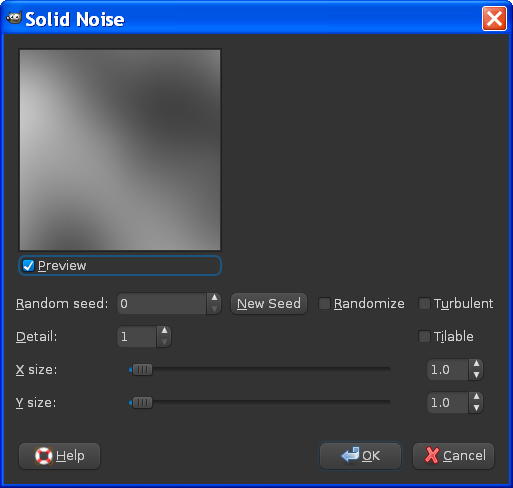
Filters/render/clouds/difference clouds
Image

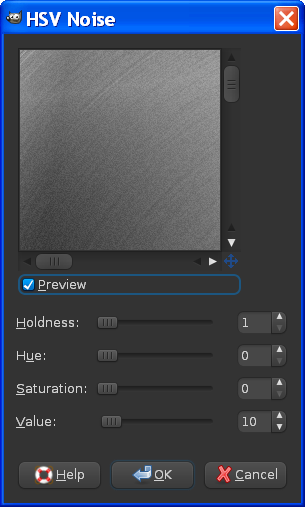
Filters/noise/HSV noise use these values.
Image

I think perhaps a little more noise may have looked even more realistic...try that if you like.

Next step...
Filters/blur/motion blur/
Image

Now duplicate the layer and using a size 10 soft brush select the dodge and burn tool...dodge the top layer.

Use these settings...
Image

Here is a more detailed image on how to dodge the top layer.
Start from the top right corner and click with the mouse, now hit the shift key and drag the mouse pointer to the bottom left corner.Do this back and forth 3 times one in the center..one on the right and one on the left...hour glass shaped.like this..
Image
With a size ten brush and the dodge tool selected...don't paint it black like in the image.

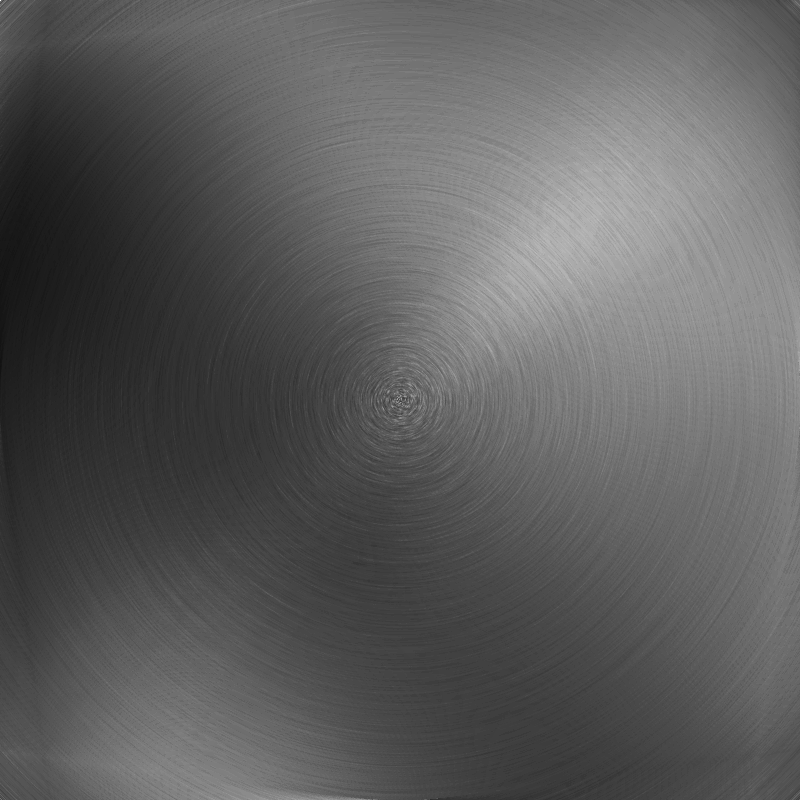
Now set the top layer opacity to 45...you should have this image or something like it.
Image

another..
Image

Hope that helps.You can adjust the shine with the top layer opacity values.

_________________
Image


Top
 Post subject: Re: Creating a realistic gear in GIMP
PostPosted: Tue Oct 05, 2010 2:59 am  (#26) 
Offline
GimpChat Member
User avatar

Joined: Jun 24, 2010
Posts: 504
Location: Western Vic Australia
Thanks Rod, that is very similar to what I was doing, and my results were very much like yours. I used a black and white brush that faded towards the centre, so like yours it had less black and less white towards the centre, to maintain a neutral gray . I also tried the gradient tool with the square mode overlaid in dissolve mode and played with different angles to change where the resonance / interference (or whatever you want to call them) highlights occur. But no matter what I tried I could not get that very sharp highlight zone that is evident in the PS sample. I shall have to have a go at it in PS.

wbool63

_________________
Image


Top
 Post subject: Re: Creating a realistic gear in GIMP
PostPosted: Wed Oct 06, 2010 6:43 am  (#27) 
Offline
Global Moderator
User avatar

Joined: May 16, 2010
Posts: 16144
Ill keep trying to get it perfect in Gimp.
When i do i will post the results here. =)

_________________
Image


Top
 Post subject: Re: Creating a realistic gear in GIMP
PostPosted: Tue Oct 12, 2010 5:13 am  (#28) 
Offline
GimpChat Member
User avatar

Joined: Oct 11, 2010
Posts: 11
Location: Durban, South Africa
Thanks Rod for the help in PM!

Okay, so I made some gears using the plugin that lylejk posted a link to! Thanks lylejk! After that I used Rod's steel texture and I created a few different variations of brightness / contrast and colours.
Image
Okay, so it's a far cry from what the tutorial was all about - I'm still starting to learn how to use GIMP properly :D
You can see the gears on my site here -> Website packages

:gimp


Last edited by Kanchi on Tue Oct 12, 2010 2:28 pm, edited 1 time in total.

Top
 Post subject: Re: Creating a realistic gear in GIMP
PostPosted: Tue Oct 12, 2010 5:30 am  (#29) 
Offline
GimpChat Member
User avatar

Joined: Apr 07, 2010
Posts: 14182
very nice Kanchi

_________________
Image


Top
 Post subject: Re: Creating a realistic gear in GIMP
PostPosted: Tue Oct 12, 2010 10:28 am  (#30) 
Offline
New Member
User avatar

Joined: Oct 09, 2010
Posts: 4
Location: In A Pie
u guys are really good ........ *crys in the corner* wish i was that good :gaah

_________________
Image

"You Don't Fail Until You Stop Trying"

"Nothing Is Impossiable, Impossiable Is A Word Used To Cover Up Their or Others Failure"


Top
 Post subject: Re: Creating a realistic gear in GIMP
PostPosted: Tue Oct 12, 2010 12:23 pm  (#31) 
Offline
Retired Staff
User avatar

Joined: May 22, 2008
Posts: 6946
Location: Somewhere in GIMP
Zax847 wrote:
u guys are really good ........ *crys in the corner* wish i was that good :gaah
Just keep on gimping, Zax, you'll get there. It takes time. Not something you learn over night.

_________________
Image
World War IV will be fought with sticks and stones. - Albert Einstein


Top
 Post subject: Re: Creating a realistic gear in GIMP
PostPosted: Tue Oct 12, 2010 2:02 pm  (#32) 
Offline
Global Moderator
User avatar

Joined: May 16, 2010
Posts: 16144
Yes do not worry check out a bunch of tutorials and keep on Gimping!
That's how everyone else learns! =)

_________________
Image


Top
 Post subject: Re: Creating a realistic gear in GIMP
PostPosted: Tue Oct 12, 2010 2:10 pm  (#33) 
Offline
Global Moderator
User avatar

Joined: May 16, 2010
Posts: 16144
Kanchi wrote:
Thanks Rod for the help in PM!

Okay, so I made some gears using the plugin that lylejk posted a link to! Thanks lylejk! After that I used Rod's steel texture and I created a few different variations of brightness / contrast and colours.
Image
Okay, so it's a far cry from what the tutorial was all about - I'm still starting to learn how to use GIMP properly :D
You can see the gears on my site here -> Website packages

:gimp


Those look great!
Did you download the layerfx script?.

_________________
Image


Top
 Post subject: Re: Creating a realistic gear in GIMP
PostPosted: Tue Oct 12, 2010 2:26 pm  (#34) 
Offline
GimpChat Member
User avatar

Joined: Oct 11, 2010
Posts: 11
Location: Durban, South Africa
I've downloaded layerfx, but I've yet to figure out how to use the features it provides :) So I did that without it...
As with everything else, practice makes perfect!


Top
 Post subject: Re: Creating a realistic gear in GIMP
PostPosted: Tue Oct 12, 2010 2:31 pm  (#35) 
Offline
GimpChat Member
User avatar

Joined: Sep 24, 2010
Posts: 12822
Yeah Rod; I always try to find alternative (and usually easier since I'm extremely and I do mean extremely lazy) and simple ways of doing things. My goal has always been to get the computer (in this case GIMP or any myriad of plugins) to do all the work. :)

_________________
Lyle

Psalm 109:8

Image


Top
 Post subject: Re: Creating a realistic gear in GIMP
PostPosted: Wed Oct 13, 2010 7:13 pm  (#36) 
Offline
GimpChat Member
User avatar

Joined: Jul 04, 2010
Posts: 2253
Location: Retired Moderator Slowly Returning to the Living.
Zax847 wrote:
u guys are really good ........ *crys in the corner* wish i was that good :gaah


We are all most critical of our own work! Keep going at it! But remember the key ingredient! Keep it fun!!

_________________
Artists aren't crazy! We're eccentric! ~G.M. Ross

Image

My Sigs = My Photos
Check out my work at http://www.flickr.com/photos/photomastergreg.


Top
 Post subject: Re: Creating a realistic gear in GIMP
PostPosted: Fri Oct 15, 2010 3:04 pm  (#37) 
Offline
Retired Staff
User avatar

Joined: May 22, 2008
Posts: 6946
Location: Somewhere in GIMP
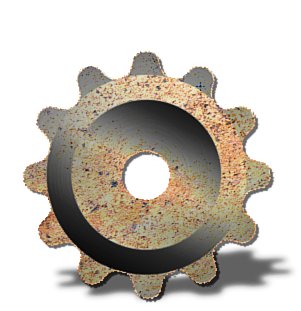
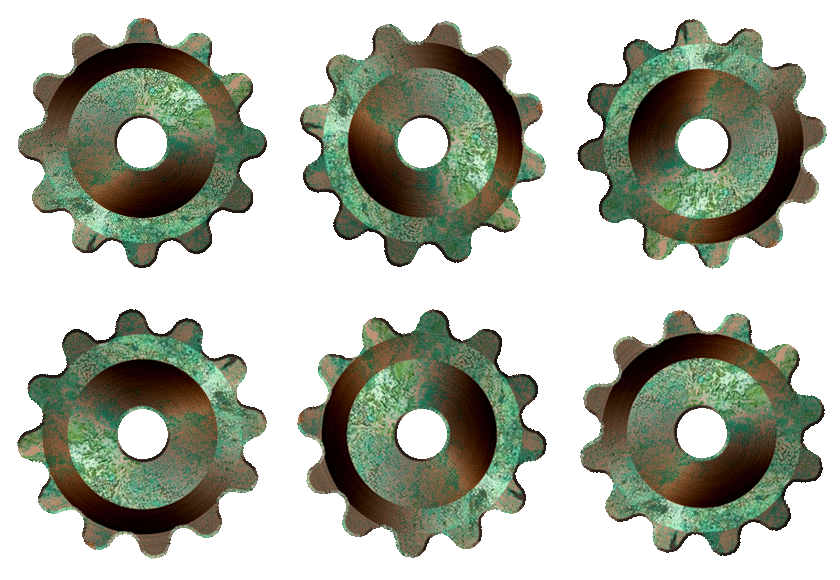
Corroded copper anyone?

Image

_________________
Image
World War IV will be fought with sticks and stones. - Albert Einstein


Top
 Post subject: Re: Creating a realistic gear in GIMP
PostPosted: Fri Oct 15, 2010 5:25 pm  (#38) 
Offline
GimpChat Member
User avatar

Joined: Jul 04, 2010
Posts: 2253
Location: Retired Moderator Slowly Returning to the Living.
Hey there 'O'! That is awesome!

_________________
Artists aren't crazy! We're eccentric! ~G.M. Ross

Image

My Sigs = My Photos
Check out my work at http://www.flickr.com/photos/photomastergreg.


Top
 Post subject: Re: Creating a realistic gear in GIMP
PostPosted: Sat Oct 16, 2010 7:04 am  (#39) 
Offline
Global Moderator
User avatar

Joined: May 16, 2010
Posts: 16144
heh heh very cool O! =)

_________________
Image


Top
 Post subject: Re: Creating a realistic gear in GIMP
PostPosted: Sat Oct 16, 2010 9:24 am  (#40) 
Offline
GimpChat Member
User avatar

Joined: Apr 07, 2010
Posts: 14182
Yes that sure is awesome.... looks like the real "thingy"......

_________________
Image


Top
Post new topic Reply to topic  [ 94 posts ]  Go to page Previous  1, 2, 3, 4, 5  Next

All times are UTC - 5 hours [ DST ]


* Login  


Powered by phpBB3 © phpBB Group