It is currently Wed Sep 09, 2026 5:36 pm


All times are UTC - 5 hours [ DST ]


Post new topic Reply to topic  [ 37 posts ]  Go to page Previous  1, 2
Author Message
 Post subject: Re: How to Make 3D Push Buttons - Metal Wurx XVIII
PostPosted: Wed Jun 06, 2012 6:29 pm  (#21) 
Offline
GimpChat Member
User avatar

Joined: Mar 23, 2012
Posts: 7388
Location: Göteborg at last!
You can get the py version for 2.8 here: http://registry.gimp.org/node/186


Top
 Post subject: Re: How to Make 3D Push Buttons - Metal Wurx XVIII
PostPosted: Wed Jun 06, 2012 6:48 pm  (#22) 
Offline
GimpChat Member
User avatar

Joined: Apr 07, 2010
Posts: 14182
I finally got this thang done. I am going to do it again, I had a heck of a time trying to get the buttons spaced right. My eyes were watering trying to see between the buttons. Anyway this is it. My next one will be different colors.
Thanks Drac.
Image

_________________
Image


Top
 Post subject: Re: How to Make 3D Push Buttons - Metal Wurx XVIII
PostPosted: Wed Jun 06, 2012 6:50 pm  (#23) 
Offline
GimpChat Member
User avatar

Joined: Mar 23, 2012
Posts: 7388
Location: Göteborg at last!
Nice work Molly. You did a great job.


Top
 Post subject: Re: How to Make 3D Push Buttons - Metal Wurx XVIII
PostPosted: Wed Jun 06, 2012 6:58 pm  (#24) 
Offline
GimpChat Member
User avatar

Joined: Apr 07, 2010
Posts: 14182
Thank you erisian, your turn,
what a job, all afternoon then 2 more hrs. spend most of it changing my bevel and emboss from scm to py. and looking for the multiply thang.

I am not happy with the bevel in the metal part, I will make it deeper the next time so it will show up.

_________________
Image


Top
 Post subject: Re: How to Make 3D Push Buttons - Metal Wurx XVIII
PostPosted: Wed Jun 06, 2012 7:01 pm  (#25) 
Offline
GimpChat Member
User avatar

Joined: Mar 23, 2012
Posts: 7388
Location: Göteborg at last!
molly wrote:
Thank you erisian, your turn,


It is my turn but I'm taking a breather from Virus scans, then I'm going to try and set up Fedora. Once I'm more settled I'll have a go.


Top
 Post subject: Re: How to Make 3D Push Buttons - Metal Wurx XVIII
PostPosted: Wed Jun 06, 2012 11:19 pm  (#26) 
Offline
GimpChat Member
User avatar

Joined: Jun 24, 2010
Posts: 504
Location: Western Vic Australia
Hey Molly, great job! Yes, do it again and put your own "spin" on it. That way you really learn what the tut is all about.


Top
 Post subject: Re: How to Make 3D Push Buttons - Metal Wurx XVIII
PostPosted: Thu Jun 07, 2012 4:12 am  (#27) 
Offline
GimpChat Member
User avatar

Joined: Apr 07, 2010
Posts: 14182
thank you wbool, I will

_________________
Image


Top
 Post subject: Re: How to Make 3D Push Buttons - Metal Wurx XVIII
PostPosted: Thu Jun 07, 2012 1:00 pm  (#28) 
Offline
GimpChat Member
User avatar

Joined: Aug 24, 2011
Posts: 1785
Location: Dallas, TX
molly wrote:
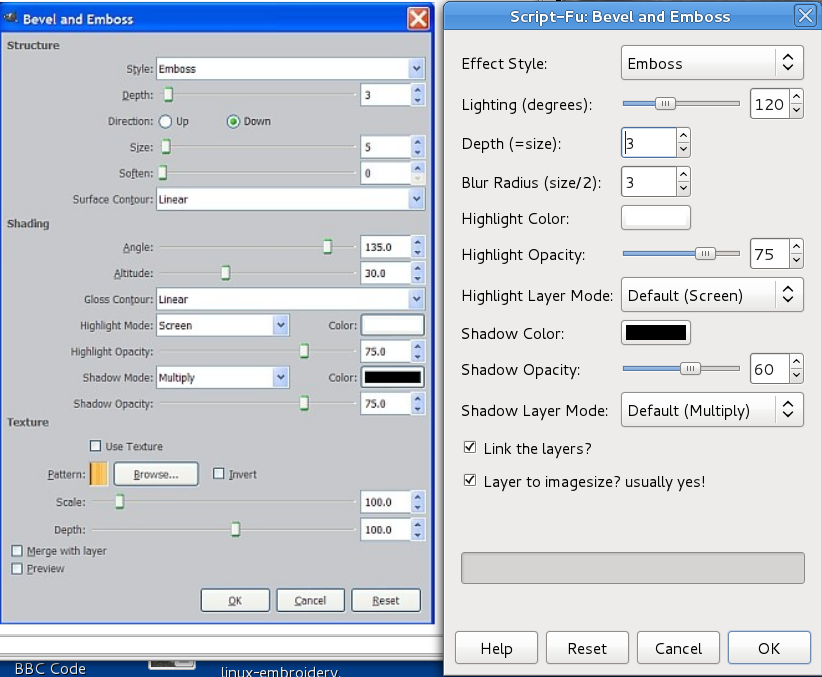
I am on step 21 of this tutorial. I have had a problem with this before. My Bevel and Emboss is Script-Fu and the one in this tutorial is under layers. I don't have that one or do I know where to get it. But I tried to fudge it but I just can't get it to come out right. I want it to have that etched look the way it is in the tutorial but with my bevel and emboss I cant get it to do that. Mine raises the arrow up and in the tute the arrows look like they are indented.
Does anyone know where I can get the other script or help me figure out a solution to this one.
Mine is the Script-Fu one on the right. Thanks in advance :oops:
Image


This is how mine came out on the right, notice it doesn't have that bevel around the arrow. I matched it up as best as I could but it doesn't have the up and down feature.

Image


Not trying to split hairs Molly but you had me confused for a minute there. It's actually Step 23. and I used the Python version of Layer Effects. The link was provided at the very first of the tutorial with all the other links. This version of Layer Effects is very close to the settings used in PS but they work a little different. Sorry you had so much trouble with it, I've got a basketball in place of my head right now and my cold is getting worse. Ugh!

Your buttons look fine to me but I think the tut needs to be changed to incorporate wbool63's sugestions. I think his looks better than mine.

_________________
Image


Top
 Post subject: Re: How to Make 3D Push Buttons - Metal Wurx XVIII
PostPosted: Thu Jun 07, 2012 1:14 pm  (#29) 
Offline
GimpChat Member
User avatar

Joined: Apr 07, 2010
Posts: 14182
Thank you Drac, I do like Wbool's a lot but I was confused enough as it was, so I didn't try to work his in.
I always used the scm (script) for the layerfx, I didn't realize there was also a py plugin. Anyway, they are very similar, the only difference is a few changes in the dialog for bevel and emboss.
Anyway, I will try it again with my spin and if I give up in the middle of it, can't say I didn't try...:teeth

_________________
Image


Top
 Post subject: Re: How to Make 3D Push Buttons - Metal Wurx XVIII
PostPosted: Thu Jun 07, 2012 2:25 pm  (#30) 
Offline
GimpChat Member
User avatar

Joined: Mar 23, 2012
Posts: 7388
Location: Göteborg at last!
Drac - maybe you should indicate in your tute that the Python version is needed.


Top
 Post subject: Re: How to Make 3D Push Buttons - Metal Wurx XVIII
PostPosted: Thu Jun 07, 2012 3:17 pm  (#31) 
Offline
GimpChat Member
User avatar

Joined: Aug 24, 2011
Posts: 1785
Location: Dallas, TX
Erisian wrote:
Drac - maybe you should indicate in your tute that the Python version is needed.


I did at the very start of the tut....

"You will need quite a few things in order to complete this tutorial which are listed below. Get everything installed before you begin the tutorial.

Python - http://www.python.org/ftp/python/2.6/python-2.6.msi. Selection Bevel script - http://gimpscripts.com/2011/10/selection-bevel
Layer Effects - http://gimpscripts.com/2011/10/gimp-layer-effects/
Drawable Multiplication - http://registry.gimp.org/node/22383
Glossy Stroke script - http://gimpscripts.com/2011/10/glossy-stroke-3d/
The two images and the brush from the attached Resources zip file."


You know if you are going to smoke that stuff, you going to have to share. :rofl

_________________
Image


Top
 Post subject: Re: How to Make 3D Push Buttons - Metal Wurx XVIII
PostPosted: Thu Jun 07, 2012 5:06 pm  (#32) 
Offline
GimpChat Member
User avatar

Joined: Mar 23, 2012
Posts: 7388
Location: Göteborg at last!
OK I'm stoned, but it still reads to me that Python and Layer effects are two separate issues. You need to make it clear that the Python version of Layer Effects is needed. :)


Top
 Post subject: Re: How to Make 3D Push Buttons - Metal Wurx XVIII
PostPosted: Thu Jun 07, 2012 5:57 pm  (#33) 
Offline
GimpChat Member
User avatar

Joined: Aug 24, 2011
Posts: 1785
Location: Dallas, TX
Erisian wrote:
OK I'm stoned, but it still reads to me that Python and Layer effects are two separate issues. You need to make it clear that the Python version of Layer Effects is needed. :)


Picky, picky, picky. I hate it when you're right. :bowdown


Edit: OK, I went back and applied fixification. :bigthup

_________________
Image


Top
 Post subject: Re: How to Make 3D Push Buttons - Metal Wurx XVIII
PostPosted: Thu Jun 07, 2012 6:30 pm  (#34) 
Offline
GimpChat Member
User avatar

Joined: Mar 23, 2012
Posts: 7388
Location: Göteborg at last!
Thank you Drac. I'm always right - even when I'm wrong. :teeth


Top
 Post subject: Re: How to Make 3D Push Buttons - Metal Wurx XVIII
PostPosted: Thu Jun 07, 2012 9:54 pm  (#35) 
Offline
GimpChat Member
User avatar

Joined: Apr 07, 2010
Posts: 14182
O my, is this a love fest or what?

_________________
Image


Top
 Post subject: Re: How to Make 3D Push Buttons - Metal Wurx XVIII
PostPosted: Fri Jun 08, 2012 9:27 am  (#36) 
Offline
GimpChat Member
User avatar

Joined: Mar 23, 2012
Posts: 7388
Location: Göteborg at last!
Well..... :cute


Top
 Post subject: Re: How to Make 3D Push Buttons - Metal Wurx XVIII
PostPosted: Fri Jun 08, 2012 11:42 am  (#37) 
Offline
GimpChat Member
User avatar

Joined: Aug 24, 2011
Posts: 1785
Location: Dallas, TX
You're dead meat Molly.....look what you started. :shoot :sword :2gun :pound :cuss

Now he's starting to sound like my wife!

_________________
Image


Top
Post new topic Reply to topic  [ 37 posts ]  Go to page Previous  1, 2

All times are UTC - 5 hours [ DST ]


* Login  


Powered by phpBB3 © phpBB Group