It is currently Sun Nov 01, 2026 6:18 am


All times are UTC - 5 hours [ DST ]


Post new topic Reply to topic  [ 54 posts ]  Go to page Previous  1, 2, 3  Next
Author Message
 Post subject: Re: Bricks Pattern Fun
PostPosted: Mon Jan 07, 2013 10:53 pm  (#21) 
Offline
GimpChat Member
User avatar

Joined: Apr 08, 2010
Posts: 5420
Location: Northwest Ohio
OK, dredged up my brick wall pattern graphic...now that I look back at it, I should make the graffiti look more like it's a bit worn and aged. I don't remember where I got the old brick pattern, but I do remember using perspective tool to try and make it look tall.

Image


Top
 Post subject: Re: Bricks Pattern Fun
PostPosted: Tue Jan 08, 2013 12:39 pm  (#22) 
Offline
GimpChat Member
User avatar

Joined: Aug 30, 2012
Posts: 2174
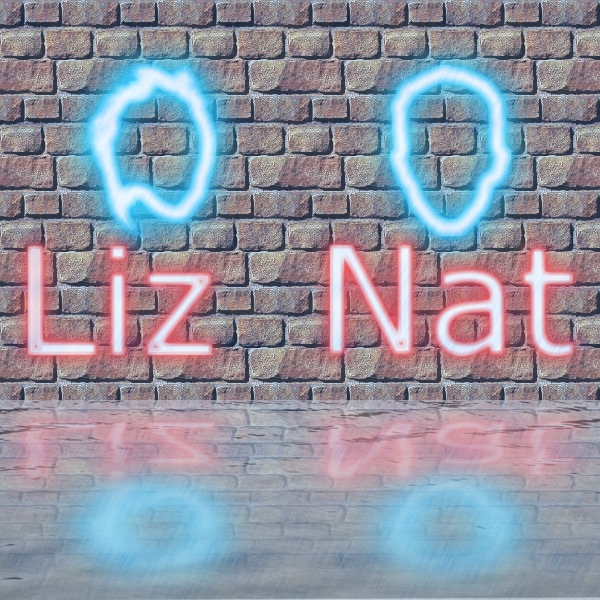
Thought I'd join in the fun, its an old picture of my two kids.

Image

_________________
Image


Top
 Post subject: Re: Bricks Pattern Fun
PostPosted: Tue Jan 08, 2013 5:38 pm  (#23) 
Offline
Script Coder
User avatar

Joined: Feb 18, 2011
Posts: 4826
Location: Bendigo Vic. Australia
Odin where is the tute start?

_________________
Image
No matter how much you push the envelope, it'll still be stationery.


Top
 Post subject: Re: Bricks Pattern Fun
PostPosted: Tue Jan 08, 2013 5:40 pm  (#24) 
Offline
GimpChat Member
User avatar

Joined: Apr 07, 2010
Posts: 14182
I am glad you asked that Graechan cuz I wanted to know too. I have tried several times to find it in that book but I can't get past the index page.

_________________
Image


Top
 Post subject: Re: Bricks Pattern Fun
PostPosted: Tue Jan 08, 2013 8:02 pm  (#25) 
Offline
GimpChat Member
User avatar

Joined: May 27, 2011
Posts: 707
I found this site with tons of brick and other patterns:
http://www.texturemate.com/

Image


Top
 Post subject: Re: Bricks Pattern Fun
PostPosted: Tue Jan 08, 2013 8:09 pm  (#26) 
Offline
GimpChat Member
User avatar

Joined: Apr 07, 2010
Posts: 14182
Yes that is a very good site Pirate, I have quite a few things I downloaded from there.

_________________
Image


Top
 Post subject: Re: Bricks Pattern Fun
PostPosted: Tue Jan 08, 2013 9:19 pm  (#27) 
Offline
GimpChat Member
User avatar

Joined: Apr 08, 2010
Posts: 5420
Location: Northwest Ohio
Can't see your picture, Hearty.


Top
 Post subject: Re: Bricks Pattern Fun
PostPosted: Tue Jan 08, 2013 10:06 pm  (#28) 
Offline
GimpChat Member
User avatar

Joined: Nov 16, 2011
Posts: 5127
Location: Metro Vancouver, BC
Graechan wrote:
Odin where is the tute start?
Go to Google Books search for "The Artist's Guide to Gimp".

If you get a preview with short snippets like this, search again.
Image

Look for a preview like this, DO NOT use view all, it's only a preview of the book.
Image

Scroll down to page 247 the tutorial preview starts. You miss the very beginning but you should be able to figure it out, (it just getting a bricks background). I've posted the last part of the tutorial in a previous post.

I hope this helps, if not I can try to post the tutorial part you can't get at. I not sure why because it is public. I'm signed into to Google account, if that makes any difference.

Only for reference: 2nd edition, isbn=1593274149

_________________
Image
Gimp 2.8.18, Linux, median user
Gimp Chat Tutorials Index
Spirit Bear (Kermode)


Top
 Post subject: Re: Bricks Pattern Fun
PostPosted: Wed Jan 09, 2013 8:48 am  (#29) 
Offline
GimpChat Member
User avatar

Joined: Aug 16, 2012
Posts: 4271
Location: Göteborg, Sweden
so much fun in this thread! great brick walls, everyone! i should go to google books and look up that tutorial, i suppose, but i have so many other things i have to do first :( .

_________________


Top
 Post subject: Re: Bricks Pattern Fun
PostPosted: Wed Jan 09, 2013 6:36 pm  (#30) 
Offline
GimpChat Member
User avatar

Joined: Aug 16, 2012
Posts: 4271
Location: Göteborg, Sweden
i couldn't find any part of the tutorial by scrolling down the book preview, but i saw there were screenshots from the tut on the book homepage - so with the screenshots and the part that odin posted i think i got something pretty close to the original effect:
Image

this is a very small neon sign for my very small café for little people :). (i didn't think of the size of the bricks until i had finished the rest of the thing and then i was too lazy to go back and edit...)
edit: the link to the book homepage, in case someone is looking: the artist's guide to gimp - neon signs

_________________


Top
 Post subject: Re: Bricks Pattern Fun
PostPosted: Thu Jan 10, 2013 1:28 am  (#31) 
Offline
Script Coder
User avatar

Joined: Feb 18, 2011
Posts: 4826
Location: Bendigo Vic. Australia
Another attempt using info from the link Anmal posted, I'm still having fun.

xcf is attached
Attachment:
neon-sign.xcf [1.6 MiB]
Downloaded 146 times

Image

_________________
Image
No matter how much you push the envelope, it'll still be stationery.


Top
 Post subject: Re: Bricks Pattern Fun
PostPosted: Thu Jan 10, 2013 2:03 am  (#32) 
Offline
GimpChat Member
User avatar

Joined: Nov 16, 2011
Posts: 5127
Location: Metro Vancouver, BC
They're both excellent results, AnMal and Graechan! I'm glad everyone's having so much fun with this one :yes

Edit, I've copied the tutorial from my book, I think it's all the public parts that Google books shows. I added it to the beginning of the thread.

_________________
Image
Gimp 2.8.18, Linux, median user
Gimp Chat Tutorials Index
Spirit Bear (Kermode)


Top
 Post subject: Re: Bricks Pattern Fun
PostPosted: Thu Jan 10, 2013 2:10 am  (#33) 
Offline
GimpChat Member
User avatar

Joined: Sep 24, 2010
Posts: 12854
Thought I would join in the fun too. :)


Attachments:
bricks.jpg
bricks.jpg [ 566.83 KiB | Viewed 2724 times ]

_________________
Lyle

Psalm 109:8

Image
Top
 Post subject: Re: Bricks Pattern Fun
PostPosted: Thu Jan 10, 2013 3:13 am  (#34) 
Offline
GimpChat Member
User avatar

Joined: Nov 16, 2011
Posts: 5127
Location: Metro Vancouver, BC
Cheers Lyle, Welcome to the Party :noiseblower

_________________
Image
Gimp 2.8.18, Linux, median user
Gimp Chat Tutorials Index
Spirit Bear (Kermode)


Top
 Post subject: Re: Bricks Pattern Fun
PostPosted: Thu Jan 10, 2013 4:29 am  (#35) 
Offline
GimpChat Member
User avatar

Joined: Jan 03, 2011
Posts: 1656
Interesting. Is there any tutorial on how to make a brick wall *from scratch* (without reusing existing textures, only by procedural techniques) ?
I've stumbled upon http://mines.lumpylumpy.com/Electronics ... ures/Wall/

but was wondering if you were aware of any other pages that describe an algorithm for doing this.
I'd like to make a new G'MIC filters for doing brick walls.


Top
 Post subject: Re: Bricks Pattern Fun
PostPosted: Thu Jan 10, 2013 5:19 am  (#36) 
Offline
GimpChat Member
User avatar

Joined: Apr 07, 2010
Posts: 14182
Thanks Odin, you must be the only one that can get to that tute in that book.

Anyway, this is what I did. I made my white bg. I then filled it with my bricks. I desaturated it then I changed my foreground color to RGB 244/0/0 (red). I did the bucket fill and that turned the whole canvas red. I am still on one layer. I set it to soft light but that didn't change anything because there is just one layer.
I proceeded through the rest of the tute, but I had to bucket the bg layer again in order to see my bricks.
SO, my problem is with the very first steps...shouldn't there be more than one layer in order to use the layer modes? :roll:
:gaah
Image

_________________
Image


Top
 Post subject: Re: Bricks Pattern Fun
PostPosted: Thu Jan 10, 2013 11:06 am  (#37) 
Offline
GimpChat Member
User avatar

Joined: Aug 30, 2012
Posts: 2174
I'll try again with posting the image, know what happened now, the file name used the & sysmbol and the site doesn't like it.

Here is an image of my two kids done a few years back when I first started learning gimp.

Image

_________________
Image


Top
 Post subject: Re: Bricks Pattern Fun
PostPosted: Thu Jan 10, 2013 12:27 pm  (#38) 
Offline
GimpChat Member
User avatar

Joined: Aug 16, 2012
Posts: 4271
Location: Göteborg, Sweden
this thread really is turning in to a party :).
odinbc: thanks for posting the tutorial, now i have an excuse for trying this again.
graechan: good job on that! it's amazing how close you got to the original without the full information.
lylejk: nice looking bricks text! how did you make it?
he4rty: i like that! a fun way to make portraits, i have to try that myself sometime.

and it seems no one has even mentioned pink floyd yet - or have i just missed it?

_________________


Top
 Post subject: Re: Bricks Pattern Fun
PostPosted: Thu Jan 10, 2013 1:27 pm  (#39) 
Offline
GimpChat Member
User avatar

Joined: Nov 16, 2011
Posts: 5127
Location: Metro Vancouver, BC
molly wrote:
Thanks Odin, you must be the only one that can get to that tute in that book.
...
SO, my problem is with the very first steps...shouldn't there be more than one layer in order to use the layer modes? :roll:
:gaah
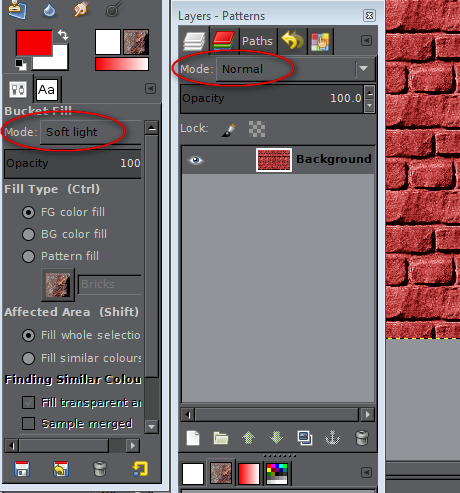
I think the layer mode is the problem. Set the Mode in the Bucket Fill dialog not the Layer dialog. Your Layer dialog should still be still be set to Normal.
Image

_________________
Image
Gimp 2.8.18, Linux, median user
Gimp Chat Tutorials Index
Spirit Bear (Kermode)


Top
 Post subject: Re: Bricks Pattern Fun
PostPosted: Thu Jan 10, 2013 1:37 pm  (#40) 
Offline
GimpChat Member
User avatar

Joined: Apr 07, 2010
Posts: 14182
Thanks Odin, :oops: I am embarrassed to say that I didn't even see that option before in the bucket fill tool. Anyway, I just tried it and it works. :oops:
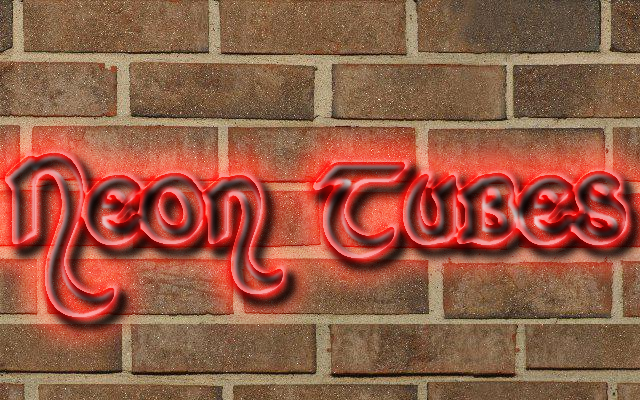
I finally got it, duh nice tute Odin

Image

_________________
Image


Top
Post new topic Reply to topic  [ 54 posts ]  Go to page Previous  1, 2, 3  Next

All times are UTC - 5 hours [ DST ]


* Login  


Powered by phpBB3 © phpBB Group