It is currently Sat Oct 31, 2026 5:01 pm


All times are UTC - 5 hours [ DST ]


Post new topic Reply to topic  [ 73 posts ]  Go to page Previous  1, 2, 3, 4  Next
Author Message
 Post subject: Re: (how to emulate ) Ink Wash
PostPosted: Thu Dec 30, 2010 3:55 am  (#21) 
Offline
Retired Staff
User avatar

Joined: May 22, 2008
Posts: 6946
Location: Somewhere in GIMP
Beautiful, mahvin. Is that what is called a snowy owl?

_________________
Image
World War IV will be fought with sticks and stones. - Albert Einstein


Top
 Post subject: Re: (how to emulate ) Ink Wash
PostPosted: Thu Dec 30, 2010 4:01 am  (#22) 
Offline
GimpChat Member
User avatar

Joined: Oct 06, 2010
Posts: 4050
Yes, ma'am. Indeed a snowy owl. I am a member of Webshots, have been for 10 years, so lots of professional pictures to choose from. Downside is you need a premium account to get the large prints.

_________________
"In order to attain the impossible, one must attempt the absurd."
~ Miguel de Cervantes


Top
 Post subject: Re: (how to emulate ) Ink Wash
PostPosted: Thu Dec 30, 2010 3:35 pm  (#23) 
Offline
GimpChat Member

Joined: Apr 12, 2010
Posts: 5870
Why my last post vanished?

anyway
Oregonian the last 2 are excellent :hi5
Mahvin the Owl come out really well :clap :clap :clap

Ink Wash should be included in next gmic 1.4.7.1, that new version should also fix some issues with selection and multiple input/output

_________________
My 3D Gallery on Deviantart http://photocomix2.deviantart.com/
Main gallery http://www.flickriver.com/photos/photocomix-mandala/
Mandala and simmetry http://www.flickriver.com/photos/photocomix_mandala/

Image

Mrs Wilbress


Top
 Post subject: Re: (how to emulate ) Ink Wash
PostPosted: Thu Dec 30, 2010 8:29 pm  (#24) 
Offline
Global Moderator
User avatar

Joined: May 16, 2010
Posts: 16221
If it comes with 4.7.1 will we have to delete that .gmic file in app data folder then?
Or will it still work ok?


Top
 Post subject: Re: (how to emulate ) Ink Wash
PostPosted: Thu Dec 30, 2010 11:34 pm  (#25) 
Offline
GimpChat Member

Joined: Apr 12, 2010
Posts: 5870
In general you may mantain both just slightly changing the names if are identical see here

#@gimp Contrast Swiss Mask : contrast_swm , contrast_swm(0)
#@gimp : sep = separator ()


#@gimp : sep = separator ()
#@gimp : Blur the mask = float(2,0.5,10)
#@gimp : sep = separator ()
#@gimp : note = note ("Contrast Mask need the negative of the mask")
#@gimp : SKIP to use the mask to boost = bool(false)
#@gimp : note = note ("Uncheck for Contrast Mask,Check for Contrast Boost")
#@gimp : sep = separator ()
#@gimp : note = note("Merge the Mask")
#@gimp : Intensity = float (1,0,1)

contrast_swm :
--luminance -to_rgb
-blur_xy[1] $1,$1
-if {$2==0} -negative[1] -elif {$2==1} -gimp_do_nothing -endif
-reverse[-2,-1] -gimp_compose_hardlight[-2,-1] $3

the name are in red , "Contrast Swiss Mask " is the name used in the filter list, changing is not compulsory but avoid confusion in the filter list
contrast_swm[/b] need to be edit if you want both (you may just remove or add a letter)

In this case anyway i would not remove the gmic file but just cancel the filter code, new version will be identical but for a couple of bugfix so not much reason to have both..., anyway the gmic file ready to host new filters may be handy

_________________
My 3D Gallery on Deviantart http://photocomix2.deviantart.com/
Main gallery http://www.flickriver.com/photos/photocomix-mandala/
Mandala and simmetry http://www.flickriver.com/photos/photocomix_mandala/

Image

Mrs Wilbress


Top
 Post subject: Re: (how to emulate ) Ink Wash
PostPosted: Thu Dec 30, 2010 11:38 pm  (#26) 
Offline
GimpChat Member

Joined: Apr 12, 2010
Posts: 5870
PS
i used another code to explain just because i had ready in the clipboard and was shorter

_________________
My 3D Gallery on Deviantart http://photocomix2.deviantart.com/
Main gallery http://www.flickriver.com/photos/photocomix-mandala/
Mandala and simmetry http://www.flickriver.com/photos/photocomix_mandala/

Image

Mrs Wilbress


Top
 Post subject: Re: (how to emulate ) Ink Wash
PostPosted: Sun Jan 02, 2011 1:36 am  (#27) 
Offline
GimpChat Founder
User avatar

Joined: May 22, 2008
Posts: 5241
Location: Gimpville
This filter produces a great effect. Well done!!
I especially like impressionist art and some of these images are very monet-esk. :paint

_________________
“If you reach for the stars, you just might land on a decently sized hill.” - Stuart Hill


Top
 Post subject: Re: (how to emulate ) Ink Wash
PostPosted: Sun Jan 02, 2011 6:02 am  (#28) 
Offline
Retired Staff
User avatar

Joined: May 22, 2008
Posts: 6946
Location: Somewhere in GIMP
I remember some photos you had of your camellias GnuTux. They would be pretty ran through the filter. I also remember one had an interesting bug on it.

_________________
Image
World War IV will be fought with sticks and stones. - Albert Einstein


Top
 Post subject: Re: (how to emulate ) Ink Wash
PostPosted: Sun Jan 02, 2011 6:27 am  (#29) 
Offline
Retired Staff
User avatar

Joined: May 22, 2008
Posts: 6946
Location: Somewhere in GIMP
PhotoComix I was trying to run an image through Ink Wash and my results were like I had desaturated rather than used the filter. The preview looked OK but the final image didn't.

I refreshed G'MIC to make sure all was up to date and when I looked for the Ink Wash filter it was gone. It was there, I even posted an image of it here. :gaah :hoh

_________________
Image
World War IV will be fought with sticks and stones. - Albert Einstein


Top
 Post subject: Re: (how to emulate ) Ink Wash
PostPosted: Sun Jan 02, 2011 8:23 am  (#30) 
Offline
GimpChat Member

Joined: Apr 12, 2010
Posts: 5870
Check in Presets/Testing section, there is the new version (i believe updated by David becouse i didn't ..i was going to do but i saw was no more needed)

_________________
My 3D Gallery on Deviantart http://photocomix2.deviantart.com/
Main gallery http://www.flickriver.com/photos/photocomix-mandala/
Mandala and simmetry http://www.flickriver.com/photos/photocomix_mandala/

Image

Mrs Wilbress


Top
 Post subject: Re: (how to emulate ) Ink Wash
PostPosted: Sun Jan 02, 2011 12:36 pm  (#31) 
Offline
Retired Staff
User avatar

Joined: May 22, 2008
Posts: 6946
Location: Somewhere in GIMP
PhotoComix wrote:
Check in Presets/Testing section, there is the new version (i believe updated by David becouse i didn't ..i was going to do but i saw was no more needed)
As I said above, it's no longer there. I guess I'll need to copy it again into my .gmic file.

Image

_________________
Image
World War IV will be fought with sticks and stones. - Albert Einstein


Top
 Post subject: Re: (how to emulate ) Ink Wash
PostPosted: Sun Jan 02, 2011 2:42 pm  (#32) 
Offline
GimpChat Member

Joined: Apr 12, 2010
Posts: 5870
sorry O i can't check on my PC because is full of..

Wait a moment ..you know how David may be quick , look also in the Artistic Menu !(it is supposed to go there in next Gmic version )

_________________
My 3D Gallery on Deviantart http://photocomix2.deviantart.com/
Main gallery http://www.flickriver.com/photos/photocomix-mandala/
Mandala and simmetry http://www.flickriver.com/photos/photocomix_mandala/

Image

Mrs Wilbress


Top
 Post subject: Re: (how to emulate ) Ink Wash
PostPosted: Sun Jan 02, 2011 3:10 pm  (#33) 
Offline
Retired Staff
User avatar

Joined: May 22, 2008
Posts: 6946
Location: Somewhere in GIMP
Not in the Artistic menu, either, PhotoComix. I have it in my .gmic file so I can get to it now.

_________________
Image
World War IV will be fought with sticks and stones. - Albert Einstein


Top
 Post subject: Re: (how to emulate ) Ink Wash
PostPosted: Sun Jan 02, 2011 3:13 pm  (#34) 
Offline
GimpChat Member
User avatar

Joined: Oct 06, 2010
Posts: 4050
Did you refresh your GMIC?
Image

_________________
"In order to attain the impossible, one must attempt the absurd."
~ Miguel de Cervantes


Top
 Post subject: Re: (how to emulate ) Ink Wash
PostPosted: Sun Jan 02, 2011 3:51 pm  (#35) 
Offline
Retired Staff
User avatar

Joined: May 22, 2008
Posts: 6946
Location: Somewhere in GIMP
mahvin wrote:
Did you refresh your GMIC?
I have practically worn out my G'MIC refresh button.

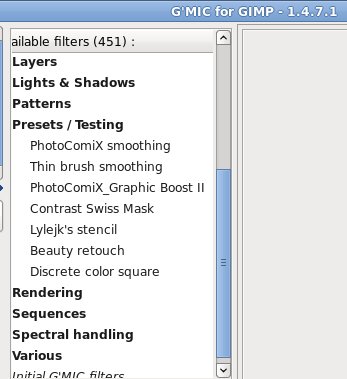
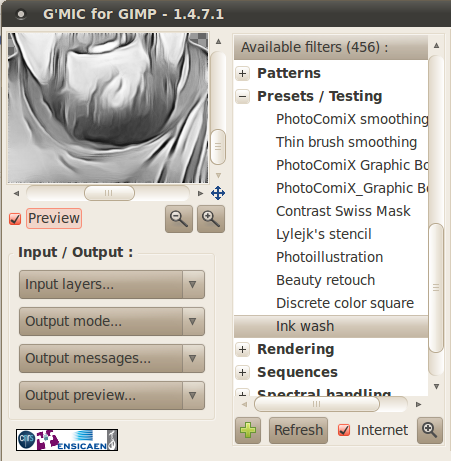
When I wanted to use Ink Wash this morning, I wasn't getting the right results with it so I refreshed G'MIC and that was when it disappeared from the Presets/Testing menu. Hasn't shown up there since and isn't in Artistic either.

Just so everyone knows. Here are two images. The one on the left is when I first installed G'MIC 1.4.7.1, the one on the right is what it shows now after many refreshes.

Image Image

_________________
Image
World War IV will be fought with sticks and stones. - Albert Einstein


Top
 Post subject: Re: (how to emulate ) Ink Wash
PostPosted: Sun Jan 02, 2011 4:08 pm  (#36) 
Offline
GimpChat Member
User avatar

Joined: Oct 06, 2010
Posts: 4050
I just refreshed and poof Ink Wash was gone...

_________________
"In order to attain the impossible, one must attempt the absurd."
~ Miguel de Cervantes


Top
 Post subject: Re: (how to emulate ) Ink Wash
PostPosted: Sun Jan 02, 2011 4:19 pm  (#37) 
Offline
Retired Staff
User avatar

Joined: May 22, 2008
Posts: 6946
Location: Somewhere in GIMP
Oh, thank you, thank you, mahvin. I thought I was going crazy. Whew.

In addition to Ink wash, I see that PhotoComiX Graphic Boost and Photoillustration are no longer there either.

_________________
Image
World War IV will be fought with sticks and stones. - Albert Einstein


Top
 Post subject: Re: (how to emulate ) Ink Wash
PostPosted: Sun Jan 02, 2011 4:21 pm  (#38) 
Offline
GimpChat Member
User avatar

Joined: Oct 19, 2010
Posts: 376
Location: North Central Ohio, USA
Is this the same one?


Attachments:
Screenshot-9.png
Screenshot-9.png [ 27.38 KiB | Viewed 3882 times ]

_________________
Life Truth: #12
My cat is a worst typist than I am.
Top
 Post subject: Re: (how to emulate ) Ink Wash
PostPosted: Sun Jan 02, 2011 4:24 pm  (#39) 
Offline
GimpChat Member
User avatar

Joined: Oct 06, 2010
Posts: 4050
Ahhhhh, good find, Bob. Thanks.

It seems David renamed them all and moved them to Artistic folder, O.

_________________
"In order to attain the impossible, one must attempt the absurd."
~ Miguel de Cervantes


Last edited by mahvin on Sun Jan 02, 2011 4:25 pm, edited 1 time in total.

Top
 Post subject: Re: (how to emulate ) Ink Wash
PostPosted: Sun Jan 02, 2011 4:24 pm  (#40) 
Offline
Retired Staff
User avatar

Joined: May 22, 2008
Posts: 6946
Location: Somewhere in GIMP
Aha! Super sleuth Bob found it. I wasn't looking for B&W in front of the name. That's it! Cool!

_________________
Image
World War IV will be fought with sticks and stones. - Albert Einstein


Top
Post new topic Reply to topic  [ 73 posts ]  Go to page Previous  1, 2, 3, 4  Next

All times are UTC - 5 hours [ DST ]


cron

* Login  


Powered by phpBB3 © phpBB Group