It is currently Wed Jul 29, 2026 1:02 pm


All times are UTC - 5 hours [ DST ]


Post new topic Reply to topic  [ 93 posts ]  Go to page Previous  1, 2, 3, 4, 5  Next
Author Message
 Post subject: Re: How to install a Theme Selector for Gimp 2.8, 2.10 (Windows) Updat
PostPosted: Fri Jul 29, 2022 1:36 am  (#41) 
Offline
Global Moderator
User avatar

Joined: May 16, 2010
Posts: 16136
Oh yeah! :)

I missed you. :) :clap :yes

Attachment:
i-missed-you-2022-07-29_022951.jpg
i-missed-you-2022-07-29_022951.jpg [ 215.23 KiB | Viewed 3668 times ]

_________________
Image


Top
 Post subject: Re: How to install a Theme Selector for Gimp 2.8, 2.10 (Windows) Updat
PostPosted: Fri Jul 29, 2022 2:57 am  (#42) 
Offline
GimpChat Member
User avatar

Joined: Jul 06, 2013
Posts: 2662
Location: California
MareroQ wrote:
Hi Mackenzieh.
Your screenshots show that you have two versions of Gimp installed:
c:\Program Files\GIMP 2
c:\Users\macke\AppData\Local\Programs\GIMP 2
You install in one but run the other?
I suggest: uninstalling both versions and reinstalling Gimp.


Hi MareroQ,

I don't have two versions of Gimp installed. The version I have is Gimp 2.10.32. The GIMP 2 folders is how it appears on my system. That's how it has always been.


Top
 Post subject: Re: How to install a Theme Selector for Gimp 2.8, 2.10 (Windows) Updat
PostPosted: Fri Jul 29, 2022 3:01 am  (#43) 
Offline
GimpChat Member
User avatar

Joined: Jul 06, 2013
Posts: 2662
Location: California
Rod wrote:
Awesome i can use my Metallic Blue Licorice theme again. :)

Attachment:
Metalic-blue-licor_RD-2022-07-29_020413.jpg


Can you use it through the theme selector, Rod?

I've tried getting the theme selector to work and it fails. I can only get certain themes to work through GIMP 2.10.32 in Edit>Preferences>Themes


Top
 Post subject: Re: How to install a Theme Selector for Gimp 2.8, 2.10 (Windows) Updat
PostPosted: Fri Jul 29, 2022 4:13 am  (#44) 
Offline
GimpChat Member
User avatar

Joined: Jan 13, 2011
Posts: 2646
Location: Poland
@Pocholo
You wrote that you have the same "dual" location as Mackenzieh.
Really? ;) I believe it's just some kind of fatigue.

@Mackenzieh
I still say you have Gimp installed in two locations (probably both versions are gimp-2.10.32). :gaah
Show screenshots of these 2 different locations:

1. c:\Program Files\GIMP 2\bin
2. c:\Users\macke\AppData\Local\Programs\GIMP 2\bin

You can also do a search for 'gimp-2.10.exe' (you will probably find at least two such files).
If I'm wrong, I know I don't know anything. :roll:

_________________
Image


Top
 Post subject: Re: How to install a Theme Selector for Gimp 2.8, 2.10 (Windows) Updat
PostPosted: Fri Jul 29, 2022 9:37 am  (#45) 
@MareroQ; I don't :nono think so my friend. I been having this Themes Selector for years since GIMP 2.6 and never had a problem with any version so far. The posts before post #36, she had those locations wrong. But I think you missed post #36, where she have them in the right location just like mine.

On Post #36, take a look at the images.
The first image is her User GIMP 2.10 profile themes that is empty and it should be. I don't put my themes there.
Now this is where themes suppose to be:
1. The second image: C:\Program Files (x86)\GTK2-Runtime\share\themes is where she have, like I have, the GTK2-runtime directory.
2. The third image is in GIMP 2 directory in the Programs Files: C:\Program Files\GIMP 2\share\themes
3. The fourth image is in: C:\Program Files\GIMP 2\share\gimp\2.0\themes

This is mine location just like her:
Image
Image
Image


Top
 Post subject: Re: How to install a Theme Selector for Gimp 2.8, 2.10 (Windows) Updat
PostPosted: Fri Jul 29, 2022 10:33 am  (#46) 
Offline
GimpChat Member
User avatar

Joined: Jan 13, 2011
Posts: 2646
Location: Poland
Hi Pocholo.
However, you missed a small detail in post #36. :hehe
Screenshot from Preferences by Mackenzieh:

Image

If Gimp displays that it has themes in:
c:\Users\macke\AppData\Local\Programs\GIMP 2\share\gimp\2.0\themes
it was run with:
c:\Users\macke\AppData\Local\Programs\GIMP 2\bin\gimp-2.10.exe
and not:
c:\Program Files\GIMP 2\bin\gimp-2.10.exe

(or else everything at Mackenzieh is even more tangled :( )

_________________
Image


Top
 Post subject: Re: How to install a Theme Selector for Gimp 2.8, 2.10 (Windows) Updat
PostPosted: Fri Jul 29, 2022 11:29 am  (#47) 
:gaah I didn't put any emphasis in that image. She put another set of themes in the : \Users\macke\AppData\Local\Programs\GIMP 2\share\gimp\2.0\themes
I never mention to put the Themes in that location. :hoh
No wonder the Selector is not working and the themes are not showing locally in the GIMP Preferences Themes.
I hope she is reading this.
Mackenzie you need to delete the themes from that location.


Last edited by Pocholo on Fri Jul 29, 2022 1:14 pm, edited 1 time in total.

Top
 Post subject: Re: How to install a Theme Selector for Gimp 2.8, 2.10 (Windows) Updat
PostPosted: Fri Jul 29, 2022 11:59 am  (#48) 
Offline
GimpChat Member
User avatar

Joined: Jan 13, 2011
Posts: 2646
Location: Poland
Mackenzieh should do what I said in post # 39.
(installed themes in a different Gimp than the one that is running :hoh ).

A completely different thing is Gimp-2.10 no longer needs the gtk2-runtime-2.24.10 and Theme selector, just a small change of the gtkrc file location (in your beautiful collection).


Attachments:
ThemeG-2.10.jpg
ThemeG-2.10.jpg [ 128.55 KiB | Viewed 3619 times ]

_________________
Image
Top
 Post subject: Re: How to install a Theme Selector for Gimp 2.8, 2.10 (Windows) Updat
PostPosted: Fri Jul 29, 2022 12:25 pm  (#49) 
Offline
GimpChat Member
User avatar

Joined: Jul 06, 2013
Posts: 2662
Location: California
Pocholo wrote:
:gaah I didn't put any emphasis in that image. She put another set of themes in the :\Users\macke\AppData\Local\Programs\GIMP 2\share\gimp\2.0\themes
I never mention to put the Themes in that location. :hoh
No wonder the Selector is not working and the themes are not showing locally in the GIMP Preferences Themes.
I hope she is reading this.
Mackenzie you need to delete the themes from that location.


Pocholo,
I mentioned that I had to reinstall GIMP. When I reinstalled it and started GIMP up, the standard set if GIMP themes (Light Gray, Dark & System) were already in the C:\Users\macke\AppData\Local\Programs\GIMP 2\share\gimp\2.0\themes location. I didn't just put them there. I had put the new set of themes there to try to get the theme selector to work.

The theme selector still doesn't for GIMP 2.10.32, for me. If I delete the standard themes, where would they go? They have to go somewhere.


Top
 Post subject: Re: How to install a Theme Selector for Gimp 2.8, 2.10 (Windows) Updat
PostPosted: Fri Jul 29, 2022 12:34 pm  (#50) 
Offline
GimpChat Member
User avatar

Joined: Jul 06, 2013
Posts: 2662
Location: California
MareroQ wrote:
Mackenzieh should do what I said in post # 39.
(installed themes in a different Gimp than the one that is running :hoh ).

A completely different thing is Gimp-2.10 no longer needs the gtk2-runtime-2.24.10 and Theme selector, just a small change of the gtkrc file location (in your beautiful collection).


If I had uninstalled and reinstalled gimp (I only have one copy running, which is what I have always had), I'd be back to square one.


Top
 Post subject: Re: How to install a Theme Selector for Gimp 2.8, 2.10 (Windows) Updat
PostPosted: Fri Jul 29, 2022 12:41 pm  (#51) 
Offline
GimpChat Member
User avatar

Joined: Jan 13, 2011
Posts: 2646
Location: Poland
I asked for two screenshots. :gaah
If you click the mouse on:

c:\Program Files\GIMP 2\bin\gimp-2.10.exe

I am convinced that new themes will be available.

_________________
Image


Top
 Post subject: Re: How to install a Theme Selector for Gimp 2.8, 2.10 (Windows) Updat
PostPosted: Fri Jul 29, 2022 12:48 pm  (#52) 
Offline
GimpChat Member
User avatar

Joined: Jul 06, 2013
Posts: 2662
Location: California
MareroQ wrote:
I asked for two screenshots. :gaah
If you click the mouse on:

c:\Program Files\GIMP 2\bin\gimp-2.10.exe

I am convinced that new themes will be available.


I will check that and post a screenshot.

This is what I see:
Image

There are no new themes within that part of gimp on my machine. There's also no need to get frustrated. If anyone should be frustrated it should be me since I can't seem to get the theme selector to work.


Last edited by mackenzieh on Fri Jul 29, 2022 12:59 pm, edited 1 time in total.

Top
 Post subject: Re: How to install a Theme Selector for Gimp 2.8, 2.10 (Windows) Updat
PostPosted: Fri Jul 29, 2022 12:59 pm  (#53) 
The good thing about having the Selector is that you can see what the theme looks like when is applied. Has a preview and you can change the Font, the Size, the Style. It also show you how the tabs are going to look. That is what I call :coolthup . GIMP doesn't offer that, ain't. I'm surprise to take the GIMP Edit/Preferences/Themes over this.
Image


Top
 Post subject: Re: How to install a Theme Selector for Gimp 2.8, 2.10 (Windows) Updat
PostPosted: Fri Jul 29, 2022 1:05 pm  (#54) 
mackenzieh wrote:
MareroQ wrote:
I asked for two screenshots. :gaah
If you click the mouse on:

c:\Program Files\GIMP 2\bin\gimp-2.10.exe

I am convinced that new themes will be available.


I will check that and post a screenshot.

This is what I see:
[ Image ]

There are no new themes within that part of gimp on my machine. There's also no need to get frustrated. If anyone should be frustrated it should be me since I can't seem to get the theme selector to work.


Not there, Mackenzie. In your: \Users\macke\AppData\Local\Programs\GIMP 2\share\gimp\2.0\themes


Last edited by Pocholo on Fri Jul 29, 2022 1:15 pm, edited 1 time in total.

Top
 Post subject: Re: How to install a Theme Selector for Gimp 2.8, 2.10 (Windows) Updat
PostPosted: Fri Jul 29, 2022 1:13 pm  (#55) 
Offline
GimpChat Member
User avatar

Joined: Jul 06, 2013
Posts: 2662
Location: California
Pocholo wrote:
mackenzieh wrote:
MareroQ wrote:
I asked for two screenshots. :gaah
If you click the mouse on:

c:\Program Files\GIMP 2\bin\gimp-2.10.exe

I am convinced that new themes will be available.


I will check that and post a screenshot.

This is what I see:
[ Image ]

There are no new themes within that part of gimp on my machine. There's also no need to get frustrated. If anyone should be frustrated it should be me since I can't seem to get the theme selector to work.


Not there, Mackenzie. In your: c:\Users\macke\AppData\Local\Programs\GIMP 2\bin You need to delete the folder there. In slow motion: Users - macke - AppData - Local - Programs - GIMP 2 - bin


I don't need it in slow motion. That just makes me seem dumb, when you say slow motion. I just like things broken down so that I can understand them better.

I deleted the folder:

Image


Top
 Post subject: Re: How to install a Theme Selector for Gimp 2.8, 2.10 (Windows) Updat
PostPosted: Fri Jul 29, 2022 1:19 pm  (#56) 
Sorry, didn't mean it for you to feel that way! :(


Top
 Post subject: Re: How to install a Theme Selector for Gimp 2.8, 2.10 (Windows) Updat
PostPosted: Fri Jul 29, 2022 1:20 pm  (#57) 
Offline
GimpChat Member
User avatar

Joined: Jan 13, 2011
Posts: 2646
Location: Poland
After uninstalling, there were files that were added manually.
When the c: \ Program Files \ GIMP 2 directory is busy, the installer may "suggest" a different location, which is:
c: \ Users \ macke \ AppData \ Local \ Programs \ GIMP 2.
I guess you missed it.
If you want a typical installation, unfortunately you have to repeat it (after uninstalling from c: \ Users \ macke \ AppData \ Local \ Programs \ GIMP 2 ok - I can see it's ready).
Pay attention to it:

Image

Pocholo - it will be better to steer Mackenzieh through one person, i.e. I withdraw.
Good luck.

_________________
Image


Top
 Post subject: Re: How to install a Theme Selector for Gimp 2.8, 2.10 (Windows) Updat
PostPosted: Fri Jul 29, 2022 1:26 pm  (#58) 
Offline
GimpChat Member
User avatar

Joined: Jul 06, 2013
Posts: 2662
Location: California
Pocholo wrote:
Sorry, didn't mean it for you to feel that way! :(


It's fine. No harm done. :) Did you see my previous post?


Top
 Post subject: Re: How to install a Theme Selector for Gimp 2.8, 2.10 (Windows) Updat
PostPosted: Fri Jul 29, 2022 1:33 pm  (#59) 
Offline
GimpChat Member
User avatar

Joined: Jul 06, 2013
Posts: 2662
Location: California
MareroQ wrote:
After uninstalling, there were files that were added manually.
When the c: \ Program Files \ GIMP 2 directory is busy, the installer may "suggest" a different location, which is:
c: \ Users \ macke \ AppData \ Local \ Programs \ GIMP 2.
I guess you missed it.
If you want a typical installation, unfortunately you have to repeat it (after uninstalling from c: \ Users \ macke \ AppData \ Local \ Programs \ GIMP 2 ok - I can see it's ready).
Pay attention to it:

[ Image ]

Pocholo - it will be better to steer Mackenzieh through one person, i.e. I withdraw.
Good luck.


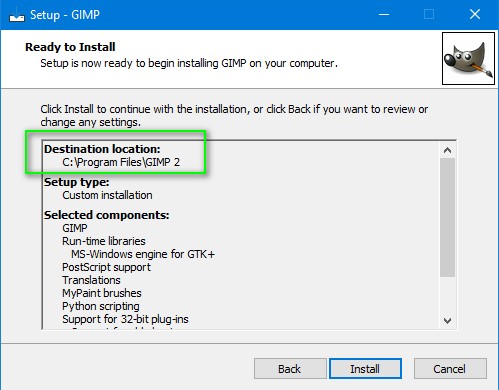
When I installed GIMP, I installed where it normally goes:
Image


Top
 Post subject: Re: How to install a Theme Selector for Gimp 2.8, 2.10 (Windows) Updat
PostPosted: Fri Jul 29, 2022 1:34 pm  (#60) 
mackenzieh wrote:
Pocholo wrote:
Sorry, didn't mean it for you to feel that way! :(


It's fine. No harm done. :) Did you see my previous post?


Yes. As MareroQ stated, when you re-installed GIMP, GIMP installed in the wrong location: c:\Users\macke\AppData\Local\Programs . You need to uninstall GIMP in that location or you're going to get a lot of errors.
It's seem you have two installed.


Top
Post new topic Reply to topic  [ 93 posts ]  Go to page Previous  1, 2, 3, 4, 5  Next

All times are UTC - 5 hours [ DST ]


* Login  


Powered by phpBB3 © phpBB Group