It is currently Wed Oct 28, 2026 6:25 pm


All times are UTC - 5 hours [ DST ]


Post new topic Reply to topic  [ 121 posts ]  Go to page Previous  1, 2, 3, 4, 5, 6, 7  Next
Author Message
 Post subject: Re: How to set up your Gimp to accept apng format in Windows
PostPosted: Wed Dec 28, 2011 5:28 am  (#61) 
Offline
GimpChat Member
User avatar

Joined: Apr 07, 2010
Posts: 14182
Finally got mine working, I changed it to replace and the delay at 500.

Image

_________________
Image


Top
 Post subject: Re: How to set up your Gimp to accept apng format in Windows
PostPosted: Wed Dec 28, 2011 5:53 am  (#62) 
Offline
GimpChat Member
User avatar

Joined: Dec 03, 2011
Posts: 149
Great it's working for me as well strange animation wasn't playing last night but never mind thanks everyone :)


Top
 Post subject: Re: How to set up your Gimp to accept apng format in Windows
PostPosted: Wed Dec 28, 2011 9:01 am  (#63) 
Offline
GimpChat Member

Joined: Dec 15, 2011
Posts: 129
molly wrote:
Finally got mine working, I changed it to replace and the delay at 500.

Image

Great Molly. Don't ya just love it when a plan comes together? :rofl


Top
 Post subject: Re: How to set up your Gimp to accept apng format in Windows
PostPosted: Wed Dec 28, 2011 9:10 am  (#64) 
Offline
GimpChat Member
User avatar

Joined: Apr 07, 2010
Posts: 14182
Yup, especially when I already had it over a year ago and it worked then until I re installed Gimp. Remember, the files will be quite a lot larger with this compared to gif.

_________________
Image


Top
 Post subject: Re: How to set up your Gimp to accept apng format in Windows
PostPosted: Mon Jan 02, 2012 6:04 pm  (#65) 
Offline
GimpChat Member
User avatar

Joined: Dec 03, 2011
Posts: 149
I think I realised what my problem with it before was... apng files are not supported by google chrome which is my main browser on my laptop can anyone who uses firefox or something tell me if this is seen as an animation?

Image


Top
 Post subject: Re: How to set up your Gimp to accept apng format in Windows
PostPosted: Mon Jan 02, 2012 6:14 pm  (#66) 
Offline
GimpChat Member

Joined: Dec 15, 2011
Posts: 129
No Jamie... Sorry.
It's frozen in time. Using Firefox here.


Top
 Post subject: Re: How to set up your Gimp to accept apng format in Windows
PostPosted: Mon Jan 02, 2012 6:23 pm  (#67) 
Offline
GimpChat Member
User avatar

Joined: Dec 03, 2011
Posts: 149
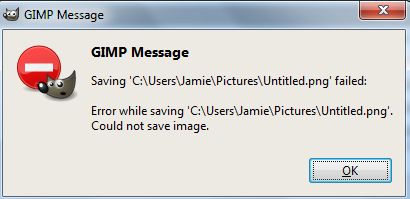
Strange laptop crashed and some stuff got corrupted so I've had to reinstall GIMP and now trying to get apng back again could someone post the link to the 2.6.11 files which they got working, sorry for bringing this back again... tried using this one: http://sourceforge.net/projects/gimp-ap ... t/download but I get this error Image think im back to the start again :cry


Top
 Post subject: Re: How to set up your Gimp to accept apng format in Windows
PostPosted: Mon Jan 02, 2012 6:35 pm  (#68) 
Offline
GimpChat Member
User avatar

Joined: Apr 07, 2010
Posts: 14182
Here ya go Jamie.


Attachments:
gimp-apng-0.1.0.win32.zip [306.12 KiB]
Downloaded 161 times

_________________
Image
Top
 Post subject: Re: How to set up your Gimp to accept apng format in Windows
PostPosted: Mon Jan 02, 2012 6:37 pm  (#69) 
Offline
GimpChat Member
User avatar

Joined: Dec 03, 2011
Posts: 149
Oh dear this isn't good that's the one I have been trying...


Top
 Post subject: Re: How to set up your Gimp to accept apng format in Windows
PostPosted: Mon Jan 02, 2012 6:38 pm  (#70) 
Offline
GimpChat Member
User avatar

Joined: Apr 07, 2010
Posts: 14182
Or this one


Attachments:
apng.rar [277.47 KiB]
Downloaded 166 times
Desktop.rar [277.47 KiB]
Downloaded 187 times

_________________
Image
Top
 Post subject: Re: How to set up your Gimp to accept apng format in Windows
PostPosted: Mon Jan 02, 2012 6:46 pm  (#71) 
Offline
GimpChat Member
User avatar

Joined: Dec 03, 2011
Posts: 149
DO I just put that in the same plugin folder in the GIMP lib?


Top
 Post subject: Re: How to set up your Gimp to accept apng format in Windows
PostPosted: Mon Jan 02, 2012 6:48 pm  (#72) 
Offline
GimpChat Member

Joined: Dec 15, 2011
Posts: 129
Jamie990 wrote:
DO I just put that in the same plugin folder in the GIMP lib?

Here Jamie.
C:\Program Files\GIMP-2.0\lib\gimp\2.0\plug-ins


Top
 Post subject: Re: How to set up your Gimp to accept apng format in Windows
PostPosted: Mon Jan 02, 2012 6:52 pm  (#73) 
Offline
GimpChat Member
User avatar

Joined: Apr 07, 2010
Posts: 14182
Yes you put them both in the same folder after you extract them that Slide said above.

_________________
Image


Top
 Post subject: Re: How to set up your Gimp to accept apng format in Windows
PostPosted: Mon Jan 02, 2012 6:59 pm  (#74) 
Offline
GimpChat Member
User avatar

Joined: Dec 03, 2011
Posts: 149
molly wrote:
Or this one

I just tried these and it doesn't come up with the png option in GIMP.

Sorry for being so hopeless.


Top
 Post subject: Re: How to set up your Gimp to accept apng format in Windows
PostPosted: Mon Jan 02, 2012 7:10 pm  (#75) 
Offline
GimpChat Member

Joined: Dec 15, 2011
Posts: 129
Look at this Jamie.
viewtopic.php?f=23&t=218&start=40#p43157


Top
 Post subject: Re: How to set up your Gimp to accept apng format in Windows
PostPosted: Mon Jan 02, 2012 7:14 pm  (#76) 
Offline
GimpChat Member
User avatar

Joined: Dec 03, 2011
Posts: 149
Yeah what I mean is with those files the option doesn't come up in the dropdown menu.


Top
 Post subject: Re: How to set up your Gimp to accept apng format in Windows
PostPosted: Mon Jan 02, 2012 7:19 pm  (#77) 
Offline
GimpChat Member
User avatar

Joined: Apr 07, 2010
Posts: 14182
Jamie, did you save it as a .png and then down at the bottom select this

Image

_________________
Image


Top
 Post subject: Re: How to set up your Gimp to accept apng format in Windows
PostPosted: Mon Jan 02, 2012 7:22 pm  (#78) 
Offline
GimpChat Member
User avatar

Joined: Dec 03, 2011
Posts: 149
What I mean is that isn't showing up I installed the second set of two files and nothing...


Top
 Post subject: Re: How to set up your Gimp to accept apng format in Windows
PostPosted: Mon Jan 02, 2012 7:25 pm  (#79) 
Offline
GimpChat Member

Joined: Dec 15, 2011
Posts: 129
molly wrote:
Jamie, did you save it as a .png and then down at the bottom select this

Image

Molly how are you doing the partial screen shots? I send mine to Screencast all of the time and takes a bit to get mine back.
Thanks


Top
 Post subject: Re: How to set up your Gimp to accept apng format in Windows
PostPosted: Mon Jan 02, 2012 7:28 pm  (#80) 
Offline
GimpChat Member
User avatar

Joined: Apr 07, 2010
Posts: 14182
Slide, It's a little program that comes with windows 7. It is called "Snipping tool." It is so easy and you can hi-lite with it underline, erase and use other colors for hi-lite.

You can also click prtScn on your keyboard then open Paint then ctrl-V to paste.

_________________
Image


Top
Post new topic Reply to topic  [ 121 posts ]  Go to page Previous  1, 2, 3, 4, 5, 6, 7  Next

All times are UTC - 5 hours [ DST ]


* Login  


Powered by phpBB3 © phpBB Group