It is currently Thu Sep 10, 2026 9:42 am


All times are UTC - 5 hours [ DST ]


Post new topic Reply to topic  [ 90 posts ]  Go to page Previous  1, 2, 3, 4, 5  Next
Author Message
 Post subject: Re: Manhattan City
PostPosted: Sun Mar 09, 2014 9:25 pm  (#61) 
Offline
GimpChat Member
User avatar

Joined: Apr 08, 2010
Posts: 5420
Location: Northwest Ohio
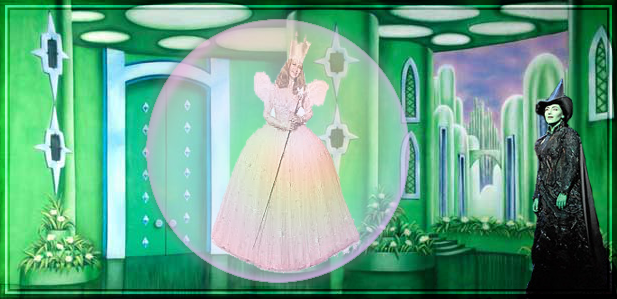
Molly, I did do a photo like you suggested. But I wanted to try and see if I could use the map to globe filter to do it…It is just very difficult to know how the ratio of the size of the people to the size of the layer will let the people look good while still looking slightly out of proportion as if they were actually inside the globe and the globe was making them look a bit warped, lol.
Here is the one I did for a friend, it is the bubble brush method you suggest…I used the curve/bend to make glinda look a bit less flat.

Image


Top
 Post subject: Re: Manhattan City
PostPosted: Sun Mar 09, 2014 11:15 pm  (#62) 
Offline
Script Coder
User avatar

Joined: Feb 18, 2011
Posts: 4826
Location: Bendigo Vic. Australia
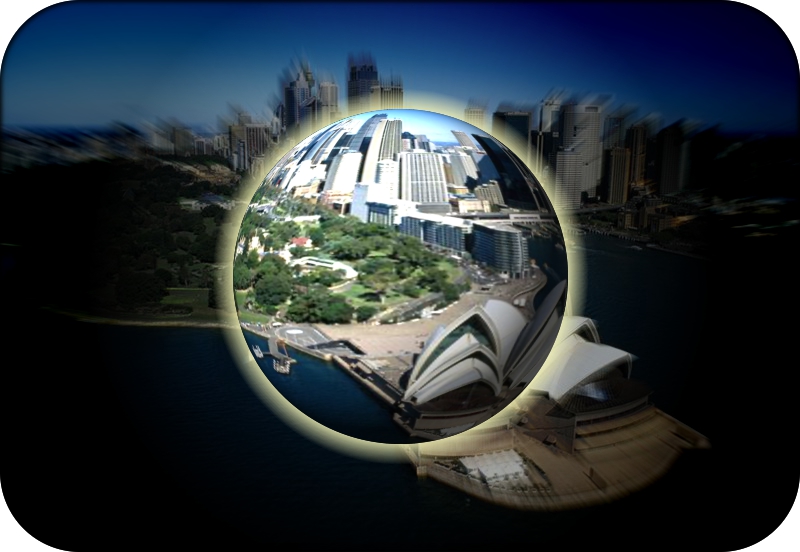
This time I thought I'd select 'keep the layers' and darken my blur layer, then I put an outer glow around the sphere
Image

_________________
Image
No matter how much you push the envelope, it'll still be stationery.


Top
 Post subject: Re: Manhattan City
PostPosted: Mon Mar 10, 2014 7:04 am  (#63) 
Offline
GimpChat Member
User avatar

Joined: Mar 01, 2014
Posts: 14178
Location: Spain, Aragón
Hello, I've been thinking about how I made a perfect sphere without almost distort in its centre. Is that what you need when there are object inside? Besides, This method admits transparency. If so, I went to filters - generic - MathMap - distort - Sphere. This works very well.


Attachments:
Sphere with transparency.png
Sphere with transparency.png [ 358.79 KiB | Viewed 2489 times ]

_________________
Image

Gimp 2.10.30(samj) portable _ OS Windows 10 Home_ 64bits
Don’t be afraid to start over. It’s a new chance to rebuild what you want.
Top
 Post subject: Re: Manhattan City
PostPosted: Mon Mar 10, 2014 9:59 am  (#64) 
Offline
GimpChat Member
User avatar

Joined: Dec 10, 2013
Posts: 1004
Another beautiful outcome - look at that! Shadow and all! You are very good Issabella. :bigthup

_________________
Image
Macbook Air - MacOS Sierra 10.12
McGimp 2.8.14
G'mic 1.6.5


Top
 Post subject: Re: Manhattan City
PostPosted: Mon Mar 10, 2014 11:54 am  (#65) 
Offline
GimpChat Member
User avatar

Joined: Mar 01, 2014
Posts: 14178
Location: Spain, Aragón
Thank you Dalia, try it with MathMap. If you can't make it, I'll explain it in a short tut. :jumpclap

_________________
Image

Gimp 2.10.30(samj) portable _ OS Windows 10 Home_ 64bits
Don’t be afraid to start over. It’s a new chance to rebuild what you want.


Top
 Post subject: Re: Manhattan City
PostPosted: Mon Mar 10, 2014 4:23 pm  (#66) 
Offline
GimpChat Member
User avatar

Joined: Mar 23, 2012
Posts: 7388
Location: Göteborg at last!
I thought I would have another go at this.

Image


Top
 Post subject: Re: Manhattan City
PostPosted: Mon Mar 10, 2014 4:36 pm  (#67) 
Offline
GimpChat Member
User avatar

Joined: Aug 16, 2012
Posts: 4271
Location: Göteborg, Sweden
issabella: i like your mathmap sphere, looks really nice with the flowers.

erisian: that's a beautiful picture! i want to walk into that bubble when i come to england.

_________________


Top
 Post subject: Re: Manhattan City
PostPosted: Mon Mar 10, 2014 4:46 pm  (#68) 
Offline
GimpChat Member
User avatar

Joined: Mar 23, 2012
Posts: 7388
Location: Göteborg at last!
AnMal wrote:
erisian: that's a beautiful picture! i want to walk into that bubble when i come to england.

It only appears every now and then so hopefully it will be there when you come.


Top
 Post subject: Re: Manhattan City
PostPosted: Mon Mar 10, 2014 5:03 pm  (#69) 
Offline
GimpChat Member
User avatar

Joined: Apr 07, 2010
Posts: 14182
Very cool Aris

_________________
Image


Top
 Post subject: Re: Manhattan City
PostPosted: Mon Mar 10, 2014 5:12 pm  (#70) 
Offline
GimpChat Member
User avatar

Joined: Apr 07, 2010
Posts: 14182
2-ton wrote:
Molly, I did do a photo like you suggested. But I wanted to try and see if I could use the map to globe filter to do it…It is just very difficult to know how the ratio of the size of the people to the size of the layer will let the people look good while still looking slightly out of proportion as if they were actually inside the globe and the globe was making them look a bit warped, lol.
Here is the one I did for a friend, it is the bubble brush method you suggest…I used the curve/bend to make glinda look a bit less flat.

Image

I like that 2-ton, it looks nice.

_________________
Image


Top
 Post subject: Re: Manhattan City
PostPosted: Mon Mar 10, 2014 9:11 pm  (#71) 
Offline
GimpChat Member
User avatar

Joined: Apr 08, 2010
Posts: 5420
Location: Northwest Ohio
Great one, Eris! It's almost alien looking, yet inviting…it really pulls you in! come into my parlor, said the spider to the fly, lol.


Top
 Post subject: Re: Manhattan City
PostPosted: Tue Mar 11, 2014 3:15 am  (#72) 
Offline
GimpChat Member
User avatar

Joined: Mar 01, 2014
Posts: 14178
Location: Spain, Aragón
Thanks AnMal, you are very kind.
Erisan, your last outcome is so attractive. You manage to achieve all you do! well done! :clap :jumpclap :yes

_________________
Image

Gimp 2.10.30(samj) portable _ OS Windows 10 Home_ 64bits
Don’t be afraid to start over. It’s a new chance to rebuild what you want.


Top
 Post subject: Re: Manhattan City
PostPosted: Tue Mar 11, 2014 3:18 am  (#73) 
Offline
GimpChat Member
User avatar

Joined: Mar 01, 2014
Posts: 14178
Location: Spain, Aragón
Molly, magic outcome! I love it!

_________________
Image

Gimp 2.10.30(samj) portable _ OS Windows 10 Home_ 64bits
Don’t be afraid to start over. It’s a new chance to rebuild what you want.


Top
 Post subject: Re: Manhattan City
PostPosted: Tue Mar 11, 2014 3:40 am  (#74) 
Offline
GimpChat Member
User avatar

Joined: Mar 23, 2012
Posts: 7388
Location: Göteborg at last!
Thanks everyone. At the end, I used levels, Hue/saturation and sharpen on the bubble layer to make it stand out more.


Top
 Post subject: Re: Manhattan City
PostPosted: Wed Mar 12, 2014 5:58 pm  (#75) 
Offline
GimpChat Member
User avatar

Joined: Jan 10, 2013
Posts: 863
Hi Issabella!
Thanks for the tutorial!
Nice effect! :tyspin

_________________
bbbbbbbbbbbImage
bbbbbbbbbbb Be patient, English is not my language.


Top
 Post subject: Re: Manhattan City
PostPosted: Thu Mar 13, 2014 2:54 am  (#76) 
Offline
GimpChat Member
User avatar

Joined: Mar 01, 2014
Posts: 14178
Location: Spain, Aragón
Thanks to you Akros. It's a pleasure for me to share my little knowledge about the possibilities of Gimp, in this marvellous Gimp-Chat Group. :tyspin

_________________
Image

Gimp 2.10.30(samj) portable _ OS Windows 10 Home_ 64bits
Don’t be afraid to start over. It’s a new chance to rebuild what you want.


Top
 Post subject: Re: Manhattan City
PostPosted: Thu May 15, 2014 4:54 pm  (#77) 
Offline
New Member

Joined: May 15, 2014
Posts: 1
Cant wait to try this one. Thank you for posting it


Top
 Post subject: Re: Manhattan City
PostPosted: Thu May 15, 2014 6:36 pm  (#78) 
Offline
Script Coder
User avatar

Joined: May 07, 2014
Posts: 4528
Location: Canada
butchart gardens. Very sweet looking effect. Thanks for showing us with your tutorial! :)
Attachment:
File comment: butchart gardens
butchartgardens.png
butchartgardens.png [ 365.48 KiB | Viewed 2603 times ]

The sphere map object is just too cool
so i selected many different squares, copy and paste in position and sphere mapped.
Attachment:
butchartgardens2.png
butchartgardens2.png [ 471.82 KiB | Viewed 2601 times ]

_________________
TinT


Top
 Post subject: Re: Manhattan City
PostPosted: Thu May 15, 2014 7:16 pm  (#79) 
Offline
Script Coder
User avatar

Joined: May 07, 2014
Posts: 4528
Location: Canada
Attachment:
buddha.png
buddha.png [ 403.73 KiB | Viewed 2601 times ]

buddha features :)

_________________
TinT


Top
 Post subject: Re: Manhattan City
PostPosted: Thu May 15, 2014 7:22 pm  (#80) 
Offline
GimpChat Member
User avatar

Joined: Apr 08, 2010
Posts: 5420
Location: Northwest Ohio
One of my favorite tutorials!!! Such an impressive effect but not too hard to do.


Top
Post new topic Reply to topic  [ 90 posts ]  Go to page Previous  1, 2, 3, 4, 5  Next

All times are UTC - 5 hours [ DST ]


* Login  


Powered by phpBB3 © phpBB Group