It is currently Tue Aug 11, 2026 2:38 pm


All times are UTC - 5 hours [ DST ]


Post new topic Reply to topic  [ 12 posts ] 
Author Message
 Post subject: I am struggling with this one. LOOKS COOL
PostPosted: Thu Apr 09, 2015 3:36 pm  (#1) 
Offline
GimpChat Member

Joined: Mar 02, 2013
Posts: 73
Hey Folks,
I found this tutorial on creating a dinosaur painting. The Layers masks and the Layer Modes are throwing me for a loop. You guys and gals are very talented with the GIMP software. Give it a shot, and see if it works for you.

I do not even know how to explain my troubles. I am getting an image. Just does not look great.

Thanks,
FB66

http://www.asganafer.it/watercolor-effect-parte-1/


Last edited by Fullback66 on Thu Apr 09, 2015 3:57 pm, edited 1 time in total.

Share on Facebook Share on Twitter Share on Orkut Share on Digg Share on MySpace Share on Delicious Share on Technorati
Top
 Post subject: Re: I am struggling with this one. LOOKS COOL
PostPosted: Thu Apr 09, 2015 3:56 pm  (#2) 
Offline
Administrator
User avatar

Joined: Aug 10, 2012
Posts: 14151
Location: Native to NYC living in Arizona, Gimp 2.8 - 3.0, Win 11 PC.
We need more information...

_________________
Image
"A wise man learns more from a foolish question than a fool can learn from a wise answer"
Image


Top
 Post subject: Re: I am struggling with this one. LOOKS COOL
PostPosted: Thu Apr 09, 2015 3:58 pm  (#3) 
Offline
GimpChat Member

Joined: Mar 02, 2013
Posts: 73
sorry, forgot the website.

http://www.asganafer.it/watercolor-effect-parte-1/


Top
 Post subject: Re: I am struggling with this one. LOOKS COOL
PostPosted: Thu Apr 09, 2015 4:26 pm  (#4) 
Offline
Administrator
User avatar

Joined: Aug 10, 2012
Posts: 14151
Location: Native to NYC living in Arizona, Gimp 2.8 - 3.0, Win 11 PC.
Fullback66 wrote:

You left out one more important bit of information, that this tutorial is in Spanish. :hehe

It looks as though the layer masks used in this tutorial are added to the selections. If you have some basic knowledge of how layer masking is done, this should be an easy task. However, I do believe that the selections made were saved to a channel for later use as well.
This is a good way to preserve a selection, instead of trying to recreate a given selection that has already been made. Which in most cases is nearly impossible to accomplish.

_________________
Image
"A wise man learns more from a foolish question than a fool can learn from a wise answer"
Image


Top
 Post subject: Re: I am struggling with this one. LOOKS COOL
PostPosted: Thu Apr 09, 2015 4:30 pm  (#5) 
Offline
GimpChat Member
User avatar

Joined: Aug 28, 2012
Posts: 3060
Location: Idk where I am.
I believe that's Italian, but yes I'm not sure how most of us can help with that there...Maybe GinoD?

_________________
Image
Reality is a lovely place...But I wouldn't wanna live there.


Top
 Post subject: Re: I am struggling with this one. LOOKS COOL
PostPosted: Thu Apr 09, 2015 4:36 pm  (#6) 
Offline
GimpChat Member
User avatar

Joined: Jan 31, 2015
Posts: 146
According to google translate it's Italian. Copy and paste the URL into google, and try "translate this page" from there.


Top
 Post subject: Re: I am struggling with this one. LOOKS COOL
PostPosted: Thu Apr 09, 2015 4:52 pm  (#7) 
Offline
Administrator
User avatar

Joined: Aug 10, 2012
Posts: 14151
Location: Native to NYC living in Arizona, Gimp 2.8 - 3.0, Win 11 PC.
David-C wrote:
According to google translate it's Italian. Copy and paste the URL into google, and try "translate this page" from there.

Yes, I was mistaken it is Italian and not Spanish. :oops:
If you're a Google Chrome user, there is a translation setting that can translate any webpage into your preferred langue.
Image

Go to your Chrome "Settings Page", scroll down to the bottom of the page and click on "Show advanced settings" and the "Language and input settings" will be shown near the bottom of the page.
Image
Check the box next to "Offer to translate pages that aren't in a language you read".


Here is a screenshot of the entire webpage translated into English.
Image

_________________
Image
"A wise man learns more from a foolish question than a fool can learn from a wise answer"
Image


Last edited by Wallace on Thu Apr 09, 2015 5:44 pm, edited 2 times in total.

Top
 Post subject: Re: I am struggling with this one. LOOKS COOL
PostPosted: Thu Apr 09, 2015 5:31 pm  (#8) 
Offline
GimpChat Member
User avatar

Joined: Nov 16, 2011
Posts: 5127
Location: Metro Vancouver, BC
Fullback66 wrote:
I do not even know how to explain my troubles. I am getting an image. Just does not look great.
Post your result so it can be compared with the tutorial, I'm sure someone will help with any differences.

_________________
Image
Gimp 2.8.18, Linux, median user
Gimp Chat Tutorials Index
Spirit Bear (Kermode)


Top
 Post subject: Re: I am struggling with this one. LOOKS COOL
PostPosted: Thu Apr 09, 2015 7:21 pm  (#9) 
Offline
GimpChat Member

Joined: Mar 02, 2013
Posts: 73
I will do that


Attachments:
T-REX to send and fix.jpg
T-REX to send and fix.jpg [ 664.26 KiB | Viewed 7613 times ]
Top
 Post subject: Re: I am struggling with this one. LOOKS COOL
PostPosted: Thu Apr 09, 2015 7:47 pm  (#10) 
Offline
GimpChat Member

Joined: Mar 02, 2013
Posts: 73
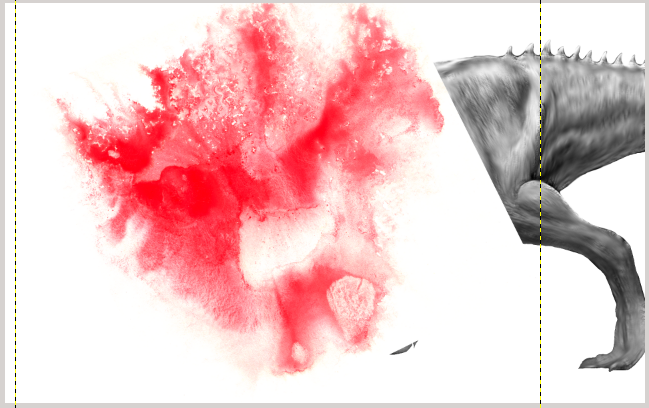
Look at the last 2 images in the t-rex Tutorial.
Why are those layers offset?
How do you do that?


Top
 Post subject: Re: I am struggling with this one. LOOKS COOL
PostPosted: Thu Apr 09, 2015 8:13 pm  (#11) 
Offline
Administrator
User avatar

Joined: Aug 10, 2012
Posts: 14151
Location: Native to NYC living in Arizona, Gimp 2.8 - 3.0, Win 11 PC.
Fullback66 wrote:
Look at the last 2 images in the t-rex Tutorial.
Why are those layers offset?
How do you do that?

I don't see what you're getting at, offset how? I don't see an offset.
Do you mean the layer group, or the something in the layers themselves?

_________________
Image
"A wise man learns more from a foolish question than a fool can learn from a wise answer"
Image


Top
 Post subject: Re: I am struggling with this one. LOOKS COOL
PostPosted: Thu Apr 09, 2015 11:09 pm  (#12) 
Offline
Script Coder
User avatar

Joined: Apr 23, 2010
Posts: 1553
Location: not from Guildford after all
Fullback66 wrote:
Look at the last 2 images in the t-rex Tutorial.
Why are those layers offset?
How do you do that?


If you look at the 7th image in the tutorial, it appears that the colored texture layer has been rotated and moved.
Image

This is accomplished using GIMP's Rotate Tool :rot and Move Tool :move. I don't see this step described in the text (but then I don't speak Italian). Also missing from the text description is the addition of a white background layer.

_________________
Any sufficiently primitive technology is indistinguishable from a rock.


Top
Post new topic Reply to topic  [ 12 posts ] 

All times are UTC - 5 hours [ DST ]


* Login  


Powered by phpBB3 © phpBB Group