It is currently Sun Aug 02, 2026 3:44 am


All times are UTC - 5 hours [ DST ]


Post new topic Reply to topic  [ 5 posts ] 
Author Message
 Post subject: How to make a Globe/Planet photo manipulation
PostPosted: Tue Aug 17, 2010 7:51 am  (#1) 
Offline
GimpChat Member
User avatar

Joined: Apr 16, 2010
Posts: 24
Here is the tutorial:

http://www.scottphotographics.com/how-t ... n-in-gimp/

:)


Share on Facebook Share on Twitter Share on Orkut Share on Digg Share on MySpace Share on Delicious Share on Technorati
Top
 Post subject: Re: How to make a Globe/Planet photo manipulation
PostPosted: Tue Aug 17, 2010 11:51 am  (#2) 
Offline
Global Moderator
User avatar

Joined: May 16, 2010
Posts: 16144
Oh i saw someone do that with a forest once, this is a cool effect.

Thanks Michael. =)

_________________
Image


Top
 Post subject: Re: How to make a Globe/Planet photo manipulation
PostPosted: Tue Aug 17, 2010 12:29 pm  (#3) 
Offline
Retired Staff
User avatar

Joined: May 22, 2008
Posts: 6946
Location: Somewhere in GIMP
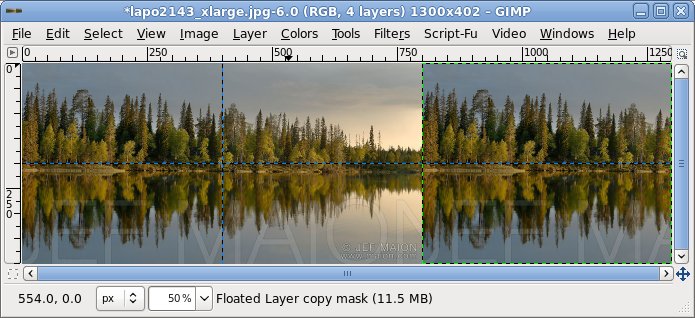
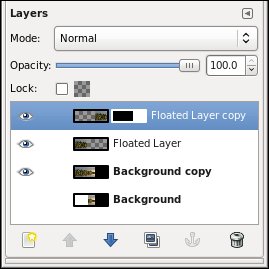
You lost me after the layer mask. Don't know how you applied the black to transparent gradient and had them come out seamless.

My image zoomed out with selection at right.
Image

Layers after adding layermask.

Image

_________________
Image
World War IV will be fought with sticks and stones. - Albert Einstein


Top
 Post subject: Re: How to make a Globe/Planet photo manipulation
PostPosted: Tue Aug 17, 2010 1:16 pm  (#4) 
Offline
Global Moderator
User avatar

Joined: May 16, 2010
Posts: 16144
I have to take some good pictures i can use for this tutorial.All mine have no depth ...lol

_________________
Image


Top
 Post subject: Re: How to make a Globe/Planet photo manipulation
PostPosted: Fri Aug 20, 2010 10:30 pm  (#5) 
Offline
GimpChat Member
User avatar

Joined: Apr 16, 2010
Posts: 24
Thanks for the feedback!

There are a lot of instructions for a good result with Step 1.b. but not necessary you can skip it!

The Layer Mask is so the image underneath shows through, when you use the Blend/Gradient Tool. Now use a White only FG gradient, Linear - to blend the side/edge image with the whole image underneath, stroke horizontally.
All this is done on the Mask (white box on the layer you can see).

I hope that helped :coolthup


Top
Post new topic Reply to topic  [ 5 posts ] 

All times are UTC - 5 hours [ DST ]


* Login  


Powered by phpBB3 © phpBB Group