It is currently Wed Sep 09, 2026 8:52 am


All times are UTC - 5 hours [ DST ]


Post new topic Reply to topic  [ 8 posts ] 
Author Message
 Post subject: Stroke path with paint tool.
PostPosted: Thu May 03, 2012 1:45 pm  (#1) 
Offline
GimpChat Member
User avatar

Joined: Mar 23, 2012
Posts: 7388
Location: Göteborg at last!
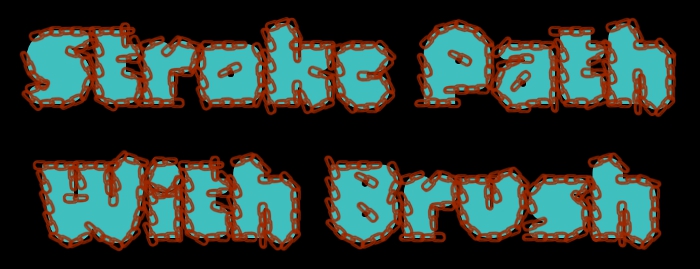
Gimp 2.8 users could have a field day with this one if they play with their brush dynamics. When I created "Beth", viewtopic.php?f=11&t=4178 I discovered the potential of stroking a path with a paint tool. This could be combined with selection to path to produce some interesting results.

Image

Image


Share on Facebook Share on Twitter Share on Orkut Share on Digg Share on MySpace Share on Delicious Share on Technorati
Top
 Post subject: Re: Stroke path with paint tool.
PostPosted: Thu May 03, 2012 1:54 pm  (#2) 
Offline
Global Moderator
User avatar

Joined: May 16, 2010
Posts: 16170
Have you installed any of Ofnuts path tools yet?
He has some nice ones. :)
http://gimp-path-tools.sourceforge.net/tools.shtml

_________________
Image


Top
 Post subject: Re: Stroke path with paint tool.
PostPosted: Thu May 03, 2012 2:01 pm  (#3) 
Offline
GimpChat Member
User avatar

Joined: Mar 23, 2012
Posts: 7388
Location: Göteborg at last!
I've got a few of them but I've bookmarked this page for later. Thank you Rod.


Top
 Post subject: Re: Stroke path with paint tool.
PostPosted: Thu May 03, 2012 2:04 pm  (#4) 
Offline
Global Moderator
User avatar

Joined: May 16, 2010
Posts: 16170
I actually use this method Brush to Path for all my PhotoFont glyphs. :)
Makes the work much, much easier.

_________________
Image


Top
 Post subject: Re: Stroke path with paint tool.
PostPosted: Thu May 03, 2012 2:15 pm  (#5) 
Offline
GimpChat Member
User avatar

Joined: Mar 23, 2012
Posts: 7388
Location: Göteborg at last!
I discovered it because I couldn't produce accurate results with my wacom. GPS special brush bitmap and stroke path gave me the idea.


Top
 Post subject: Re: Stroke path with paint tool.
PostPosted: Thu May 03, 2012 2:47 pm  (#6) 
Offline
GimpChat Member
User avatar

Joined: Sep 24, 2010
Posts: 12845
I like the results Erisian; yes, I do this a lot and a lot of that reason is my lack of having a pad. lol

Stroking path gives you cleaner and better (like 10 times superior) results then stroking a selection but I use both methods quite often. Now you are getting to the point of letting GIMP do all the work (or as much as feasibly possibly). That's the lazy filter guy method so welcome to the club. lol

Better to be the maestro then a player anyway. Challenging sometimes but the more tricks you learn, the faster and better your results will be. Love faking things (i.e., making GIMP do all the work or a Photoshop filter). lol

:)

_________________
Lyle

Psalm 109:8

Image


Top
 Post subject: Re: Stroke path with paint tool.
PostPosted: Thu May 03, 2012 3:11 pm  (#7) 
Offline
GimpChat Member
User avatar

Joined: Mar 23, 2012
Posts: 7388
Location: Göteborg at last!
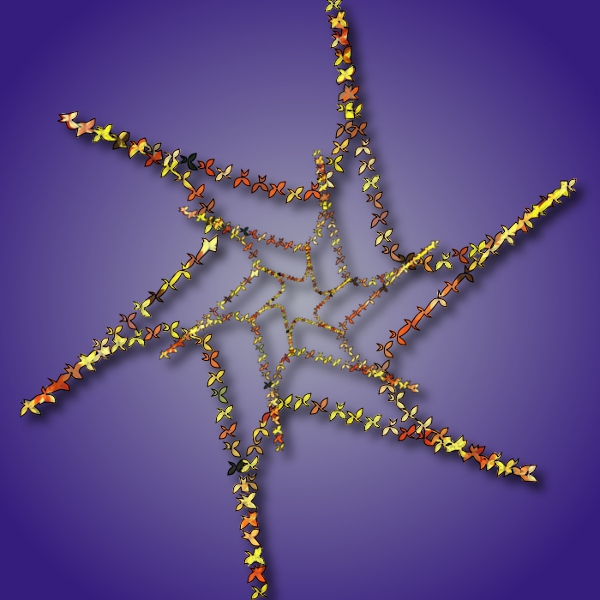
I'm beginning to see that laziness can be cool, Lyle. Letting filters and scripts do the work is great fun. Here's one with shape paths.

Image


Top
 Post subject: Re: Stroke path with paint tool.
PostPosted: Thu May 03, 2012 3:30 pm  (#8) 
Offline
GimpChat Member
User avatar

Joined: Sep 24, 2010
Posts: 12845
That definitely looks cool too Erisian; hate to have to manually place (and resize) all them butterflies. lol

Viva la filter guys (and gals). ;)

:)

_________________
Lyle

Psalm 109:8

Image


Top
Post new topic Reply to topic  [ 8 posts ] 

All times are UTC - 5 hours [ DST ]


* Login  


Powered by phpBB3 © phpBB Group