It is currently Sun Jul 26, 2026 11:48 pm


All times are UTC - 5 hours [ DST ]


Post new topic Reply to topic  [ 12 posts ] 
Author Message
 Post subject: PhotoMaster's Cloudy Text Tutorial
PostPosted: Sat Aug 28, 2010 9:34 am  (#1) 
Offline
GimpChat Member
User avatar

Joined: Jul 04, 2010
Posts: 2253
Location: Retired Moderator Slowly Returning to the Living.
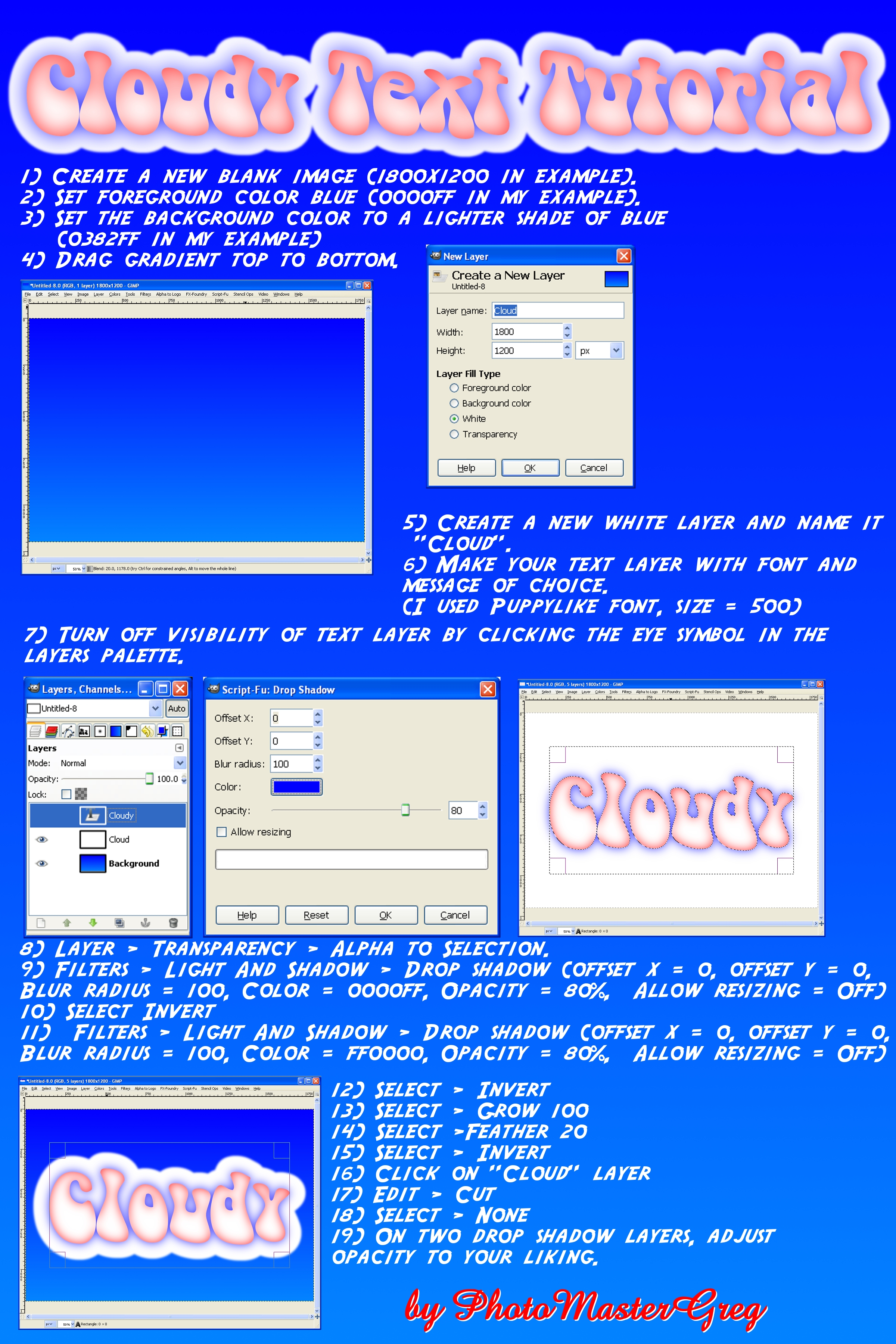
This is a simple Cloudy Text tutorial. I believe I got the font from dafonts.com website.

Image
Cloudy Text Tutorial by photomastergreg, on Flickr

_________________
Artists aren't crazy! We're eccentric! ~G.M. Ross

Image

My Sigs = My Photos
Check out my work at http://www.flickr.com/photos/photomastergreg.


Share on Facebook Share on Twitter Share on Orkut Share on Digg Share on MySpace Share on Delicious Share on Technorati
Top
 Post subject: Re: PhotoMaster's Cloudy Text Tutorial
PostPosted: Sat Aug 28, 2010 6:35 pm  (#2) 
Offline
Retired Staff
User avatar

Joined: May 22, 2008
Posts: 6946
Location: Somewhere in GIMP
Here's mine. I made my clouds gray.

Image

_________________
Image
World War IV will be fought with sticks and stones. - Albert Einstein


Top
 Post subject: Re: PhotoMaster's Cloudy Text Tutorial
PostPosted: Sat Aug 28, 2010 6:50 pm  (#3) 
Offline
GimpChat Member
User avatar

Joined: Jul 04, 2010
Posts: 2253
Location: Retired Moderator Slowly Returning to the Living.
Great work! What font did you use? It's perfect for this one!

_________________
Artists aren't crazy! We're eccentric! ~G.M. Ross

Image

My Sigs = My Photos
Check out my work at http://www.flickr.com/photos/photomastergreg.


Top
 Post subject: Re: PhotoMaster's Cloudy Text Tutorial
PostPosted: Sat Aug 28, 2010 8:34 pm  (#4) 
Offline
Retired Staff
User avatar

Joined: May 22, 2008
Posts: 6946
Location: Somewhere in GIMP
This isn't the only cloud font. I like this one because it has small caps for the lower case. Alpha Clouds font

If you do a Google search for cloud fonts, you will find others.

I filled this in using solid noise and lightening it.

Image

_________________
Image
World War IV will be fought with sticks and stones. - Albert Einstein


Top
 Post subject: Re: PhotoMaster's Cloudy Text Tutorial
PostPosted: Sat Aug 28, 2010 9:40 pm  (#5) 
Offline
GimpChat Member
User avatar

Joined: Apr 08, 2010
Posts: 5420
Location: Northwest Ohio
had to do a quick try on this one!
Image


Top
 Post subject: Re: PhotoMaster's Cloudy Text Tutorial
PostPosted: Tue Aug 31, 2010 11:06 am  (#6) 
Offline
GimpChat Member
User avatar

Joined: Aug 31, 2010
Posts: 17
Oregonian wrote:
This isn't the only cloud font. I like this one because it has small caps for the lower case. Alpha Clouds font

If you do a Google search for cloud fonts, you will find others.

I filled this in using solid noise and lightening it.

Image


How did you make the words without a background? I tried to make "LUCKY40" without a background and the background came out red. Maybe, its because I outline the letters in red?

_________________
Image

Feel free to help me with my Youtube Channel Click Here


Top
 Post subject: Re: PhotoMaster's Cloudy Text Tutorial
PostPosted: Tue Aug 31, 2010 12:17 pm  (#7) 
Offline
Retired Staff
User avatar

Joined: May 22, 2008
Posts: 6946
Location: Somewhere in GIMP
LUCKY40 wrote:

How did you make the words without a background? I tried to make "LUCKY40" without a background and the background came out red. Maybe, its because I outline the letters in red?
It's very likely you didn't have an alpha channel on your Lucky40 layer.

Right-click the LUCKY40 layer and in the drop down, choose Add Alpha channel.

If you are wondering what Alpha channel is, alpha = transparent.

Layers that don't have an alpha channel have bold type in their names. Also, if your image is a jpg, jpg doesn't support transparency. You're better off saving your image as a png image.

_________________
Image
World War IV will be fought with sticks and stones. - Albert Einstein


Top
 Post subject: Re: PhotoMaster's Cloudy Text Tutorial
PostPosted: Tue Aug 31, 2010 12:59 pm  (#8) 
Offline
GimpChat Member

Joined: Aug 27, 2010
Posts: 491
I had a bit of fun with this ... :hehe

Image


Top
 Post subject: Re: PhotoMaster's Cloudy Text Tutorial
PostPosted: Tue Aug 31, 2010 4:08 pm  (#9) 
Offline
Retired Staff
User avatar

Joined: May 22, 2008
Posts: 6946
Location: Somewhere in GIMP
Hey Mike! That's very cool!

_________________
Image
World War IV will be fought with sticks and stones. - Albert Einstein


Top
 Post subject: Re: PhotoMaster's Cloudy Text Tutorial
PostPosted: Tue Aug 31, 2010 4:22 pm  (#10) 
Offline
Retired Staff
User avatar

Joined: May 22, 2008
Posts: 6946
Location: Somewhere in GIMP
LUCKY40 wrote:

How did you make the words without a background? I tried to make "LUCKY40" without a background and the background came out red. Maybe, its because I outline the letters in red?
LUCKY40, I downloaded your sig. It's a jpg image and it will not support transparency. You need to save it as a png image. You probably had red as the BG color and that's why it came out with a red background.


I removed the white background and saved it as a png image. You can right-click it, download it and open it in GIMP to see the transparent bg in it.
Image

_________________
Image
World War IV will be fought with sticks and stones. - Albert Einstein


Top
 Post subject: Re: PhotoMaster's Cloudy Text Tutorial
PostPosted: Tue Aug 31, 2010 8:25 pm  (#11) 
Offline
GimpChat Member
User avatar

Joined: Aug 31, 2010
Posts: 17
Oregonian wrote:
LUCKY40 wrote:

How did you make the words without a background? I tried to make "LUCKY40" without a background and the background came out red. Maybe, its because I outline the letters in red?
LUCKY40, I downloaded your sig. It's a jpg image and it will not support transparency. You need to save it as a png image. You probably had red as the BG color and that's why it came out with a red background.


I removed the white background and saved it as a png image. You can right-click it, download it and open it in GIMP to see the transparent bg in it.
Image

Thank you! I got my sig the way I like it :)

_________________
Image

Feel free to help me with my Youtube Channel Click Here


Top
 Post subject: Re: PhotoMaster's Cloudy Text Tutorial
PostPosted: Wed Sep 01, 2010 12:40 am  (#12) 
Offline
Global Moderator
User avatar

Joined: May 16, 2010
Posts: 16133
Mine turned out kinda funky looking, maybe because of the two lines of text...lol
Image

_________________
Image


Top
Post new topic Reply to topic  [ 12 posts ] 

All times are UTC - 5 hours [ DST ]


* Login  


Powered by phpBB3 © phpBB Group