It is currently Mon Jul 20, 2026 2:55 pm


All times are UTC - 5 hours [ DST ]


Post new topic Reply to topic  [ 6 posts ] 
Author Message
 Post subject: Adding G'MIC and MathMap to Onkels Gimp-Painter-2.8
PostPosted: Sun Jun 02, 2013 1:50 pm  (#1) 
Offline
Global Moderator
User avatar

Joined: May 16, 2010
Posts: 16123
Adding MathMap - download the file below.

MathMap Plugin

To install the Mathmap filter follow these directions PRECISELY or it will not work.
Unzip the download
There are two folders in the zip
MM_Add_2_plug-ins AND
mathmap

1) mathmap MUST be placed in the gimp-painter-2.8\.gimp-2.8 folder
2) All files INSIDE the MM_Add_2_plug-ins folder MUST go in the gimp-painter-2.8\.gimp-2.8\plug-ins folder


Now restart Gimp Painter and you should have mathmap

You will find Mathmap under Filters > Generic > Mathmap
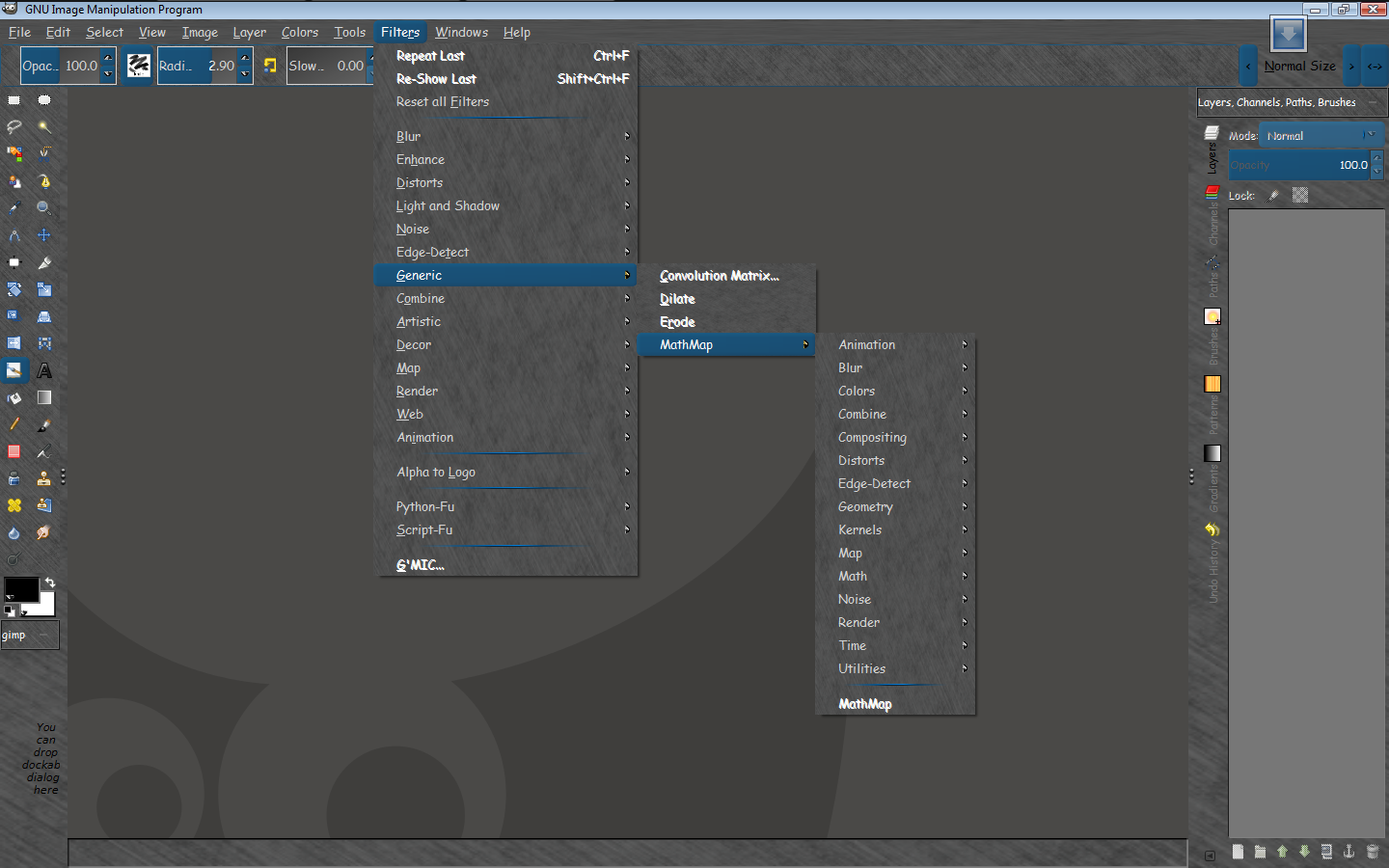
Image

G'MIC is as simple as installing into the gimp-painter-2.8\plug-ins folder.
You will find G'MIC under Filters>G'MIC

_________________
Image


Share on Facebook Share on Twitter Share on Orkut Share on Digg Share on MySpace Share on Delicious Share on Technorati
Top
 Post subject: Re: Adding G'MIC and MathMap to Onkels Gimp-Painter-2.8
PostPosted: Sun Jun 02, 2013 8:00 pm  (#2) 
Offline
Administrator
User avatar

Joined: Aug 10, 2012
Posts: 14126
Location: Native to NYC living in Arizona, Gimp 2.8 - 3.0, Win 11 PC.
Rod wrote:
Adding MathMap Plugin-

To install the Mathmap filter follow these directions PRECISELY or it will not work.
Unzip the download
There are two folders in the zip
MM_Add_2_plug-ins AND
mathmap
1) mathmap MUST be placed in the gimp-painter-2.8\.gimp-2.8 folder
2) All files INSIDE the MM_Add_2_plug-ins folder MUST go in the gimp-painter-2.8\.gimp-2.8\plug-ins folder

Now restart Gimp Painter and you should have mathmap

You will find Mathmap under Filters > Generic > Mathmap
G'MIC is as simple as installing into the gimp-painter-2.8\plug-ins folder.
You will find G'MIC under Filters>G'MIC

Image

_________________
Image
"A wise man learns more from a foolish question than a fool can learn from a wise answer"
Image


Top
 Post subject: Re: Adding G'MIC and MathMap to Onkels Gimp-Painter-2.8
PostPosted: Sun Jun 02, 2013 8:35 pm  (#3) 
Offline
Script Coder
User avatar

Joined: Feb 18, 2011
Posts: 4826
Location: Bendigo Vic. Australia
Rod did this work in the 64bit version as well

_________________
Image
No matter how much you push the envelope, it'll still be stationery.


Top
 Post subject: Re: Adding G'MIC and MathMap to Onkels Gimp-Painter-2.8
PostPosted: Sun Jun 02, 2013 8:37 pm  (#4) 
Offline
Global Moderator
User avatar

Joined: May 16, 2010
Posts: 16123
Graechan wrote:
Rod did this work in the 64bit version as well


I do not have 64 bit, but i imagine it would. :)

_________________
Image


Top
 Post subject: Re: Adding G'MIC and MathMap to Onkels Gimp-Painter-2.8
PostPosted: Mon Jun 03, 2013 2:26 am  (#5) 
Offline
Script Coder
User avatar

Joined: Feb 18, 2011
Posts: 4826
Location: Bendigo Vic. Australia
Well I could not get MathMap on the 64bit Painter working before but now with your files it works :jumpclap :bigthup thanks Rod

_________________
Image
No matter how much you push the envelope, it'll still be stationery.


Top
 Post subject: Re: Adding G'MIC and MathMap to Onkels Gimp-Painter-2.8
PostPosted: Mon Jun 03, 2013 11:25 am  (#6) 
Offline
Global Moderator
User avatar

Joined: May 16, 2010
Posts: 16123
Graechan wrote:
Well I could not get MathMap on the 64bit Painter working before but now with your files it works :jumpclap :bigthup thanks Rod


Your welcome. :) I am very happy it works for you.

_________________
Image


Top
Post new topic Reply to topic  [ 6 posts ] 

All times are UTC - 5 hours [ DST ]


* Login  


Powered by phpBB3 © phpBB Group