It is currently Tue Aug 04, 2026 3:41 pm


All times are UTC - 5 hours [ DST ]


Post new topic Reply to topic  [ 11 posts ] 
Author Message
 Post subject: Gator text
PostPosted: Sat Jun 29, 2013 12:23 am  (#1) 
Offline
Global Moderator
User avatar

Joined: May 16, 2010
Posts: 16147
Image
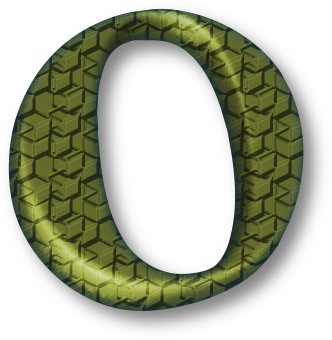
typeface is called "savatage"

_________________
Image


Share on Facebook Share on Twitter Share on Orkut Share on Digg Share on MySpace Share on Delicious Share on Technorati
Top
 Post subject: Re: Gator text
PostPosted: Sat Jun 29, 2013 3:58 am  (#2) 
Offline
GimpChat Member
User avatar

Joined: Nov 16, 2011
Posts: 5127
Location: Metro Vancouver, BC
Looks good, Rod!
The text note is good but how...?
Is this script or a technique?

_________________
Image
Gimp 2.8.18, Linux, median user
Gimp Chat Tutorials Index
Spirit Bear (Kermode)


Top
 Post subject: Re: Gator text
PostPosted: Sat Jun 29, 2013 4:50 am  (#3) 
Offline
GimpChat Member
User avatar

Joined: Aug 16, 2012
Posts: 4271
Location: Göteborg, Sweden
rod: cool! and i also wondered how?

_________________


Top
 Post subject: Re: Gator text
PostPosted: Sat Jun 29, 2013 7:27 am  (#4) 
Offline
Global Moderator
User avatar

Joined: May 16, 2010
Posts: 16147
Odinbc wrote:
Looks good, Rod!
The text note is good but how...?
Is this script or a technique?

You will need G'MIC - http://gmic.eu/
and GC Drop Shadow scm script - http://gimpscripts.com/2013/05/gc-shadow/

Create a new image - white bg
Create some text
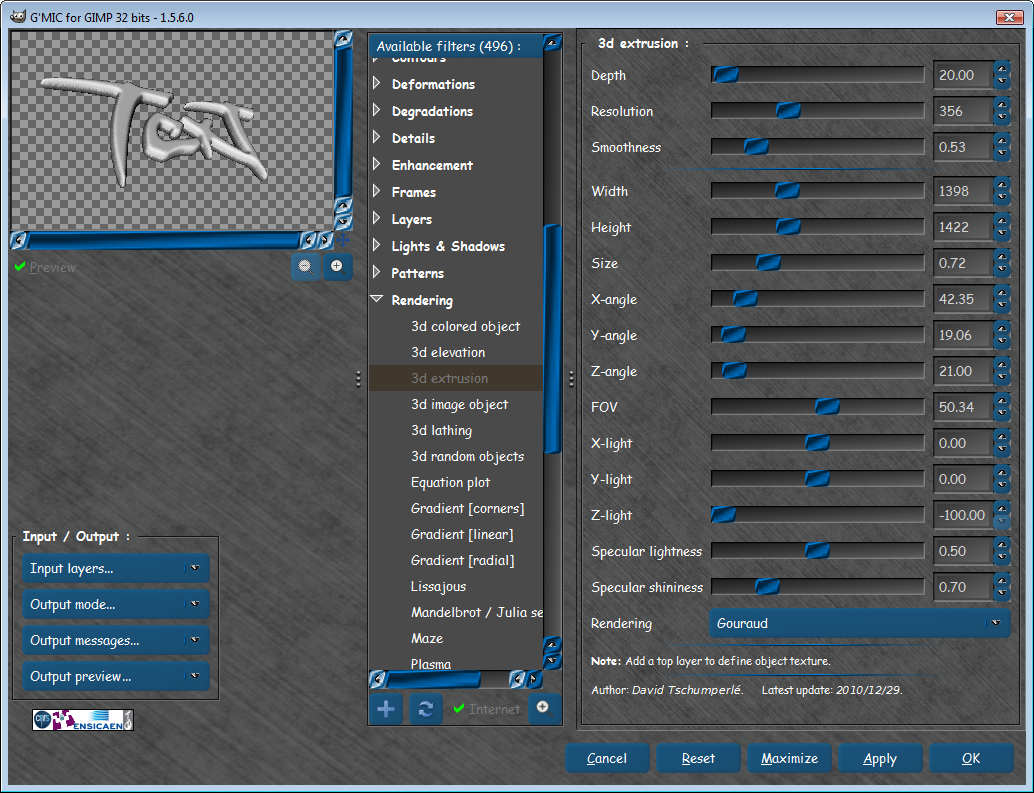
Open G'MIC>Rendering>3d extrusion (set your extrusion the way you want it).I used these settings
Image
Now do a alpha to selection on the new text layer, and create a new layer - fill the selection on the new layer with the Red Cubes 64x64 pattern)
Set that layer mode to overlay.
Copy overlay layer 2 more times.
Make the white bg layer invisible.
New from visible.
Make all layers invisible except bg and visible layer.
Select visible layer
Run Filters>light and shadow>gc dropshadow with inner glow and shadow all else default.
Select visible layer
Go to Filters>light and Shadow>drop shadow - use defaults.
Select visible layer
Go to colors>colorize and color how you want. :)

That's it.
XCF attached also. :bigthup
Attachment:
3D-text-GMIC.xcf [1.86 MiB]
Downloaded 512 times


I have actually thought about scripting this one.
Maybe. :hehe

_________________
Image


Top
 Post subject: Re: Gator text
PostPosted: Sat Jun 29, 2013 7:47 am  (#5) 
Offline
Global Moderator
User avatar

Joined: May 16, 2010
Posts: 16147
Moved to text tutorials.

_________________
Image


Top
 Post subject: Re: Gator text
PostPosted: Sat Jun 29, 2013 12:14 pm  (#6) 
Offline
GimpChat Member
User avatar

Joined: Nov 16, 2011
Posts: 5127
Location: Metro Vancouver, BC
Rod, Thanks for the tutorial :bigthup

_________________
Image
Gimp 2.8.18, Linux, median user
Gimp Chat Tutorials Index
Spirit Bear (Kermode)


Top
 Post subject: Re: Gator text
PostPosted: Sat Jun 29, 2013 1:50 pm  (#7) 
Offline
Retired Staff
User avatar

Joined: May 22, 2008
Posts: 6946
Location: Somewhere in GIMP
That was fun and easy. I don't know how you got some of your edges smooth without the scales. Also, after alpha to selection and filling with pattern, needs to be deselected.

Nice tutorial, Rod. :bigthup

Image

_________________
Image
World War IV will be fought with sticks and stones. - Albert Einstein


Top
 Post subject: Re: Gator text
PostPosted: Sat Jun 29, 2013 2:24 pm  (#8) 
Offline
GimpChat Member
User avatar

Joined: Apr 07, 2010
Posts: 14182
:pengy cool :bigthup

_________________
Image


Top
 Post subject: Re: Gator text
PostPosted: Sat Jun 29, 2013 8:59 pm  (#9) 
Offline
Global Moderator
User avatar

Joined: May 16, 2010
Posts: 16147
To be perfectly honest i have no idea how i got that alpha effect either.
Maybe one or two of the copied pattern layers opacity setting was different?

Thanks for the tut corrections O. :bigthup

_________________
Image


Top
 Post subject: Re: Gator text
PostPosted: Sat Jun 29, 2013 10:41 pm  (#10) 
Offline
GimpChat Member
User avatar

Joined: Jan 10, 2013
Posts: 863
Thx Rod!
These Red Cubes 64x64 pattern turned out great! First time I use the Rendering> 3D extrusion
Grateful for the tuto!

_________________
bbbbbbbbbbbImage
bbbbbbbbbbb Be patient, English is not my language.


Top
 Post subject: Re: Gator text
PostPosted: Sat Jun 29, 2013 10:43 pm  (#11) 
Offline
Global Moderator
User avatar

Joined: May 16, 2010
Posts: 16147
You are all very welcome and i am glad you liked the tutorial. :)

_________________
Image


Top
Post new topic Reply to topic  [ 11 posts ] 

All times are UTC - 5 hours [ DST ]


* Login  


Powered by phpBB3 © phpBB Group