It is currently Sat Oct 31, 2026 8:47 pm


All times are UTC - 5 hours [ DST ]


Post new topic Reply to topic  [ 49 posts ]  Go to page Previous  1, 2, 3  Next
Author Message
 Post subject: Re: Animated Ligntining Text Effect
PostPosted: Mon Jun 10, 2013 8:52 am  (#21) 
Offline
GimpChat Member
User avatar

Joined: Apr 07, 2010
Posts: 14182
You are right about that Wallace. My first animations were before Saulgoode wrote those scripts and wow, did it ever cut down the steps. I love that combine background one.
I have cropped a lot of my animations and used the crop tool and when I cropped one layer, they all cropped.

_________________
Image


Top
 Post subject: Re: Animated Ligntining Text Effect
PostPosted: Mon Jun 10, 2013 6:48 pm  (#22) 
Offline
GimpChat Member
User avatar

Joined: Jun 02, 2013
Posts: 2090
molly wrote:
I love that combine background one.
I have cropped a lot of my animations and used the crop tool and when I cropped one layer, they all cropped.

Didn't know that. Will have to give that one a go.

_________________
Image


Top
 Post subject: Re: Animated Ligntining Text Effect
PostPosted: Mon Jun 10, 2013 9:14 pm  (#23) 
Offline
GimpChat Member
User avatar

Joined: Apr 08, 2010
Posts: 5420
Location: Northwest Ohio
I think that as long as you tick the box for 'allow growing', the crop tool will crop all layers.


Top
 Post subject: Re: Animated Ligntining Text Effect
PostPosted: Mon Jun 10, 2013 10:05 pm  (#24) 
Offline
GimpChat Member
User avatar

Joined: Jun 02, 2013
Posts: 2090
2-ton wrote:
I think that as long as you tick the box for 'allow growing', the crop tool will crop all layers.

You are correct, just tried it. Thanks for the heads up. Now, if there were just a way to resize all the images at once.

_________________
Image


Top
 Post subject: Re: Animated Ligntining Text Effect
PostPosted: Mon Jun 10, 2013 10:41 pm  (#25) 
Offline
Administrator
User avatar

Joined: Aug 10, 2012
Posts: 14253
Location: Native to NYC living in Arizona, Gimp 2.8 - 3.0, Win 11 PC.
The Warrior wrote:
2-ton wrote:
I think that as long as you tick the box for 'allow growing', the crop tool will crop all layers.

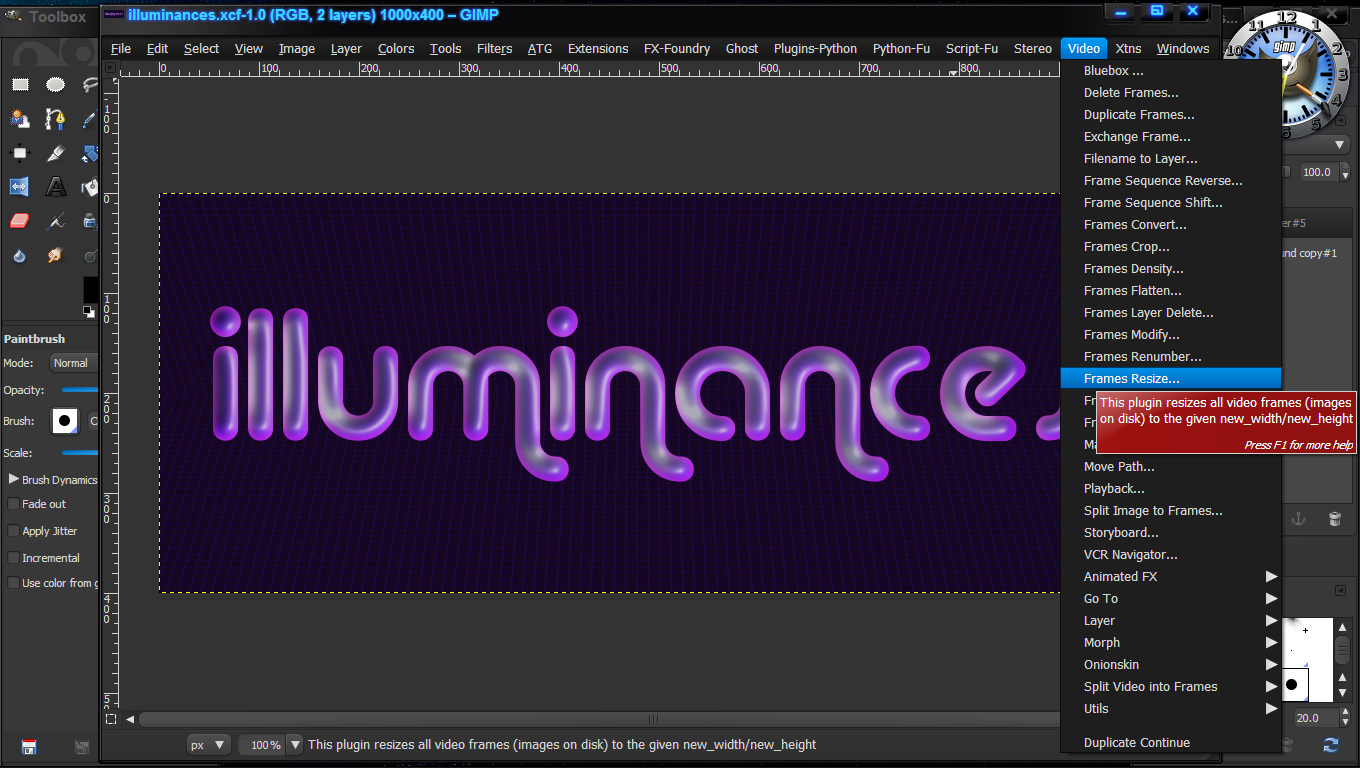
You are correct, just tried it. Thanks for the heads up. Now, if there were just a way to resize all the images at once.


The Gap for Gimp has a Frame re-sizer. You'll have to install Gap though. Have a look here...

Image
Image

Note: GAP video plug-ins only work with filenames
that end in numbers like _000001.xcf.

_________________
Image
"A wise man learns more from a foolish question than a fool can learn from a wise answer"
Image


Top
 Post subject: Re: Animated Ligntining Text Effect
PostPosted: Mon Jun 10, 2013 10:43 pm  (#26) 
Offline
Administrator
User avatar

Joined: Aug 10, 2012
Posts: 14253
Location: Native to NYC living in Arizona, Gimp 2.8 - 3.0, Win 11 PC.
gramg wrote:
Mission accomplished. Thanks to Esper on the text and Wallace on the lightning. You guys rock.
I can't wait to try out my new Splash.

FYI: sf-will-lightning does not work in 2.8, but luckily I have a 2.6 for such situations... :)


Looks really good.
I would have made the lightning bolt some kind of bright green. Still nice job! :bigthup

_________________
Image
"A wise man learns more from a foolish question than a fool can learn from a wise answer"
Image


Top
 Post subject: Re: Animated Ligntining Text Effect
PostPosted: Mon Jun 10, 2013 10:46 pm  (#27) 
Offline
GimpChat Member
User avatar

Joined: Jun 02, 2013
Posts: 2090
Wallace wrote:
The Warrior wrote:
2-ton wrote:
I think that as long as you tick the box for 'allow growing', the crop tool will crop all layers.

You are correct, just tried it. Thanks for the heads up. Now, if there were just a way to resize all the images at once.


The Gap for Gimp has a Frame re-sizer. You'll have to install Gap though. Have a look here...

Image
Image

Note: GAP video plug-ins only work with filenames
that end in numbers like _000001.xcf.

Thanks yet again Wallace. Am I correct in that while it resizes the frame, it does not resize the image within the frame? I have GAP, and it seemed to just resize the frame, and not the image.

_________________
Image


Top
 Post subject: Re: Animated Ligntining Text Effect
PostPosted: Mon Jun 10, 2013 10:51 pm  (#28) 
Offline
Administrator
User avatar

Joined: Aug 10, 2012
Posts: 14253
Location: Native to NYC living in Arizona, Gimp 2.8 - 3.0, Win 11 PC.
The Warrior wrote:
Thanks yet again Wallace. Am I correct in that while it resizes the frame, it does not resize the image within the frame? I have GAP, and it seemed to just resize the frame, and not the image.


Oh.... Okay.
Do you have the 'Filter All Layers' plugin? That might have something there that you can use to scale all the layers with.

BTW... Check your PM's. ;)

_________________
Image
"A wise man learns more from a foolish question than a fool can learn from a wise answer"
Image


Top
 Post subject: Re: Animated Ligntining Text Effect
PostPosted: Mon Jun 10, 2013 11:34 pm  (#29) 
Offline
GimpChat Member
User avatar

Joined: Jun 02, 2013
Posts: 2090
Wallace wrote:
The Warrior wrote:
Thanks yet again Wallace. Am I correct in that while it resizes the frame, it does not resize the image within the frame? I have GAP, and it seemed to just resize the frame, and not the image.


Oh.... Okay.
Do you have the 'Filter All Layers' plugin? That might have something there that you can use to scale all the layers with.

Yeah, I sure do, but that feature isn't in there.

_________________
Image


Top
 Post subject: Re: Animated Ligntining Text Effect
PostPosted: Mon Jun 10, 2013 11:51 pm  (#30) 
Offline
Administrator
User avatar

Joined: Aug 10, 2012
Posts: 14253
Location: Native to NYC living in Arizona, Gimp 2.8 - 3.0, Win 11 PC.
The Warrior wrote:
Wallace wrote:
The Warrior wrote:
Thanks yet again Wallace. Am I correct in that while it resizes the frame, it does not resize the image within the frame? I have GAP, and it seemed to just resize the frame, and not the image.


Oh.... Okay.
Do you have the 'Filter All Layers' plugin? That might have something there that you can use to scale all the layers with.

Yeah, I sure do, but that feature isn't in there.


Can't you just go, Image>Scale image? That should scale every layer to the same size you choose.

_________________
Image
"A wise man learns more from a foolish question than a fool can learn from a wise answer"
Image


Top
 Post subject: Re: Animated Ligntining Text Effect
PostPosted: Tue Jun 11, 2013 12:00 am  (#31) 
Offline
GimpChat Member
User avatar

Joined: Jun 02, 2013
Posts: 2090
Wallace wrote:
Can't you just go, Image>Scale image? That should scale every layer to the same size you choose.

Yep, sure can. Thanks a million Wallace, you save me hours on the ol' GIMPer.

_________________
Image


Top
 Post subject: Re: Animated Ligntining Text Effect
PostPosted: Tue Jun 11, 2013 12:02 am  (#32) 
Offline
Administrator
User avatar

Joined: Aug 10, 2012
Posts: 14253
Location: Native to NYC living in Arizona, Gimp 2.8 - 3.0, Win 11 PC.
The Warrior wrote:
Wallace wrote:
Can't you just go, Image>Scale image? That should scale every layer to the same size you choose.

Yep, sure can. Thanks a million Wallace, you save me hours on the ol' GIMPer.


That one was right under our noses all the time. :hehe

_________________
Image
"A wise man learns more from a foolish question than a fool can learn from a wise answer"
Image


Top
 Post subject: Re: Animated Ligntining Text Effect
PostPosted: Tue Jun 11, 2013 12:28 am  (#33) 
Offline
GimpChat Member
User avatar

Joined: Jun 02, 2013
Posts: 2090
Glad I signed up here. Have learned a lot in a short amount of time.

_________________
Image


Top
 Post subject: Re: Animated Ligntining Text Effect
PostPosted: Tue Jun 11, 2013 12:31 am  (#34) 
Offline
Administrator
User avatar

Joined: Aug 10, 2012
Posts: 14253
Location: Native to NYC living in Arizona, Gimp 2.8 - 3.0, Win 11 PC.
The Warrior wrote:
Glad I signed up here. Have learned a lot in a short amount of time.

:bigthup

_________________
Image
"A wise man learns more from a foolish question than a fool can learn from a wise answer"
Image


Top
 Post subject: Re: Animated Ligntining Text Effect
PostPosted: Tue Jun 11, 2013 2:04 am  (#35) 
I had a look at the sf-will-lightning.scm to see why it was not working on Gimp 2.8.
Very simple fix. Just edit line 36 of the script as below
Change it from
  (plug-in-solid-noise 1 img cloud1 1 0 (rand 2100000000) detail instability frequency)

to
  (plug-in-solid-noise 1 img cloud1 1 0 (rand 65535) detail instability frequency)

[/color]


Top
 Post subject: Re: Animated Ligntining Text Effect
PostPosted: Tue Jun 11, 2013 3:20 am  (#36) 
Offline
Administrator
User avatar

Joined: Aug 10, 2012
Posts: 14253
Location: Native to NYC living in Arizona, Gimp 2.8 - 3.0, Win 11 PC.
fluffybunny wrote:
I had a look at the sf-will-lightning.scm to see why it was not working on Gimp 2.8.
Very simple fix. Just edit line 36 of the script as below
Change it from
  (plug-in-solid-noise 1 img cloud1 1 0 (rand 2100000000) detail instability frequency)

to
  (plug-in-solid-noise 1 img cloud1 1 0 (rand 65535) detail instability frequency)

[/color]


Thanks Fluffybunny, I've made the changes to the script and posted it along side the 2.6 script. Now both scripts will be available for download.

_________________
Image
"A wise man learns more from a foolish question than a fool can learn from a wise answer"
Image


Top
 Post subject: Re: Animated Ligntining Text Effect
PostPosted: Tue Jun 11, 2013 3:33 am  (#37) 
No worries. I didn't realise you needed it as well.

Would a 'registered' member of registry.gimp.org post this information as a comment on the Lightning Bolt script.

Cheers


Top
 Post subject: Re: Animated Ligntining Text Effect
PostPosted: Tue Jun 11, 2013 3:43 am  (#38) 
Offline
Administrator
User avatar

Joined: Aug 10, 2012
Posts: 14253
Location: Native to NYC living in Arizona, Gimp 2.8 - 3.0, Win 11 PC.
fluffybunny wrote:
No worries. I didn't realise you needed it as well. :)
Would a 'registered' member of registry.gimp.org post this information as a comment on the Lightning Bolt script.

Cheers


I can post the information to registry.gimp.org. ;)

_________________
Image
"A wise man learns more from a foolish question than a fool can learn from a wise answer"
Image


Top
 Post subject: Re: Animated Ligntining Text Effect
PostPosted: Tue Jun 11, 2013 7:47 am  (#39) 
Offline
GimpChat Member
User avatar

Joined: Jun 02, 2013
Posts: 2090
Wallace, since you've helped me so much, I'll ask you a final question here. Say, I render the lightening, and rotate it. I only want the lightening ends to go so far, so they are contained within a certain boundary. So, I add a layer, of say, a circle. I alpha to selection the circle, invert it, then go through the layers one at a time, clearing the lightening outside the circle. Is there a way to clear all the layers at once?

_________________
Image


Top
 Post subject: Re: Animated Ligntining Text Effect
PostPosted: Tue Jun 11, 2013 1:15 pm  (#40) 
Offline
Administrator
User avatar

Joined: Aug 10, 2012
Posts: 14253
Location: Native to NYC living in Arizona, Gimp 2.8 - 3.0, Win 11 PC.
The Warrior wrote:
Wallace, since you've helped me so much, I'll ask you a final question here. Say, I render the lightening, and rotate it. I only want the lightening ends to go so far, so they are contained within a certain boundary. So, I add a layer, of say, a circle. I alpha to selection the circle, invert it, then go through the layers one at a time, clearing the lightening outside the circle. Is there a way to clear all the layers at once?


I made this screen shot for you. It will explain how I did your signature image using the Lightning script.
This design is mainly for use where white is the color of the background, on which the image will be displayed eg. Gimp Chat. The color of the BG Layer can be altered to fit the background that you wish the image to be displayed on.

Your sig was broken down into 5 parts, the drop-shadow Layer, Text 1 & 2 layers, Outer Ring Layer and the White BG Layer.

I wrote numbers that correspond to the order these layers are to be used in the Lightning animation, once you've rotated it Horizontally. Also, you'll notice that the Combine/Overlay operations are also given, that are to be used for each layer.
I've also included an attached xcf file with my breakdown of these 5 layer. For you to use if you like. It is the same size as your signature image that is displayed here at GC, which is 317x150.

Image


Attachments:
The Warrior cut.xcf [236.8 KiB]
Downloaded 220 times

_________________
Image
"A wise man learns more from a foolish question than a fool can learn from a wise answer"
Image
Top
Post new topic Reply to topic  [ 49 posts ]  Go to page Previous  1, 2, 3  Next

All times are UTC - 5 hours [ DST ]


* Login  


Powered by phpBB3 © phpBB Group