|
The number of options and filters available in G'MIC is astounding.
I've only spent a couple of hours tinkering, but have found some very handy filters.
One of the only niggles I have is that the main preview window seems to have a mind of its
own when browsing through the various filters, resizing and zooming the preview image seemingly
at random.
I also find that the preview image can't be resized to the full-size of the preview pane. I run a 1920x1080
screen resolution in Windows 8, but when I maximize the G'MIC window, the maximum size I can get
the preview image to display is a mere 512x384. Maybe that's a program limit, I haven't made my way
through the documentation as yet.
Since I was in a tinkering mood, I created a quick mock-up of my idea for an 'updated' program
window layout. Not a huge change, but the general idea was to give the preview image pride of
place, perhaps with an extra option to fit the preview to the size of the adjusted program window.
(see attached image)
Just an idea and certainly in no way meant to be a criticism of the current layout - I'm simply not worthy! :-)
Cheers,
Mike.
| Attachments: |
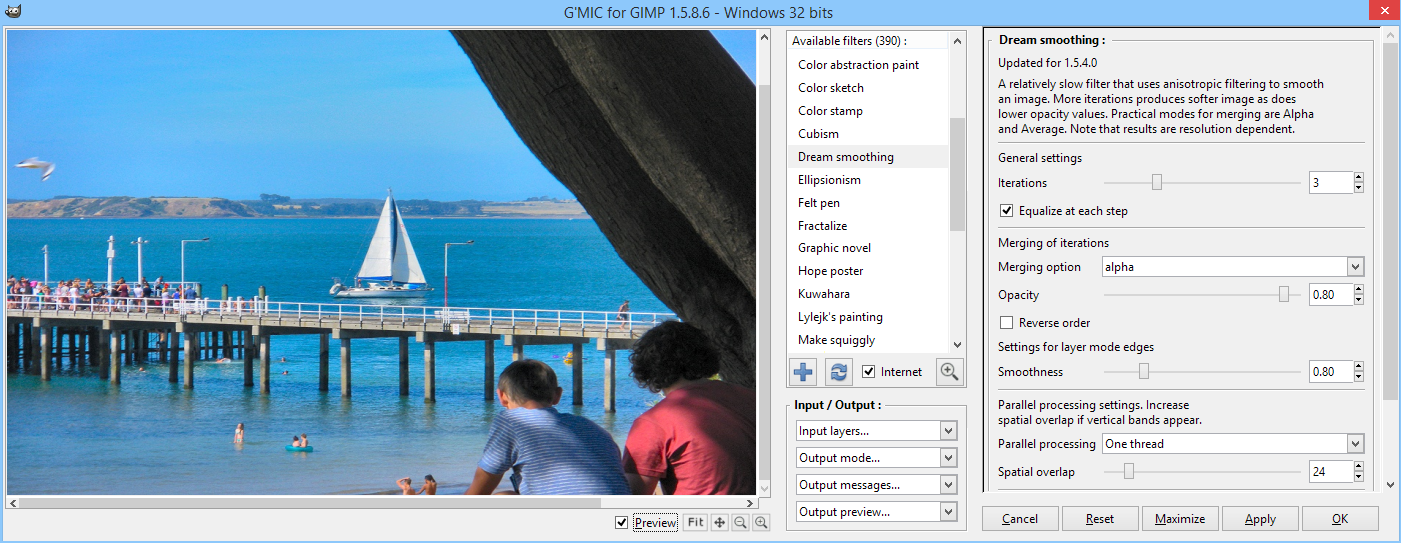
gmic_1.png [ 688.28 KiB | Viewed 2245 times ]
|
|
 Login
Login Register
 Tweets
 FAQ
FAQ Advanced Search


