It is currently Tue Aug 18, 2026 5:45 am


All times are UTC - 5 hours [ DST ]


Post new topic Reply to topic  [ 17 posts ] 
Author Message
 Post subject: Release of G'MIC 1.7.1
PostPosted: Mon Apr 25, 2016 1:52 pm  (#1) 
Offline
GimpChat Member
User avatar

Joined: Jan 03, 2011
Posts: 1656
Hello friends,

There is a new release (numbered 1.7.1) of the G'MIC image processing framework, that has been made available today !
This is a minor release somehow: It has several improvements and new filters, but most new features have been already backported for the users of the previous major version (1.7.0), thanks to the nice filter update mechanism we have in G'MIC.
The Changelog is available here : https://discuss.pixls.us/t/release-of-gmic-1-7-1/
It shows the amount of work that has been done since then. I hope you'll keep enjoying G'MIC as much as I enjoyed working on it (for almost the last 8 years!).

Attachment:
gmic171.png
gmic171.png [ 327.77 KiB | Viewed 6456 times ]


Share on Facebook Share on Twitter Share on Orkut Share on Digg Share on MySpace Share on Delicious Share on Technorati
Top
 Post subject: Re: Release of G'MIC 1.7.1
PostPosted: Mon Apr 25, 2016 2:30 pm  (#2) 
Offline
GimpChat Member
User avatar

Joined: Sep 24, 2010
Posts: 12832
Thanks for the heads up, David. I've been toying with a new rendering technique that uses a blend of Engrave with the original image followed by Segmentation for a camouflage like painting result. Add Bilateral filter and few other presets (for cleanup and anti-alias) and you get the type of rendering below (posted elsewhere here already; just one of the many captures I took at the George Renaissance Festival this past weekend). :)

Image

_________________
Lyle

Psalm 109:8

Image


Top
 Post subject: Re: Release of G'MIC 1.7.1
PostPosted: Mon Apr 25, 2016 4:22 pm  (#3) 
Offline
GimpChat Member
User avatar

Joined: Jun 02, 2013
Posts: 2090
Thanks for all your hard work. Appreciate it very much.

_________________
Image


Top
 Post subject: Re: Release of G'MIC 1.7.1
PostPosted: Mon Apr 25, 2016 5:16 pm  (#4) 
Offline
GimpChat Member

Joined: Dec 19, 2015
Posts: 46
David, great to see the new release. I'll have to remember if I installed 1.7.0 :oops:

On the -img2hex & -hex2img commands added to 1.7.1, can you define what a hex string looks like from G'MIC's point of view? Or just point me to any link that explains it.

Souphead.


Top
 Post subject: Re: Release of G'MIC 1.7.1
PostPosted: Mon Apr 25, 2016 8:46 pm  (#5) 
Offline
Global Moderator
User avatar

Joined: Apr 01, 2012
Posts: 8457
Location: On the other side of your screen
This has not happened to me before.
I have deleted the G'MIC I had so I could go ahead and install this one. Windows won't let me though, even when I try to run as administrator! :hoh

Whoohoo it is finally installed :yes Found out where I could 'run any way'. Didn't see the option before. :oops:

Now to have a look and play with my new toy.

_________________
Image
Free Fun Photo Editing & resources
Poems from the Lord
Gimp Newby
Gimp version 3.2.4 and GMIC-Qt 4.0.2 OS :- Windows 10 Home 64


Top
 Post subject: Re: Release of G'MIC 1.7.1
PostPosted: Tue Apr 26, 2016 1:12 am  (#6) 
Offline
GimpChat Member
User avatar

Joined: Jan 03, 2011
Posts: 1656
Souphead wrote:
David, great to see the new release. I'll have to remember if I installed 1.7.0 :oops:

On the -img2hex & -hex2img commands added to 1.7.1, can you define what a hex string looks like from G'MIC's point of view? Or just point me to any link that explains it.

Souphead.


Yes, for instance, with a test image you get :

$ gmic -testimage2d 16 -e \$\{-img2hex}


gives you :

[gmic]-0./ Start G'MIC interpreter.
[gmic]-0./ Input 2d synthetic image of size 16x16x3.
[gmic]-1./ 2509493c383c4804192e3f4b4f4b3e294225110809152b4a193c061d292a200c0239251d23380606ff062b4f0f140c4e0e432d04051101121a120ba9030c044413422703191919191a1919fffe150a450f3613a9191301121a1201bbffa91f51031f440b190119001a001906ff0b431246002b382f1200121a1200b2ffb806312323434a383e1a1a1a1a1a1affffff000f55686032673eb51a120012ffb8062452369e6830545502ff001901ff0b1243461f576a672f3eb2ffb20613ffa9360442132e535f543efffffffffffe404b10471228303c422bb8ffb80ba952495111531c3038321d4f06ff062a06464149071330444d4c402a0b3c194f382c2b3549255e9e3c8d3c9d5919833fa04fa03e7e972566085e15804a19915b1d7e2a750c578e2572238d5bd38ada804f0f690c4e0e4382e9f3fffaeaf3fedc46580c5999689727f1f5f4f4f4f3f3f37f7b6a0a450f3668fcf4eafbfef3ebfbf77f4674a6587499d1f4fbf4fbf3fbf3da83dc43679b00435849fefbebf3fefb3986f8da31787869735760f3f3f3f3f3f38a8a8a000faaa3964ea160f9f3ebfbfe8d31d3795236d5a24c8485d88afbf4fb91d167439b7488a6a14960398afad3ea94fc360442138381958460868a8d91949840a0659c6728855e6743f88a31d1fc529e5111531c8538871d4fda8ad32a5b9b419e5c138544a24c952a6091194f8d2c80359e255e9ee63891f259c32e94f54fa0e829ec2566b2096ad54ac33cb01d7ed42061ace32572cd38b0ea6ae5d54fb91461a36398d7040d0a18180b08e3f40361aeee13427c1409090a0a0b0b0b7679bf0a45b9e01368091817090b18175076f474a6587499ec0a170a170b170be572e3ed12f00055705d0917180b0917f06e54e586787885936f7b0b0b0b0b0b0b6a6a6a000fffcfbf64cd7b580b18170966edea79a78bffce60a8aae76a170a1762ec12ed461fadd4ce5d7bf06a5cea185e688b59ecbd83a5bea87b6e6a66625e5b40f5ba9c6728da788456546aedec68fc9e5111531cda8d32c74fe56aea2ab046eb9e5c13da994df6952ab53cc34fe2812bdf9e
[gmic]-1./ Display image [0] = '[2d test image]'.


Top
 Post subject: Re: Release of G'MIC 1.7.1
PostPosted: Tue Apr 26, 2016 7:35 am  (#7) 
Offline
GimpChat Member

Joined: Dec 19, 2015
Posts: 46
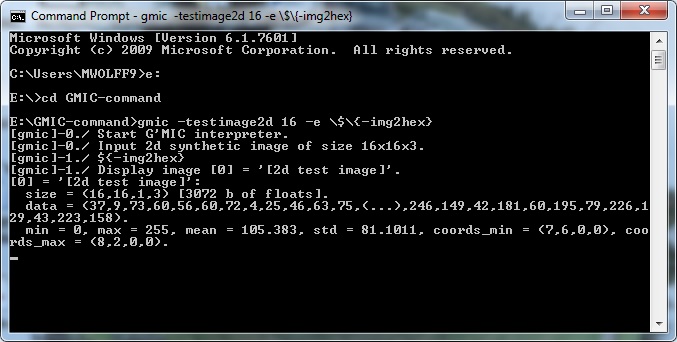
I get this below and it displays the testimage2d image in a separate window:-

Image

This is the Windows GMIC and is 1.7.1

Souphead


Top
 Post subject: Re: Release of G'MIC 1.7.1
PostPosted: Tue Apr 26, 2016 7:53 am  (#8) 
Offline
GimpChat Member
User avatar

Joined: Jan 03, 2011
Posts: 1656
Ha you are on Windows...
I'm not familiar with the use of the Windows console, but maybe try to remove the backslash, so ${} instead of \$\{\}.


Top
 Post subject: Re: Release of G'MIC 1.7.1
PostPosted: Tue Apr 26, 2016 9:30 am  (#9) 
Offline
GimpChat Member

Joined: Dec 19, 2015
Posts: 46
Yep, that was it, no escapes needed.


Top
 Post subject: Re: Release of G'MIC 1.7.1
PostPosted: Tue Apr 26, 2016 11:43 am  (#10) 
Offline
GimpChat Member
User avatar

Joined: Dec 10, 2013
Posts: 1004
Runounours, that seems amazing.

Asking bashfully.... I'm on a Mac and my last working G'mic (v. 1.6.5) was on Gimp's v. 2.8.14 both working well on OSX El Capitan. Recently, foolishly, I installed Gimp's 2.8.16 and there doesn't seem to be a working G'mic for this version on a Mac. Why would I do that? Long story...but, would you know if someone is working on a possibility for us Mac folk on El Capitan. I believe I'm not alone - there was another recently having difficulties.

_________________
Image
Macbook Air - MacOS Sierra 10.12
McGimp 2.8.14
G'mic 1.6.5


Top
 Post subject: Re: Release of G'MIC 1.7.1
PostPosted: Tue Apr 26, 2016 11:55 am  (#11) 
Offline
GimpChat Member
User avatar

Joined: Jan 03, 2011
Posts: 1656
Dalia, you may find information here : viewtopic.php?f=28&t=13169

I can't help much more as I don't have a Mac (and I'll probably never have one).
Installing G'MIC on Mac has always been a bit of a mess, so I'm not surprised :)


Top
 Post subject: Re: Release of G'MIC 1.7.1
PostPosted: Tue Apr 26, 2016 2:33 pm  (#12) 
Offline
GimpChat Member
User avatar

Joined: Dec 10, 2013
Posts: 1004
For your answer alone Runounours, I'm thankful! :tyspin

_________________
Image
Macbook Air - MacOS Sierra 10.12
McGimp 2.8.14
G'mic 1.6.5


Top
 Post subject: Re: Release of G'MIC 1.7.1
PostPosted: Tue Apr 26, 2016 9:09 pm  (#13) 
Offline
GimpChat Member
User avatar

Joined: Jun 22, 2015
Posts: 233
OK so if I understand correctly, I would get this by clicking the download new updates in Gmic?


Top
 Post subject: Re: Release of G'MIC 1.7.1
PostPosted: Sun May 08, 2016 2:39 pm  (#14) 
Offline
GimpChat Member
User avatar

Joined: Jul 02, 2013
Posts: 59
Dalia, there is now a 1.7.1 gmic build unluckily still only for Gimp 2.8.14 running on El Capitan too from GIMPonOSX.

This nice Mac build of Gimp 2.8.16 on the Gimp download page does not have any plugins. Maybe you try to convince the Gimp builders to prepare a richer Mac bundle with gmic!?!


Top
 Post subject: Re: Release of G'MIC 1.7.1
PostPosted: Mon May 09, 2016 2:28 pm  (#15) 
Offline
GimpChat Member

Joined: Aug 05, 2013
Posts: 23
Lylejk, I didn't know we were at least vaguely neighbors. How often do you get to the Georgia Renaissance Festival?

_________________
Image


Top
 Post subject: Re: Release of G'MIC 1.7.1
PostPosted: Tue May 10, 2016 1:26 am  (#16) 
Offline
New Member

Joined: May 10, 2016
Posts: 1
Hello, I want to report that Norton 360 finds a malicious file in new G'MIC(1.7.1), via "heuristic detection".

That file is called "SAPE.Heur.AF456". Norton says the risk is high.

In Norton, there is a link which leads to page of this virus but that page is "Not Found"
( lol I can't send the link because my post looks too spammy for a new user )

But there is a somewhat similar thing called "W32.SAPE.Heur.2" if you want to check it out.
( lol I can't send the link because my post looks too spammy for a new user )


Top
 Post subject: Re: Release of G'MIC 1.7.1
PostPosted: Tue May 10, 2016 1:43 am  (#17) 
Offline
Administrator
User avatar

Joined: Aug 10, 2012
Posts: 14156
Location: Native to NYC living in Arizona, Gimp 2.8 - 3.0, Win 11 PC.
aslansi wrote:
Hello, I want to report that Norton 360 finds a malicious file in new G'MIC(1.7.1), via "heuristic detection".

That file is called "SAPE.Heur.AF456". Norton says the risk is high.

In Norton, there is a link which leads to page of this virus but that page is "Not Found"
( lol I can't send the link because my post looks too spammy for a new user )

But there is a somewhat similar thing called "W32.SAPE.Heur.2" if you want to check it out.
( lol I can't send the link because my post looks too spammy for a new user )

It's more then likely a False Positive.

_________________
Image
"A wise man learns more from a foolish question than a fool can learn from a wise answer"
Image


Top
Post new topic Reply to topic  [ 17 posts ] 

All times are UTC - 5 hours [ DST ]


* Login  


Powered by phpBB3 © phpBB Group