It is currently Thu Jul 02, 2026 8:08 am


All times are UTC - 5 hours [ DST ]


Post new topic Reply to topic  [ 4 posts ] 
Author Message
 Post subject: New Filter: Shear
PostPosted: Mon Nov 10, 2025 3:26 pm  (#1) 
Offline
GimpChat Member

Joined: Oct 16, 2017
Posts: 45
Hi,

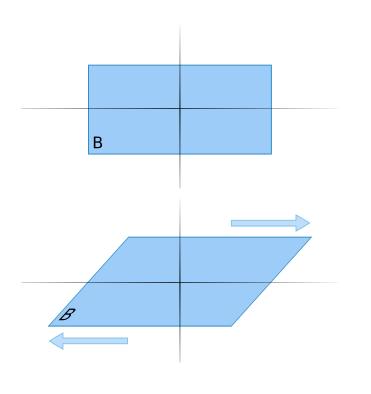
Recently I have made a new filter called Shear. This is a transformation filter that allows you to do a simple 2D transformation within the 4 dimensions.

Here's a image:

Image

That is what a shear does. It should be available after update on the latest G'MIC.

For Z-based transformation, you'd need to use multiple images and all images must be of same dimensions for it to work!

Thank you for reading.


Share on Facebook Share on Twitter Share on Orkut Share on Digg Share on MySpace Share on Delicious Share on Technorati
Top
 Post subject: Re: New Filter: Shear
PostPosted: Mon Nov 10, 2025 10:04 pm  (#2) 
Offline
Global Moderator
User avatar

Joined: Apr 01, 2012
Posts: 8405
Location: On the other side of your screen
Thank you. :)

_________________
Image
Free Fun Photo Editing & resources
Poems from the Lord
Gimp Newby
Gimp version 3.2.0 and GMIC-Qt 3.7.5 OS :- Windows 10 Home 64


Top
 Post subject: Re: New Filter: Shear
PostPosted: Tue Nov 11, 2025 1:40 am  (#3) 
Offline
Global Moderator
User avatar

Joined: May 16, 2010
Posts: 16075
Nice addition to G'MIC Reptorian. Thank you for sharing. :)
It should be noted that the filter is located under Testing>Reptorian.

_________________
Image


Top
 Post subject: Re: New Filter: Shear
PostPosted: Wed Nov 12, 2025 12:55 am  (#4) 
Offline
GimpChat Member
User avatar

Joined: Nov 04, 2015
Posts: 1456
Thanks Reptorian for another great filter. This one seems very clean and practical. Thanks also for staying engaged with your potential filter users.

Image

Image

I applied the Shear filter to a fractal image to give an idea what how it 'shears' :)
I used gmic_qt from the standalone version of G'MIC. Because I can get the precise command from the top RHS I can apply it to many layers.


Top
Post new topic Reply to topic  [ 4 posts ] 

All times are UTC - 5 hours [ DST ]


* Login  


Powered by phpBB3 © phpBB Group