It is currently Thu Jul 02, 2026 8:09 am


All times are UTC - 5 hours [ DST ]


Post new topic Reply to topic  [ 5 posts ] 
Author Message
 Post subject: Update your G'MIC filters!
PostPosted: Fri Apr 05, 2024 4:46 am  (#1) 
Offline
GimpChat Member
User avatar

Joined: May 24, 2021
Posts: 859
Location: SEA - South East Asia
Discussion is over there > https://discuss.pixls.us/t/motion-blur- ... y/42841/15 (please give David Tschumperlé a lot of thumbs up)

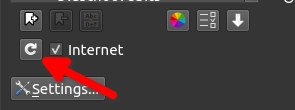
Click on that roundabout arrow to update your G'MIC's filters (version 3.3.5 and up)
Image

And you will have a NEW filter in "Degradations > Blur [Motion]" with up to 5 control points, yes you can zigzag the blur!

But even Better with the option "Mode >> Max (Slower)" ... you can have some effects that... >> speaking is not enough, a picture is worth thousands words
Attachment:
screenshot_20240405-173435.jpg
screenshot_20240405-173435.jpg [ 229.79 KiB | Viewed 7062 times ]

_________________
Patrice


Share on Facebook Share on Twitter Share on Orkut Share on Digg Share on MySpace Share on Delicious Share on Technorati
Top
 Post subject: Re: Update your G'MIC filters!
PostPosted: Fri Apr 05, 2024 7:15 am  (#2) 
Offline
GimpChat Member
User avatar

Joined: Sep 24, 2010
Posts: 12785
Looks like a possible cool way to create caustics, Pix; might give it a whirl if I ever get my spark back. :)

_________________
Lyle

Psalm 109:8

Image


Top
 Post subject: Re: Update your G'MIC filters!
PostPosted: Sun Nov 23, 2025 3:50 pm  (#3) 
Offline
New Member

Joined: Nov 23, 2025
Posts: 4
Hi, i installed G'MIC and updated to 3.6.4 via Discover on MX Linux, but sadly i can't vote my 5 stars for this great framework/addon/tool what is indeed a must have for Gimp! I used Flathub for this...
Discover popup a Error

"Error transferring https odrs.gnome. org /1.0/reviews/api/submit - server replied: BAD REQUEST"

So i drop my vote here...and yeah update it, then it maybe work better for the 2 stars voters - :D
Well only 3 Votes and 2 Stars? G'MIC is awesome!!!

"
This is a must have free and open-source image processing framework for Gimp, it contains a ton of nice and crazy Filters and Effects.

Working well for now on my System with Gimp 3.0.6

System:
Kernel: 6.16.12-1-liquorix-amd64 [6.16-11~mx23ahs] arch: x86_64 bits: 64
Desktop: KDE Plasma v: 5.27.5 tk: Qt v: 5.15.8 wm: kwin_x11
Distro: MX-23.6_ahs_x64 Libretto base: Debian GNU/Linux 12 (bookworm)
"


Top
 Post subject: Re: Update your G'MIC filters!
PostPosted: Mon Nov 24, 2025 7:23 am  (#4) 
Offline
Global Moderator
User avatar

Joined: May 16, 2010
Posts: 16075
Nice addition to G'MIC for sure. Is it possible to allow for only certain areas of an image to be motion blurred?

_________________
Image


Top
 Post subject: Re: Update your G'MIC filters!
PostPosted: Mon Nov 24, 2025 2:37 pm  (#5) 
Offline
New Member

Joined: Nov 23, 2025
Posts: 4
Rod wrote:
Nice addition to G'MIC for sure. Is it possible to allow for only certain areas of an image to be motion blurred?

With a Mask?


Top
Post new topic Reply to topic  [ 5 posts ] 

All times are UTC - 5 hours [ DST ]


* Login  


Powered by phpBB3 © phpBB Group