It is currently Thu Jul 09, 2026 12:22 pm


All times are UTC - 5 hours [ DST ]


Post new topic Reply to topic  [ 49 posts ]  Go to page Previous  1, 2, 3
Author Message
 Post subject: Re: NEW: G'MIC Discussions
PostPosted: Wed Jul 08, 2026 3:28 am  (#41) 
Offline
Global Moderator
User avatar

Joined: Apr 01, 2012
Posts: 8417
Location: On the other side of your screen
I can't even get 4.0.2 to show!! https://discuss.pixls.us/t/release-of-gmic-4-0/56116/66
I dont have any GMIC for now. I may have to return to an older one and hope it's not my computer.

_________________
Image
Free Fun Photo Editing & resources
Poems from the Lord
Gimp Newby
Gimp version 3.2.0 and GMIC-Qt 3.7.5 OS :- Windows 10 Home 64


Top
 Post subject: Re: NEW: G'MIC Discussions
PostPosted: Wed Jul 08, 2026 3:32 am  (#42) 
Offline
GimpChat Member
User avatar

Joined: Jul 04, 2019
Posts: 282
Location: Lake Havasu City, Arizona, USA
Hi Lyle,
Thanks so much for the links. I was able to download GMIC. I am very appreciative. :)

_________________
Charles


Top
 Post subject: Re: NEW: G'MIC Discussions
PostPosted: Wed Jul 08, 2026 3:33 am  (#43) 
Offline
Global Moderator
User avatar

Joined: Apr 01, 2012
Posts: 8417
Location: On the other side of your screen
gasMask wrote:
I've been unable to get a G'MIC download to finish from the EU website. I live in USA, Arizona, and I've been trying to download the G'MIC infrequently over the last year. I am hoping to download both the 2.10 and 4.0 G'MIC versions. Anybody here have an alternate download link, perhaps from this continent?


Happened to me twice last night .
Have since had downloads without problem. Installation is another problem though

_________________
Image
Free Fun Photo Editing & resources
Poems from the Lord
Gimp Newby
Gimp version 3.2.0 and GMIC-Qt 3.7.5 OS :- Windows 10 Home 64


Top
 Post subject: Re: NEW: G'MIC Discussions
PostPosted: Wed Jul 08, 2026 11:04 am  (#44) 
Offline
GimpChat Member
User avatar

Joined: Sep 24, 2010
Posts: 12794
MareroQ wrote:
Hi Lylejk

If you were using G'MIC 4.0.0, it should save "Faves" in the gmic_qt_faves.json.bak file. After installing G'MIC 4.0.2, I removed the .bak from the filename and the old favorites settings were restored.


Did not know and didn't even try to research this to do so, Mario. Even so, a good chunk of my favs no longer worked due to past updates anyway, and I just never got around to updating them since I rarely if ever used them. I am slowly getting my favs back, though and they work. lol

:)

_________________
Lyle

Psalm 109:8

Image


Top
 Post subject: Re: NEW: G'MIC Discussions
PostPosted: Wed Jul 08, 2026 9:32 pm  (#45) 
Offline
GimpChat Member
User avatar

Joined: Sep 24, 2010
Posts: 12794
sallyanne wrote:
gasMask wrote:
I've been unable to get a G'MIC download to finish from the EU website. I live in USA, Arizona, and I've been trying to download the G'MIC infrequently over the last year. I am hoping to download both the 2.10 and 4.0 G'MIC versions. Anybody here have an alternate download link, perhaps from this continent?


Happened to me twice last night .
Have since had downloads without problem. Installation is another problem though


Saw your post at Pixls' site, Sallyanne; responding here since I know your frequent here more than there. Anyway, I've solely been using the zip version of G'MIC from day one (despise installers). Since G'MIC is a GIMP plugin, you need to add the path in your GIMP Plugin preferences (and remove any paths that are no longer applicable since you use to use the installer, it might be pointing to a rogue path).


Attachments:
GIMP_Plugin_folders.png
GIMP_Plugin_folders.png [ 60.51 KiB | Viewed 20 times ]

_________________
Lyle

Psalm 109:8

Image
Top
 Post subject: Re: NEW: G'MIC Discussions
PostPosted: Thu Jul 09, 2026 1:27 am  (#46) 
Offline
Global Moderator
User avatar

Joined: Apr 01, 2012
Posts: 8417
Location: On the other side of your screen
Unfortunately I have done all that and even zip files are not doing anything. Tried that first. I notice your GMIC isn't in a plugins folder or it doesn't say so in the path. Does it need to be?
I just realized something earlier that could be the problem. Libre office has updated on me and I have had no end of trouble with it since. I have to use it in safe mode now to keep track of my budget or I would delete that!

_________________
Image
Free Fun Photo Editing & resources
Poems from the Lord
Gimp Newby
Gimp version 3.2.0 and GMIC-Qt 3.7.5 OS :- Windows 10 Home 64


Top
 Post subject: Re: NEW: G'MIC Discussions
PostPosted: Thu Jul 09, 2026 4:01 am  (#47) 
Offline
Global Moderator
User avatar

Joined: Apr 01, 2012
Posts: 8417
Location: On the other side of your screen
Did it again with the zip. Still nothing! :gaah :gaah
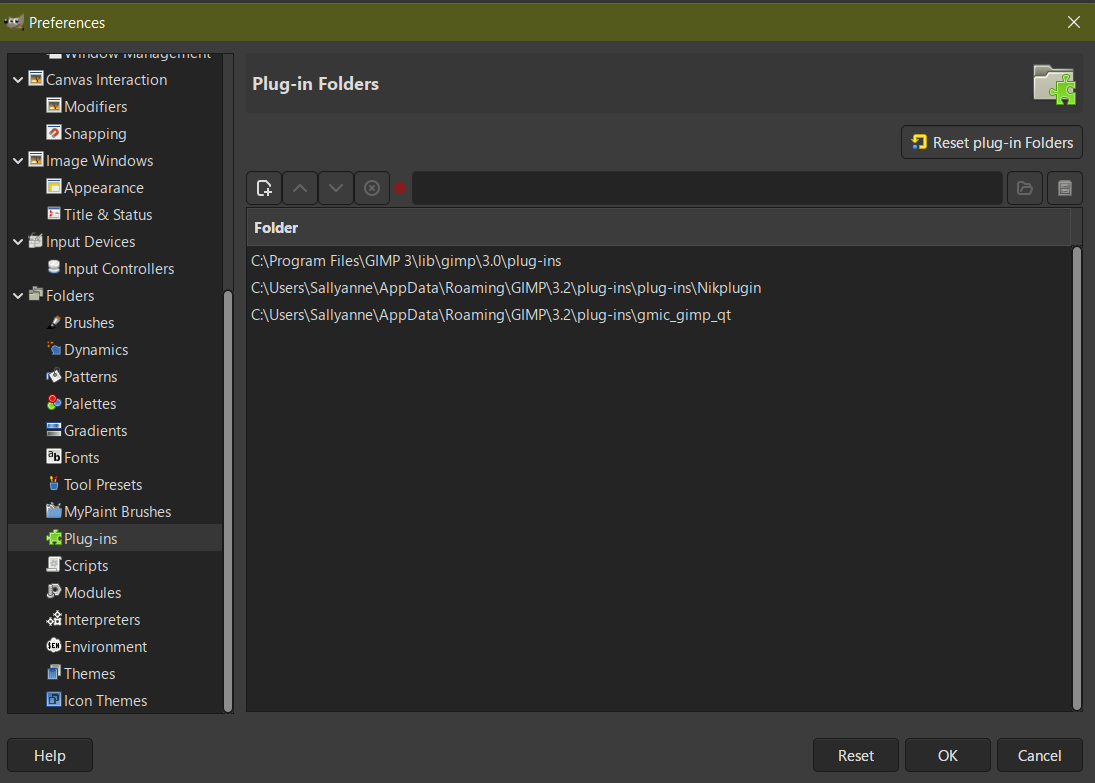
My plug ins folder
Image

_________________
Image
Free Fun Photo Editing & resources
Poems from the Lord
Gimp Newby
Gimp version 3.2.0 and GMIC-Qt 3.7.5 OS :- Windows 10 Home 64


Top
 Post subject: Re: NEW: G'MIC Discussions
PostPosted: Thu Jul 09, 2026 4:05 am  (#48) 
Offline
GimpChat Member

Joined: Mar 04, 2011
Posts: 2605
That last one should have worked, however for desperation, try the zip version in a folder as:

https://sendvid.com/dpkq529p (3 minutes so no hardship)


Top
 Post subject: Re: NEW: G'MIC Discussions
PostPosted: Thu Jul 09, 2026 5:59 am  (#49) 
Offline
Global Moderator
User avatar

Joined: May 16, 2010
Posts: 16092
Sallyanne try adding this folder path making sure the gmic_gimp_qt folder is in it.
C:\Users\Sallyanne\AppData\Roaming\GIMP\3.2\plug-ins

In other words don't set the path directly to the gmic_gimp_qt folder like you have in the third option. Just point it to the plug-ins folder itself.
Really all you need to do is point to that folder if you have any plugins in the plug-ins directory. Also make sure it is on top. That way gimp will look in that folder first to load any plugins.

_________________
Image


Top
Post new topic Reply to topic  [ 49 posts ]  Go to page Previous  1, 2, 3

All times are UTC - 5 hours [ DST ]


* Login  


Powered by phpBB3 © phpBB Group