It is currently Sat Oct 10, 2026 8:01 am


All times are UTC - 5 hours [ DST ]


Post new topic Reply to topic  [ 21 posts ]  Go to page 1, 2  Next
Author Message
 Post subject: My foreground GMIC extract is locking up every time I try it.
PostPosted: Wed Feb 11, 2015 6:14 am  (#1) 
Offline
GimpChat Member
User avatar

Joined: Apr 07, 2010
Posts: 14182
I load my image, then click apply, the preview pic comes up. I put my red and green dots it and hit spacebar.
Sometimes it works and the background is gone and it produces a new layer with the background transparent, but when I click OK, the bar at the bottom keeps going back and forth and it wont quit until I hit ESC many times and then I get the message that GMIC has quit responding and then I can get out of it.
This just started to happen since I upgraded to the newest Fedora which may not be the cause. Does anyone else have this problem?

_________________
Image


Share on Facebook Share on Twitter Share on Orkut Share on Digg Share on MySpace Share on Delicious Share on Technorati
Top
 Post subject: Re: My foreground GMIC extract is locking up every time I try it.
PostPosted: Wed Feb 11, 2015 11:35 am  (#2) 
Offline
GimpChat Member
User avatar

Joined: Jan 20, 2013
Posts: 14835
Location: roma, italy
if you got what you expected, NO NEED TO CLICK OK
hit Cancel
you have in Gimp your new layer with the FG extracted

_________________
"Where am I ?"


Top
 Post subject: Re: My foreground GMIC extract is locking up every time I try it.
PostPosted: Wed Feb 11, 2015 11:40 am  (#3) 
Offline
GimpChat Member
User avatar

Joined: Apr 07, 2010
Posts: 14182
What if I want to edit it because I missed some of the articles? Mine just locks up when I want to continue on fixing the dots.
Also, I can't click cancel because the page where that is goes blank.

_________________
Image


Top
 Post subject: Re: My foreground GMIC extract is locking up every time I try it.
PostPosted: Wed Feb 11, 2015 1:00 pm  (#4) 
Offline
GimpChat Member
User avatar

Joined: Jan 20, 2013
Posts: 14835
Location: roma, italy
in the previous post you said "...when I click OK..."
the Cancel button is where the OK button is, so I don't understand about the blank page; if you were able to click OK (and starting and endless loop, it seems) you are also able to click Cancel
or simply have a look at the result and without clicking anything continue with green/red dots
but, I'm not an expert and I don't have your system...

_________________
"Where am I ?"


Top
 Post subject: Re: My foreground GMIC extract is locking up every time I try it.
PostPosted: Wed Feb 11, 2015 1:47 pm  (#5) 
Offline
GimpChat Member
User avatar

Joined: Apr 07, 2010
Posts: 14182
When I try it again I will try to do a screen shot of the blank page that comes up. the ok, cancel and every thing is blank. I will see if I can re-produce this problem, then post it.

_________________
Image


Top
 Post subject: Re: My foreground GMIC extract is locking up every time I try it.
PostPosted: Wed Feb 11, 2015 2:20 pm  (#6) 
Offline
GimpChat Member
User avatar

Joined: Apr 07, 2010
Posts: 14182
Dinaset, I tried another one and the same thing happens over and over.
1. I open my image with Gmic
2. I click contours - extract.
3. I click click normal preview, it goes very large, If I click smaller then it is only a black square.
4. I click apply and the preview comes up
5. I put all my dots in.
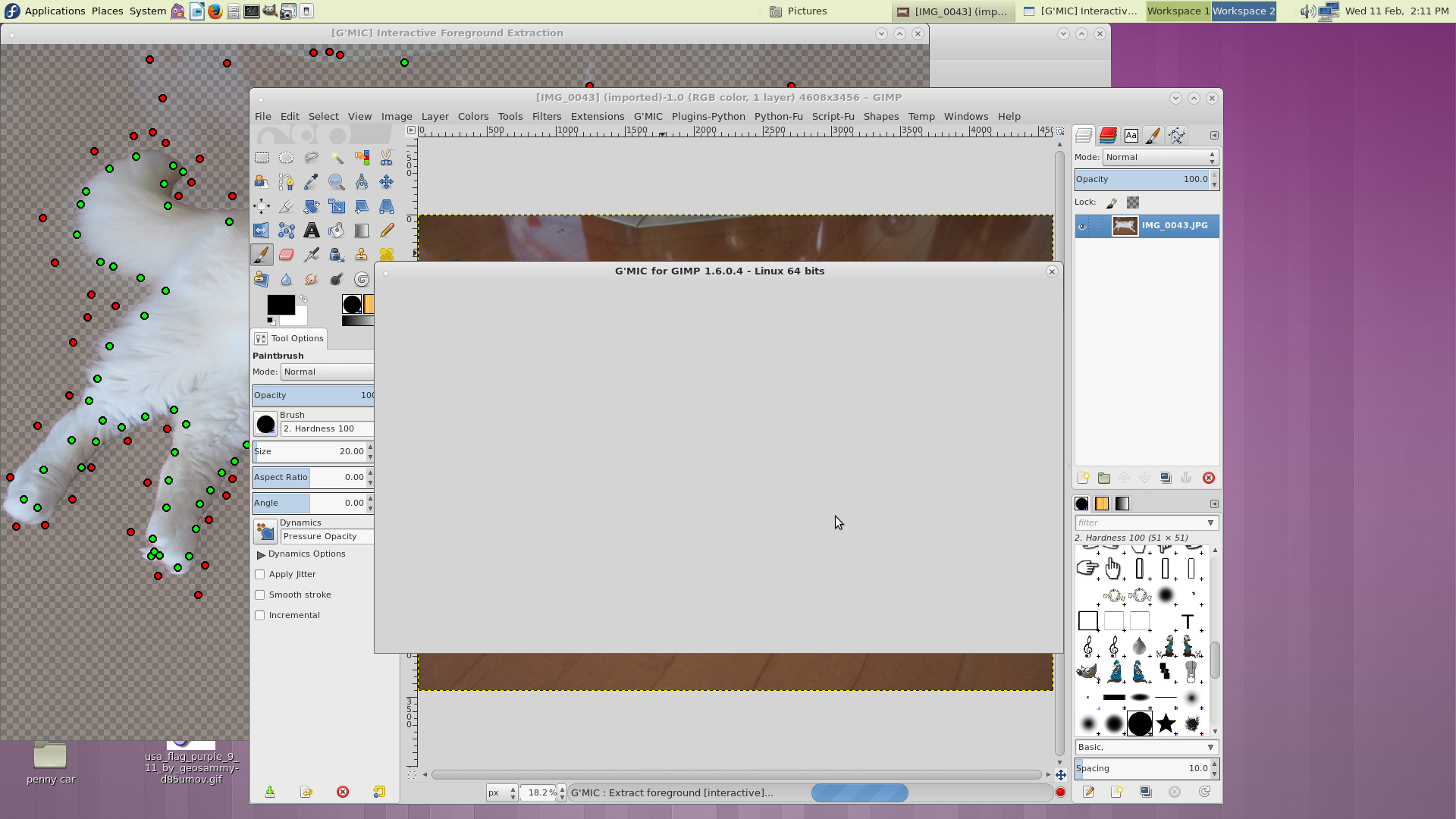
6. I hit the space bar then a white page comes up and it doesn't execute. I try clicking cancel, nothing happens, then I click OK and nothing happens. The only way I can get out of it is to X out of everything. This just started since I updated Fedora. Screen shot below
Image

_________________
Image


Top
 Post subject: Re: My foreground GMIC extract is locking up every time I try it.
PostPosted: Wed Feb 11, 2015 3:00 pm  (#7) 
Offline
GimpChat Member
User avatar

Joined: Jan 20, 2013
Posts: 14835
Location: roma, italy
outside my knowledge, sorry
it seems the problem lies in the preview mechanism
(I see "normal" preview by default and large preview if I choose so)

is there someone else in Gimpchat using Fedora?
maybe David can have a look into the technicalities of the dialog...

_________________
"Where am I ?"


Top
 Post subject: Re: My foreground GMIC extract is locking up every time I try it.
PostPosted: Wed Feb 11, 2015 3:28 pm  (#8) 
Offline
GimpChat Member
User avatar

Joined: Apr 07, 2010
Posts: 14182
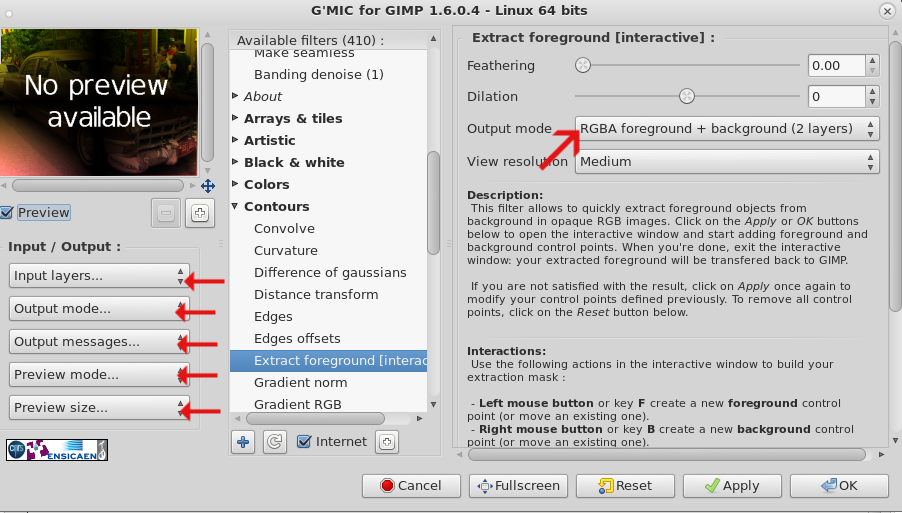
I was thinking that maybe David could help, this just doesn't make sense. I had it working like a charm before. BTW what settings should I be using in the extract background? maybe I am doing something wrong there. I was leaving them at default
Image

_________________
Image


Top
 Post subject: Re: My foreground GMIC extract is locking up every time I try it.
PostPosted: Wed Feb 11, 2015 5:15 pm  (#9) 
Offline
Administrator
User avatar

Joined: Aug 10, 2012
Posts: 14236
Location: Native to NYC living in Arizona, Gimp 2.8 - 3.0, Win 11 PC.
molly wrote:
I was thinking that maybe David could help, this just doesn't make sense. I had it working like a charm before. BTW what settings should I be using in the extract background? maybe I am doing something wrong there. I was leaving them at default
[ Image ]

Maybe have a look here...

[G'MIC] Smart foreground extraction tool:
http://gimpchat.com/viewtopic.php?f=28&t=11081#p148643

_________________
Image
"A wise man learns more from a foolish question than a fool can learn from a wise answer"
Image


Top
 Post subject: Re: My foreground GMIC extract is locking up every time I try it.
PostPosted: Wed Feb 11, 2015 5:57 pm  (#10) 
Offline
GimpChat Member
User avatar

Joined: Apr 07, 2010
Posts: 14182
Thanks Wallace, I was looking for the penguins one all day. I ran out out ideas what to type in the Search.

_________________
Image


Top
 Post subject: Re: My foreground GMIC extract is locking up every time I try it.
PostPosted: Wed Feb 11, 2015 6:15 pm  (#11) 
Offline
Administrator
User avatar

Joined: Aug 10, 2012
Posts: 14236
Location: Native to NYC living in Arizona, Gimp 2.8 - 3.0, Win 11 PC.
molly wrote:
Thanks Wallace, I was looking for the penguins one all day. I ran out out ideas what to type in the Search.

Cool, no problem. ;)

_________________
Image
"A wise man learns more from a foolish question than a fool can learn from a wise answer"
Image


Top
 Post subject: Re: My foreground GMIC extract is locking up every time I try it.
PostPosted: Thu Feb 12, 2015 4:44 pm  (#12) 
Offline
GimpChat Member
User avatar

Joined: Apr 07, 2010
Posts: 14182
:bump :bump

molly wrote:
I was thinking that maybe David could help, this just doesn't make sense. I had it working like a charm before. BTW what settings should I be using in the extract background? maybe I am doing something wrong there. I was leaving them at default
[ Image ]


Can anyone tell me what setting I use in this dialogue where the red arrows are?
Image

_________________
Image


Top
 Post subject: Re: My foreground GMIC extract is locking up every time I try it.
PostPosted: Thu Feb 12, 2015 4:56 pm  (#13) 
Offline
Retired Staff
User avatar

Joined: May 22, 2008
Posts: 6946
Location: Somewhere in GIMP
molly wrote:
I load my image, then click apply, the preview pic comes up. I put my red and green dots it and hit spacebar.
Sometimes it works and the background is gone and it produces a new layer with the background transparent, but when I click OK, the bar at the bottom keeps going back and forth and it wont quit until I hit ESC many times and then I get the message that GMIC has quit responding and then I can get out of it.
This is from notes you gave me:
from my Molly notes wrote:
When you think you have all your dots in place, press your Space Bar and it will show you that your background has been removed but it will show a shadow of what was there so you can go over the parts you missed.

I missed part of his shoe so I went back and placed some more green dots there and hit space bar again. Keep doing this until you have it the way you are satisfied, then press Enter.


You're clicking OK instead of pressing Enter and I think that's what's messing with your stuff.

_________________
Image
World War IV will be fought with sticks and stones. - Albert Einstein


Top
 Post subject: Re: My foreground GMIC extract is locking up every time I try it.
PostPosted: Thu Feb 12, 2015 5:06 pm  (#14) 
Offline
GimpChat Member
User avatar

Joined: Apr 07, 2010
Posts: 14182
No, I wish that was it but where I put that press enter in instructs must have been a typo or my head thinking one thing and my fingers doing something else. (You press OK after you finish editing it)
In this case I haven't been pressing anything except space bar and the second layer doesn't happen and the green bar at the bottom keeps going back and forth and the dialogue page turns white like in the screen shot I posted back on page 1. It is very annoying. If I knew what to blame then maybe I could fix it. Then I got to thinking maybe it is the settings where I showed the arrows because I don't know which ones to choose.

_________________
Image


Top
 Post subject: Re: My foreground GMIC extract is locking up every time I try it.
PostPosted: Thu Feb 12, 2015 5:23 pm  (#15) 
Offline
Retired Staff
User avatar

Joined: May 22, 2008
Posts: 6946
Location: Somewhere in GIMP
I just did another image, and when I was finished with the dots, I pressed Enter. I had to Cancel or X the G'MIC dialog and then I had two layers of my image. The cleaned one and the rest of the image in the second layer.

_________________
Image
World War IV will be fought with sticks and stones. - Albert Einstein


Top
 Post subject: Re: My foreground GMIC extract is locking up every time I try it.
PostPosted: Thu Feb 12, 2015 5:51 pm  (#16) 
Offline
Script Coder
User avatar

Joined: Dec 27, 2014
Posts: 508
@Molly:
I think you should hit Enter (or Q or Esc) when you've finished placing points in the interactive window.

The description in the GMIC window says "When you're done, exit the interactive window..."
and further down under "Interactions" it says "Keys ESC, Q or Enter exit the interactive window".

It may simply be that GMIC is getting confused 'cos you're not closing the interactive window before hitting OK.

Edit:
In fact on my machine (Ubuntu 14.04) you can't hit OK without closing the interactive window first 'cos the GMIC window is completely unresponsive while the interactive window remains open! Perhaps that's where your Fedora machine differs?


Top
 Post subject: Re: My foreground GMIC extract is locking up every time I try it.
PostPosted: Thu Feb 12, 2015 6:37 pm  (#17) 
Offline
GimpChat Member
User avatar

Joined: Apr 07, 2010
Posts: 14182
This happens before I get to that part. It used to work.
I loaded my pic, opened it up in GMIC, I went to the extract Background file.
I chose normal preview, then clicked apply.
The preview opened but it was almost the size of the monitor
Anyway, I put my green dots on the foreground and the red dots on the background, then I pressed spacebar.
This is when my screen with the dialoges turns white like it shows in my screen shot on page 1 of this thread. Now I can't do anything because of the white screen there is nothing for me to click. I still have just the one layer.
I should have two layers. the original one at the bottom and the one above is the extracted one, but it doesn't do that any more.

_________________
Image


Top
 Post subject: Re: My foreground GMIC extract is locking up every time I try it.
PostPosted: Thu Feb 12, 2015 6:47 pm  (#18) 
Offline
Script Coder
User avatar

Joined: Dec 27, 2014
Posts: 508
The spacebar is used to update the background mask in the interactive window.
You still have to hit Enter (or Esc or Q) to exit the interactive window before you can hit OK.


Top
 Post subject: Re: My foreground GMIC extract is locking up every time I try it.
PostPosted: Thu Feb 12, 2015 8:17 pm  (#19) 
Offline
GimpChat Member
User avatar

Joined: Apr 07, 2010
Posts: 14182
I finally figured it out. I wasn't doing anything wrong, it is what I didn't do. I needed to change the settings on input output...to active default and output mode {inplace default] and the 4th one down 1st output (default) Every thing worked perfectly after that. This is why I posted that dialogue twice because I forgot what the settings should be.
Image


There is a little piece of hair at the top that I couldn't capture the bit of fuzz

_________________
Image


Top
 Post subject: Re: My foreground GMIC extract is locking up every time I try it.
PostPosted: Thu Feb 12, 2015 8:24 pm  (#20) 
Offline
GimpChat Member
User avatar

Joined: Sep 24, 2010
Posts: 12850
Kudos Molly; knew you would figure this one out (from other thread; just didn't reply there with that sentiment). :)

_________________
Lyle

Psalm 109:8

Image


Top
Post new topic Reply to topic  [ 21 posts ]  Go to page 1, 2  Next

All times are UTC - 5 hours [ DST ]


* Login  


Powered by phpBB3 © phpBB Group