It is currently Tue Jun 09, 2026 7:11 am


All times are UTC - 5 hours [ DST ]


Post new topic Reply to topic  [ 39 posts ]  Go to page 1, 2  Next
Author Message
 Post subject: Re: New filter 'Artistic / Shapeism'
PostPosted: Tue Jun 11, 2013 1:48 am  (#11) 
Offline
GimpChat Member
User avatar

Joined: Feb 17, 2011
Posts: 225
Image

If your cheese looks like this -- do not eat it! ;)

G'MIC Shapeism (form), Rodilius (texture), Gimp 2.8.4, Art of Illusion 3 beta.


Top
 Post subject: Re: New filter 'Artistic / Shapeism'
PostPosted: Tue Jun 11, 2013 4:19 am  (#12) 
Offline
GimpChat Member
User avatar

Joined: Jan 03, 2011
Posts: 1656
I've added some new options to the 'Shapeism' filter in G'MIC. Now you can create custom shapes, with 3 new parameters 'Branches', 'Thickness' and 'Angle'. You can also set the desired minimal spacing between shapes (default is 1 pixel).
Beware that allowing negative spacing will probably make the shapes intersecting, and then the colors you'll get at the end will be less pleasant (each shape color is computed as the average color of the image pixels below).
The preview now displays the selected shape.

Attachment:
gmic_shapeism6.png
gmic_shapeism6.png [ 220.62 KiB | Viewed 2924 times ]


And the result :

Attachment:
gmic_shapeism7.png
gmic_shapeism7.png [ 231.72 KiB | Viewed 2923 times ]


Top
 Post subject: Re: New filter 'Artistic / Shapeism'
PostPosted: Tue Jun 11, 2013 10:17 am  (#13) 
Offline
GimpChat Member
User avatar

Joined: Sep 24, 2010
Posts: 12775
Again getting fantastically better David. You know you are keeping me from getting good sleep right? lololol

:)

_________________
Lyle

Psalm 109:8

Image


Top
 Post subject: Re: New filter 'Artistic / Shapeism'
PostPosted: Tue Jun 11, 2013 10:40 am  (#14) 
Offline
GimpChat Member
User avatar

Joined: Sep 24, 2010
Posts: 12775
For whatever reason, I like the star shape the best thus far. Amazing the packing ability of this shape. Again, thanks for the update David. :)

ref: http://www.fontplay.com/freephotos/2nd5 ... 04-009.jpg

Image

_________________
Lyle

Psalm 109:8

Image


Top
 Post subject: Re: New filter 'Artistic / Shapeism'
PostPosted: Tue Jun 11, 2013 4:53 pm  (#15) 
Offline
GimpChat Member
User avatar

Joined: Jan 03, 2011
Posts: 1656
Hey Lyle, I've done a trick so that even with negative spacing, the shapes are filled with the good color (they still keep a one pixel black border).
Maybe this is a better solution to your squeeze proposal. Just let me know :)


Top
 Post subject: Re: New filter 'Artistic / Shapeism'
PostPosted: Tue Jun 11, 2013 5:14 pm  (#16) 
Offline
GimpChat Member
User avatar

Joined: Sep 24, 2010
Posts: 12775
I actually didn't use the squeeze trick with the doggy star render David; just your preset then dupped ran motion blur on the base layer at 235 degs and dupped til solid and merged all the motion blur layers, then created a solid black layer between the top layer and motion blur layer set to overlay to shade the base layer to give the dimension like result. You new method is not only accurate but at least 10 times faster then the original circlism preset so kudos to you. Can't really ask more of you short of GPU or CPU acceleration (again, I asketh for too much; lolol). Thanks again David. :)

_________________
Lyle

Psalm 109:8

Image


Top
 Post subject: Re: New filter 'Artistic / Shapeism'
PostPosted: Tue Jun 11, 2013 6:00 pm  (#17) 
Offline
GimpChat Member
User avatar

Joined: Apr 18, 2011
Posts: 620
Location: New York
Image
MARILYN by cecilia fx, on Flickr

Made in two layers.
layer 1: Artistic / Shapeism
layer 2: Rodilius and then wild cartoonizer

_________________
Ubuntu 24.04.1, Kernel i686, 6.8.0-52-generic
python3 v3.12.3 ----- GIMP - ver 2.10.38


Top
 Post subject: Re: New filter 'Artistic / Shapeism'
PostPosted: Tue Jun 11, 2013 6:04 pm  (#18) 
Offline
GimpChat Member
User avatar

Joined: Sep 24, 2010
Posts: 12775
Left you a message at your Flickr for the image Cecilia. :)

_________________
Lyle

Psalm 109:8

Image


Top
 Post subject: Re: New filter 'Artistic / Shapeism'
PostPosted: Wed Jun 12, 2013 9:47 am  (#19) 
Offline
Global Moderator
User avatar

Joined: May 16, 2010
Posts: 16023
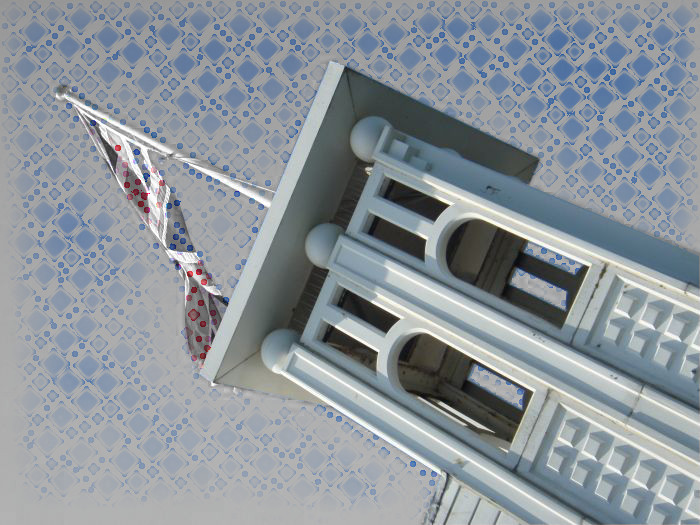
Love the effects this filter has with graphic boost.
Check out image properties to see how i got this outcome. :)

Image

XCF attached.

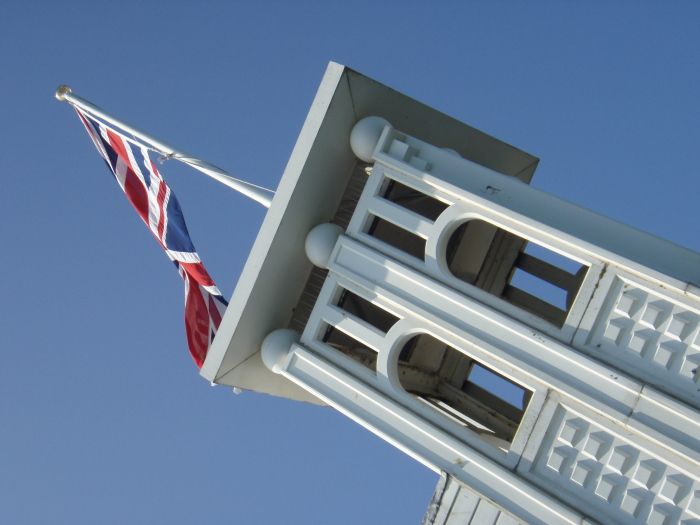
Original image
Image


Attachments:
building-shapism-graphic-boost-sat-mask.xcf [1.31 MiB]
Downloaded 142 times

_________________
Image
Top
 Post subject: Re: New filter 'Artistic / Shapeism'
PostPosted: Wed Jun 12, 2013 10:01 am  (#20) 
Offline
Retired Staff
User avatar

Joined: May 22, 2008
Posts: 6946
Location: Somewhere in GIMP
Rod wrote:
Check out image properties to see how i got this outcome. :)
Clever way to make a quicky tut, Rod.

Great results. I keep looking at the flag and thinking it should be hanging perpendicular to the bottom of the image.

_________________
Image
World War IV will be fought with sticks and stones. - Albert Einstein


Top
 Post subject: Re: New filter 'Artistic / Shapeism'
PostPosted: Wed Jun 12, 2013 11:14 am  (#21) 
Offline
Global Moderator
User avatar

Joined: May 16, 2010
Posts: 16023
Oregonian wrote:
Rod wrote:
Check out image properties to see how i got this outcome. :)
Clever way to make a quicky tut, Rod.

Great results. I keep looking at the flag and thinking it should be hanging perpendicular to the bottom of the image.


It would be if the horizon for the image was correct. :)
The image is just rotated ccw.

_________________
Image


Top
 Post subject: Re: New filter 'Artistic / Shapeism'
PostPosted: Wed Jun 12, 2013 4:42 pm  (#22) 
Offline
Retired Staff
User avatar

Joined: May 22, 2008
Posts: 6946
Location: Somewhere in GIMP
Rod wrote:
It would be if the horizon for the image was correct. :)
The image is just rotated ccw.
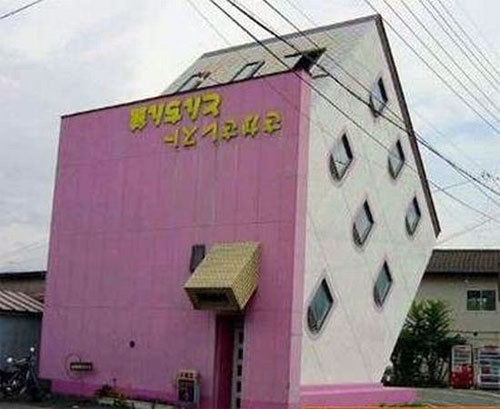
Sheesh, I figured that much out by myself. I just want the flag to hang down so it looks like the building is really built on a slant like this one.

_________________
Image
World War IV will be fought with sticks and stones. - Albert Einstein


Top
 Post subject: Re: New filter 'Artistic / Shapeism'
PostPosted: Wed Jun 12, 2013 6:22 pm  (#23) 
Offline
Global Moderator
User avatar

Joined: May 16, 2010
Posts: 16023
Oregonian wrote:
Rod wrote:
It would be if the horizon for the image was correct. :)
The image is just rotated ccw.
Sheesh, I figured that much out by myself. I just want the flag to hang down so it looks like the building is really built on a slant like this one.


Cool looking house. :)
Here we go i froze the building in time (Ice-Anything script-fu) so the flag can not move at all.

Attachment:
iced-building.jpg
iced-building.jpg [ 112.04 KiB | Viewed 1909 times ]

_________________
Image


Top
 Post subject: Re: New filter 'Artistic / Shapeism'
PostPosted: Wed Jun 12, 2013 8:24 pm  (#24) 
Offline
GimpChat Member
User avatar

Joined: Apr 08, 2010
Posts: 5420
Location: Northwest Ohio
I searched for ice-anything script but couldn't find it.


Top
 Post subject: Re: New filter 'Artistic / Shapeism'
PostPosted: Thu Jun 13, 2013 1:37 am  (#25) 
Offline
Global Moderator
User avatar

Joined: May 16, 2010
Posts: 16023
2-ton wrote:
I searched for ice-anything script but couldn't find it.


viewtopic.php?f=9&t=7435 :)

_________________
Image


Top
 Post subject: Re: New filter 'Artistic / Shapeism'
PostPosted: Fri Jun 14, 2013 7:13 am  (#26) 
Offline
GimpChat Member

Joined: May 09, 2012
Posts: 914
Here is a test that uses the new filter :)

If the effect is interesting I will make a script.

Image : http://www.fontplay.com/freephotos/4thf ... 706-13.jpg


Attachments:
test_gmic_shapeism.jpg
test_gmic_shapeism.jpg [ 443.5 KiB | Viewed 1871 times ]
Top
 Post subject: Re: New filter 'Artistic / Shapeism'
PostPosted: Fri Jun 14, 2013 8:00 am  (#27) 
Offline
GimpChat Member
User avatar

Joined: Jan 03, 2011
Posts: 1656
Very nice samj !
I'm currently working on improving the existing filters, maybe some important changes/breaks are likely to happen with the existing commands.
So, I'd suggest you just copy/paste the current code of the '-fitshape' command somewhere on your .gmic file, so you can be sure it will stay there for you. Maybe you can also rename it to '-samj_fitshape' to be sure the name will not be reused afterwards.

The improvements concern :
- Shapes with arbitrary number of channels will be managed, so it will be easier to keep alpha-channels of current shapes (instead of binarizing them as it is done now). Also, we will be able to keep the binary mask of pasted shapes as well.
- Shapeism effect will be more precise, as the shape will be re-generated for each scale instead of being downsized from an initial size.


Top
 Post subject: Re: New filter 'Artistic / Shapeism'
PostPosted: Fri Jun 14, 2013 8:49 am  (#28) 
Offline
GimpChat Member
User avatar

Joined: Sep 24, 2010
Posts: 12775
Wow; cool enhancements it looks like they will be David. Also, like the result you achieved samj; almost can feel the beads as I virtually wipe across my computer screen. :)

_________________
Lyle

Psalm 109:8

Image


Top
 Post subject: Re: New filter 'Artistic / Shapeism'
PostPosted: Fri Jun 14, 2013 11:20 am  (#29) 
Offline
GimpChat Member

Joined: May 09, 2012
Posts: 914
Thank you both :tyspin
I'll wait for the stable version to test the changes :)


Top
 Post subject: Re: New filter 'Artistic / Shapeism'
PostPosted: Fri Jun 14, 2013 11:59 am  (#30) 
Offline
GimpChat Member
User avatar

Joined: Jan 03, 2011
Posts: 1656
I'm almost ready in converting existing filters to the use of a new command 'pack_sprites' that does less things than 'fitshape' but allows more flexibility at the end.
Filter 'patterns/pack shape' has been recoded and you can now use more complex shapes (non binary alpha channel) without loosing the shades in the transparency.
I've started working on shapeism too.


Top
Post new topic Reply to topic  [ 39 posts ]  Go to page 1, 2  Next

All times are UTC - 5 hours [ DST ]


* Login  


Powered by phpBB3 © phpBB Group