 |
| GimpChat Member |
 |
Joined: Sep 24, 2010
Posts: 12850
|
OK; held back a bit. I originally created this preset using Mathmap Composer (combined several presets into one). Indeed, it can do everything that Moon2Pan can but much, much more (i.e., if you just want Moon2Pan, that's actually the default settings). Also, need the wrap ability for this preset too, Souphead. Again, it's more involved so might be a pain to implement. The result are vortex renders such as the Blackberry hole (lol). Note the extended range of the span; this is great for multi-pole droste like output.  # by Alexander Heide <[email protected]>
# see http://www.physik.uni-halle.de/~heide/crystal/crystal.html
pixel filter rotation (pixel image in,
float x_center: -1024-1024 (0), float y_center: -1024-1024 (0),
float psi: 0-3.141592 (0), float theta: -3.141592-3.141592 (0),
float radius: 1-2048 (2048),
float x_shift: -2048-2048 (0), float y_shift: -2048-2048 (0),
float zoom: -1-1 (0))
x0=x_center-X;
y0=-(y_center-Y);
rad=radius;
xs=-x_shift;
ys=-y_shift;
s=-zoom;
xy1=xy*10^s+xy:[xs,ys];
pxy=xy1-xy:[x0,y0];
pxy=pxy/rad;
psq=pxy[0]^2+pxy[1]^2;
xi=2*pxy[0]/(1+psq);
eta=2*pxy[1]/(1+psq);
zeta=(1-psq)/(1+psq);
xi1=cos(psi)*xi+sin(psi)*eta;
eta1=-sin(psi)*xi+cos(psi)*eta;
zeta1=zeta;
xi=xi1;
eta=cos(theta)*eta1+sin(theta)*zeta1;
zeta=-sin(theta)*eta1+cos(theta)*zeta1;
xi1=cos(psi)*xi-sin(psi)*eta;
eta1=sin(psi)*xi+cos(psi)*eta;
zeta1=zeta;
px=xi1/(1+zeta1)*rad+x0;
py=eta1/(1+zeta1)*rad+y0;
in(xy:[px,py])
end
filter moon2panorama(
image in,
bool center_help (0),
float center_x: -20-20 (0),
float center_y: -20-20 (0),
float span: 0-1450 (360),
float shift_x: -200-200 (0),
float shift_y: -200-200 (0)
)
scaled = ri:[x, y/(1+9*center_help)]/W*span;
shifted = (scaled - ri:[shift_x, shift_y])*pi/180;
remapped = I*exp(-I*shifted);
centered = (remapped*0.8+ri:[center_x, center_y]/100)*min(X, Y);
if center_help && abs(y/Y) < 0.01 then
rgbColor(1, 1, 0)
else
in(xy:[centered[0], centered[1]])
end
end
filter untitled_composition (bool moon2panorama_center_help (0), float moon2panorama_center_x : -20.000000 - 20.000000 (0.000000), float moon2panorama_center_y : -20.000000 - 20.000000 (0.000000), float moon2panorama_span : 0.000000 - 1450.000000 (360.000000), float moon2panorama_shift_x : -200.000000 - 200.000000 (0.000000), float moon2panorama_shift_y : -200.000000 - 200.000000 (0.000000), image rotation_in, float rotation_x_center : -1024.000000 - 1024.000000 (0.000000), float rotation_y_center : -1024.000000 - 1024.000000 (0.000000), float rotation_psi : 0.000000 - 3.141592 (0.000000), float rotation_theta : -3.141592 - 3.141592 (0.000000), float rotation_radius : 1.000000 - 2048.000000 (2048.000000), float rotation_x_shift : -2048.000000 - 2048.000000 (0.000000), float rotation_y_shift : -2048.000000 - 2048.000000 (0.000000), float rotation_zoom : -1.000000 - 1.000000 (0.000000))
rotation_out = rotation(rotation_in, rotation_x_center, rotation_y_center, rotation_psi, rotation_theta, rotation_radius, rotation_x_shift, rotation_y_shift, rotation_zoom);
moon2panorama_out = moon2panorama(rotation_out, moon2panorama_center_help, moon2panorama_center_x, moon2panorama_center_y, moon2panorama_span, moon2panorama_shift_x, moon2panorama_shift_y);
moon2panorama_out(xy)
end
filter __composer_filter__ (bool untitled_composition_moon2panorama_center_help (0), float untitled_composition_moon2panorama_center_x : -20.000000 - 20.000000 (0.000000), float untitled_composition_moon2panorama_center_y : -20.000000 - 20.000000 (0.000000), float untitled_composition_moon2panorama_span : 0.000000 - 1450.000000 (360.000000), float untitled_composition_moon2panorama_shift_x : -200.000000 - 200.000000 (0.000000), float untitled_composition_moon2panorama_shift_y : -200.000000 - 200.000000 (0.000000), image untitled_composition_rotation_in, float untitled_composition_rotation_x_center : -1024.000000 - 1024.000000 (0.000000), float untitled_composition_rotation_y_center : -1024.000000 - 1024.000000 (0.000000), float untitled_composition_rotation_psi : 0.000000 - 3.141592 (0.000000), float untitled_composition_rotation_theta : -3.141592 - 3.141592 (0.000000), float untitled_composition_rotation_radius : 1.000000 - 2048.000000 (2048.000000), float untitled_composition_rotation_x_shift : -2048.000000 - 2048.000000 (0.000000), float untitled_composition_rotation_y_shift : -2048.000000 - 2048.000000 (0.000000), float untitled_composition_rotation_zoom : -1.000000 - 1.000000 (0.000000))
untitled_composition_out = untitled_composition(untitled_composition_moon2panorama_center_help, untitled_composition_moon2panorama_center_x, untitled_composition_moon2panorama_center_y, untitled_composition_moon2panorama_span, untitled_composition_moon2panorama_shift_x, untitled_composition_moon2panorama_shift_y, untitled_composition_rotation_in, untitled_composition_rotation_x_center, untitled_composition_rotation_y_center, untitled_composition_rotation_psi, untitled_composition_rotation_theta, untitled_composition_rotation_radius, untitled_composition_rotation_x_shift, untitled_composition_rotation_y_shift, untitled_composition_rotation_zoom);
untitled_composition_out(xy)
end
| Attachments: |
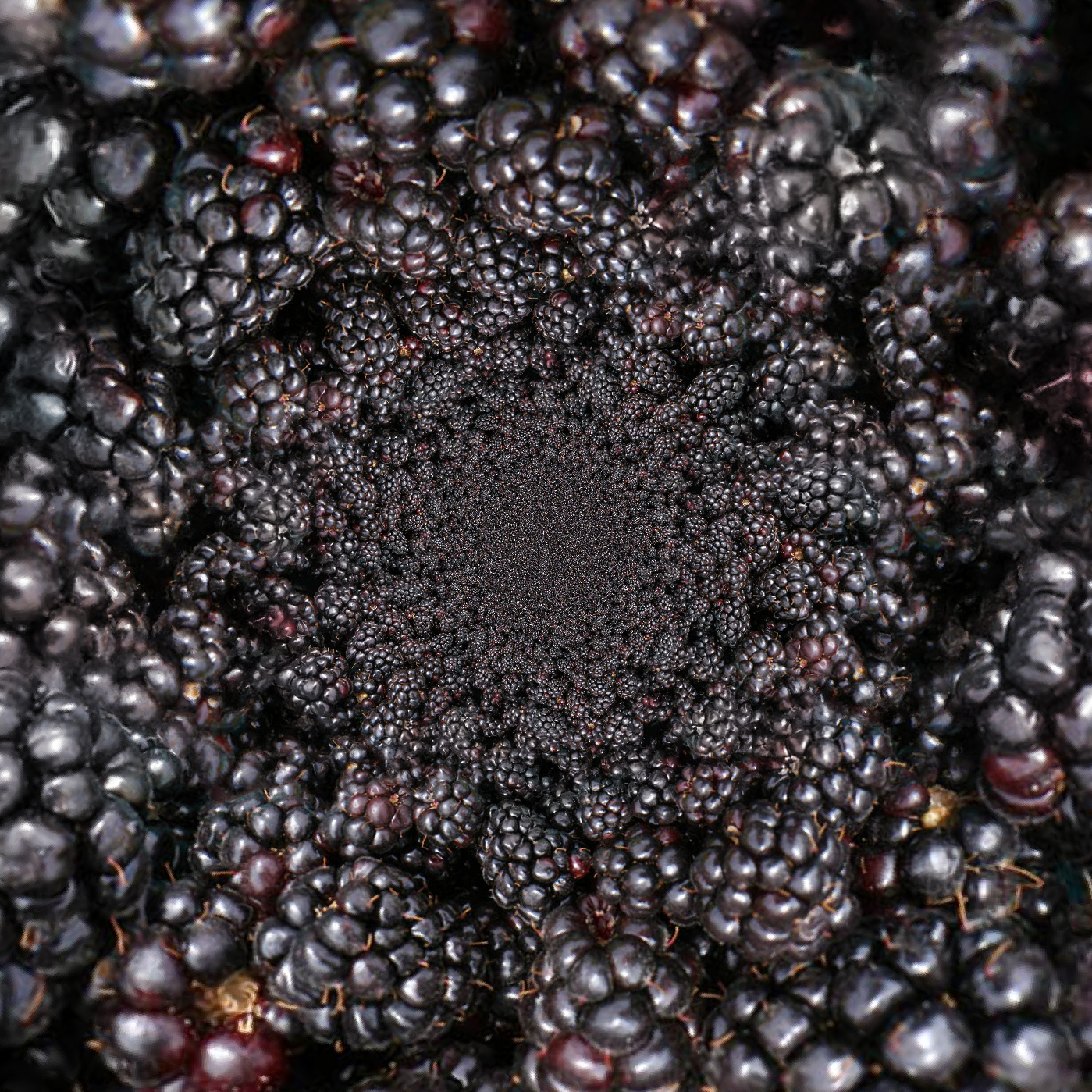
Blackberries.jpg [ 1.17 MiB | Viewed 2568 times ]
|
_________________
Lyle
Psalm 109:8
|
|
 Login
Login Register
 Tweets
 FAQ
FAQ Advanced Search


