It is currently Wed Aug 19, 2026 12:12 am


All times are UTC - 5 hours [ DST ]


Post new topic Reply to topic  [ 36 posts ]  Go to page Previous  1, 2
Author Message
 Post subject: Re: Small Bokehs with G'MIC
PostPosted: Thu May 09, 2013 8:28 pm  (#21) 
Offline
Global Moderator
User avatar

Joined: May 16, 2010
Posts: 16161
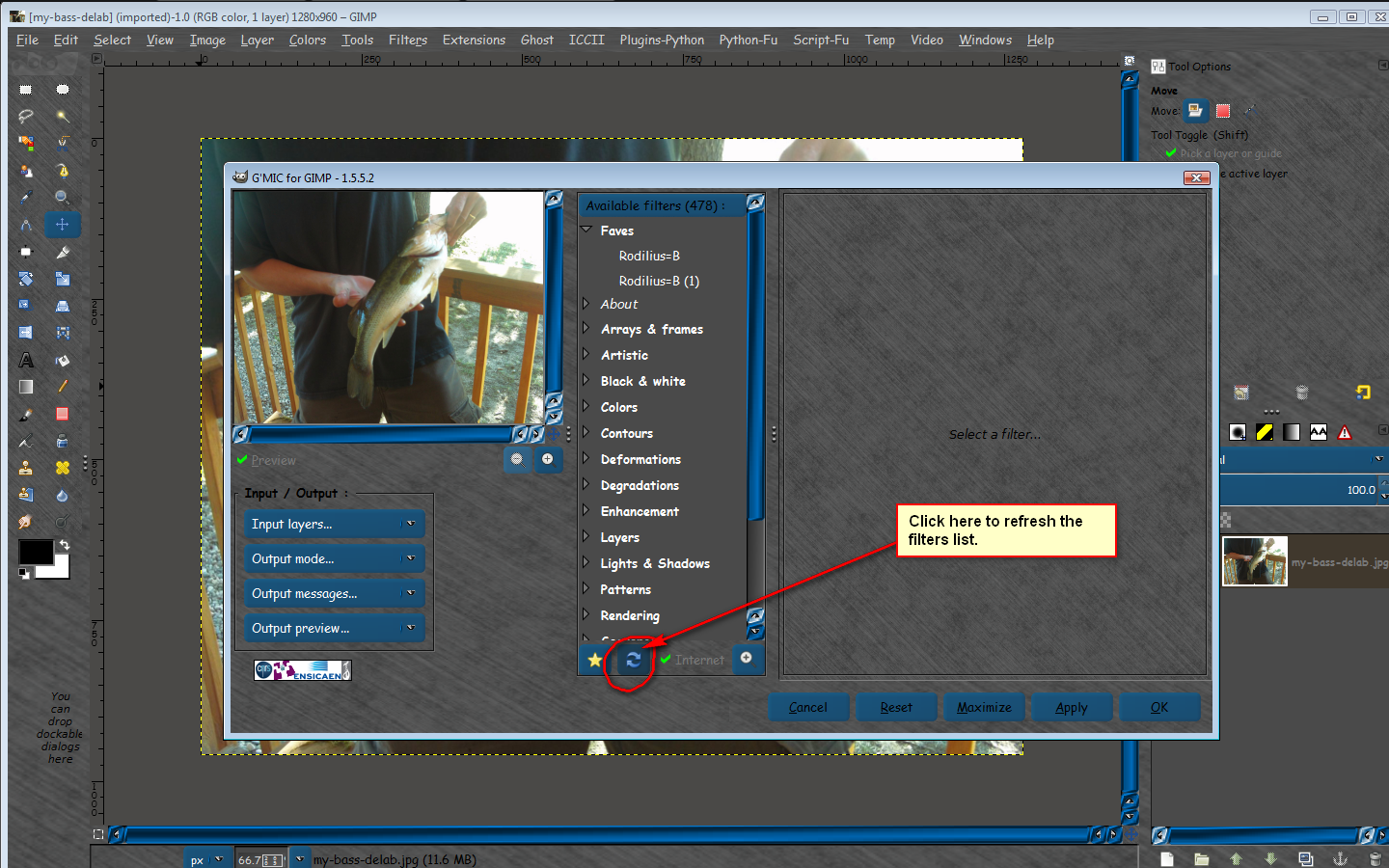
You should be able to just open G'MIC and click the refresh arrows under the filter list.
Image

Image

_________________
Image


Top
 Post subject: Re: Small Bokehs with G'MIC
PostPosted: Thu May 09, 2013 9:49 pm  (#22) 
Offline
GimpChat Member
User avatar

Joined: May 09, 2013
Posts: 53
In Debian there's only version 1.5.1.6 (gmic & gimp-gmic & gmic-zart packages)... I've seen that there is a deb-file in the download section - but looking at the name it seems to be only the gmic tool itself and not the gimp-gmic-plugin?

Edit: I tried to install and got an error message that it wants to overwrite something from another package. I'll try again after I have uninstalled the Debian gmic packages.

[...] No, it cannot install: your package depends on libcv2.1 and libhighgui2.1 but I get only libhighgui2.3 libhighgui2.4 and libcv2.3/libcv2.4... the 2.1 versions are way too old, they aren't available...


Last edited by spacepenguin on Thu May 09, 2013 10:13 pm, edited 2 times in total.

Top
 Post subject: Re: Small Bokehs with G'MIC
PostPosted: Fri May 10, 2013 7:01 am  (#23) 
Offline
GimpChat Member
User avatar

Joined: May 09, 2013
Posts: 53
Got it, I just installed the plugin in my personal gimp folder and gave up on the external application. Works so far :). But I cannot manage to get bigger bokeh circles. When I set the size to maxium it is still small and gets very bright. It looks fine in the preview but the proportions circles to objects are not the same as in the real picture. I usually work on pictures sized from 1920x1200 to 3000x?...


Top
 Post subject: Re: Small Bokehs with G'MIC
PostPosted: Fri May 10, 2013 8:09 am  (#24) 
Offline
GimpChat Member
User avatar

Joined: May 09, 2013
Posts: 53
Attached picture is a layer combination of sponge and bokeh filter. Without the smoothing effect of the sponge layer it would totally look like teen lizzy was caught in the washing machine - in a wild, bright, bubbly washing cycle.

The sponge and bokeh filter alas don't respect a selection in the image - or is there some trick?


Attachments:
teen-lizzy-is-caught-in-the-washing-machine.jpg
teen-lizzy-is-caught-in-the-washing-machine.jpg [ 253.34 KiB | Viewed 2300 times ]
Top
 Post subject: Re: Small Bokehs with G'MIC
PostPosted: Fri May 10, 2013 11:03 am  (#25) 
Offline
Global Moderator
User avatar

Joined: May 16, 2010
Posts: 16161
spacepenguin wrote:
Attached picture is a layer combination of sponge and bokeh filter. Without the smoothing effect of the sponge layer it would totally look like teen lizzy was caught in the washing machine - in a wild, bright, bubbly washing cycle.

The sponge and bokeh filter alas don't respect a selection in the image - or is there some trick?


No you are correct.Neither of these respect a selection for me either.
You could have the output as a new layer and use a mask.
Just make your selection then select to channel so you save the original selection. Then do a select/invert
Then run either filter and select output as new layer.Use the channel as your selection mask. :bigthup

_________________
Image


Top
 Post subject: Re: Small Bokehs with G'MIC
PostPosted: Fri May 10, 2013 11:17 am  (#26) 
Offline
Retired Staff
User avatar

Joined: May 22, 2008
Posts: 6946
Location: Somewhere in GIMP
I, too, was hoping for greater sizing options. Perhaps David can take a look and see what he can do.

There are also bokeh brushes which you can resize to your specifications. You can download the ones I made or find others in Internet searches.
GIMP Bokeh Brushes

The sponge and bokeh filters do respect a selection for me. Select the area you do not want the bokehs in, then Select > Invert (or Ctrl + I) and the bokehs will not appear in the inverted selection area.

Here is a screen shot of a quicky example demonstrating an exclusive selection with the bokeh filter.

Image

The champagne bottle is another example of exclusive selection. It was done with the sponge filter.

_________________
Image
World War IV will be fought with sticks and stones. - Albert Einstein


Top
 Post subject: Re: Small Bokehs with G'MIC
PostPosted: Fri May 10, 2013 11:42 am  (#27) 
Offline
Global Moderator
User avatar

Joined: May 16, 2010
Posts: 16161
Oregonian wrote:
I, too, was hoping for greater sizing options. Perhaps David can take a look and see what he can do.

There are also bokeh brushes which you can resize to your specifications. You can download the ones I made or find others in Internet searches.
GIMP Bokeh Brushes

The sponge and bokeh filters do respect a selection for me. Select the area you do not want the bokehs in, then Select > Invert (or Ctrl + I) and the bokehs will not appear in the inverted selection area.

Here is a screen shot of a quicky example demonstrating an exclusive selection with the bokeh filter.

[ Image ]

The champagne bottle is another example of exclusive selection. It was done with the sponge filter.


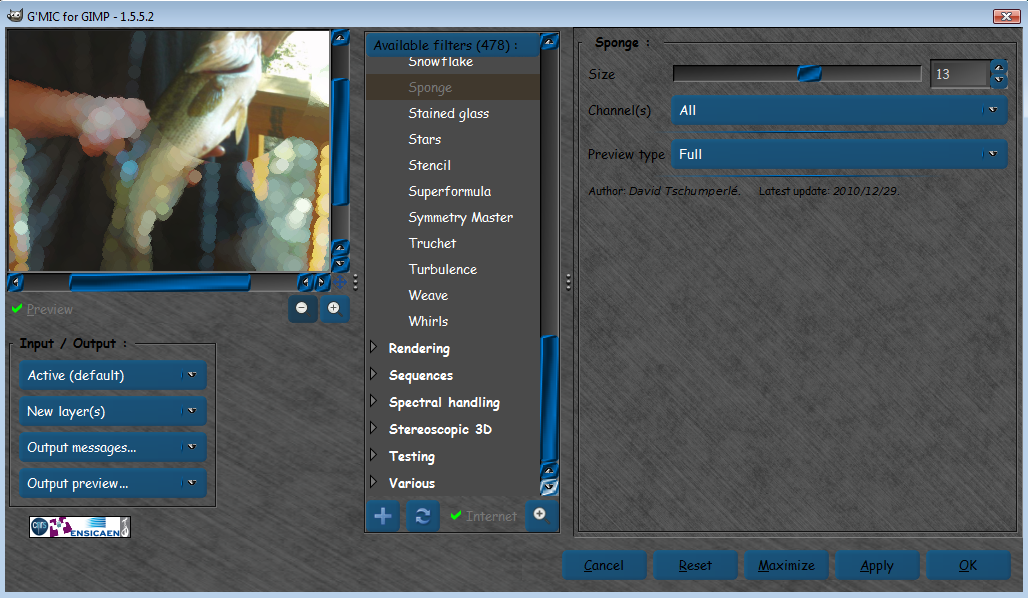
It looks good in the sponge preview, but it applies the effect on the whole image after selecting OK or apply..
Image
I tried adding alpha,apply instead of OK, and those didn't work either.
Maybe just a Windows bug thing?

_________________
Image


Top
 Post subject: Re: Small Bokehs with G'MIC
PostPosted: Fri May 10, 2013 11:46 am  (#28) 
Offline
Global Moderator
User avatar

Joined: May 16, 2010
Posts: 16161
I just tried other filters and i get the same results.None of them respect selections.

_________________
Image


Top
 Post subject: Re: Small Bokehs with G'MIC
PostPosted: Fri May 10, 2013 11:49 am  (#29) 
Offline
GimpChat Member
User avatar

Joined: Apr 07, 2010
Posts: 14182
That is very pretty O. I remember that bird, you used it in a tute for me a long time ago. cool. love the bubbles

_________________
Image


Top
 Post subject: Re: Small Bokehs with G'MIC
PostPosted: Fri May 10, 2013 12:06 pm  (#30) 
Offline
GimpChat Member
User avatar

Joined: May 09, 2013
Posts: 53
Strange... Rod, that's exactly what I experience here: Preview is fine, selection is excluded - but as soon as I apply the filter the whole picture is used. And no, it cannot be a Windows problem, I'm using Linux (Debian Sid... Maybe a bug in the 64bit plugin?


Top
 Post subject: Re: Small Bokehs with G'MIC
PostPosted: Fri May 10, 2013 12:12 pm  (#31) 
Offline
Global Moderator
User avatar

Joined: May 16, 2010
Posts: 16161
spacepenguin wrote:
Strange... Rod, that's exactly what I experience here: Preview is fine, selection is excluded - but as soon as I apply the filter the whole picture is used. And no, it cannot be a Windows problem, I'm using Linux (Debian Sid... Maybe a bug in the 64bit plugin?

It can't be a bug in the 64 bit plug-in i use 32 bit. :)
Resetting G'MIC doesn't work either.
Can you tell me which version of Gimp-2.8.4 you are using.Is it from Gimp.org or elsewhere?

_________________
Image


Top
 Post subject: Re: Small Bokehs with G'MIC
PostPosted: Fri May 10, 2013 12:15 pm  (#32) 
Offline
GimpChat Member
User avatar

Joined: May 09, 2013
Posts: 53
gimp:
  Installiert:           2.8.4-1
  Installationskandidat: 2.8.4-1
  Versionstabelle:
*** 2.8.4-1 0
        500 http://ftp.de.debian.org/debian/ unstable/main amd64 Packages


Top
 Post subject: Re: Small Bokehs with G'MIC
PostPosted: Fri May 10, 2013 12:25 pm  (#33) 
Offline
Global Moderator
User avatar

Joined: May 16, 2010
Posts: 16161
spacepenguin wrote:
gimp:
  Installiert:           2.8.4-1
  Installationskandidat: 2.8.4-1
  Versionstabelle:
*** 2.8.4-1 0
        500 http://ftp.de.debian.org/debian/ unstable/main amd64 Packages


So it's not the compile because i get mine from Partha.com (always).
It's not a 32 or 64 bit plugin error.
Resetting G'MIC doesn't fix it.
It works in Fedora (O's platform os)
Does anyone else using Linux, Windows, or Mac have this problem?
viewtopic.php?f=8&t=7199

_________________
Image


Top
 Post subject: Re: Small Bokehs with G'MIC
PostPosted: Fri May 10, 2013 1:06 pm  (#34) 
Offline
GimpChat Member
User avatar

Joined: May 09, 2013
Posts: 53
It works, the selection is respected and kept, IF I choose the standard output which is to overwrite the current layer. It does NOT work and the whole image is used in case I choose any other output (new layer, new active layer, new image). I tried with the binary and a self compiled plug-in.


Top
 Post subject: Re: Small Bokehs with G'MIC
PostPosted: Fri May 10, 2013 2:38 pm  (#35) 
Offline
Administrator
User avatar

Joined: Aug 10, 2012
Posts: 14158
Location: Native to NYC living in Arizona, Gimp 2.8 - 3.0, Win 11 PC.
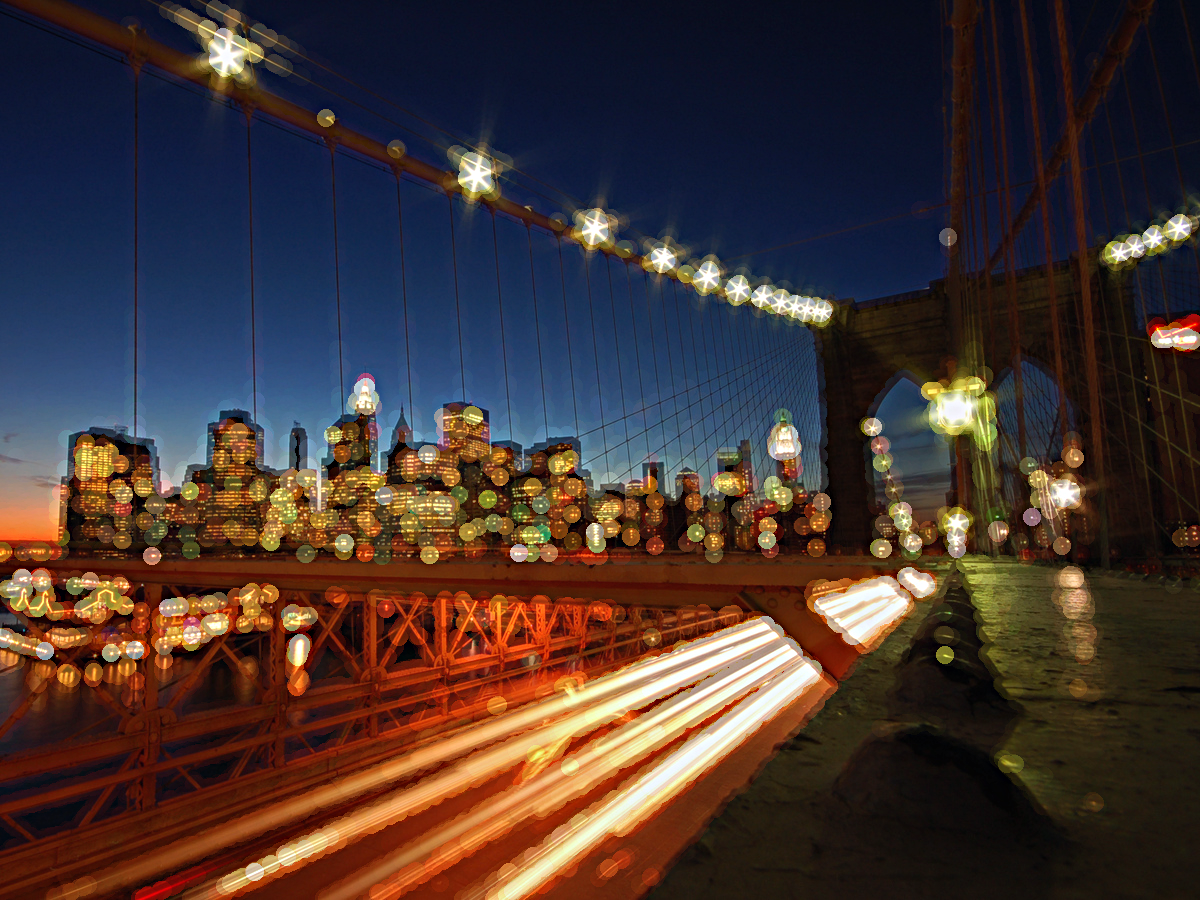
Made this image using, G'MIC>Pattern>Sponge...
Image

I put the setting at max, without any selection. I think it came out pretty good.
I know what this is a picture of, but does anyone else know? ;)

_________________
Image
"A wise man learns more from a foolish question than a fool can learn from a wise answer"
Image


Top
 Post subject: Re: Small Bokehs with G'MIC
PostPosted: Fri May 10, 2013 2:51 pm  (#36) 
Offline
GimpChat Member
User avatar

Joined: May 09, 2013
Posts: 53
gramg wrote:
Yep...I always use the defaults...but you are correct...as soon as I changed the output on the lower left to make a different layer...it fills the whole picture with the bokehs.


Thanks for the confirmation. So I guess this is a G'Mic bug?


Top
Post new topic Reply to topic  [ 36 posts ]  Go to page Previous  1, 2

All times are UTC - 5 hours [ DST ]


cron

* Login  


Powered by phpBB3 © phpBB Group