It is currently Thu Aug 20, 2026 10:54 pm


All times are UTC - 5 hours [ DST ]


Post new topic Reply to topic  [ 39 posts ]  Go to page Previous  1, 2
Author Message
 Post subject: Re: New filter 'Artistic / Shapeism'
PostPosted: Wed Jun 12, 2013 11:14 am  (#21) 
Offline
Global Moderator
User avatar

Joined: May 16, 2010
Posts: 16164
Oregonian wrote:
Rod wrote:
Check out image properties to see how i got this outcome. :)
Clever way to make a quicky tut, Rod.

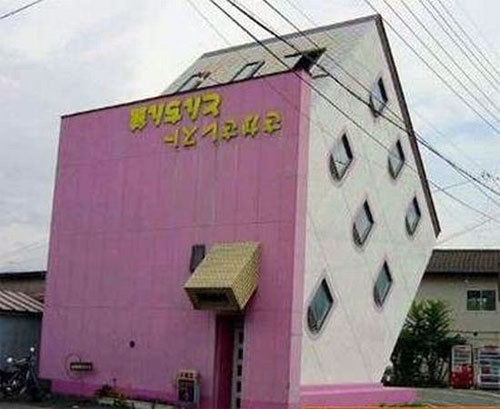
Great results. I keep looking at the flag and thinking it should be hanging perpendicular to the bottom of the image.


It would be if the horizon for the image was correct. :)
The image is just rotated ccw.

_________________
Image


Top
 Post subject: Re: New filter 'Artistic / Shapeism'
PostPosted: Wed Jun 12, 2013 4:42 pm  (#22) 
Offline
Retired Staff
User avatar

Joined: May 22, 2008
Posts: 6946
Location: Somewhere in GIMP
Rod wrote:
It would be if the horizon for the image was correct. :)
The image is just rotated ccw.
Sheesh, I figured that much out by myself. I just want the flag to hang down so it looks like the building is really built on a slant like this one.

_________________
Image
World War IV will be fought with sticks and stones. - Albert Einstein


Top
 Post subject: Re: New filter 'Artistic / Shapeism'
PostPosted: Wed Jun 12, 2013 6:22 pm  (#23) 
Offline
Global Moderator
User avatar

Joined: May 16, 2010
Posts: 16164
Oregonian wrote:
Rod wrote:
It would be if the horizon for the image was correct. :)
The image is just rotated ccw.
Sheesh, I figured that much out by myself. I just want the flag to hang down so it looks like the building is really built on a slant like this one.


Cool looking house. :)
Here we go i froze the building in time (Ice-Anything script-fu) so the flag can not move at all.

Attachment:
iced-building.jpg
iced-building.jpg [ 112.04 KiB | Viewed 2048 times ]

_________________
Image


Top
 Post subject: Re: New filter 'Artistic / Shapeism'
PostPosted: Wed Jun 12, 2013 8:24 pm  (#24) 
Offline
GimpChat Member
User avatar

Joined: Apr 08, 2010
Posts: 5420
Location: Northwest Ohio
I searched for ice-anything script but couldn't find it.


Top
 Post subject: Re: New filter 'Artistic / Shapeism'
PostPosted: Thu Jun 13, 2013 1:37 am  (#25) 
Offline
Global Moderator
User avatar

Joined: May 16, 2010
Posts: 16164
2-ton wrote:
I searched for ice-anything script but couldn't find it.


viewtopic.php?f=9&t=7435 :)

_________________
Image


Top
 Post subject: Re: New filter 'Artistic / Shapeism'
PostPosted: Fri Jun 14, 2013 7:13 am  (#26) 
Offline
GimpChat Member

Joined: May 09, 2012
Posts: 914
Here is a test that uses the new filter :)

If the effect is interesting I will make a script.

Image : http://www.fontplay.com/freephotos/4thf ... 706-13.jpg


Attachments:
test_gmic_shapeism.jpg
test_gmic_shapeism.jpg [ 443.5 KiB | Viewed 2010 times ]
Top
 Post subject: Re: New filter 'Artistic / Shapeism'
PostPosted: Fri Jun 14, 2013 8:00 am  (#27) 
Offline
GimpChat Member
User avatar

Joined: Jan 03, 2011
Posts: 1656
Very nice samj !
I'm currently working on improving the existing filters, maybe some important changes/breaks are likely to happen with the existing commands.
So, I'd suggest you just copy/paste the current code of the '-fitshape' command somewhere on your .gmic file, so you can be sure it will stay there for you. Maybe you can also rename it to '-samj_fitshape' to be sure the name will not be reused afterwards.

The improvements concern :
- Shapes with arbitrary number of channels will be managed, so it will be easier to keep alpha-channels of current shapes (instead of binarizing them as it is done now). Also, we will be able to keep the binary mask of pasted shapes as well.
- Shapeism effect will be more precise, as the shape will be re-generated for each scale instead of being downsized from an initial size.


Top
 Post subject: Re: New filter 'Artistic / Shapeism'
PostPosted: Fri Jun 14, 2013 8:49 am  (#28) 
Offline
GimpChat Member
User avatar

Joined: Sep 24, 2010
Posts: 12836
Wow; cool enhancements it looks like they will be David. Also, like the result you achieved samj; almost can feel the beads as I virtually wipe across my computer screen. :)

_________________
Lyle

Psalm 109:8

Image


Top
 Post subject: Re: New filter 'Artistic / Shapeism'
PostPosted: Fri Jun 14, 2013 11:20 am  (#29) 
Offline
GimpChat Member

Joined: May 09, 2012
Posts: 914
Thank you both :tyspin
I'll wait for the stable version to test the changes :)


Top
 Post subject: Re: New filter 'Artistic / Shapeism'
PostPosted: Fri Jun 14, 2013 11:59 am  (#30) 
Offline
GimpChat Member
User avatar

Joined: Jan 03, 2011
Posts: 1656
I'm almost ready in converting existing filters to the use of a new command 'pack_sprites' that does less things than 'fitshape' but allows more flexibility at the end.
Filter 'patterns/pack shape' has been recoded and you can now use more complex shapes (non binary alpha channel) without loosing the shades in the transparency.
I've started working on shapeism too.


Top
 Post subject: Re: New filter 'Artistic / Shapeism'
PostPosted: Fri Jun 14, 2013 12:59 pm  (#31) 
Offline
GimpChat Member
User avatar

Joined: Sep 24, 2010
Posts: 12836
Like the packed sprites but you are now merging the base layer with the packed opject which I don't like David since I like to keep the original base layer as is and not have any part of the base layer with the packing objects. :)

_________________
Lyle

Psalm 109:8

Image


Top
 Post subject: Re: New filter 'Artistic / Shapeism'
PostPosted: Fri Jun 14, 2013 1:17 pm  (#32) 
Offline
GimpChat Member
User avatar

Joined: Jan 03, 2011
Posts: 1656
Will look at it Lyle, thanks for noticing it.


Top
 Post subject: Re: New filter 'Artistic / Shapeism'
PostPosted: Sat Jun 15, 2013 12:47 am  (#33) 
Offline
Global Moderator
User avatar

Joined: May 16, 2010
Posts: 16164
Some cool looking results using 3 different shapes - octagons, circles, and (triangles with transparency). Then setting the layer modes for each. I used my crayon script for the rendered building.
XCF attached.
Image

Attachment:
cool-tower-shapeism_RD.xcf [2.9 MiB]
Downloaded 173 times

_________________
Image


Top
 Post subject: Re: New filter 'Artistic / Shapeism'
PostPosted: Sat Jun 15, 2013 7:52 am  (#34) 
Offline
GimpChat Member

Joined: May 09, 2012
Posts: 914
@Ronounours

Test pack_sprites : I like the ability to overlay patterns with a negative value of the first parameter (picture attached)

*****

The command line :
gmic -m test.txt masque2.png motif.png --pack_sprites -10,5
gmic masque1.png motif.png --pack_sprites 1,5

*****
(beta version win-64 is udapted)


Attachments:
files_test_pack_sprites.zip [8.49 KiB]
Downloaded 111 times
test_pack_sprites.png
test_pack_sprites.png [ 77.49 KiB | Viewed 2015 times ]
Top
 Post subject: Re: New filter 'Artistic / Shapeism'
PostPosted: Sun Jun 16, 2013 10:01 am  (#35) 
Offline
GimpChat Member
User avatar

Joined: Sep 24, 2010
Posts: 12836
Just refreshed my filters and the bug appears to be fixed in packed sprites anyway (haven't tested Shapeism yet). Thanks a headp David. :)

edit:
Man I must have been tired when I got home from work to type this. lol

Just woke up; still tired though. lol

:)

_________________
Lyle

Psalm 109:8

Image


Last edited by lylejk on Sun Jun 16, 2013 4:26 pm, edited 1 time in total.

Top
 Post subject: Re: New filter 'Artistic / Shapeism'
PostPosted: Sun Jun 16, 2013 10:04 am  (#36) 
Offline
GimpChat Member
User avatar

Joined: Jan 03, 2011
Posts: 1656
Finally, I've finished converting the 'Shapeism' and 'Pack sprites' filters to the new command '-pack_sprites', instead of '-fitshape'.
The latter now disappears, and the new filters have some new options and should render nicer images.
Particularly, all the scales of the shapeism filters are now antialiased (was only for lower scales before), and it better manages negative spacing. Nothing spectacular, but required quite a lot of work anyway :) (all has been recoded from scratch!).


Top
 Post subject: Re: New filter 'Artistic / Shapeism'
PostPosted: Sun Jun 16, 2013 10:09 am  (#37) 
Offline
GimpChat Member
User avatar

Joined: Jul 17, 2012
Posts: 2769
thanks for all the work, David - very much apreciated !!


Top
 Post subject: Re: New filter 'Artistic / Shapeism'
PostPosted: Sun Jun 16, 2013 10:14 am  (#38) 
Offline
Global Moderator
User avatar

Joined: May 16, 2010
Posts: 16164
Thank you David. :)

_________________
Image


Top
 Post subject: Re: New filter 'Artistic / Shapeism'
PostPosted: Sun Jun 16, 2013 2:58 pm  (#39) 
Offline
GimpChat Member
User avatar

Joined: Jan 03, 2011
Posts: 1656
I was talking about how these two filters are implemented in fact.
They were using an 'old' G'MIC internal command '-fitshape' that does not exist anymore. For the GIMP plug-in user, there shouldn't be a so noticeable difference. By the way, if you didn't see any differences, then it's great, at least this means it is working as expected :)


Top
Post new topic Reply to topic  [ 39 posts ]  Go to page Previous  1, 2

All times are UTC - 5 hours [ DST ]


* Login  


Powered by phpBB3 © phpBB Group