It is currently Mon Aug 03, 2026 3:12 pm


All times are UTC - 5 hours [ DST ]


Post new topic Reply to topic  [ 12 posts ] 
Author Message
 Post subject: Engrave modifie from Samj
PostPosted: Thu Mar 19, 2015 8:15 pm  (#1) 
Offline
Script Coder
User avatar

Joined: Feb 18, 2011
Posts: 4826
Location: Bendigo Vic. Australia
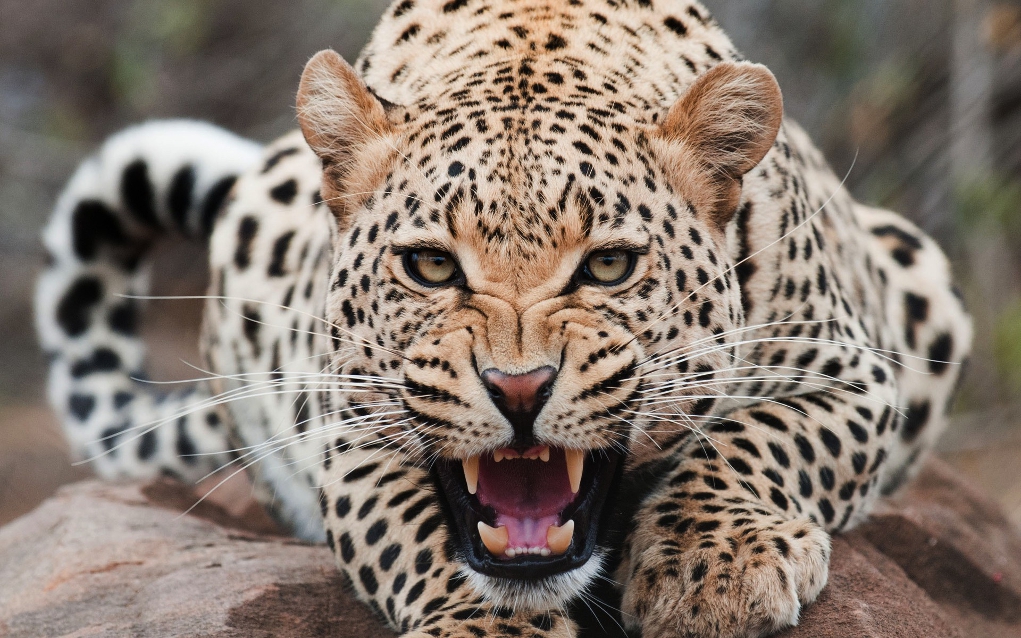
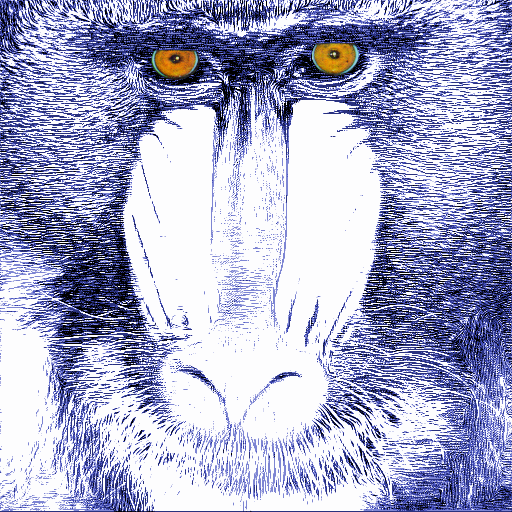
This is a new interesting filter from Samj and after 'refreshing filters' is available from
Testing / Samj / Black & white / Engrave modifie
this filter has 8 different defaults to choose from as well as settings to vary output
Original Image
Image
Default A
Image

_________________
Image
No matter how much you push the envelope, it'll still be stationery.


Share on Facebook Share on Twitter Share on Orkut Share on Digg Share on MySpace Share on Delicious Share on Technorati
Top
 Post subject: Re: Engrave modifie from Samj
PostPosted: Thu Mar 19, 2015 8:26 pm  (#2) 
Offline
GimpChat Member
User avatar

Joined: Sep 24, 2010
Posts: 12822
Definitely cool; thanks for pointing samj's modification Graechan. Used D*** (no idea why the astericks; lol) applied to your cool cheatah pose. :)


Attachments:
Untitled.png
Untitled.png [ 320.28 KiB | Viewed 3908 times ]

_________________
Lyle

Psalm 109:8

Image
Top
 Post subject: Re: Engrave modifie from Samj
PostPosted: Thu Mar 19, 2015 8:39 pm  (#3) 
Offline
Script Coder
User avatar

Joined: Feb 18, 2011
Posts: 4826
Location: Bendigo Vic. Australia
I new you would love this filter Lyle, it definitely simplifies engrave

_________________
Image
No matter how much you push the envelope, it'll still be stationery.


Top
 Post subject: Re: Engrave modifie from Samj
PostPosted: Fri Mar 20, 2015 12:31 am  (#4) 
Offline
GimpChat Member
User avatar

Joined: Sep 24, 2010
Posts: 12822
Not sure why, but the slider under samj's preset don't appear to do anything (at least for me), but that doesn't really matter. The presets make it easier to see how different settings work and that's all that matters. :)

_________________
Lyle

Psalm 109:8

Image


Top
 Post subject: Re: Engrave modifie from Samj
PostPosted: Fri Mar 20, 2015 1:12 am  (#5) 
Offline
Script Coder
User avatar

Joined: Feb 18, 2011
Posts: 4826
Location: Bendigo Vic. Australia
Lyle which slider are you referring to they all function for me
Image

_________________
Image
No matter how much you push the envelope, it'll still be stationery.


Top
 Post subject: Re: Engrave modifie from Samj
PostPosted: Fri Mar 20, 2015 1:17 am  (#6) 
Offline
GimpChat Member
User avatar

Joined: Sep 24, 2010
Posts: 12822
I can move any slider but the preview doesn't change when I pick one of the presets other then non. :)

_________________
Lyle

Psalm 109:8

Image


Top
 Post subject: Re: Engrave modifie from Samj
PostPosted: Fri Mar 20, 2015 7:14 am  (#7) 
Offline
GimpChat Member
User avatar

Joined: Nov 16, 2011
Posts: 5127
Location: Metro Vancouver, BC
This filter is great.

Image

_________________
Image
Gimp 2.8.18, Linux, median user
Gimp Chat Tutorials Index
Spirit Bear (Kermode)


Top
 Post subject: Re: Engrave modifie from Samj
PostPosted: Fri Mar 20, 2015 9:44 am  (#8) 
Offline
GimpChat Member

Joined: Jul 11, 2010
Posts: 349
lylejk wrote:
I can move any slider but the preview doesn't change when I pick one of the presets other then non. :)


It might be that the sliders were meant to be used with non. For me using the sliders in other modes produce very slight differences. You need to look carefuly to see them.


Top
 Post subject: Re: Engrave modifie from Samj
PostPosted: Fri Mar 20, 2015 10:40 am  (#9) 
Offline
GimpChat Member
User avatar

Joined: Sep 24, 2010
Posts: 12822
You're probably right bilbo. After clicking a preset then going to non, you can then change the sliders. I suppose that was indeed samj's intent. Call it a feature then. lol

:)

_________________
Lyle

Psalm 109:8

Image


Top
 Post subject: Re: Engrave modifie from Samj
PostPosted: Fri Mar 20, 2015 1:17 pm  (#10) 
Offline
GimpChat Member
User avatar

Joined: Mar 01, 2014
Posts: 14105
Location: Spain, Aragón
I like this filter, too. Nice outcomes. :) :bigthup


Attachments:
1366_Tiger-Engrave.jpg
1366_Tiger-Engrave.jpg [ 542.59 KiB | Viewed 3720 times ]

_________________
Image

Gimp 2.10.30(samj) portable _ OS Windows 10 Home_ 64bits
Don’t be afraid to start over. It’s a new chance to rebuild what you want.
Top
 Post subject: Re: Engrave modifie from Samj
PostPosted: Sun Mar 22, 2015 9:56 pm  (#11) 
Offline
Script Coder
User avatar

Joined: Feb 18, 2011
Posts: 4826
Location: Bendigo Vic. Australia
This filter is now also in Artistic > 'Colored Engraving' and has color options added
Original Image
Image
Output
Image

_________________
Image
No matter how much you push the envelope, it'll still be stationery.


Top
 Post subject: Re: Engrave modifie from Samj
PostPosted: Sun Mar 22, 2015 10:11 pm  (#12) 
Offline
GimpChat Member
User avatar

Joined: Sep 24, 2010
Posts: 12822
Thanks for the heads up Graechan. :)

_________________
Lyle

Psalm 109:8

Image


Top
Post new topic Reply to topic  [ 12 posts ] 

All times are UTC - 5 hours [ DST ]


* Login  


Powered by phpBB3 © phpBB Group