It is currently Tue Aug 18, 2026 5:45 am


All times are UTC - 5 hours [ DST ]


Post new topic Reply to topic  [ 20 posts ] 
Author Message
 Post subject: Giving up on 2 filters
PostPosted: Fri Jun 26, 2015 2:29 pm  (#1) 
Offline
GimpChat Member
User avatar

Joined: Jul 06, 2013
Posts: 2662
Location: California
I'm done with two filters. They are Split Objects and Extraction foreground filter. Neither of them work properly for me. I guess I will just use the other tools to remove backgrounds.


Share on Facebook Share on Twitter Share on Orkut Share on Digg Share on MySpace Share on Delicious Share on Technorati
Top
 Post subject: Re: Giving up on 2 filters
PostPosted: Fri Jun 26, 2015 4:38 pm  (#2) 
Offline
GimpChat Member

Joined: May 12, 2015
Posts: 4693
For the extraction, did you try Partha's Portable? Go to www.partha.com. Click on Mirrors, Select the file that is 32 or 64 depending on your computer. Make sure you choose a file name with Rggjan in it.


Top
 Post subject: Re: Giving up on 2 filters
PostPosted: Fri Jun 26, 2015 5:32 pm  (#3) 
Offline
GimpChat Member
User avatar

Joined: Jul 06, 2013
Posts: 2662
Location: California
Pat625 wrote:
For the extraction, did you try Partha's Portable? Go to http://www.partha.com. Click on Mirrors, Select the file that is 32 or 64 depending on your computer. Make sure you choose a file name with Rggjan in it.


No, I haven't tried it and I probably won't. Thanks though.


Top
 Post subject: Re: Giving up on 2 filters
PostPosted: Fri Jun 26, 2015 5:39 pm  (#4) 
Offline
GimpChat Founder
User avatar

Joined: May 22, 2008
Posts: 5241
Location: Gimpville
mackenzieh wrote:
I'm done with two filters. They are Split Objects and Extraction foreground filter. Neither of them work properly for me.

Extract foreground [interactively] has always worked great for me. I'm curious as to what kind of problems you had with it?

_________________
“If you reach for the stars, you just might land on a decently sized hill.” - Stuart Hill


Top
 Post subject: Re: Giving up on 2 filters
PostPosted: Fri Jun 26, 2015 6:45 pm  (#5) 
Offline
GimpChat Member
User avatar

Joined: Jul 06, 2013
Posts: 2662
Location: California
GnuTux wrote:
mackenzieh wrote:
I'm done with two filters. They are Split Objects and Extraction foreground filter. Neither of them work properly for me.

Extract foreground [interactively] has always worked great for me. I'm curious as to what kind of problems you had with it?


Extract Foreground is okay but it can be confusing and hard to use. Especially, when you want an updatable layer but I've figured it out. I would have to just say new image for the output layer and keep changing the image until I get it right. I have given up on Split Objects for sure. That filter I can't do anything with.


Top
 Post subject: Re: Giving up on 2 filters
PostPosted: Fri Jun 26, 2015 7:52 pm  (#6) 
Offline
GimpChat Member
User avatar

Joined: Sep 24, 2010
Posts: 12832
Just making sure; you know that pressing the space bar refreshes your view as you extract right Mackenzieh? Just didn't want to assume. :)

_________________
Lyle

Psalm 109:8

Image


Top
 Post subject: Re: Giving up on 2 filters
PostPosted: Fri Jun 26, 2015 7:54 pm  (#7) 
Offline
GimpChat Member
User avatar

Joined: Jul 06, 2013
Posts: 2662
Location: California
lylejk wrote:
Just making sure; you know that pressing the space bar refreshes your view as you extract right Mackenzieh? Just didn't want to assume. :)


No, I didn't know that Lyle. :) For which filter does that work for?


Top
 Post subject: Re: Giving up on 2 filters
PostPosted: Fri Jun 26, 2015 11:13 pm  (#8) 
Offline
GimpChat Member

Joined: Dec 05, 2014
Posts: 14
For the interactive filters are you clicking on Apply or Ok when you want to perform that filter?

When I click Ok, the screen with the instructions disappears, so then I have no idea what key does what.

If I click on Apply, the instruction screen stays and then I can reference it to know what I'm doing.

If you've been clicking on Ok, try Apply and see if that helps with having the instructions stick around.


Top
 Post subject: Re: Giving up on 2 filters
PostPosted: Fri Jun 26, 2015 11:42 pm  (#9) 
Offline
GimpChat Member
User avatar

Joined: Jul 06, 2013
Posts: 2662
Location: California
kevin360 wrote:
For the interactive filters are you clicking on Apply or Ok when you want to perform that filter?

When I click Ok, the screen with the instructions disappears, so then I have no idea what key does what.

If I click on Apply, the instruction screen stays and then I can reference it to know what I'm doing.

If you've been clicking on Ok, try Apply and see if that helps with having the instructions stick around.


I have been clicking on Apply for both filters and only on Split Objects, the filter for some reason or another doesn't work properly but the extraction filter I am getting the hang of it.


Top
 Post subject: Re: Giving up on 2 filters
PostPosted: Sat Jun 27, 2015 9:44 am  (#10) 
Offline
GimpChat Member

Joined: Sep 24, 2012
Posts: 275
Location: Scotland
Extract foreground is probably your best bet then, but I'd really like to know if other people have problems with split objects. I'm not very good with gimp myself :oops: but I'll try to show how I use it, maybe if you see something different on your PC I can figure out what's wrong:
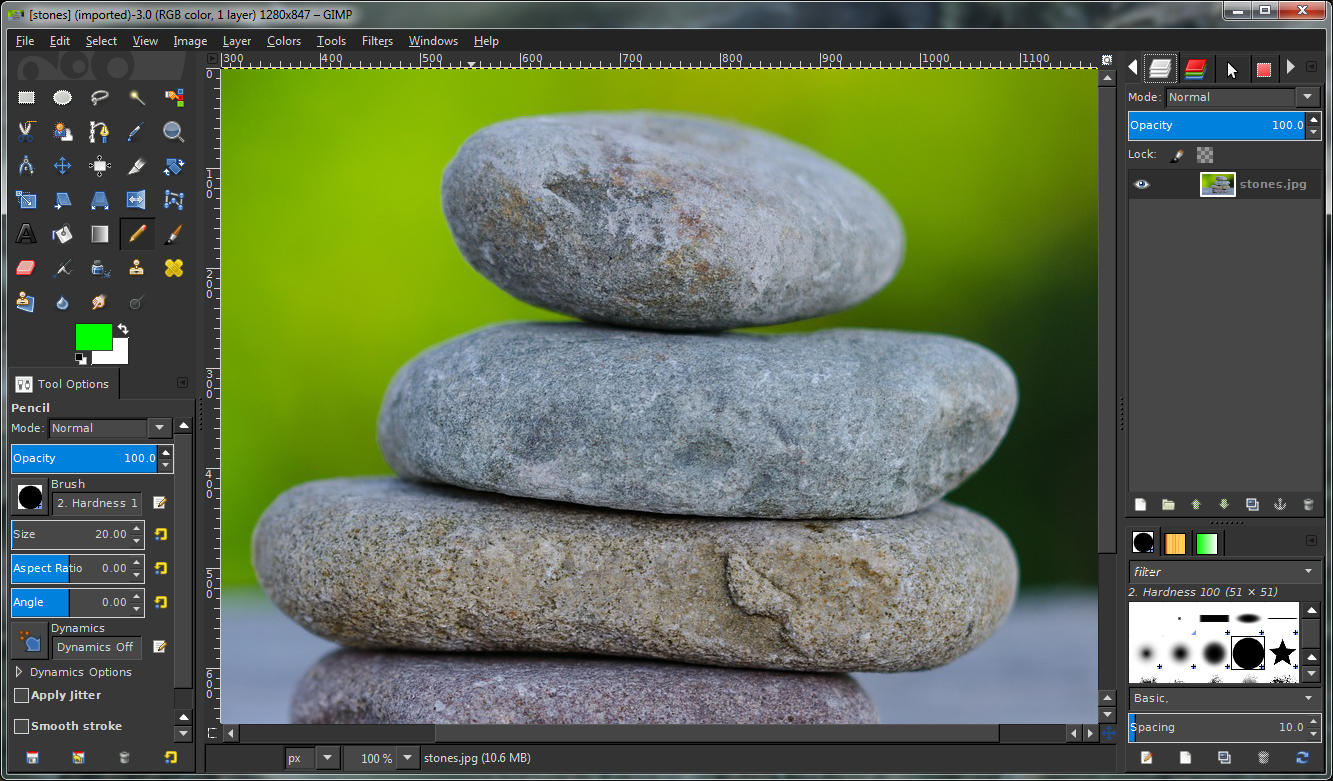
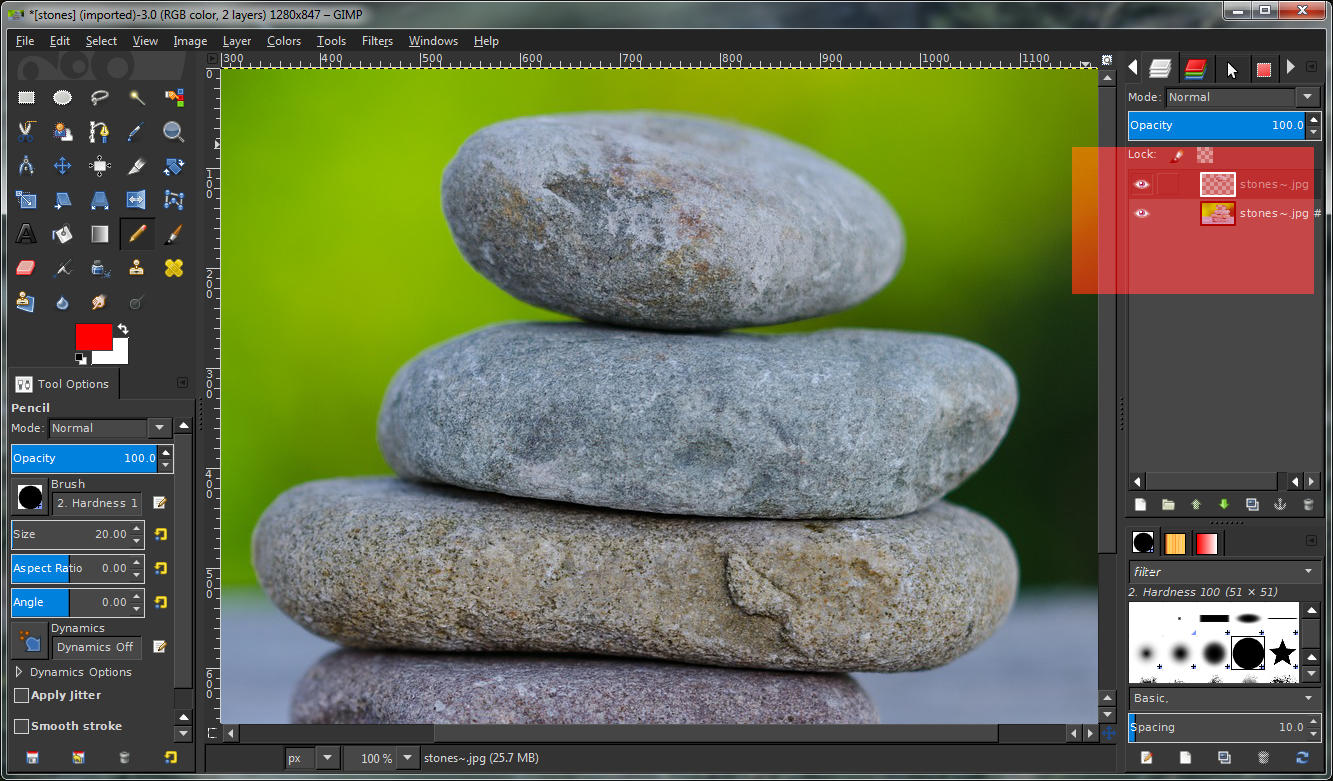
1. Open your image
Image

2. Add a transparent layer
Image

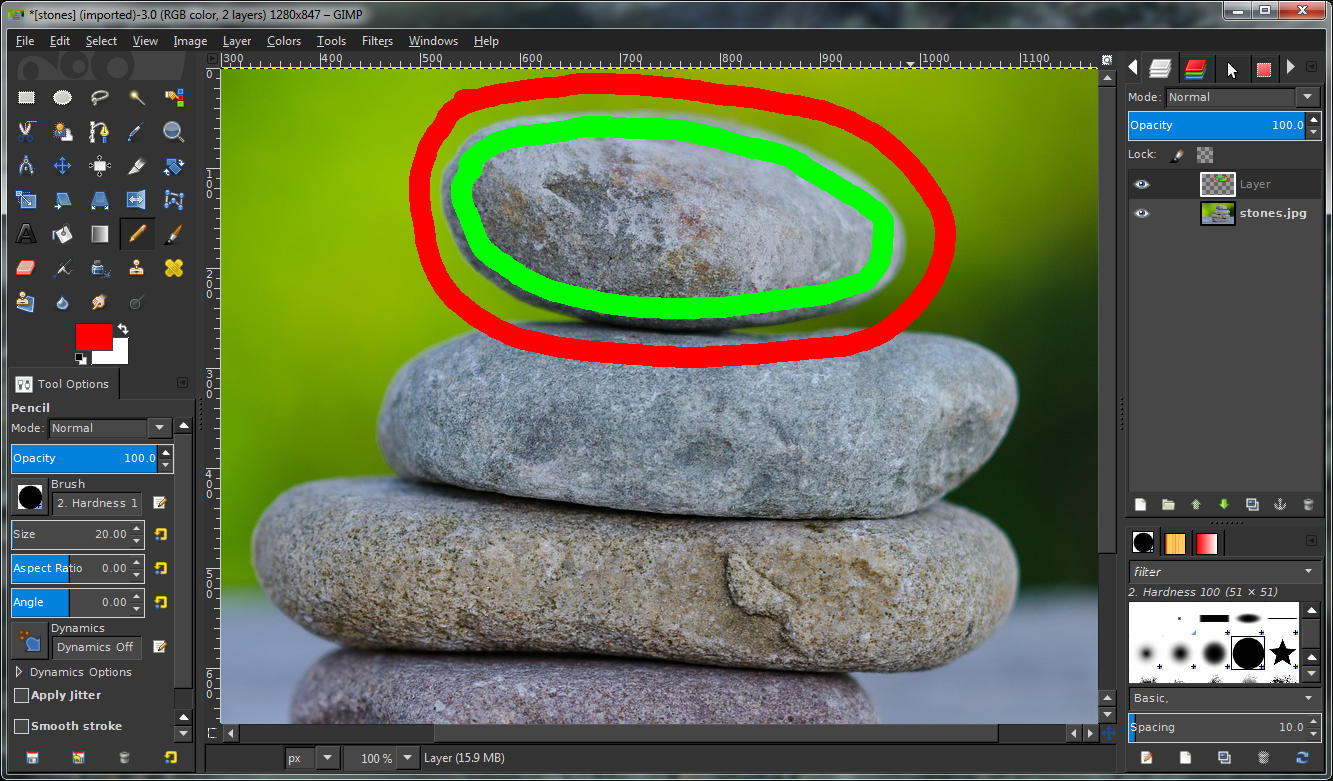
3. Select pencil tool and draw on the transparent layer - green for foreground red for background
Image
Image

4. Use "split objects" and select "Active & below" or "All" input layers
Image

5. Click OK and now you have 2 layers
Image

6. Now you can see if the selection worked OK by hiding a layer
Image

If the selection doesn't look good I just use ctrl+z to undo back to the green/red drawing, make some new pencil strokes then repeat G'MIC with ctrl+f.

If anyone can try this to confirm a problem it would really help! I know the object selection isn't always perfect, I'm often thinking about ways to improve it :)


Top
 Post subject: Re: Giving up on 2 filters
PostPosted: Sat Jun 27, 2015 4:44 pm  (#11) 
Offline
GimpChat Member

Joined: May 12, 2015
Posts: 4693
Garagecoder:

I tried to duplicate your process but I cannot find split objects. I have split alpha and layers which is not the same thing. How do I get split objects for GMIC? I have version 1.6.5.0.


Top
 Post subject: Re: Giving up on 2 filters
PostPosted: Sat Jun 27, 2015 4:52 pm  (#12) 
Offline
Script Coder
User avatar

Joined: Dec 27, 2014
Posts: 508
Pat625 wrote:
Garagecoder:

I tried to duplicate your process but I cannot find split objects. I have split alpha and layers which is not the same thing. How do I get split objects for GMIC? I have version 1.6.5.0.

GMIC > Testing > Garagecoder > Split objects


Top
 Post subject: Re: Giving up on 2 filters
PostPosted: Sat Jun 27, 2015 5:32 pm  (#13) 
Offline
GimpChat Member

Joined: May 12, 2015
Posts: 4693
Thank you jontait2 for telling me where the script was. I did not check in the testing.
garagecoder:

I think I followed your instructions correctly. I could not get results either. I copied your picture of rocks. Put it into gimp, added a transparent layer, placed my red and green circles, and went into g'mic split objects. I tried with using OK and then again with APPLY. Neither worked. Once I had a transparent layer left with the green circles and the intact original image. Another time I had a blank transparent layer and no image. The top transparent layer was the top layer, I selected All for layers in G"MIC. Using G'MIC 1.6.5.0


Top
 Post subject: Re: Giving up on 2 filters
PostPosted: Sat Jun 27, 2015 5:56 pm  (#14) 
Offline
Script Coder
User avatar

Joined: Dec 27, 2014
Posts: 508
This is very odd!
It works fine for me (Gimp 2.8.14 , G'MIC 1.6.5.0 , Ubuntu 14.04 x64)
What OS and Gimp version are you using, Pat625 ? Is it a portable Gimp ?

What does the GMIC preview show before you hit OK or Apply?
Mine looks the same as Garagecoder's.


Top
 Post subject: Re: Giving up on 2 filters
PostPosted: Sat Jun 27, 2015 9:03 pm  (#15) 
Offline
GimpChat Member

Joined: May 12, 2015
Posts: 4693
Gimp 2.8.14 installed, not portable version. Windows 7.

Image

I'm not sure this is how to send an image


edit: This does not make sense to me, but I used a 2.8 portable with G'MIC 1.6.5.0 and it worked fine! This was on the same computer. Why does one work and not the other??


Top
 Post subject: Re: Giving up on 2 filters
PostPosted: Sat Jun 27, 2015 10:39 pm  (#16) 
Offline
GimpChat Member
User avatar

Joined: Jul 06, 2013
Posts: 2662
Location: California
garagecoder wrote:
Extract foreground is probably your best bet then, but I'd really like to know if other people have problems with split objects. I'm not very good with gimp myself :oops: but I'll try to show how I use it, maybe if you see something different on your PC I can figure out what's wrong:
1. Open your image
[ Image ]

2. Add a transparent layer
[ Image ]

3. Select pencil tool and draw on the transparent layer - green for foreground red for background
[ Image ]
[ Image ]

4. Use "split objects" and select "Active & below" or "All" input layers
[ Image ]

5. Click OK and now you have 2 layers
[ Image ]

6. Now you can see if the selection worked OK by hiding a layer
[ Image ]

If the selection doesn't look good I just use ctrl+z to undo back to the green/red drawing, make some new pencil strokes then repeat G'MIC with ctrl+f.

If anyone can try this to confirm a problem it would really help! I know the object selection isn't always perfect, I'm often thinking about ways to improve it :)


Do we have to use a pencil tool? Can't we use a brush as well? I ask because with Split Objects, I was using a brush and I used Active and Below. When I split the layers, I had a transparent layer on top and the image I used on the bottom and only the image can be edited. The transparent layer couldn't be edited. I also used the pencil tool as well as and I still got the same results.


Top
 Post subject: Re: Giving up on 2 filters
PostPosted: Sat Jun 27, 2015 11:42 pm  (#17) 
Offline
GimpChat Member
User avatar

Joined: Sep 24, 2010
Posts: 12832
You can use a brush; just used a rigid (solid) one and not a diffuse edged one. As a side note, I've not used GC's extractor before; just did so for this one (extracted the kid and his pup). Not perfect (did some back tracking copy/pasting for parts that I missed), but still not bad. :)

_________________
Lyle

Psalm 109:8

Image


Top
 Post subject: Re: Giving up on 2 filters
PostPosted: Sun Jun 28, 2015 12:47 am  (#18) 
Offline
GimpChat Member
User avatar

Joined: Jul 06, 2013
Posts: 2662
Location: California
I tried Split Objects with an image and this time it actually worked when I said "All" on Input Layers and left the other options alone. The only downside is when you want to see the image you split and you want to edit that part. In order to do that, you have to close the eye on the layer that has the background and then you will see that the image with the extra background is what you have left and you can edit that part. Then after that, I just edited the background layer and erased it.


Last edited by mackenzieh on Sun Jun 28, 2015 4:48 am, edited 3 times in total.

Top
 Post subject: Re: Giving up on 2 filters
PostPosted: Sun Jun 28, 2015 4:16 am  (#19) 
Offline
GimpChat Member

Joined: Sep 24, 2012
Posts: 275
Location: Scotland
Thanks everyone for trying this out (and mackenzieh for finding the bug!), it's possible I've found what the problem was. Last night before I went to bed I did a small fix so that hopefully explains why it's started working for some people. My last big update introduced a flaw :oops:

Basically if you had any amount of red in your green brush/pencil or vice versa - even 1 "unit" - it would make it fail. It had to be pure green and red for it to work, which was not intended. In the first version it didn't care about that!

What I've done is just a quick tweak so I'll probably figure out a more robust way now.

Thanks again and sorry for the confusion :tyspin


Top
 Post subject: Re: Giving up on 2 filters
PostPosted: Sun Jun 28, 2015 4:21 am  (#20) 
Offline
GimpChat Member
User avatar

Joined: Jul 06, 2013
Posts: 2662
Location: California
garagecoder wrote:
Thanks everyone for trying this out (and mackenzieh for finding the bug!), it's possible I've found what the problem was. Last night before I went to bed I did a small fix so that hopefully explains why it's started working for some people. My last big update introduced a flaw :oops:

Basically if you had any amount of red in your green brush/pencil or vice versa - even 1 "unit" - it would make it fail. It had to be pure green and red for it to work, which was not intended. In the first version it didn't care about that!

What I've done is just a quick tweak so I'll probably figure out a more robust way now.

Thanks again and sorry for the confusion :tyspin


It was no problem, garagecoder. I'm glad I could help. :) Not sure what you did but I still have to do it the way I explained it in the other post.


Top
Post new topic Reply to topic  [ 20 posts ] 

All times are UTC - 5 hours [ DST ]


* Login  


Powered by phpBB3 © phpBB Group