It is currently Sun Oct 11, 2026 3:31 pm


All times are UTC - 5 hours [ DST ]


Post new topic Reply to topic  [ 15 posts ] 
Author Message
 Post subject: New filter in G'mic - Freaky B&W
PostPosted: Wed Sep 30, 2015 5:41 pm  (#1) 
Offline
GimpChat Member

Joined: Mar 06, 2015
Posts: 308
I like this filter.
And it is really does very strange things on your image.


Thanks
Doron


Share on Facebook Share on Twitter Share on Orkut Share on Digg Share on MySpace Share on Delicious Share on Technorati
Top
 Post subject: Re: New filter in G'mic - Freaky B&W
PostPosted: Wed Sep 30, 2015 6:21 pm  (#2) 
Offline
Retired Staff
User avatar

Joined: May 22, 2008
Posts: 6946
Location: Somewhere in GIMP
I don't have a filter called Freaky in B&W in G'MIC.

Does anyone have a link to the gmic text list? The one to Source Forge is no longer available.

_________________
Image
World War IV will be fought with sticks and stones. - Albert Einstein


Top
 Post subject: Re: New filter in G'mic - Freaky B&W
PostPosted: Wed Sep 30, 2015 6:46 pm  (#3) 
Offline
Script Coder
User avatar

Joined: Feb 18, 2011
Posts: 4826
Location: Bendigo Vic. Australia
Filters webpage has Freaky B&W (in '/Black & white/') but I could not find it

_________________
Image
No matter how much you push the envelope, it'll still be stationery.


Top
 Post subject: Re: New filter in G'mic - Freaky B&W
PostPosted: Wed Sep 30, 2015 7:24 pm  (#4) 
Offline
Script Coder
User avatar

Joined: Feb 18, 2011
Posts: 4826
Location: Bendigo Vic. Australia
Make sure you have installed GMIC 1-6-6-1 and then refresh filters to load Freaky B&W (in '/Black & white/')

_________________
Image
No matter how much you push the envelope, it'll still be stationery.


Top
 Post subject: Re: New filter in G'mic - Freaky B&W
PostPosted: Wed Sep 30, 2015 7:27 pm  (#5) 
Offline
GimpChat Member

Joined: Jun 19, 2014
Posts: 81
Location: STRATFORD,CT USA
I have G'mic-1.6.1 and i don't see it in my Black & White list of filter's


Top
 Post subject: Re: New filter in G'mic - Freaky B&W
PostPosted: Wed Sep 30, 2015 7:37 pm  (#6) 
Offline
Script Coder
User avatar

Joined: Feb 18, 2011
Posts: 4826
Location: Bendigo Vic. Australia
did you refresh your filters

Image

_________________
Image
No matter how much you push the envelope, it'll still be stationery.


Top
 Post subject: Re: New filter in G'mic - Freaky B&W
PostPosted: Wed Sep 30, 2015 7:49 pm  (#7) 
Offline
GimpChat Member

Joined: Jun 19, 2014
Posts: 81
Location: STRATFORD,CT USA
Yes but mine came with GIMP Extensions 2.8.20150403 . and ill have reinstall all my Scripts i just installed if i do the New G'mic1.6.6.1


Top
 Post subject: Re: New filter in G'mic - Freaky B&W
PostPosted: Wed Sep 30, 2015 7:52 pm  (#8) 
Offline
Retired Staff
User avatar

Joined: May 22, 2008
Posts: 6946
Location: Somewhere in GIMP
I downloaded the linux 64bit zip file and it doesn't come up in gimp. It's been made executable and gimp has been restarted.

I don't recall having all those other files in a download before. Perhaps I used the wrong file. I did screenshots of what I downloaded, and I only installed the file called gmic.

Image

_________________
Image
World War IV will be fought with sticks and stones. - Albert Einstein


Top
 Post subject: Re: New filter in G'mic - Freaky B&W
PostPosted: Wed Sep 30, 2015 8:04 pm  (#9) 
Offline
Script Coder
User avatar

Joined: Dec 27, 2014
Posts: 508
@Oregonian:
I think you downloaded the command-line version of G'MIC rather than the Gimp plugin version.

There is a Gimp-specific page on the website: http://gmic.eu/gimp.shtml


Top
 Post subject: Re: New filter in G'mic - Freaky B&W
PostPosted: Wed Sep 30, 2015 8:08 pm  (#10) 
Offline
Retired Staff
User avatar

Joined: May 22, 2008
Posts: 6946
Location: Somewhere in GIMP
jontait2 wrote:
@Oregonian:
I think you downloaded the command-line version of G'MIC rather than the Gimp plugin version.

There is a Gimp-specific page on the website: http://gmic.eu/gimp.shtml
Oh, my. :oops:
That's the first time I've done that.
:tyspin

I still can't find the text gmic-gimp filter list online.

The last link I had for it was at sourceforge.

_________________
Image
World War IV will be fought with sticks and stones. - Albert Einstein


Top
 Post subject: Re: New filter in G'mic - Freaky B&W
PostPosted: Wed Sep 30, 2015 8:31 pm  (#11) 
Offline
Script Coder
User avatar

Joined: Feb 18, 2011
Posts: 4826
Location: Bendigo Vic. Australia
'O' The online filter list is at http://gmic.eu/gimp_filters.txt

Image

_________________
Image
No matter how much you push the envelope, it'll still be stationery.


Top
 Post subject: Re: New filter in G'mic - Freaky B&W
PostPosted: Wed Sep 30, 2015 9:18 pm  (#12) 
Offline
GimpChat Member
User avatar

Joined: Sep 24, 2010
Posts: 12850
I actually had G'MIC 1.6.6.0 pre-release and I installed that recently I thought. Behind the times. lol

The example you showed looks sort of infrared like and blended with a solarize effect. Interesting. :)

_________________
Lyle

Psalm 109:8

Image


Top
 Post subject: Re: New filter in G'mic - Freaky B&W
PostPosted: Wed Sep 30, 2015 9:53 pm  (#13) 
Offline
Retired Staff
User avatar

Joined: May 22, 2008
Posts: 6946
Location: Somewhere in GIMP
Graechan wrote:
'O' The online filter list is at http://gmic.eu/gimp_filters.txt
Thank you!!! Have it bookmarked. :hi5

_________________
Image
World War IV will be fought with sticks and stones. - Albert Einstein


Top
 Post subject: Re: New filter in G'mic - Freaky B&W
PostPosted: Wed Sep 30, 2015 10:07 pm  (#14) 
Offline
Script Coder
User avatar

Joined: Feb 18, 2011
Posts: 4826
Location: Bendigo Vic. Australia
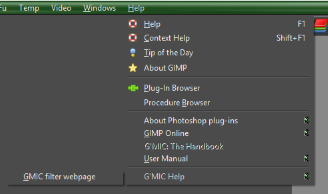
'O' I used Rods simple script to find the page

Image

sorry that I could not find Rods original post but I'll attach the script

Attachment:
links-script-fu_RD.scm [1.55 KiB]
Downloaded 104 times

_________________
Image
No matter how much you push the envelope, it'll still be stationery.


Top
 Post subject: Re: New filter in G'mic - Freaky B&W
PostPosted: Thu Oct 01, 2015 12:31 am  (#15) 
Offline
Retired Staff
User avatar

Joined: May 22, 2008
Posts: 6946
Location: Somewhere in GIMP
Graechan wrote:
'O' I used Rods simple script to find the page
:wow That's handy! TYVM

_________________
Image
World War IV will be fought with sticks and stones. - Albert Einstein


Top
Post new topic Reply to topic  [ 15 posts ] 

All times are UTC - 5 hours [ DST ]


* Login  


Powered by phpBB3 © phpBB Group