Hi everyone!

I intend to add a new G'MIC filter "Rendering / Neon Carpet".
With default parameters, on a 800x600 layer, it would give:
Attachment:
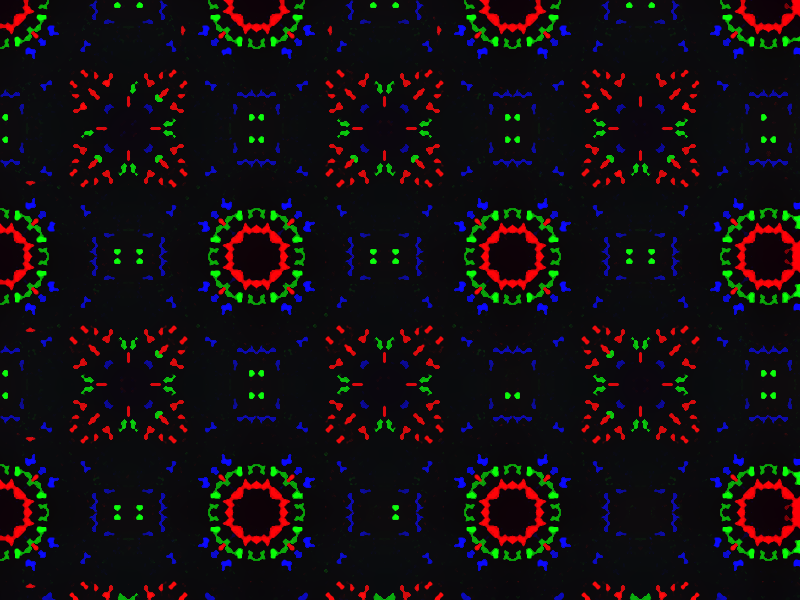 neonCarpet.png [ 209.15 KiB | Viewed 8185 times ]
Here is its code:
#@gui ____<b>Rendering</b>
#------------------
#@gui Neon Carpet (prerelease): cl_neonCarpet_prerelease, cl_neonCarpet_prerelease(0)
#@gui : Sequence Number = ~int(0, 0, 200)
#@gui : Item Number = ~int(0, 0, 100)
#@gui : Invert = ~bool(0)
#@gui : sep = separator()
#@gui : note = note("Note: Some combinations of parameters give a completely black result")
#@gui : note = note("<small>Author: <i>Claude Lion</i>. Latest Update: <i>2024/12/08</i>.</small>")
#@gui : note = note["<small>It uses filters of David Tschumperlé and Andy Kelday (garagecoder)</small>"]

cl_neonCarpet_prerelease:
   num1,num2,inv=$"*"

   foreach {

      fact2={11+2*$num2}
      fact1={$fact2+$num1}

      fill. "(x*x+y*y+128*c)%512%"$fact1"%"$fact2
      n. 0,256
      distance. 128,3
      %. 32
      n. 0,255
      b. 1.1
      ac "repeat 6 { bilateral 10,7 }",0 # copied from "fx_smooth_bilateral 10,7,6,0" of David Tschumperlé
      cut. 0,100
      n. 0,255
      # copied from "gcd_despeckle 20,20" of Andy Kelday (garagecoder)
      +label. 20,1 nb={1+iM}
      +histogram. $nb,0,{$nb-1}
      map.. . rm.
      le. 20 *. 255
      inpaint.. . rm.
      # end of copy from garagecoder

      if $inv==1
         negate. n. 0,255
      fi

   }
Installation:
- Copy and paste the above code into the file "~/.gmic" on Linux or the file "%USERPROFILE%\user.gmic" on Windows.
- The new filter appears in "Filters -> G'MIC -> Rendering -> Rendering / Neon Carpet (prerelease)".
or you can use the new
option.
Have fun!
 Login
Login Register
 Tweets
 FAQ
FAQ Advanced Search


 Thanks to you, I've fixed the bug, thank you!