It is currently Wed Aug 19, 2026 5:33 am


All times are UTC - 5 hours [ DST ]


Post new topic Reply to topic  [ 17 posts ] 
Author Message
 Post subject: Circle Transform
PostPosted: Sun May 12, 2013 4:31 am  (#1) 
Offline
Global Moderator
User avatar

Joined: Apr 01, 2012
Posts: 8457
Location: On the other side of your screen
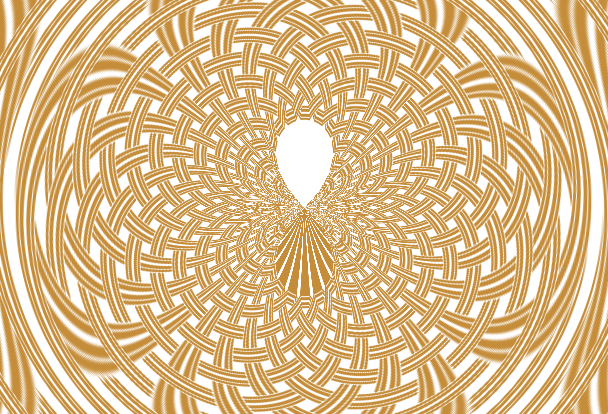
I found a new/not tried before filter today. (New for me. I have not tried it before)
Tried this onImage
and got this
Image

_________________
Image
Free Fun Photo Editing & resources
Poems from the Lord
Gimp Newby
Gimp version 3.2.4 and GMIC-Qt 4.0.2 OS :- Windows 10 Home 64


Last edited by sallyanne on Sun May 12, 2013 8:57 am, edited 1 time in total.

Share on Facebook Share on Twitter Share on Orkut Share on Digg Share on MySpace Share on Delicious Share on Technorati
Top
 Post subject: Re: Circle Transform
PostPosted: Sun May 12, 2013 6:20 am  (#2) 
Offline
GimpChat Member
User avatar

Joined: Jan 20, 2013
Posts: 14831
Location: roma, italy
Yes, you are right SallyAnne!
It works pretty nicely on textures...

_________________
"Where am I ?"


Top
 Post subject: Re: Circle Transform
PostPosted: Sun May 12, 2013 7:27 am  (#3) 
Offline
GimpChat Member
User avatar

Joined: Apr 08, 2010
Posts: 5420
Location: Northwest Ohio
I cannot see the pictures???


Top
 Post subject: Re: Circle Transform
PostPosted: Sun May 12, 2013 8:16 am  (#4) 
Offline
Global Moderator
User avatar

Joined: Apr 01, 2012
Posts: 8457
Location: On the other side of your screen
@ dinasset, I should try some more and see what happens. First time I have uploaded pictures that have changed colour. They were a light brown colour. Could be that they were .bmp files?

@ 2ton, they are still there - thumbnails. If it just says image instead of showing a picture click on that.

_________________
Image
Free Fun Photo Editing & resources
Poems from the Lord
Gimp Newby
Gimp version 3.2.4 and GMIC-Qt 4.0.2 OS :- Windows 10 Home 64


Top
 Post subject: Re: Circle Transform
PostPosted: Sun May 12, 2013 8:54 am  (#5) 
Offline
Global Moderator
User avatar

Joined: Apr 01, 2012
Posts: 8457
Location: On the other side of your screen
In G'MIC under deformations

_________________
Image
Free Fun Photo Editing & resources
Poems from the Lord
Gimp Newby
Gimp version 3.2.4 and GMIC-Qt 4.0.2 OS :- Windows 10 Home 64


Top
 Post subject: Re: Circle Transform
PostPosted: Sun May 12, 2013 8:59 am  (#6) 
Offline
Global Moderator
User avatar

Joined: Apr 01, 2012
Posts: 8457
Location: On the other side of your screen
Your most welcome.

_________________
Image
Free Fun Photo Editing & resources
Poems from the Lord
Gimp Newby
Gimp version 3.2.4 and GMIC-Qt 4.0.2 OS :- Windows 10 Home 64


Top
 Post subject: Re: Circle Transform
PostPosted: Sun May 12, 2013 10:16 am  (#7) 
Offline
GimpChat Member
User avatar

Joined: Jan 20, 2013
Posts: 14831
Location: roma, italy
@SallyAnne
tried with a .bmp image, I don't see difference in colour (at least with my eyes...)
with .png also seems OK


Attachments:
PNG.7z [906.49 KiB]
Downloaded 113 times
BMP.7z [1.45 MiB]
Downloaded 132 times

_________________
"Where am I ?"
Top
 Post subject: Re: Circle Transform
PostPosted: Mon May 13, 2013 4:01 am  (#8) 
Offline
Global Moderator
User avatar

Joined: Apr 01, 2012
Posts: 8457
Location: On the other side of your screen
dinasset wrote:
@SallyAnne
tried with a .bmp image, I don't see difference in colour (at least with my eyes...)
with .png also seems OK

@ dinasset, I believe you. Pretty sure I have tried before too and not had any trouble. I do not have purple/lilac pictures on my computer which is where they come from - What colour do they look to you? I said in my previous post what colour they started out as.
ps I can't check your pics out because I cannot open those files.

_________________
Image
Free Fun Photo Editing & resources
Poems from the Lord
Gimp Newby
Gimp version 3.2.4 and GMIC-Qt 4.0.2 OS :- Windows 10 Home 64


Top
 Post subject: Re: Circle Transform
PostPosted: Mon May 13, 2013 4:24 am  (#9) 
Offline
GimpChat Member
User avatar

Joined: Jan 20, 2013
Posts: 14831
Location: roma, italy
@SallyAnne
your examples look both violet/purple to me.
my zipped files are not single files: unzip to get a folder, inside the folder you get two images, the original one and the circled one.
btw, when and where your original image was brown? originally on internet? so it changed colour when downloaded into your PC?

_________________
"Where am I ?"


Top
 Post subject: Re: Circle Transform
PostPosted: Mon May 13, 2013 4:27 am  (#10) 
Offline
GimpChat Member
User avatar

Joined: Mar 23, 2012
Posts: 7388
Location: Göteborg at last!
sallyanne - try 7zip ( http://www.7-zip.org/ ) - it's free software and opens most compressed file types.


Top
 Post subject: Re: Circle Transform
PostPosted: Mon May 13, 2013 6:45 am  (#11) 
Offline
GimpChat Member
User avatar

Joined: Aug 16, 2012
Posts: 4271
Location: Göteborg, Sweden
sallyanne: fun filter, isn't it :)? worked beautifully on the interlace pattern. did you mean the colour was different here on gc than they were in your gimp? that happens to me at times too, though never such a dramatic change as from light brown to lilac.

_________________


Top
 Post subject: Re: Circle Transform
PostPosted: Mon May 13, 2013 7:41 am  (#12) 
Offline
Global Moderator
User avatar

Joined: Apr 01, 2012
Posts: 8457
Location: On the other side of your screen
dinasset wrote:
@SallyAnne
your examples look both violet/purple to me.
my zipped files are not single files: unzip to get a folder, inside the folder you get two images, the original one and the circled one.
btw, when and where your original image was brown? originally on internet? so it changed colour when downloaded into your PC?

The image was never on the internet before. I created it. It was the same colour before and after I manipulated it. So it changed colour when I uploaded it. Any how it doesn't really matter. I just wondered if this happens some times.

_________________
Image
Free Fun Photo Editing & resources
Poems from the Lord
Gimp Newby
Gimp version 3.2.4 and GMIC-Qt 4.0.2 OS :- Windows 10 Home 64


Top
 Post subject: Re: Circle Transform
PostPosted: Mon May 13, 2013 8:28 am  (#13) 
Offline
Global Moderator
User avatar

Joined: Apr 01, 2012
Posts: 8457
Location: On the other side of your screen
Image
I coloured this one in a little. circle transformed it a few times and array faded as well. Looks like the colours stayed the same this time.

_________________
Image
Free Fun Photo Editing & resources
Poems from the Lord
Gimp Newby
Gimp version 3.2.4 and GMIC-Qt 4.0.2 OS :- Windows 10 Home 64


Top
 Post subject: Re: Circle Transform
PostPosted: Mon May 13, 2013 8:29 am  (#14) 
Offline
GimpChat Member
User avatar

Joined: Apr 07, 2010
Posts: 14182
Very pretty Sallyanne. Love the colors.

_________________
Image


Top
 Post subject: Re: Circle Transform
PostPosted: Mon May 13, 2013 9:00 am  (#15) 
Offline
Global Moderator
User avatar

Joined: Apr 01, 2012
Posts: 8457
Location: On the other side of your screen
Thank you Molly

_________________
Image
Free Fun Photo Editing & resources
Poems from the Lord
Gimp Newby
Gimp version 3.2.4 and GMIC-Qt 4.0.2 OS :- Windows 10 Home 64


Top
 Post subject: Re: Circle Transform
PostPosted: Mon May 13, 2013 1:47 pm  (#16) 
Offline
GimpChat Member
User avatar

Joined: Sep 24, 2010
Posts: 12832
The patterns (Lissajous like ripples) catch my eye the most Sallyanne. Thanks for sharing. :)

_________________
Lyle

Psalm 109:8

Image


Top
 Post subject: Re: Circle Transform
PostPosted: Wed May 15, 2013 1:45 am  (#17) 
Offline
Global Moderator
User avatar

Joined: Apr 01, 2012
Posts: 8457
Location: On the other side of your screen
Thank you Lyle. I may get to and do some more.

_________________
Image
Free Fun Photo Editing & resources
Poems from the Lord
Gimp Newby
Gimp version 3.2.4 and GMIC-Qt 4.0.2 OS :- Windows 10 Home 64


Top
Post new topic Reply to topic  [ 17 posts ] 

All times are UTC - 5 hours [ DST ]


* Login  


Powered by phpBB3 © phpBB Group