It is currently Sun Aug 30, 2026 3:01 am


All times are UTC - 5 hours [ DST ]


Post new topic Reply to topic  [ 9 posts ] 
Author Message
 Post subject: Squares and Rectangles Aimated Brush
PostPosted: Thu Jan 22, 2015 11:23 pm  (#1) 
Offline
Administrator
User avatar

Joined: Aug 10, 2012
Posts: 14182
Location: Native to NYC living in Arizona, Gimp 2.8 - 3.0, Win 11 PC.
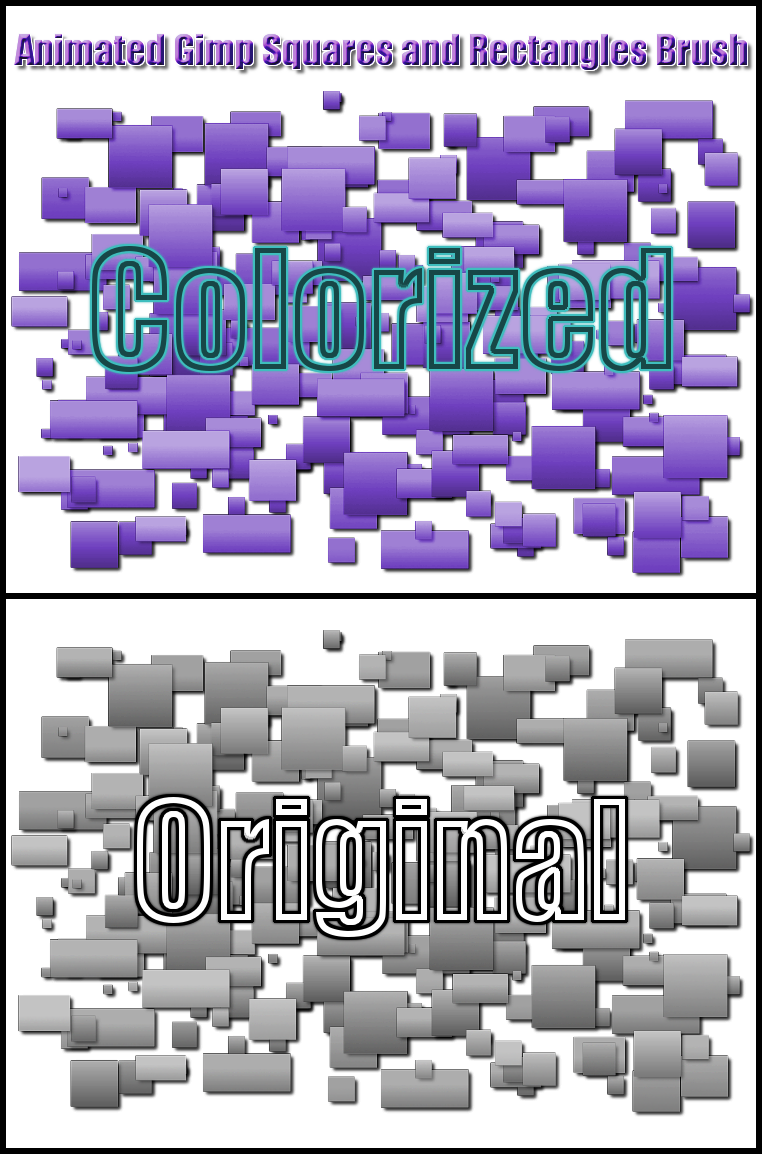
As the title says, Squares and Rectangles Animated Brush. I really don't know what this brush might be use for, but I got the idea form making a text ball/globe in this thread viewtopic.php?f=22&t=11860#p160274.
Here's a preview image that I made using this brush, enjoy.
Image
Attachment:
Squares and Rectangles Animated Brush.zip [15.99 KiB]
Downloaded 258 times

_________________
Image
"A wise man learns more from a foolish question than a fool can learn from a wise answer"
Image


Last edited by Wallace on Fri Jan 23, 2015 3:56 am, edited 2 times in total.

Share on Facebook Share on Twitter Share on Orkut Share on Digg Share on MySpace Share on Delicious Share on Technorati
Top
 Post subject: Re: Squares and Rectangles Aimated Brush
PostPosted: Fri Jan 23, 2015 2:58 am  (#2) 
Offline
GimpChat Member
User avatar

Joined: Mar 01, 2014
Posts: 14158
Location: Spain, Aragón
So productive Wallace, and I find the brush very interesting. I'll think of something to use it. Thank you so much. :clap :bump

_________________
Image

Gimp 2.10.30(samj) portable _ OS Windows 10 Home_ 64bits
Don’t be afraid to start over. It’s a new chance to rebuild what you want.


Top
 Post subject: Re: Squares and Rectangles Aimated Brush
PostPosted: Fri Jan 23, 2015 3:43 am  (#3) 
Offline
Administrator
User avatar

Joined: Aug 10, 2012
Posts: 14182
Location: Native to NYC living in Arizona, Gimp 2.8 - 3.0, Win 11 PC.
Issabella wrote:
So productive Wallace, and I find the brush very interesting. I'll think of something to use it. Thank you so much. :clap :bump

Thanks Issabella.
Unfortunately I feel that I shouldn't have included a drop shadow as part of the brush. What's done is done.

_________________
Image
"A wise man learns more from a foolish question than a fool can learn from a wise answer"
Image


Top
 Post subject: Re: Squares and Rectangles Aimated Brush
PostPosted: Fri Jan 23, 2015 5:53 am  (#4) 
Offline
GimpChat Member
User avatar

Joined: Mar 18, 2011
Posts: 283
Location: Lusaka, Zambia
Hi Wallace,

The brush preview in the brush tab appears too small. Maybe you can consider increasing the preview size:


Attachments:
screenshort.png
screenshort.png [ 115.8 KiB | Viewed 4416 times ]
Top
 Post subject: Re: Squares and Rectangles Aimated Brush
PostPosted: Fri Jan 23, 2015 6:11 am  (#5) 
Offline
GimpChat Member
User avatar

Joined: Mar 01, 2014
Posts: 14158
Location: Spain, Aragón
Thank you Wallace. I was playing with your animated brush. I like it a lot. :hi5


Attachments:
Thank-Wallace.png
Thank-Wallace.png [ 908.24 KiB | Viewed 4412 times ]

_________________
Image

Gimp 2.10.30(samj) portable _ OS Windows 10 Home_ 64bits
Don’t be afraid to start over. It’s a new chance to rebuild what you want.
Top
 Post subject: Re: Squares and Rectangles Aimated Brush
PostPosted: Fri Jan 23, 2015 6:14 am  (#6) 
Offline
Global Moderator
User avatar

Joined: May 16, 2010
Posts: 16168
Thanks Wallace i will find a use for them somewhere. :)

_________________
Image


Top
 Post subject: Re: Squares and Rectangles Aimated Brush
PostPosted: Fri Jan 23, 2015 10:16 am  (#7) 
Offline
Administrator
User avatar

Joined: Aug 10, 2012
Posts: 14182
Location: Native to NYC living in Arizona, Gimp 2.8 - 3.0, Win 11 PC.
josephbupe wrote:
Hi Wallace,

The brush preview in the brush tab appears too small. Maybe you can consider increasing the preview size:

I don't understand?
Are you suggesting that I somehow have control over the brushes preview image that is displayed in your Gimp brush dialog?

_________________
Image
"A wise man learns more from a foolish question than a fool can learn from a wise answer"
Image


Top
 Post subject: Re: Squares and Rectangles Aimated Brush
PostPosted: Fri Jan 23, 2015 11:36 am  (#8) 
Offline
Script Coder
User avatar

Joined: Dec 27, 2014
Posts: 508
@Wallace:
For a brush pipe, the preview image displayed in the brushes dialog is simply the FIRST image in the pipe.
Unfortunately, in your "Squares and Rectangles Animated Brush", the first image is of a very small rectangle ..hence it hardly shows up in the dialog tile. If you've still got your .xcf for this pipe you could simply move a larger image to the first position (presumably the bottom layer) or even present a composite of a largish square and a largish rectangle.

-


Top
 Post subject: Re: Squares and Rectangles Aimated Brush
PostPosted: Fri Jan 23, 2015 11:48 am  (#9) 
Offline
Administrator
User avatar

Joined: Aug 10, 2012
Posts: 14182
Location: Native to NYC living in Arizona, Gimp 2.8 - 3.0, Win 11 PC.
jontait2 wrote:
@Wallace:
For a brush pipe, the preview image displayed in the brushes dialog is simply the FIRST image in the pipe.
Unfortunately, in your "Squares and Rectangles Animated Brush", the first image is of a very small rectangle ..hence it hardly shows up in the dialog tile. If you've still got your .xcf for this pipe you could simply move a larger image to the first position (presumably the bottom layer) or even present a composite of a largish square and a largish rectangle.

-

Thanks Jontait2, but I'm aware of this and the brush will remain as is. Unless those that wish to change this actually do so, by opening the brush as an image and moving the layers themselves. ;)

_________________
Image
"A wise man learns more from a foolish question than a fool can learn from a wise answer"
Image


Top
Post new topic Reply to topic  [ 9 posts ] 

All times are UTC - 5 hours [ DST ]


* Login  


Powered by phpBB3 © phpBB Group