It is currently Sat Jun 20, 2026 4:40 pm


All times are UTC - 5 hours [ DST ]


Post new topic Reply to topic  [ 2 posts ] 
Author Message
 Post subject: Plugin Paint.NET based on ShellOut for Gimp 3
PostPosted: Thu Mar 27, 2025 3:03 am  (#1) 
Offline
GimpChat Member
User avatar

Joined: Jan 13, 2011
Posts: 2639
Location: Poland
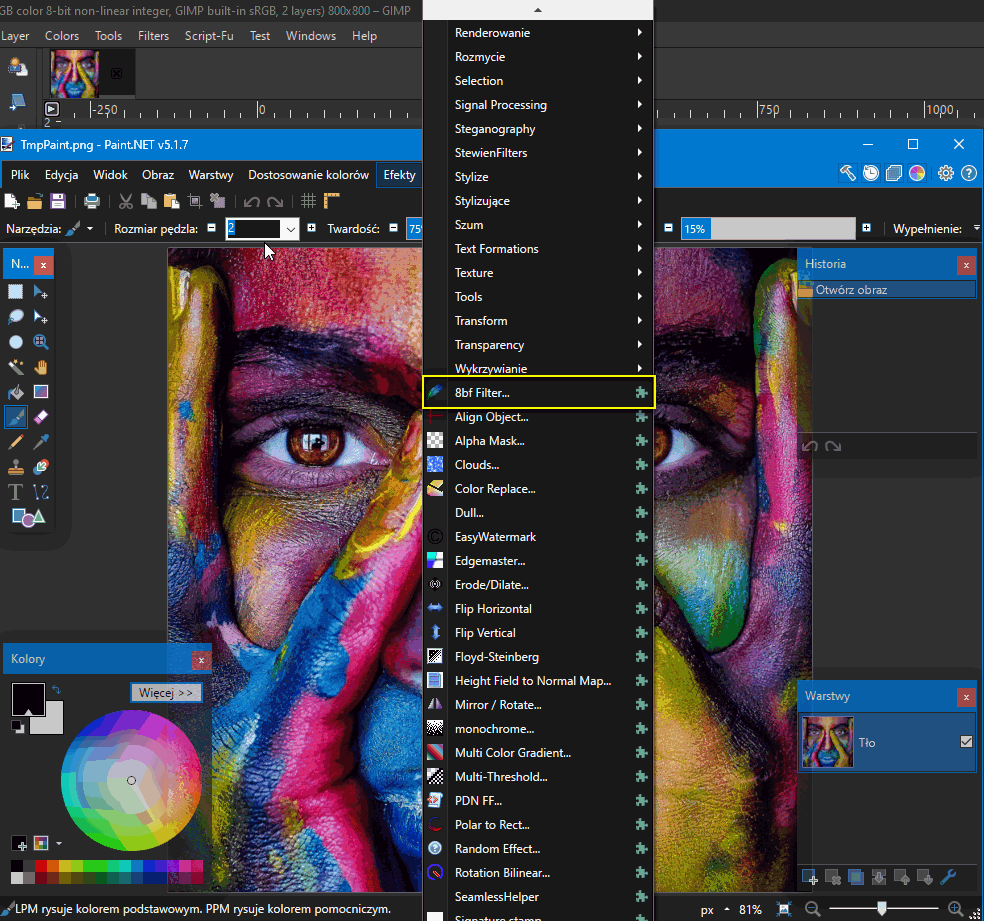
The free Paint.NET program seems to be the best option for handling 8bf files in Gimp 3 (+ a lot of other plugins e.g. GMIC 3.5.3 ).
Paint_dot_NET_plugin is a simple modification of the nikplugin.py plugin by iiey.

My installation steps:
1. downolad from https://github.com/paintdotnet/release/ ... tag/v5.1.7 paint.net.5.1.7.portable.x64.zip
2. unzip this file
3. replace name paint.net.5.1.7.portable.x64 to paintdotnet
4. locate paintdotnet to c:\Program Files\paintdotnet\
5. downolad PSFilterPdn.zip from https://forums.getpaint.net/topic/20622 ... ent-343262
6. unzip this file
7. locate this folder to c:\Program Files\paintdotnet\Effects\PSFilterPdn\
8. download and instal Paint_dot_NET_plugin (in ... GIMP\3.0\plug-ins\Paint_dot_NET_plugin\Paint_dot_NET_plugin.py)

In menu: Filters ➤ ShellOut ➤ PaintdotNET

Image

Image

Image

Image

Image

Image

Image

Temporary files are saved in:
C:\Users\YOUR_USERNAME\AppData\Local\Temp\

A little tip:
Some plugins don't work when the image has an alpha channel (e.g. Impressionist.8bf)
Then:
- copy the layer
- remove the alpha channel
- run the plugin with the option: "Use_current_layer"


Attachments:
Paint_dot_NET_plugin.zip [3.56 KiB]
Downloaded 172 times

_________________
Image
Share on Facebook Share on Twitter Share on Orkut Share on Digg Share on MySpace Share on Delicious Share on Technorati
Top
 Post subject: Re: Plugin Paint.NET based on ShellOut for Gimp 3
PostPosted: Fri Mar 28, 2025 2:02 am  (#2) 
Offline
Global Moderator
User avatar

Joined: May 16, 2010
Posts: 16037
This is great because many filters in Filter Forge 14 require a selection. Now you can just open a font letter, alt select, and run a filter on it. Great for custom font creation. Great stuff! Thanks MareroQ! :)

But i do have to correct step #2 Make darn sure you unzip this file to a folder NOT YOUR DESKTOP! LOL
I spent a half hour getting rid of desktop clutter because i just unzipped the file. :)

Dont make my misstake

I also tried to adapt this to PS CS2 and because CS2 installs into Program Files 86 i cant get it to work. I tried double slashes and that didnt work either. Any ideas? :tyspin

_________________
Image


Top
Post new topic Reply to topic  [ 2 posts ] 

All times are UTC - 5 hours [ DST ]


* Login  


Powered by phpBB3 © phpBB Group