It is currently Sat Jun 20, 2026 4:44 pm


All times are UTC - 5 hours [ DST ]


Post new topic Reply to topic  [ 49 posts ]  Go to page Previous  1, 2, 3
Author Message
 Post subject: Re: Image Watermark Plug-in - My 1st GIMP 3.0 plug-in
PostPosted: Thu Apr 03, 2025 4:35 pm  (#41) 
Offline
GimpChat Member
User avatar

Joined: Jan 13, 2011
Posts: 2639
Location: Poland
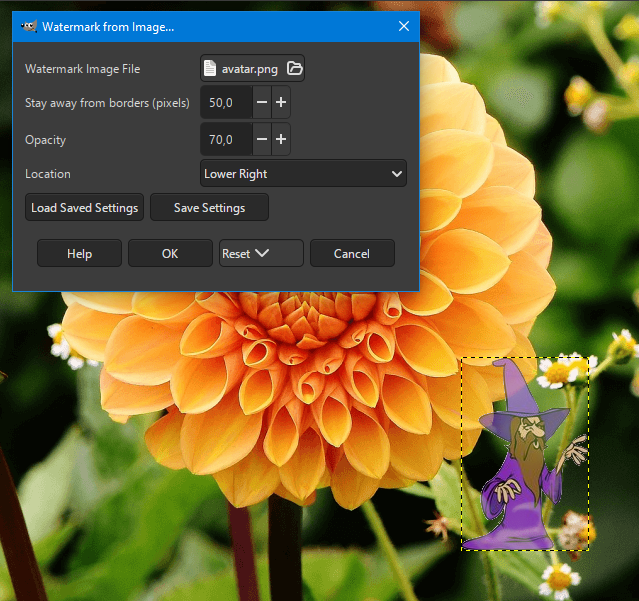
In Gimp-3.0.2-1 the plugin does not register in the menu and sys.stderr shows the message:
TypeError: Gimp.Procedure.add_file_argument() takes exactly 8 arguments (5 given)

I fixed it a bit, but the plugin behaves a bit strangely: Watermark Image File window - every time you run it, you have to search for the file again, because it opens with (none).

This line:
        procedure.add_file_argument ("file", _("Watermark Image File"),
                                         _("Watermark Imag File"), GObject.ParamFlags.READWRITE)


It was replaced with this:
        procedure.add_file_argument ("file", _("Watermark Image File"), _("Watermark Image File"),
                                         Gimp.FileChooserAction.OPEN,
                                         False, None, GObject.ParamFlags.READWRITE)   


Is this normal behavior or is there something wrong with the code?
Image


Attachments:
Watermark3_from_Image.zip [2.85 KiB]
Downloaded 83 times

_________________
Image
Top
 Post subject: Re: Image Watermark Plug-in - My 1st GIMP 3.0 plug-in
PostPosted: Fri Apr 04, 2025 12:09 pm  (#42) 
Offline
Script Coder
User avatar

Joined: May 07, 2014
Posts: 4469
Location: Canada
Not sure, I think I'll just stick to using Gimp 2.10.

_________________
TinT
My GIMP 2.10 plug-in writer Fiverr Gig
Plaid Community Forum
Imageplaid-patterns.com


Top
 Post subject: Re: Image Watermark Plug-in - My 1st GIMP 3.0 plug-in
PostPosted: Fri Apr 04, 2025 3:27 pm  (#43) 
Offline
GimpChat Member

Joined: Sep 01, 2024
Posts: 9
Location: Alabama
trandoductin wrote:
Not sure, I think I'll just stick to using Gimp 2.10.


Tin, none of the three watermark plugins you listed showed up while using a 3.0.2 AppImage derived from Mateusz Łukasik's PPA while using Linux Mint 22.1. 3.0.2 PPA

On the other hand, the one that MareroQ provided did work properly.

I'm not sure if that is important to you or not, at this moment early in the development of Gimp 3.0 but, I thought I would let you know just in case it was anything that you may want to know.


Top
 Post subject: Re: Image Watermark Plug-in - My 1st GIMP 3.0 plug-in
PostPosted: Sat Apr 05, 2025 12:19 am  (#44) 
Offline
GimpChat Member
User avatar

Joined: Jan 13, 2011
Posts: 2639
Location: Poland
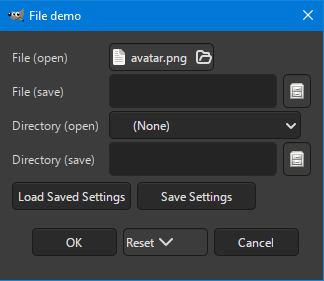
I checked how file-demo by Ofnuts behaves:
https://gitlab.com/gimp1614946/gimphelp ... type=heads

Select file to open:
Image

For Re_Show:
Image

Empty File (open):
Image

For File (open) it doesn't work either:
Save Settings
Load Saved Settings

For Re_Show in Gimp-2.10.38-1
Image

This is another major regression in Gimp 3.

_________________
Image


Top
 Post subject: Re: Image Watermark Plug-in - My 1st GIMP 3.0 plug-in
PostPosted: Mon Apr 07, 2025 2:27 am  (#45) 
Offline
GimpChat Member
User avatar

Joined: Jan 13, 2011
Posts: 2639
Location: Poland
A small step forward: :mrgreen:
- include position and different sizes of layers
- added option to merge watermark with active layer

To distinguish it from the original plug:
In menu: Filters ➤ Render ➤ Decor ➤ Watermark for Layer from Image

Image


Attachments:
Watermark3_for_Layer.zip [2.58 KiB]
Downloaded 89 times

_________________
Image
Top
 Post subject: Re: Image Watermark Plug-in - My 1st GIMP 3.0 plug-in
PostPosted: Mon Apr 07, 2025 9:35 am  (#46) 
Offline
GimpChat Member

Joined: Apr 11, 2024
Posts: 298
A little suggestion for localization:
If instead of
def do_set_i18n(self, procname):
return True, 'gimp30-python', None

You do this
return True, None, None

The translation files could be in the plugin's folder instead of in GIMP' folder.
You can then have a locale folder with the plugin.
The .po/ .mo file would have the same name as your plugin like so

/locale/pl/LC_MESSAGES/Watermark3_for_Layer.po


Top
 Post subject: Re: Image Watermark Plug-in - My 1st GIMP 3.0 plug-in
PostPosted: Tue Apr 08, 2025 3:35 pm  (#47) 
Offline
GimpChat Member
User avatar

Joined: Jan 13, 2011
Posts: 2639
Location: Poland
Thanks for the tip. :hi5
My problem is that I don't know yet if I want to delve into Gimp 3 and writing plugins for it. :hehe :roll: :mrgreen:

_________________
Image


Top
 Post subject: Re: Image Watermark Plug-in - My 1st GIMP 3.0 plug-in
PostPosted: Thu Apr 17, 2025 6:41 am  (#48) 
Offline
GimpChat Member
User avatar

Joined: Jan 13, 2011
Posts: 2639
Location: Poland
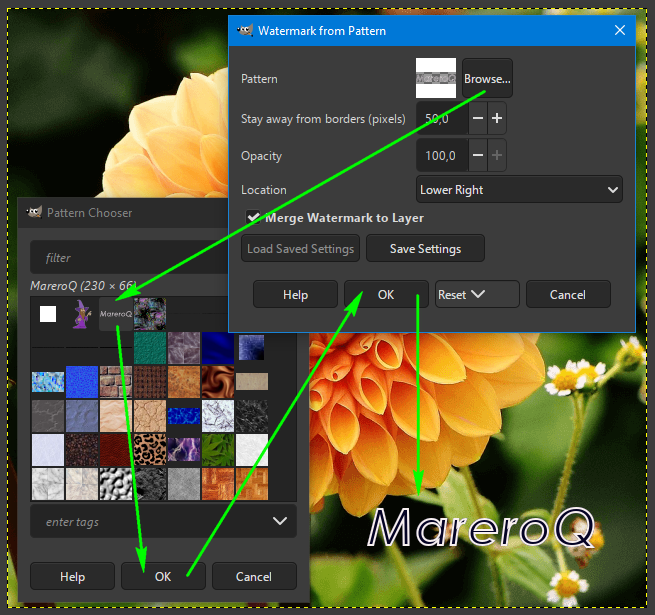
Another small change:
- I replaced "Image file" with (incorrect) pattern selection,
- Also included is a quietreader tip.

In menu: Filters ➤ Render ➤ Decor ➤ Watermark from Pattern

Image

First, you need to save your watermark (image or text) as *.pat - and you will always have it at hand.
From your prepared watermark, you can create a pattern very quickly:

Image

Edit: Sorry - attachment changed (incorrect one uploaded previously)


Attachments:
Watermark3_from_Pattern.zip [2.73 KiB]
Downloaded 80 times

_________________
Image
Top
 Post subject: Re: Image Watermark Plug-in - My 1st GIMP 3.0 plug-in
PostPosted: Thu May 29, 2025 2:12 pm  (#49) 
Offline
Script Coder
User avatar

Joined: May 07, 2014
Posts: 4469
Location: Canada
So if you're supposed to love what you do.
Then I am sticking with GIMP 2.10 and plug-ins for it.
If I don't stop using it then it won't die.
There isn't anything that I think is missing from 2.10 features.
The non destructive editing doesn't attract me that much because I am used to destructive editing and if I don't want it to edit then I just don't or Ctrl-Z.

_________________
TinT
My GIMP 2.10 plug-in writer Fiverr Gig
Plaid Community Forum
Imageplaid-patterns.com


Top
Post new topic Reply to topic  [ 49 posts ]  Go to page Previous  1, 2, 3

All times are UTC - 5 hours [ DST ]


* Login  


Powered by phpBB3 © phpBB Group