It is currently Sat Jun 20, 2026 3:05 pm


All times are UTC - 5 hours [ DST ]


Post new topic Reply to topic  [ 33 posts ]  Go to page Previous  1, 2
Author Message
 Post subject: Re: Resynthesizer for GIMP 3.0 RC2 Win64
PostPosted: Thu Jun 26, 2025 12:21 pm  (#21) 
Offline
GimpChat Member

Joined: Mar 04, 2011
Posts: 2603
MareroQ wrote:
.......
This is not a sufficient explanation for me. :oops:
All resynth scripts have a shebang but behave differently.


Well, I think it is the recommended way,

https://developer.gimp.org/resource/scr ... -languages


Top
 Post subject: Re: Resynthesizer for GIMP 3.0 RC2 Win64
PostPosted: Thu Jun 26, 2025 9:33 pm  (#22) 
Offline
GimpChat Member
User avatar

Joined: Apr 25, 2011
Posts: 121
Location: Taiwan
Although the official suggestion is that if the first line is
#!/usr/bin/env gimp-script-fu-interpreter-3.0
then treat it as a plugin, but it is not absolute

MareroQ wrote:
At least that's how it is in Win10 Gimp 3.0.4.

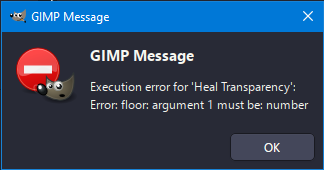
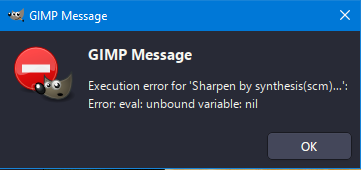
When I put plug-in-heal-transparency.scm and plug-in-resynth-sharpener.scm in scripts, I get errors:
[ Image ]

[ Image ]

This may change, but for now they only work when placed in the plug-ins directory (which I indicated in post #10 and that's how I packaged it).

@mmjoshi
For me all scripts work fine for 16/32 bit with the condition that the test files were created in Gimp using the Image ➤ Encoding method

plug-in-resynth-sharpener.scm Not ported yet
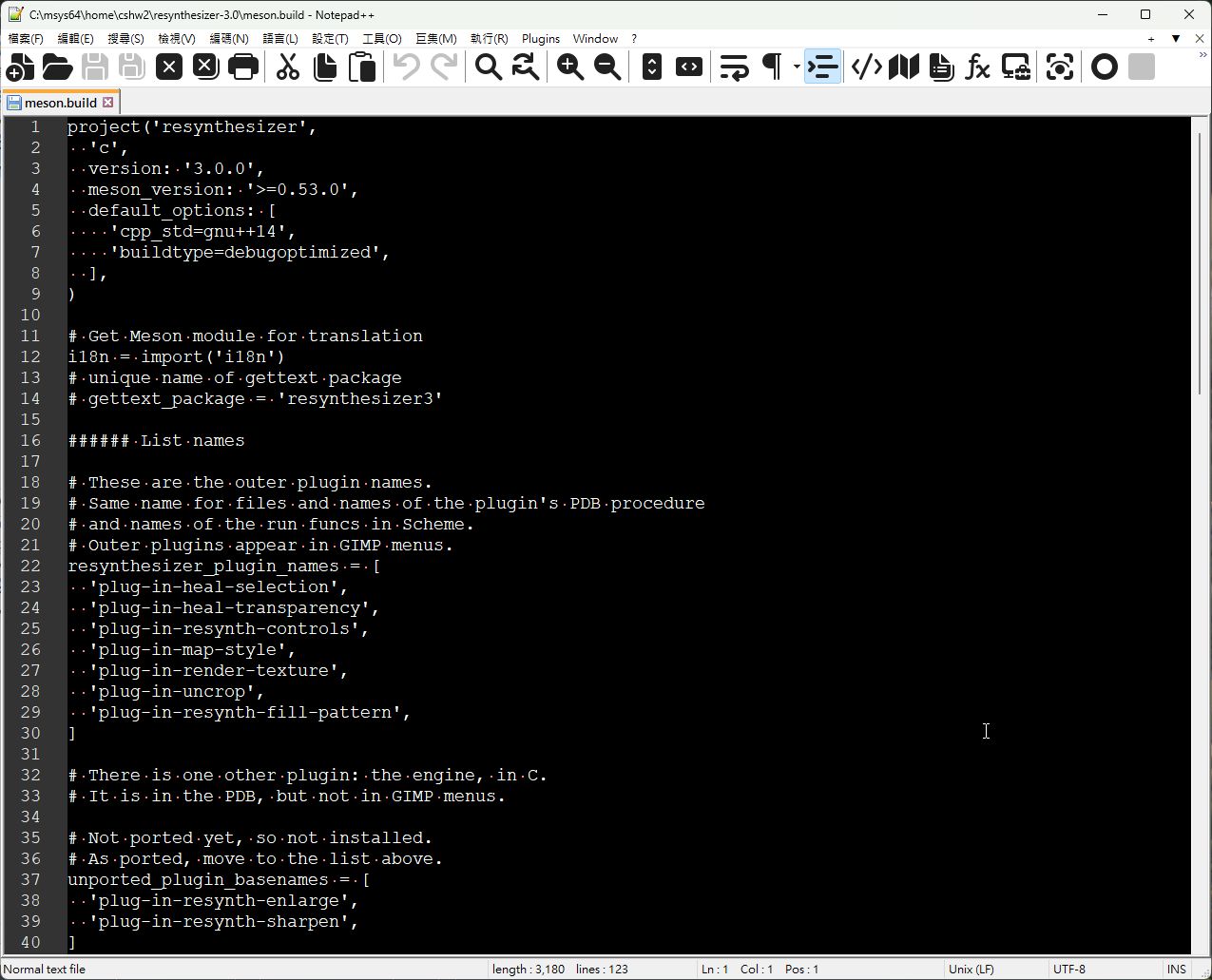
Image

plug-in-heal-transparency.scm You need to mark this line
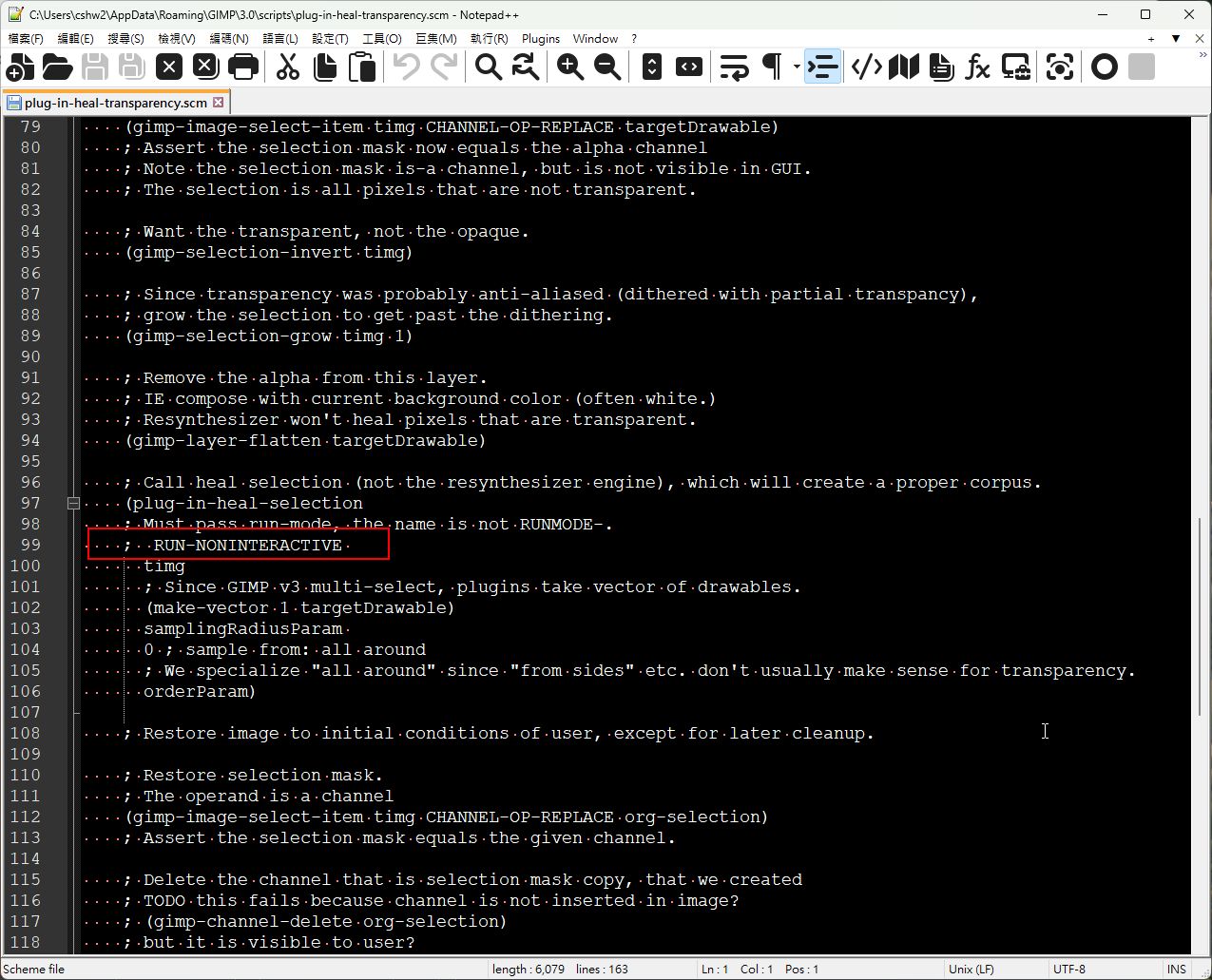
Image

MareroQ wrote:
Thank you very much for this information. :bigthup

I have another request. :roll:
Can you share the source code in this thread after the perfect changes for preview?

gimp-plugin-userfilter1.zip

_________________
Sorry for my poor English, I use Google Translate.
There may be something wrong, Please understand.

GIMP 2.10.38 rev1 portable+GAP+G'MIC+nufraw+Beautify+MathMap+...


Top
 Post subject: Re: Resynthesizer for GIMP 3.0 RC2 Win64
PostPosted: Thu Jun 26, 2025 11:04 pm  (#23) 
Offline
GimpChat Member
User avatar

Joined: Jan 13, 2011
Posts: 2639
Location: Poland
Hi James.

Thanks a lot for the userfilter source code and additional information about resynthesizer scripts.
When the programmer speaks, everything becomes clear.
:tyspin

_________________
Image


Top
 Post subject: Re: Resynthesizer for GIMP 3.0 RC2 Win64
PostPosted: Fri Jun 27, 2025 2:24 am  (#24) 
Offline
GimpChat Member

Joined: Mar 04, 2011
Posts: 2603
MareroQ wrote:
.....
When the programmer speaks, everything becomes clear.
:tyspin


Indeed: https://github.com/bootchk/resynthesize ... r3-Plugins

However, going back and more important, has sallyanne got it working ?


Top
 Post subject: Re: Resynthesizer for GIMP 3.0 RC2 Win64
PostPosted: Fri Jun 27, 2025 7:26 am  (#25) 
Offline
Global Moderator
User avatar

Joined: Apr 01, 2012
Posts: 8382
Location: On the other side of your screen
Thank you all for your replies. :)
I have downlowded it twice now but put the scripts in the script folder and plugins in the plugin folder. Should they all be in the plugins folder? Oh and after I downloaded the second time I didn't delete the other files I added the first time. Probably should?
I haven't tried it again rich since just before I posed the question. Just remembered about asking here now, so I will try again tomorrow. Let you know then if I get it working. Do I have to change the writing in a couple plugin/scripts as well?

_________________
Image
Free Fun Photo Editing & resources
Poems from the Lord
Gimp Newby
Gimp version 3.2.0 and GMIC-Qt 3.7.5 OS :- Windows 10 Home 64


Top
 Post subject: Re: Resynthesizer for GIMP 3.0 RC2 Win64
PostPosted: Fri Jun 27, 2025 10:07 am  (#26) 
Offline
GimpChat Member

Joined: Mar 04, 2011
Posts: 2603
If your old set up works and you do not need to use at higher than 8 bit images then stick with what you have.

If you want to use the up-dated resynthesizer then a couple of screenshots here: https://www.gimp-forum.net/Thread-Resyn ... ows-Gimp-3


Top
 Post subject: Re: Resynthesizer for GIMP 3.0 RC2 Win64
PostPosted: Fri Jun 27, 2025 11:40 pm  (#27) 
Offline
GimpChat Member

Joined: May 15, 2020
Posts: 17
MareroQ wrote:
At least that's how it is in Win10 Gimp 3.0.4.

When I put plug-in-heal-transparency.scm and plug-in-resynth-sharpener.scm in scripts, I get errors:
[ Image ]

[ Image ]

This may change, but for now they only work when placed in the plug-ins directory (which I indicated in post #10 and that's how I packaged it).

@mmjoshi
For me all scripts work fine for 16/32 bit with the condition that the test files were created in Gimp using the Image ➤ Encoding method


What encoding method you are referring to?

Also should the plug-in-heal-transparency.scm & plug-in-resynth-sharpener.scm be in the Plugins\resynthesizer directory or the Plugins directory

I import RAW files into Gimp using darktable. Will the plugins not work on them?


Top
 Post subject: Re: Resynthesizer for GIMP 3.0 RC2 Win64
PostPosted: Sun Jun 29, 2025 2:13 am  (#28) 
Offline
Global Moderator
User avatar

Joined: Apr 01, 2012
Posts: 8382
Location: On the other side of your screen
rich2005 wrote:
However, going back and more important, has sallyanne got it working ?


Yes, heal selection is working for me now. I assume the others will as well. Thankyou again
Apparently I checked it out in 2.10
Still nothing in 3

_________________
Image
Free Fun Photo Editing & resources
Poems from the Lord
Gimp Newby
Gimp version 3.2.0 and GMIC-Qt 3.7.5 OS :- Windows 10 Home 64


Top
 Post subject: Re: Resynthesizer for GIMP 3.0 RC2 Win64
PostPosted: Mon Nov 10, 2025 12:07 pm  (#29) 
Offline
GimpChat Member

Joined: Oct 11, 2025
Posts: 12
Hello
I'm trying to install it on Windows 11 and it's not working. I downloaded the resynthesizer.zip file, unzipped it, and tried the following alternatives: I placed the unzipped resynthesizer3.0 folder in the plugins folder, but it didn't work.


Top
 Post subject: Re: Resynthesizer for GIMP 3.0 RC2 Win64
PostPosted: Tue Dec 16, 2025 5:16 pm  (#30) 
Offline
New Member

Joined: Dec 16, 2025
Posts: 2
I just can't get this to work with Gimp 3.0.6.
I have 'portableapps' on a USB stick and updated to 3.0.6.
I don't use Gimp that often, so when it updated I can't remember what version of Gimp 3.0 I had.
Resynthesizer was working perfectly before I updated.
I've followed the instructions and it still doesn't work, just comes up with an error message.
I'm no computer expert, what is meant by 'require their own subdirectories'?
It's so frustrating when it was working perfectly before the update!


Top
 Post subject: Re: Resynthesizer for GIMP 3.0 RC2 Win64
PostPosted: Wed Dec 17, 2025 12:42 am  (#31) 
Offline
Global Moderator
User avatar

Joined: May 16, 2010
Posts: 16037
ANT wrote:
I just can't get this to work with Gimp 3.0.6.
I have 'portableapps' on a USB stick and updated to 3.0.6.
I don't use Gimp that often, so when it updated I can't remember what version of Gimp 3.0 I had.
Resynthesizer was working perfectly before I updated.
I've followed the instructions and it still doesn't work, just comes up with an error message.
I'm no computer expert, what is meant by 'require their own subdirectories'?
It's so frustrating when it was working perfectly before the update!


require their own sub-directories refers to making sure all plugins in Gimp-3.0 have to have their own sub directory including most SCM files.
For instance if you have a plugin named resythesizer.exe it needs to be in its own sub-directory
Plugins>Resynthesizer>Resynthesizer.exe. Same with scm files and py files.
Hope that helps. :bigthup

_________________
Image


Top
 Post subject: Re: Resynthesizer for GIMP 3.0 RC2 Win64
PostPosted: Wed Dec 17, 2025 7:30 am  (#32) 
Offline
New Member

Joined: Dec 16, 2025
Posts: 2
I'm going to go back and use 2.10.38.
Any idea what version of Resynthesizer works with this earlier version?


Top
 Post subject: Re: Resynthesizer for GIMP 3.0 RC2 Win64
PostPosted: Wed Dec 17, 2025 8:17 am  (#33) 
Offline
GimpChat Member

Joined: Mar 04, 2011
Posts: 2603
ANT wrote:
I'm going to go back and use 2.10.38.
Any idea what version of Resynthesizer works with this earlier version?


There are versions here: the partha version is 64 bit.

https://www.gimp-forum.net/Thread-Resyn ... 7#pid12687

There is a recent post about gmic on a portable gimp from portableapps.com and testing, IMHO it is not a wonderful version, User profile not properly formed ...etc. However the later 2.10 versions are 64 bit.
Always best if you give information on versions, Our crystal ball is a bit flakey.


Top
Post new topic Reply to topic  [ 33 posts ]  Go to page Previous  1, 2

All times are UTC - 5 hours [ DST ]


* Login  


Powered by phpBB3 © phpBB Group