It is currently Sat Jun 20, 2026 3:04 pm


All times are UTC - 5 hours [ DST ]


Post new topic Reply to topic  [ 10 posts ] 
Author Message
 Post subject: [New Plugin] Photoshop-style Layer Workflow (Group, Ungroup, Merge)
PostPosted: Fri Feb 06, 2026 3:34 am  (#1) 
Offline
GimpChat Member
User avatar

Joined: Feb 06, 2026
Posts: 40
I'm Yousei3, a GIMP user from Japan. I recently moved my creative environment to Linux Mint, and while I love GIMP, I found myself missing some of the specific layer workflows I was used to in Photoshop.

To bridge this gap, I’ve developed a small suite of Python plugins: "Photoshop-style Layer Workflow".

- Group Selected Layers: Groups only the layers you have currently selected.

- Ungroup Layers: Unpacks layers from a group and cleans up the empty group layer.

- Merge Selected Layers: Merges selected layers into a new single layer while keeping the originals (non-destructive style).

Installation (for GIMP 3.0 / 3.2)
1. Download the `.py` files.
2. In your GIMP plug-ins directory, create a separate folder for each plugin with the same name as the file :
plug-ins/merge_selected_layers/merge_selected_layers.py
plug-ins/group_selected_layers/group_selected_layers.py
plug-ins/ungroup_layers/ungroup_layers.py


plug-ins/
 ├── group_selected_layers/
 │       └── group_selected_layers.py
 ├── merge_selected_layers/
 │       └── merge_selected_layers.py
 └── ungroup_layers/
           └── ungroup_layers.py


3. Ensure the files have execution permissions (`chmod +x`).
4. Restart GIMP.

It would be more convenient to set up shortcut keys.
Attachment:
gimpplugsins260208.png
gimpplugsins260208.png [ 68.55 KiB | Viewed 2685 times ]


A right-click menu has also been added to the layers.
Attachment:
LayerRightClickMenu.png
LayerRightClickMenu.png [ 103.53 KiB | Viewed 2602 times ]

A Note on Development: I am still a beginner at Python. To bring these ideas to life, I collaborated with AI (Google Gemini) to write and refine the scripts. They have been tested and are working smoothly on my Linux Mint system.

I've shared the code on GitHub. I would be very happy if you could try them out and give me any feedback or suggestions!

GitHub Repository: /yousei3/gimp-photoshop-layer-workflow

Thank you for this wonderful community!

⚠️ I've attached the plugins as a ZIP file for your convenience. (update v1.1)


Attachments:
File comment: Updated to v1.1: Fixed README description for Merge, added Windows paths, and enabled right-click menu.
gimp-photoshop-layer-tools.zip [5.6 KiB]
Downloaded 99 times


Last edited by Yousei3D on Sun Feb 08, 2026 4:22 am, edited 8 times in total.
Share on Facebook Share on Twitter Share on Orkut Share on Digg Share on MySpace Share on Delicious Share on Technorati
Top
 Post subject: Re: [New Plugin] Photoshop-style Layer Workflow (Group, Ungroup, Merge
PostPosted: Fri Feb 06, 2026 2:06 pm  (#2) 
Offline
Global Moderator
User avatar

Joined: May 16, 2010
Posts: 16037
Yousei3D wrote:
Hi everyone,

I'm Yousei3, a GIMP user from Japan. I recently moved my creative environment to Linux Mint, and while I love GIMP, I found myself missing some of the specific layer workflows I was used to in Photoshop.

To bridge this gap, I’ve developed a small suite of Python plugins: "Photoshop-style Layer Workflow".

What’s included:


Group Selected Layers: Groups only the layers you have currently selected.

Ungroup Layers: Unpacks layers from a group and cleans up the empty group layer.

Merge Selected Layers: Merges selected layers into a new single layer while keeping the originals (non-destructive style).


A Note on Development: I am still a beginner at Python. To bring these ideas to life, I collaborated with AI (Google Gemini) to write and refine the scripts. They have been tested and are working smoothly on my Linux Mint system.

I've shared the code on GitHub. I would be very happy if you could try them out and give me any feedback or suggestions!

GitHub Repository: yousei3/gimp-photoshop-layer-workflow

Thank you for this wonderful community!

⚠️ I've attached the plugins as a ZIP file for your convenience.


Thank you Yousei3D. Are these for Gimp-3.0 or Gimp-2.10 versions?
Never mind i see they are for Gimp-3.0.
They also for your information work in Gimp-3.2 as well.
But remember you must place them in their own folders inside the plug-ins folder for them to work correctly or they will not show in the layers menu, Thanks again. :bigthup

_________________
Image


Top
 Post subject: Re: [New Plugin] Photoshop-style Layer Workflow (Group, Ungroup, Merge
PostPosted: Sat Feb 07, 2026 4:45 pm  (#3) 
Offline
GimpChat Member
User avatar

Joined: Feb 06, 2026
Posts: 40
Haha, you caught me! Yes, I posted this here because I developed and tested it specifically for the GIMP 3.0 series.

It’s great to have your confirmation that it works smoothly in GIMP 3.2 as well—that’s very reassuring!

And thank you for the reminder about the folder structure. It's such a specific rule for GIMP 3.x that even I sometimes forget to mention it. I'll make sure to update the installation notes so others don't get stuck.

I also replaced the ZIP file with one that includes README.md.

Cheers! — Yousei3


Top
 Post subject: Re: [New Plugin] Photoshop-style Layer Workflow (Group, Ungroup, Merge
PostPosted: Sun Feb 08, 2026 12:34 am  (#4) 
Offline
GimpChat Member
User avatar

Joined: Jan 13, 2011
Posts: 2639
Location: Poland
Tested for Win10 and Gimp 3.0.4/3.0.8-1/3.2 RC2.

Please don't take my comment as criticism, but merely a suggestion. :hehe

Ungroup layers and group selected layers are not Photoshop-specific features.
The corresponding plugins have been available since at least GIMP 2.10 (including GIMP 3).
About Merging Selected Layers [Multi_Merge]:

Quote:
Merges selected layers into a single new layer, preserving the original (non-destructive style).


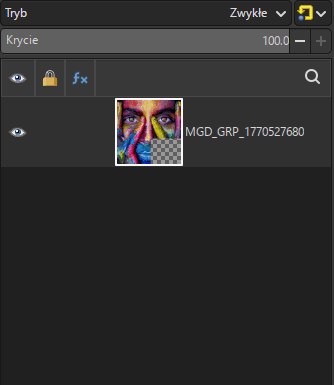
1. This doesn't work for me – it merges the selected layers but doesn't preserve the original layers (it deletes them). Once you fix this, the name of this function should probably be New Layer from Selected (by analogy with New Layer from Visible).

Two layers selected:
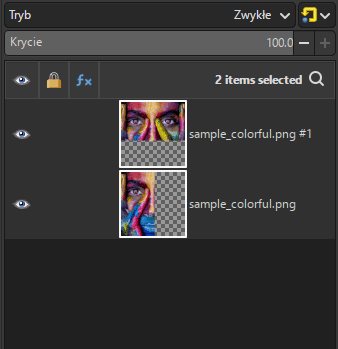
Image

Result of the action:
Image

2. Changing the location of the 3 filter triggers (or adding a second location) from Layer to Layers, i.e.:
procedure.add_menu_path('<Layers>/Layers Menu')

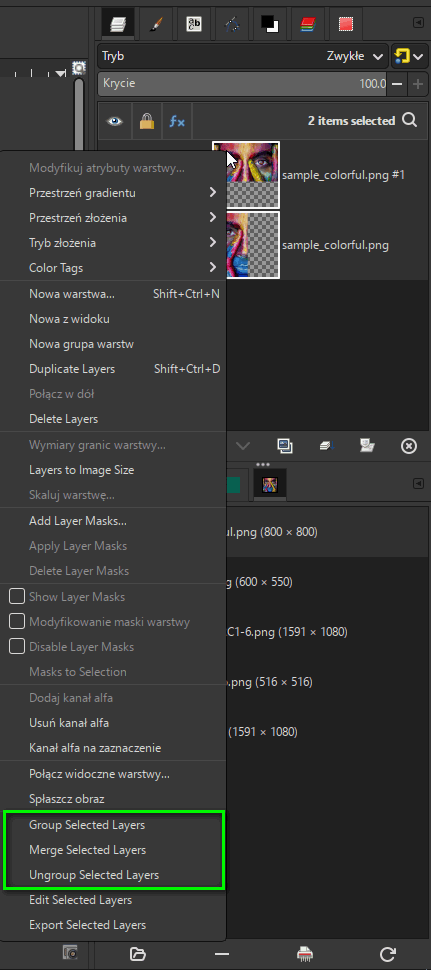
Image

Image

_________________
Image


Top
 Post subject: Re: [New Plugin] Photoshop-style Layer Workflow (Group, Ungroup, Merge
PostPosted: Sun Feb 08, 2026 1:33 am  (#5) 
Offline
GimpChat Member
User avatar

Joined: Feb 06, 2026
Posts: 40
Hi MareroQ,

Thank you for the clarification!

You're right—my README description was misleading.

My actual intention for "Merge Selected Layers" was the "destructive" style (merging and removing the originals), similar to how Photoshop behaves.
I believe users can simply duplicate layers beforehand if they wish to keep the originals.
I will correct the description in the README to avoid further confusion.

Also, thank you for the code tip! I'll definitely add procedure.add_menu_path('<Layers>/Layers Menu') to the scripts.
It makes sense to have these tools accessible directly from the Layers dock.

I'll update the scripts and the documentation soon. Thanks for helping me make this better! — Yousei3


Top
 Post subject: Re: [New Plugin] Photoshop-style Layer Workflow (Group, Ungroup, Merge
PostPosted: Sun Feb 08, 2026 4:27 am  (#6) 
Offline
GimpChat Member
User avatar

Joined: Feb 06, 2026
Posts: 40
Hi MareroQ,
Thank you again for your valuable feedback!
I’ve updated the ZIP file in the first post with the following improvements:

Right-click Menu Support: Added the tools to the `<Layers>/Layers Menu` as you suggested. It's much more convenient now!
Clarified "Merge" Behavior: Updated the README to clearly state that "Merge Selected Layers" is a destructive operation (similar to the Photoshop workflow) to avoid confusion.
Windows Support: Added Windows installation paths to the README so more users can enjoy the tools.

I really appreciate your help in making this project better.
Cheers!
— Yousei3


Top
 Post subject: Re: [New Plugin] Photoshop-style Layer Workflow (Group, Ungroup, Merge
PostPosted: Mon Feb 09, 2026 2:35 am  (#7) 
Offline
GimpChat Member
User avatar

Joined: May 10, 2013
Posts: 1430
Location: FInland
I was waiting an update of these (group linked layers & ungroup in 2.10) from ofnuts.
These work great, thank you Yousei3D.


Top
 Post subject: Re: [New Plugin] Photoshop-style Layer Workflow (Group, Ungroup, Merge
PostPosted: Mon Feb 09, 2026 4:18 am  (#8) 
Offline
GimpChat Member

Joined: Mar 04, 2011
Posts: 2603
Nidhogg wrote:
I was waiting an update of these (group linked layers & ungroup in 2.10) from ofnuts.
These work great, thank you Yousei3D.


It is reinventing the wheel to a certain extent.
There are some tools here: https://script-fu.github.io/funky/hub/plug-ins/folder/ together with MareroQ ungroup plugin.


Top
 Post subject: Re: [New Plugin] Photoshop-style Layer Workflow (Group, Ungroup, Merge
PostPosted: Mon Feb 09, 2026 6:23 am  (#9) 
Offline
GimpChat Member
User avatar

Joined: May 10, 2013
Posts: 1430
Location: FInland
Ohhh, I see. Funky stuff, I had already 2 wheels installed, what do I do with 3rd?
Build myself a Reliant Regal Gimp.


Top
 Post subject: Re: [New Plugin] Photoshop-style Layer Workflow (Group, Ungroup, Merge
PostPosted: Sun Feb 15, 2026 1:14 pm  (#10) 
Offline
GimpChat Member

Joined: Feb 09, 2026
Posts: 10
Thanks for sharing.


Top
Post new topic Reply to topic  [ 10 posts ] 

All times are UTC - 5 hours [ DST ]


* Login  


Powered by phpBB3 © phpBB Group