It is currently Mon Jun 08, 2026 5:07 am


All times are UTC - 5 hours [ DST ]


Post new topic Reply to topic  [ 33 posts ]  Go to page 1, 2  Next
Author Message
 Post subject: Resynthesizer for GIMP 3.0 RC2 Win64
PostPosted: Sat Jan 25, 2025 8:47 am  (#1) 
Offline
GimpChat Member
User avatar

Joined: Apr 25, 2011
Posts: 121
Location: Taiwan
Source(2025/05/18)
https://github.com/bootchk/resynthesizer/tree/resynthesizer3

Win64 binary, You can download here
Resynthesizer3.0.zip

_________________
Sorry for my poor English, I use Google Translate.
There may be something wrong, Please understand.

GIMP 2.10.38 rev1 portable+GAP+G'MIC+nufraw+Beautify+MathMap+...


Last edited by JamesH on Thu Jun 19, 2025 9:00 pm, edited 1 time in total.

Share on Facebook Share on Twitter Share on Orkut Share on Digg Share on MySpace Share on Delicious Share on Technorati
Top
 Post subject: Re: Resynthesizer for GIMP 3.0 RC2 Win64
PostPosted: Sun Jan 26, 2025 12:52 am  (#2) 
Offline
Global Moderator
User avatar

Joined: May 16, 2010
Posts: 16019
Thank you for the Windows compile JamesH! :)

_________________
Image


Top
 Post subject: Re: Resynthesizer for GIMP 3.0 RC2 Win64
PostPosted: Sun Jan 26, 2025 2:29 am  (#3) 
Offline
GimpChat Member
User avatar

Joined: Apr 25, 2011
Posts: 121
Location: Taiwan
You're welcome

_________________
Sorry for my poor English, I use Google Translate.
There may be something wrong, Please understand.

GIMP 2.10.38 rev1 portable+GAP+G'MIC+nufraw+Beautify+MathMap+...


Top
 Post subject: Re: Resynthesizer for GIMP 3.0 RC2 Win64
PostPosted: Fri Feb 07, 2025 8:36 pm  (#4) 
Offline
GimpChat Member
User avatar

Joined: Apr 25, 2011
Posts: 121
Location: Taiwan
For those who can't download from box.net


Attachments:
Resynthesizer3.0.zip [128.9 KiB]
Downloaded 31954 times

_________________
Sorry for my poor English, I use Google Translate.
There may be something wrong, Please understand.

GIMP 2.10.38 rev1 portable+GAP+G'MIC+nufraw+Beautify+MathMap+...
Top
 Post subject: Re: Resynthesizer for GIMP 3.0 RC2 Win64
PostPosted: Thu Apr 03, 2025 3:04 pm  (#5) 
Offline
New Member

Joined: Apr 03, 2025
Posts: 1
Hmm. On the git hub for the resynthesizer plugin it states that it is not ported yet:
"News
Porting to GIMP 3 is in progress. The "resynthesizer3" branch is ready for initial trials with GIMP 3.0rc2.

Porting of plugins from GIMP 2 to 3 is not complete. Testing is not complete. An MS Windows build is not tested and not in the repo."

That and it triggers Windows defender on it for InstallCore.


Top
 Post subject: Re: Resynthesizer for GIMP 3.0 RC2 Win64
PostPosted: Fri Apr 04, 2025 11:31 pm  (#6) 
Offline
Global Moderator
User avatar

Joined: May 16, 2010
Posts: 16019
Mkquist wrote:
Hmm. On the git hub for the resynthesizer plugin it states that it is not ported yet:
"News
Porting to GIMP 3 is in progress. The "resynthesizer3" branch is ready for initial trials with GIMP 3.0rc2.

Porting of plugins from GIMP 2 to 3 is not complete. Testing is not complete. An MS Windows build is not tested and not in the repo."

That and it triggers Windows defender on it for InstallCore.

Windows Defender always throws false positives. I've been using the Gimp-3.0 version of Resyth on Gimp-3.0.3 Dev version for a while now with no problems with viruses. I have Windows 10 x64 myself.

_________________
Image


Top
 Post subject: Re: Resynthesizer for GIMP 3.0 RC2 Win64
PostPosted: Wed Jun 04, 2025 1:03 am  (#7) 
Offline
GimpChat Member

Joined: May 15, 2020
Posts: 17
Rod wrote:
Mkquist wrote:
Hmm. On the git hub for the resynthesizer plugin it states that it is not ported yet:
"News
Porting to GIMP 3 is in progress. The "resynthesizer3" branch is ready for initial trials with GIMP 3.0rc2.

Porting of plugins from GIMP 2 to 3 is not complete. Testing is not complete. An MS Windows build is not tested and not in the repo."

That and it triggers Windows defender on it for InstallCore.

Windows Defender always throws false positives. I've been using the Gimp-3.0 version of Resyth on Gimp-3.0.3 Dev version for a while now with no problems with viruses. I have Windows 10 x64 myself.


I had downloaded the resynthesizer plugin by JamesH and it worked only on 8 bit images. There were 4 files in the zip file. I believe the plugin has been updated to work on 16 bit images too. However, I can not find the compiled version for Windows 11. Anybody knows from where I can download the upgraded plugin for Windows 11?


Top
 Post subject: Re: Resynthesizer for GIMP 3.0 RC2 Win64
PostPosted: Wed Jun 04, 2025 6:37 am  (#8) 
Offline
GimpChat Member
User avatar

Joined: Jan 13, 2011
Posts: 2639
Location: Poland
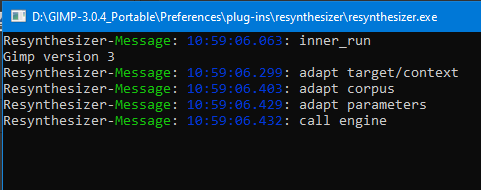
Here I share resynthesizer3, but only temporarily, i.e. until another version appears that will not be burdened with displaying the console window (which I do not know how to get rid of - my old way of export CFLAGS="-pipe -g -O2 -mwindows" doesn't work).
Image

Compilation according to sources from 2025-05-22 using msys2-x86_64-20250221 (mingw64) and Gimp 3.0.4 Win 64bit.
According to my tests it also works on 32-bit images.


Edit 19.06.2025
Attachment removed as announced.
A version is available in #12

_________________
Image


Last edited by MareroQ on Wed Jun 18, 2025 11:19 pm, edited 2 times in total.

Top
 Post subject: Re: Resynthesizer for GIMP 3.0 RC2 Win64
PostPosted: Wed Jun 04, 2025 7:32 am  (#9) 
Offline
GimpChat Member

Joined: May 15, 2020
Posts: 17
MareroQ wrote:
Here I share resynthesizer3, but only temporarily, i.e. until another version appears that will not be burdened with displaying the console window (which I do not know how to get rid of - my old way of export CFLAGS="-pipe -g -O2 -mwindows" doesn't work).
[ Image ]

Compilation according to sources from 2025-05-22 using msys2-x86_64-20250221 (mingw64) and Gimp 3.0.4 Win 64bit.
According to my tests it also works on 32-bit images.


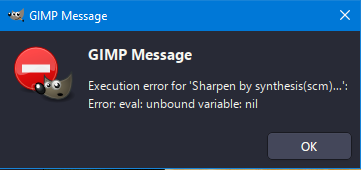
I tried the plugin. Unfortunately, it didn't work for me. Only the Sharpen by synthesis plugin is visible. That too crashes giving an error eval: unbound variable: nil

Wonder why the other plugins are not visible.

Windows 11, 64 bit, Gimp 3.0.4


Top
 Post subject: Re: Resynthesizer for GIMP 3.0 RC2 Win64
PostPosted: Wed Jun 04, 2025 9:21 am  (#10) 
Offline
GimpChat Member
User avatar

Joined: Jan 13, 2011
Posts: 2639
Location: Poland
Not all scripts work when placed in the 'scripts' subdirectory.
Plug-in-heal-transparency and plug-in-resynth-sharpen require their own subdirectories in 'plug-ins'.

Menu location (varies) and short description:

1. plug-in-heal-selection

In menu: Filters > Enhance > Heal selection...
Retouch. Like the heal tool, but automatic. Replaces the selection to look like its surroundings. Probably the most popular and useful.


2. plug-in-heal-transparency

In menu: Filters > Enhance > Heal transparency...
Like above, but you don't need to select anything, it heals every transparent pixel.


3. plug-in-uncrop

In menu: Filters > Enhance > Uncrop...
Makes the canvas larger and heals the new transparent border. Not exactly the inverse of cropping, but almost: reconstructs what might have been cropped earlier.


4. plug-in-resynth-sharpen

In menu: Filters > Enhance > Sharpen by synthesis...
A variant of sharpening that might give more plausible detail.


5. plug-in-resynth-enlarge

In menu: Filters > Enhance > Enlarge & sharpen...
Enlarge (increase the resolution) and sharpen. Might restore more plausible detail than simple scaling up and using other sharpens.


6. plug-in-map-style

In menu: Filters > Map > Style...
Transfer the 'style' of one image to another.


7. plug-in-render-texture

In menu: Filters > Render > Texture...
Creates a new image having the texture from another image. In other words, a seamless, irregular wallpaper (if the source image is smaller.)
(You can also use Map>Resynthesize to create tiles, and then you can create a regular but seamless pattern.)


8. plug-in-resynth-fill-pattern

In menu: Edit > Fill with pattern seamless...
Somewhat similar to Render > Texture. Fills with an irregular pattern from another image. From RobA.

9. plug-in-resynth-controls

In menu: Filters > Map > Resynthesize...
GUI resynthesizer.

_________________
Image


Top
 Post subject: Re: Resynthesizer for GIMP 3.0 RC2 Win64
PostPosted: Thu Jun 05, 2025 1:40 am  (#11) 
Offline
GimpChat Member

Joined: May 15, 2020
Posts: 17
[quote="MareroQ"]Not all scripts work when placed in the 'scripts' subdirectory.
Plug-in-heal-transparency and plug-in-resynth-sharpen require their own subdirectories in 'plug-ins'.

Thanks for the update. Yes, now I can find the plugins in the places you mentioned. I guess I was looking in the wrong place.

A quick confirmation, the heal selection works on 16 bit images. However, the other plugins crash. Anyway for me heal selection is the only one I will be ever using. So not much of a problem.

Will wait for your updated version where the console window does not appear. Though it is annoying the plugin gets the job done.

Thanks for your excellent work.


Top
 Post subject: Re: Resynthesizer for GIMP 3.0 RC2 Win64
PostPosted: Wed Jun 18, 2025 11:16 pm  (#12) 
Offline
GimpChat Member
User avatar

Joined: Jan 13, 2011
Posts: 2639
Location: Poland
There is a version without the console window compiled by JamesH.
(maybe one day he will teach me how he did it :oops: ).


Attachments:
Resynthesizer3.0.zip [148.22 KiB]
Downloaded 1626 times

_________________
Image
Top
 Post subject: Re: Resynthesizer for GIMP 3.0 RC2 Win64
PostPosted: Thu Jun 19, 2025 8:59 pm  (#13) 
Offline
GimpChat Member
User avatar

Joined: Apr 25, 2011
Posts: 121
Location: Taiwan
MareroQ wrote:
There is a version without the console window compiled by JamesH.
(maybe one day he will teach me how he did it :oops: ).


When you use "meson setup builddir" to setup build folder
Then goto builddir
Use Text Editor open "build.ninja" file
Find "subsystem", Change
--subsystem,console
to
--subsystem,windows

_________________
Sorry for my poor English, I use Google Translate.
There may be something wrong, Please understand.

GIMP 2.10.38 rev1 portable+GAP+G'MIC+nufraw+Beautify+MathMap+...


Top
 Post subject: Re: Resynthesizer for GIMP 3.0 RC2 Win64
PostPosted: Thu Jun 19, 2025 10:11 pm  (#14) 
Offline
GimpChat Member
User avatar

Joined: Jan 13, 2011
Posts: 2639
Location: Poland
Thank you very much for this information. :bigthup

I have another request. :roll:
Can you share the source code in this thread after the perfect changes for preview?

_________________
Image


Top
 Post subject: Re: Resynthesizer for GIMP 3.0 RC2 Win64
PostPosted: Mon Jun 23, 2025 11:57 pm  (#15) 
Offline
GimpChat Member

Joined: May 15, 2020
Posts: 17
MareroQ wrote:
There is a version without the console window compiled by JamesH.
(maybe one day he will teach me how he did it :oops: ).


Tested the plugins on 16 it images. The Heal selection plugin works perfectly. Unfortunately, the other plugins crash. Not a showstopper for me as I had never used them in the past. The Heal selection is the only plugin I have ever used. Thanks.

Just curious why the other plugins are crashing.


Top
 Post subject: Re: Resynthesizer for GIMP 3.0 RC2 Win64
PostPosted: Wed Jun 25, 2025 10:38 pm  (#16) 
Offline
Global Moderator
User avatar

Joined: Apr 01, 2012
Posts: 8361
Location: On the other side of your screen
Has this been changed since originally put out. I cannot get it to work in vs 3.0.4

_________________
Image
Free Fun Photo Editing & resources
Poems from the Lord
Gimp Newby
Gimp version 3.2.0 and GMIC-Qt 3.7.5 OS :- Windows 10 Home 64


Top
 Post subject: Re: Resynthesizer for GIMP 3.0 RC2 Win64
PostPosted: Thu Jun 26, 2025 10:05 am  (#17) 
Offline
GimpChat Member

Joined: Mar 04, 2011
Posts: 2600
sallyanne wrote:
Has this been changed since originally put out. I cannot get it to work in vs 3.0.4


The version from post #12 is updated, it is a fix for high bit-depth images. ( the earlier version was 8 bit only)

It does work, I have tried with the heal-selection / heal-transparency options @ 32 bit and they work, Win11 / Gimp 3.0.4

Packaging is a bit strange, neither one thing or another eg. plugins contains folders plug-in-heal-transparency / plug-in-resynth-sharpen / resynthesizer (all containing relevant files) , Why sharpen? (explained in earlier post) and why not plugin-heal-selection ?
....and the rest as individual script-fu.

In my opinion they should be all packaged as plugins. [Edit] ...have to mention it is a bit slow slow, so have patience.


Top
 Post subject: Re: Resynthesizer for GIMP 3.0 RC2 Win64
PostPosted: Thu Jun 26, 2025 11:05 am  (#18) 
Offline
GimpChat Member
User avatar

Joined: Jan 13, 2011
Posts: 2639
Location: Poland
At least that's how it is in Win10 Gimp 3.0.4.

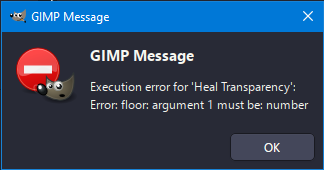
When I put plug-in-heal-transparency.scm and plug-in-resynth-sharpener.scm in scripts, I get errors:
Image

Image

This may change, but for now they only work when placed in the plug-ins directory (which I indicated in post #10 and that's how I packaged it).

@mmjoshi
For me all scripts work fine for 16/32 bit with the condition that the test files were created in Gimp using the Image ➤ Encoding method

_________________
Image


Top
 Post subject: Re: Resynthesizer for GIMP 3.0 RC2 Win64
PostPosted: Thu Jun 26, 2025 11:29 am  (#19) 
Offline
GimpChat Member

Joined: Apr 11, 2024
Posts: 294
Check the .scm file for a shebang:
#!/usr/bin/env gimp-script-fu-interpreter-3.0

If there is one, then they are plug-ins and have to be handle like that.


Top
 Post subject: Re: Resynthesizer for GIMP 3.0 RC2 Win64
PostPosted: Thu Jun 26, 2025 11:49 am  (#20) 
Offline
GimpChat Member
User avatar

Joined: Jan 13, 2011
Posts: 2639
Location: Poland
Hi quietreader.
This is not a sufficient explanation for me. :oops:
All resynth scripts have a shebang but behave differently.

_________________
Image


Top
Post new topic Reply to topic  [ 33 posts ]  Go to page 1, 2  Next

All times are UTC - 5 hours [ DST ]


* Login  


Powered by phpBB3 © phpBB Group