StingerMKO wrote:
Hi, I try to achieve this with batcher, not sure if there is way:
I want to have the lowest layer always be visible/exported and then via batch all others one-by-one on top.
The lowest layer is the background and there are several layers on top of it with different compositions. The background should be the same in all exports.
Not going into great detail, users need to experiment.
This is much the same as adding a background to an animation. If there are not too many images then
Open the background. This need a color tag which you can get with a right click on the layer -> Color Tags. (1)
Open as Layers the images.
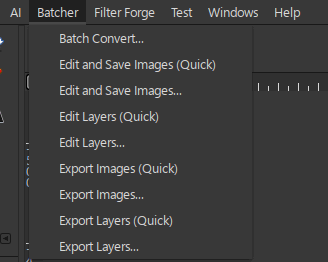
Batcher -> Edit Layers -> Add Action -> Layers & Composition -> Insert Background.
If you want, you can also export the layers to separate files.
Attachment:
 a-few.jpg [ 83.42 KiB | Viewed 5639 times ]
----------------
Another scenario is lots and lots of images, too many for layers. Typically all the same size and planted on a larger background. You need two separate runs.
Batcher -> Batch Convert -> Open a Folder of images.
Add Action -> Resize & Transform -> Resize Canvas -> Resize from Edges (Add Borders) and make them large enough to cover the background. (4)
....and run that overwriting the images (3)
Then
Clear those actions and Add Action -> Layers & Composition -> Insert Background (5)
Attachment:
 more.jpg [ 135.4 KiB | Viewed 5639 times ]
 Login
Login Register
 Tweets
 FAQ
FAQ Advanced Search